
学习编写Windows Live Writer插件
1、参考链接
参考:http://www.cnblogs.com/liulun/archive/2009/05/27/1491116.html
Live Writer API参考:http://msdn.microsoft.com/en-us/library/aa702864.aspx
获取用户名密码参考:http://www.cnblogs.com/xiaoshatian/archive/2010/09/14/1825561.html
经过修改后的项目文件查看如下:LiveWriterPlugin2.7z
2、Live Writer API调用实例
2.1、添加关键引用
using WindowsLive.Writer.Api;

using System.Windows.Forms;
using System.Web;
引用的dll文件在你安装windows live writer的根目录下
名字叫WindowsLive.Writer.Api.dll
2.2、框体类文件
添加一个类文件,此文件程序用来处理用户插入的代码
    public static class ContentProcessor

    {

        public static string ProcessedContent { get; private set; }

        public static void Process(string originalContent)

        {

            ProcessedContent = (!string.IsNullOrEmpty(originalContent)

                ?string.Format("<fieldset style=\"background-color:#E0EFF6;color:#15428B\"><pre>{0}</pre></div>", HttpUtility.HtmlEncode(originalContent))

                :string.Empty

                );

        }

    }
添加一个windows form窗体,如图:
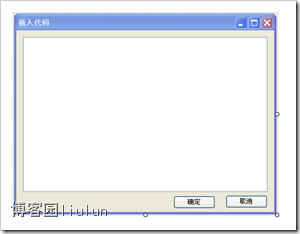
给确定按钮添加的事件为
        private void button1_Click(object sender, EventArgs e)

        {

            ContentProcessor.Process(this.textBox1.Text);

            this.Close();

        }
其中ContentProcessor.Process(this.textBox1.Text);
就是调用的我们上一个类文件中的处理程序
2.2.1、插件类文件
    [WriterPlugin("7c371eef-e350-4aae-af28-91613a9137e3", "xland", Description = "insert code plugin", Name = "xland", PublisherUrl = "http://www.cnblogs.com/liulun")]

    [InsertableContentSource("insert code",SidebarText="insert code")]

    public class MyPlugin:ContentSource

    {

        public override DialogResult CreateContent(IWin32Window dialogOwner, ref string content)

        {

            new ProcessForm().ShowDialog();

            content = ContentProcessor.ProcessedContent;

            return (!string.IsNullOrEmpty(content) ? DialogResult.OK : DialogResult.No);

        }

    }
其中7c371eef-e350-4aae-af28-91613a9137e3为一个GUID
其他的一些信息是插件在live writer中的信息
函数中第一句是创建一个窗口(我们刚才制作的窗口)
第二句获取我们输入的数据(处理过后的数据)
第三句让live writer知道有东西要插入。
content变量是live writer中的,所以要用ref修饰
都完成后只要把生成的dll文件放在live writer安装目录下Plugins文件夹内就可以了
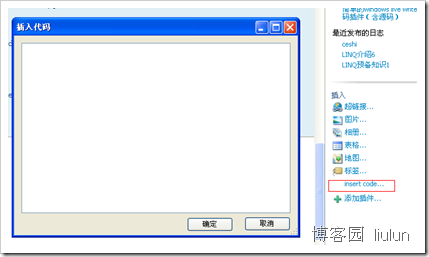
此文章就是用这个插件写的
贴个图看下
2.2.2、插件类文件图标
c#项目中,添加图片到根目录(图片为18*16大小),右键图片属性,生成操作:嵌入的资源,添加ImagePath如下。
    [WriterPlugin("7c371eef-e350-4aae-af28-91613a9137e3", "xland", ImagePath="icon.png",Description = "insert code plugin", Name = "xland", PublisherUrl = "http://www.cnblogs.com/liulun")]

    [InsertableContentSource("insert code",SidebarText="insert code")]

    public class MyPlugin:ContentSource

    {

        public override DialogResult CreateContent(IWin32Window dialogOwner, ref string content)

        {

            new ProcessForm().ShowDialog();

            content = ContentProcessor.ProcessedContent;

            return (!string.IsNullOrEmpty(content) ? DialogResult.OK : DialogResult.No);

        }

    }
2.2.3、源代码下载
另外:
我在我的blog中设置了这样的样式
pre { white-space: pre-wrap; /* css-3 */ white-space: -moz-pre-wrap; /* Mozilla, since 1999 */ white-space: -pre-wrap; /* Opera 4-6 */ white-space: -o-pre-wrap; /* Opera 7 */ }

* html pre { word-wrap: break-word; /* Internet Explorer 5.5+ */ white-space : normal ; /* Internet Explorer 5.5+ */ }
具体设置方法是,进入你的博客园后台》》》选项》》》config》》》通过CSS定制页面
这样设置主要是不让代码太宽,撑破页面
******************************************************
3、获取用户信息
Windows Live Writer是颇受欢迎的博客客户端,除了支持多种博客服务之外,还具备良好的扩展性,允许第三方开发插件来扩展或补充功能,我也为它开发了两个插件:用来补充Slug的SlugHelper和补充图片Exif信息的ExifInfo。
但你有没有想过,虽然这些第三方插件的确为我们提供了方便,但它们真的值得信赖吗?
最近搬家,没有网络,闲暇时便用“.NET Reflector”来查看Windows Live Writer的内部实现,期望能找到对我开发插件有帮助的API,没想到却发现了令人大吃一惊的东西,Windows Live Writer插件可以轻而易举地窃取你的博客账号和密码!
想知道是怎么做到的吗?只需要随便开发一个插件,添加对“WindowsLive.Writer.BlogClient.dll”的引用和以下的using:
|
1
|
using WindowsLive.Writer.BlogClient; |
在适当的位置添加以下代码:
|
1
2
3
4
5
6
7
8
9
10
11
|
StringBuilder sb = new StringBuilder();string[] blogIds = BlogSettings.GetBlogIds();foreach (string blogId in blogIds){BlogSettings blogSetting = BlogSettings.ForBlogId(blogId);sb.AppendLine("blogname: " + blogSetting.BlogName);sb.AppendLine("homepage: " + blogSetting.HomepageUrl);sb.AppendLine("username: " + blogSetting.Credentials.Username);sb.AppendLine("password: " + blogSetting.Credentials.Password);sb.AppendLine("===============================================");} |
执行后查看sb.ToString(),你会看到你添加到Windows Live Writer里的所有博客信息,包括博客名称、主页地址、用户名和密码,可怕之处就在于密码是明文的。
如果插件的作者心怀不轨,他完全可以利用这些内容来控制你的博客。所以在使用第三方插件之前,最好能够确定该插件是值得信赖的。
另外,开源的插件也是个不错的选择,你可以检查插件的代码中是否包含泄露隐私的内容,并自行编译使用。
我开发的SlugHelper和ExifInfo两个插件都是开源项目,欢迎使用。
学习编写Windows Live Writer插件的更多相关文章
- windows live writer插件说明文档(附录网盘地址)
百度云地址:http://pan.baidu.com/s/1hqnjzjY 1.Screen Capture tool 用于直接在WLWriter中进行截图的一个插件,要配合SnagIt 这个软件使用 ...
- 编写自己的Windows Live Writer插件
起因 自从小猪使用Windows Live Writer(wlw)来写博客之后就很少打开网站的后台编辑器了,这真是个写博客的好东西啊,但是任何东西都是不完美的.索契冬奥会开幕式都会把五环弄成四环呢!对 ...
- 如何安装Windows Live Writer插件
Windows Live Writer 是一个强大的离线博客编辑工具,通过它可以离线编辑内容丰富的博文.它不但支持微软的live space,还支持诸如Wordpress 这样的开源博客系统. Win ...
- 一次查找Windows Live Writer的VSPaste插件丢失RTF格式信息的经历
背景 我在博客园上写博客是使用Windows Live Writer,代码高亮插件是使用Paste from Visual Studio(下文简称VSPaste). Windows Live Writ ...
- Windows Live Writer介绍及相关问题解决
今天本来想说更新一篇我的文章,更新的过程中添加了很多的内容,里面的图片太多了,导致我浏览器占用的内存不断增大,浏览器变得很卡,最后过了好久我终于更新完文章打算保存的时候居然卡住,然后所有我更新的文字和 ...
- Windows Live Writer代码插件整理
以下code插件命名按照 Windows Live Writer 中显示的插件名 1.Source code plug-in(cnblogs官方推荐) 界面: 效果: /** * Returns th ...
- Windows Live Writer离线编写博客
WLW最新版本为2012,官网下载 Windows Live Writer配置步骤 使用Windows Live Writer 2012和Office Word 2013 发布文章到博客园全面总结 L ...
- Windows Live Writer编写Octopress
Windows live Writer是一个可以用来离线编写,并发布博客的工具. Octopress是一个静态博客生成系统.使用群体多是geek,主要有显示代码清晰,git同步,并且不用购买空间的特点 ...
- Windows Live Writer的Markdown插件MarkdownInLiveWriter支持语法高亮了
我前几天开发的Windows Live Writer的Markdown的插件MarkdownInLiveWriter支持语法高亮了.参见下图: 基本上就是把我的另一个插件CodeInLiveWrite ...
随机推荐
- const和#define 区别
1: 编译器处理不同 define宏是在预处理阶段展开,const常量是编译运行阶段使用. 2:类型和安全检查不同 const常量有数据类型,而宏常量没有数据类型,仅仅是展开.编译器可以对前者 ...
- Jmeter中通过BeanShell获取当前时间
第一步编写需要的java类: 第二步:将编写好的java类打包成jar包 第三步:将jar包放到\apache-jmeter-2.13\lib\ext下面 第四步:在Jmeter中通过BeanShel ...
- Ubuntu 14.04 Trusty安装java环境
原文:Install Oracle Java 6, 7, or 8 in Ubuntu 14.04 Trusty 命令如下: sudo add-apt-repository ppa:webupd8te ...
- Android中Service 使用详解(LocalService + RemoteService)
Service 简介: Service分为本地服务(LocalService)和远程服务(RemoteService): 1.本地服务依附在主进程上而不是独立的进程,这样在一定程度上节约了资源,另外L ...
- WIN10 新建ORACLE实例
1 管理员身份进入CMD环境,执行DBCA命令,在弹出窗口的引导中,完成实例创建 2 如果在创建过程中没有选择适当的字符集(最好采用默认字符集),如下图所示,在进入PLSQL DEVELOPER的时候 ...
- Analysis Services OLAP 概述
1. 什么是OLAP •定义1 :OLAP(联机分析处理)是针对特定问题的联机数据访问和分析.通过对信息(维数据)的多种可能的观察形式进行快速.稳定一致和交互性的存取,允许管理决策人员对数据进行深入观 ...
- Getting Started with Blocks
本文来源为:developer.apple.com,仅仅是博主练习排版所用. Getting Started with Blocks The following sections help you t ...
- android 入门-git之上传本地代码到github
github部分: 1.首先去github网站 上注册一个用户 2.说明 https://guides.github.com/activities/hello-world/ 2.点击 New repo ...
- android 入门-控件 测量状态栏高度
private ViewTreeObserver viewTreeObserver; /** 获取可見区域高度 **/ WindowManager manager = getWindowManager ...
- WPF 自定义Metro Style窗体
为了使WPF程序在不同版本的操作系统上保持一致的显示效果,我们需要重写WPF控件样式.这篇博客将展示如何创建一个Metro Style的WPF窗体. 首先先看一下最终窗体的效果图, 通过截图我们可以看 ...