
NServiceBus 结合 RabbitMQ 使用
参考官方教程:
新建4个项目:
- A Console Application named
Client - A Console Application named
Server - A Console Application named
Subscriber - A Class Library named
Shared
Framework框架选择4.6及以上,后面有用到。
Client,Server,Subscriber引用Shared。
4个项目都安装NServiceBus包:
Install-Package NServiceBus
3个控制台项目安装NServiceBus.RabbitMQ包:
Install-Package NServiceBus.RabbitMQ
Share代码:
using NServiceBus;
public class PlaceOrder:ICommand
    {
        public Guid Id { get; set; }
        public string Product { get; set; }
    }
public class OrderPlaced:IEvent
    {
        public Guid OrderId { get; set; }
    }
public class PlaceShipping:ICommand
    {
        public Guid Id { get; set; }
        public string Product { get; set; }
    }
Client代码:
namespace Client
{
    class Program
    {
        static void Main(string[] args)
        {
            AsyncMain().GetAwaiter().GetResult();
        }
        static async Task AsyncMain()
        {
            Console.Title = "Sample.StepByStep.Client";
            var endpointConfiguration = new EndpointConfiguration(endpointName: "Sample.StepByStep.Client");
            endpointConfiguration.SendFailedMessagesTo("error");
            var transport = endpointConfiguration.UseTransport<RabbitMQTransport>();
            transport.ConnectionString("host=10.255.20.44;username=guest;password=guest");
            endpointConfiguration.UseSerialization<JsonSerializer>();
            endpointConfiguration.EnableInstallers();
            endpointConfiguration.UsePersistence<InMemoryPersistence>();
            var endpointInstance = await Endpoint.Start(endpointConfiguration).ConfigureAwait(false);
            try
            {
                await SendOrder(endpointInstance);
            }
            catch (Exception)
            {
                await endpointInstance.Stop().ConfigureAwait(false);
            }
        }

        private static async Task SendOrder(IEndpointInstance endpointInstance)
        {
            Console.WriteLine("Press enter to send a message");
            Console.WriteLine("Press any key to exit");
            while(true)
            {
                var key = Console.ReadKey();
                Console.WriteLine();
                if(key.Key!=ConsoleKey.Enter)
                {
                    return;
                }
                var id = Guid.NewGuid();
                var id2 = Guid.NewGuid();
                var placeOrder = new PlaceOrder
                {
                    Product = "New shoes",
                    Id = id
                };
                var placeShipping = new PlaceShipping
                {
                    Product = "A-->B",
                    Id = id2
                };
                await endpointInstance.Send("Samples.StepByStep.Server", placeOrder);
                await endpointInstance.Send("Samples.StepByStep.Server", placeShipping);
                Console.WriteLine($"Sent a PlaceOrder messge with id:{id:N}");
                Console.WriteLine($"Sent a PlaceShipping messge with id:{id2:N}");
            }
        }
    }
}
Server代码:
namespace Server
{
    class Program
    {
        static void Main(string[] args)
        {
            AsyncMain().GetAwaiter().GetResult();
        }
        static async Task AsyncMain()
        {
            Console.Title = "Samples.StepByStep.Server";
            var endpointConfiguration = new EndpointConfiguration("Samples.StepByStep.Server");
            endpointConfiguration.UseSerialization<JsonSerializer>();
            endpointConfiguration.EnableInstallers();
            var transport = endpointConfiguration.UseTransport<RabbitMQTransport>();
            transport.ConnectionString("host=10.255.20.44;username=guest;password=guest");
            endpointConfiguration.UsePersistence<InMemoryPersistence>();
            endpointConfiguration.SendFailedMessagesTo("error");

            var endpointInstance = await Endpoint.Start(endpointConfiguration)
                .ConfigureAwait(false);
            try
            {
                Console.WriteLine("Press any key to exit");
                Console.ReadKey();
            }
            finally
            {
                await endpointInstance.Stop()
                    .ConfigureAwait(false);
            }
        }
    }
}
namespace Server
{
    public class PlaceOrderHandler : IHandleMessages<PlaceOrder>
    {
        static ILog log = LogManager.GetLogger<PlaceOrderHandler>();

        public Task Handle(PlaceOrder message, IMessageHandlerContext context)
        {
            log.Info($"Order for Product:{message.Product} placed with id: {message.Id}");
            log.Info($"Publishing: OrderPlaced for Order Id: {message.Id}");

            var orderPlaced = new OrderPlaced
            {
                OrderId = message.Id
            };
            return context.Publish(orderPlaced);
        }
    }
}
namespace Server
{
    public class PlaceShippingHandler : IHandleMessages<PlaceShipping>
    {
        static ILog log = LogManager.GetLogger<PlaceShippingHandler>();

        public Task Handle(PlaceShipping message, IMessageHandlerContext context)
        {
            log.Info($"Shipping for Product:{message.Product} placed with id: {message.Id}");
            return Task.CompletedTask;
        }
    }
}
为什么要选4.6以上,原因就在Task.CompletedTask需要4.6以上。
SubScribe代码:
namespace Subscriber
{
    class Program
    {
        static void Main(string[] args)
        {
            AsyncMain().GetAwaiter().GetResult();
        }
        static async Task AsyncMain()
        {
            Console.Title = "Samples.StepByStep.Subscriber";
            var endpointConfiguration = new EndpointConfiguration("Samples.StepByStep.Subscriber");
            endpointConfiguration.UseSerialization<JsonSerializer>();
            endpointConfiguration.EnableInstallers();
            var transport = endpointConfiguration.UseTransport<RabbitMQTransport>();
            transport.ConnectionString("host=10.255.20.44;username=guest;password=guest");
            endpointConfiguration.UsePersistence<InMemoryPersistence>();
            endpointConfiguration.SendFailedMessagesTo("error");

            var endpointInstance = await Endpoint.Start(endpointConfiguration)
                .ConfigureAwait(false);
            try
            {
                Console.WriteLine("Press any key to exit");
                Console.ReadKey();
            }
            finally
            {
                await endpointInstance.Stop()
                    .ConfigureAwait(false);
            }
        }
    }
}
namespace Subscriber
{
    public class OrderCreatedHandler : IHandleMessages<OrderPlaced>
    {
        static ILog log = LogManager.GetLogger<OrderCreatedHandler>();

        public Task Handle(OrderPlaced message, IMessageHandlerContext context)
        {
            log.Info($"Handling: OrderPlaced for Order Id: {message.OrderId}");
            return Task.CompletedTask;
        }
    }
}
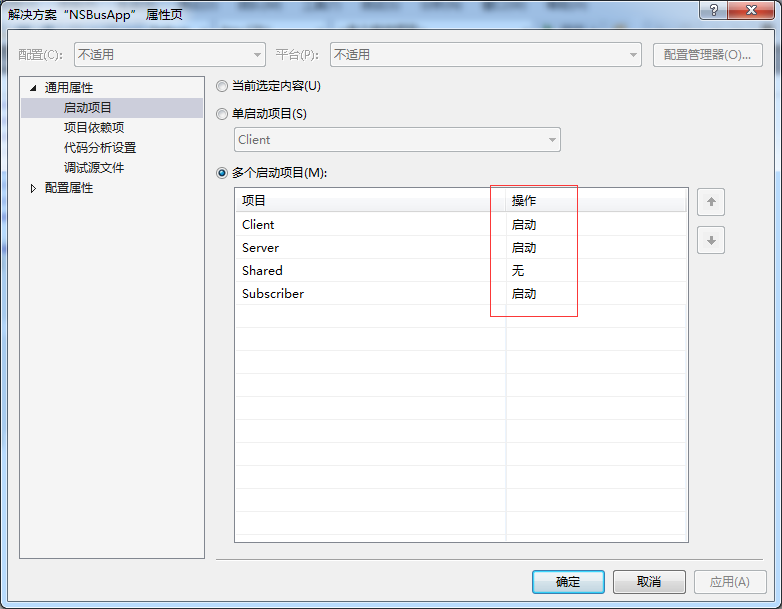
选择多启动项目:
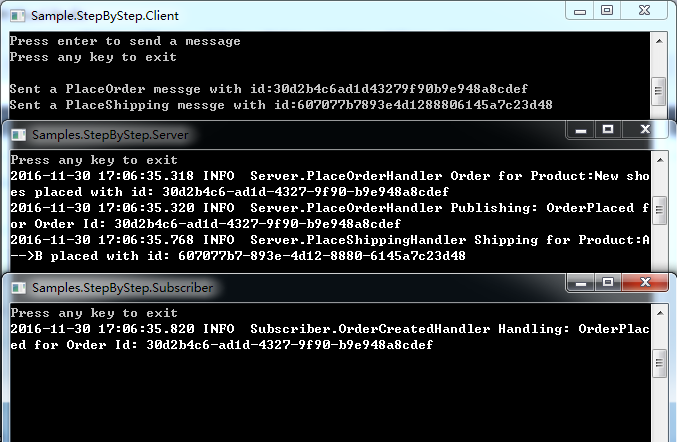
启动项目,在Client端按回车,可以看到Server端和Subscribe端的接收信息:
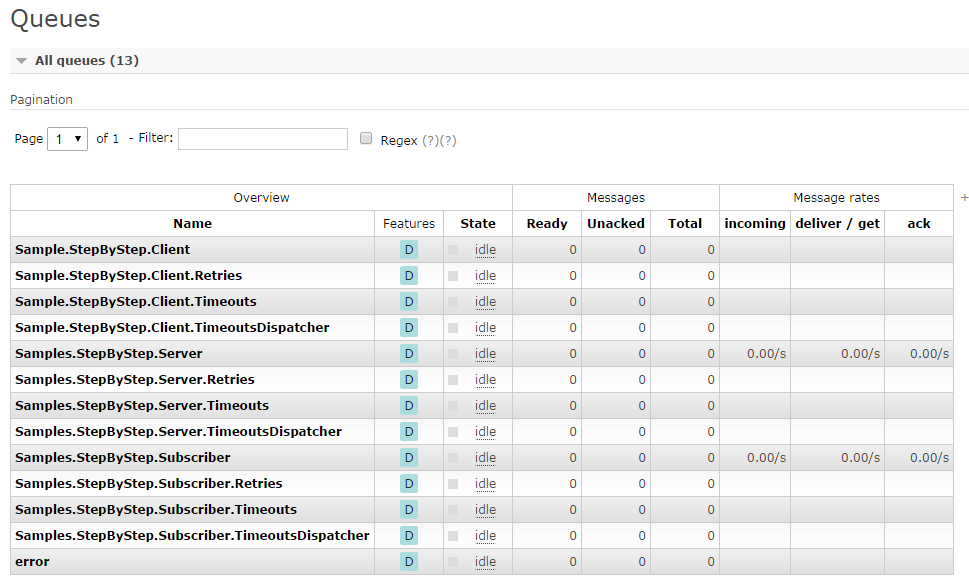
同时查看http://10.255.20.44:15672/#/queues:
NServiceBus 结合 RabbitMQ 使用的更多相关文章
- NServiceBus+RabbitMQ开发分布式应用
前言 NServiceBus提供了8种传输管道组件,分别是Learning.MSMQ.Azure Service Bus.Azure Service Bus (Legacy).Azure S ...
- NServiceBus VS MassTransit 从 stackoverflow.com 翻译而来,希望对这两个技术比较关心的同学有帮助
近段时间在看SOA,在国外网站有很多资料可以查看,本来在中文网站中找到一片关于这两个框架的对比介绍的可惜笔者没有认真翻译,只有花点时间自己翻译了一个版本,希望对技术界的朋友有所帮助. 我正纠结于NSe ...
- NserviceBus+rabbitmq
Ok so I figured this out after looking a bit at the code and the requirements for amqp URI and it sh ...
- 如何优雅的使用RabbitMQ
RabbitMQ无疑是目前最流行的消息队列之一,对各种语言环境的支持也很丰富,作为一个.NET developer有必要学习和了解这一工具.消息队列的使用场景大概有3种: 1.系统集成,分布式系统的设 ...
- 使用NServiceBus开发分布式应用
系列主题:基于消息的软件架构模型演变 NServiceBus 是一个.Net平台下开源的消息服务框架,这类产品有时也被称作ESB(Enterprise Service Bus)--企业服务总线.NSe ...
- 消息队列与RabbitMQ
1 什么是消息队列 消息指进程或应用间通信的数据:队列是保存数据的结构:消息队列是指进程或应用间通信时,保存消息的容器.消息队列独特的机制和结构保证了消息发送者和接收者之间良好的异步通信. 2 为什么 ...
- NServiceBus开发
使用NServiceBus开发分布式应用 系列主题:基于消息的软件架构模型演变 NServiceBus 是一个.Net平台下开源的消息服务框架,这类产品有时也被称作ESB(Enterprise Ser ...
- 如何优雅的使用RabbitMQ(转)
RabbitMQ无疑是目前最流行的消息队列之一,对各种语言环境的支持也很丰富,作为一个.NET developer有必要学习和了解这一工具.消息队列的使用场景大概有3种: 1.系统集成,分布式系统的设 ...
- RabbitMQ入门-理论
目录 RabbitMQ简介 RabbitMQ原理简介 RabbitMQ安装 .NET Core 使用 RabbitMQ Hello World 工作队列 扇型交换机 直连交换机 主题交换机 远程过程调 ...
随机推荐
- 【转载】eclipse插件安装
原文:http://blog.csdn.net/dylan619/article/details/46839941 原来的eclipse3.7安装了太多插件后,m2e怎么也安装不成功,因此今天重新下载 ...
- 好玩的-记最近玩的几个经典ipad ios游戏
最近回了趟家,在家里闲着没事去app store找了找一些高分游戏玩一玩,下面就是我最近玩的游戏. 海岛奇兵 想必大家都很了解,这是由开发过clash of clan部落冲突的公司所开发的另一款多人策 ...
- Hibernate之Query接口的uniqueResult()方法
如果查询返回多个值用list()方法 public void testQuery(){ Configuration config = new Configuration().configure(); ...
- uGUI练习(八) InputField
InputField 文本输入组件,本文练习InputField的属性及事件 一.属性 1.Character Limit 限制字符长度(0表示不限制),比如:设置只能输入3个字符(中文,英文,数字, ...
- CodeCover初体验
国庆刚过完,闲来无事,就随便看看,顺便来了解下一些工具的使用,在工作中要用到的时候可以直接上手. CodeCover是一个免费的白盒测试工具,主要测试代码.分支.循环.MC/DC 覆盖.支持为每个测试 ...
- java9-5 修饰符
1. 修饰符: 权限修饰符:private,默认的,protected,public 状态修饰符:static,final 抽象修饰符:abstract 类: 权限修饰符:默认修饰符,public 状 ...
- 转: 使用virtualenv搭建独立的Python环境
转自: http://qicheng0211.blog.51cto.com/3958621/1561685 谢谢作者的辛苦付出 virtualenv可以搭建虚拟且独立的python环境,可以使每个项 ...
- 啊D工具语句 适合Access和Mssql注入
啊D注入工具中使用的SQL注入语句 爆user )) )= | ***** ?Id)) : ?Id : Id 检查SA权限:)))) 爆当前库: )) -- 检查是否为mssql数据库:and exi ...
- ios之申请后台延时执行和做一个假后台的方法(系统进入长时间后台后,再进入前台部分功能不能实现)
转自:http://sis hu ok.com/forum/blogCategory/showByCategory.html?categories_id=138&user_id=10385 ...
- 搞懂function(*args,**kwargs)
给出一个例子: def foo(*args,**kwargs): print 'args=',args print 'kwargs=',kwargs print '------------------ ...