
SpringBoot --- 自定义 Starter
SpringBoot --- 自定义 Starter
创建
1、需要创建一个新的空工程
2、新的工程需要引入两个模块
一个Maven 模块 作为启动器
一个SpringBoot 模块 作为自动配置模块
3、在Starter 模块(即启动器模块)的 pom.xml 引入 自动配置模块
    <!--启动器-->

    <groupId>com.ling.starter</groupId>

    <artifactId>ling-spring-boot-starter</artifactId>

    <version>1.0-SNAPSHOT</version>

    <dependencies>

<!--        引入自动配置模块-->

        <dependency>

            <groupId>com.ling.starter</groupId>

            <artifactId>ling-spring-boot-starter-autoconfigurer</artifactId>

            <version>0.0.1-SNAPSHOT</version>

        </dependency>

    </dependencies>
4、接下来主要的工作是编写自动配置包 ling-spring-boot-starter-autoconfigurer
首先,我们要明确,需要使用者配置的属性有哪些,需要编写一个类并用 @ConfigurationProperties 标注,用 prefix 明确配置的字首部分,约定后,使用者配置。
package com.ling.starter;

import org.springframework.boot.context.properties.ConfigurationProperties;

@ConfigurationProperties(prefix = "ling.hello")

public class HelloProperties {

    private String prefix;

    private String suffix;

    public String getPrefix() {

        return prefix;

    }

    public void setPrefix(String prefix) {

        this.prefix = prefix;

    }

    public String getSuffix() {

        return suffix;

    }

    public void setSuffix(String suffix) {

        this.suffix = suffix;

    }

}
5、接下来是编写Service 类,明确的是,以上的配置,用于哪些处理。
package com.ling.starter;

public class HelloService {

    HelloProperties helloProperties;

    public HelloProperties getHelloProperties() {

        return helloProperties;

    }

    public void setHelloProperties(HelloProperties helloProperties) {

        this.helloProperties = helloProperties;

    }

    public String syaHello(String name){  // 做业务处理

        return helloProperties.getPrefix()+ "---" + name + "---" + helloProperties.getSuffix();

    }

}
编写配置类(类似 xml ),注入Bean。
@Configuration     //表明这是一个配置类

@ConditionalOnWebApplication   //判断是否是web 工程,是则配置

@EnableConfigurationProperties(HelloProperties.class)  //需要注入哪些类到容器中

public class HelloAutoconfiguration {

    @Autowired

    HelloProperties helloProperties;

    @Bean

    public HelloService helloService(){

        HelloService helloService = new HelloService();

        helloService.setHelloProperties(helloProperties);

        return helloService;

    }

}
到这里自定义 starter 已经完成。
测试
1、创建一个web 工程,测试
2、导入自定义的 starter 依赖
<!--        测试 自定义 starter-->

        <dependency>

            <groupId>com.ling.starter</groupId>

            <artifactId>ling-spring-boot-starter</artifactId>

            <version>1.0-SNAPSHOT</version>

        </dependency>
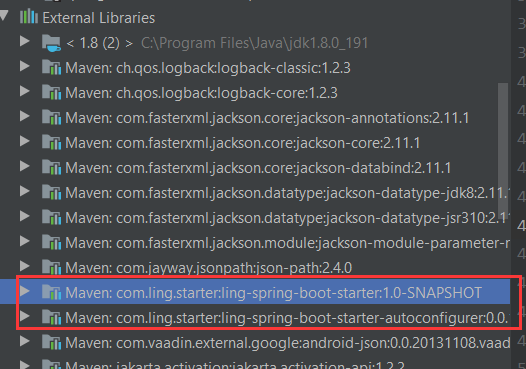
3、导入成功后,可以在依赖库中找到自定义 starter 的包,因为 ling-spring-boot-starter 的 pom 文件已经导入了 ling-spring-boot-starter-autoconfigurer 的依赖。所以会自动导入ling-spring-boot-starter 所依赖的包。
4、创建并配置 properties.yml 文件(配置是没有相关提示属于正常,按照约定好的字首和属性名配置即可)
ling:

  hello:

    prefix: 你好呀

    suffix: 欢迎你。。。
5、编写Contriller 类
@RestController  //非JSON 数据,可用 @RestController

/* @RestController== @ResponseBody +@Controller*/

public class HWcontroller {

    @Autowired

    HelloService helloService;

    @RequestMapping("/hello")

    public String hello(){

        return helloService.syaHello("son");

    }

}
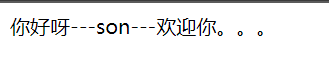
6、启动工程,访问
http://localhost:8080/hello
SpringBoot --- 自定义 Starter的更多相关文章
- SpringBoot自定义starter及自动配置
SpringBoot的核心就是自动配置,而支持自动配置的是一个个starter项目.除了官方已有的starter,用户自己也可以根据规则自定义自己的starter项目. 自定义starter条件 自动 ...
- SpringBoot自定义Starter实现
自定义Starter: Starter会把所有用到的依赖都给包含进来,避免了开发者自己去引入依赖所带来的麻烦.Starter 提供了一种开箱即用的理念,其中核心就是springboot的自动配置原理相 ...
- springboot 自定义starter之AutoConfiguration【原】
八.自定义starter AutoConfiguration: 1.这个场景需要使用到的依赖是什么? 没有特别依赖的配置 2.如何编写自动配置 @Configuration //指定这个类是一个配置类 ...
- SpringBoot自定义starter开发分布式任务调度实践
概述 需求 在前面的博客<Java定时器演进过程和生产级分布式任务调度ElasticJob代码实战>中,我们已经熟悉ElasticJob分布式任务的应用,其核心实现为elasticjob- ...
- SpringBoot系列三:SpringBoot自定义Starter
在前面两章 SpringBoot入门 .SpringBoot自动配置原理 的学习后,我们对如何创建一个 SpringBoot 项目.SpringBoot 的运行原理以及自动配置等都有了一定的了解.如果 ...
- springboot自定义starter
1,创建一个空工程 2,new一个Modules ---------------- maven (启动器) : springboottest-spring-boot-starter 3,new一个M ...
- Springboot自定义starter打印sql及其执行时间
前面写到了通过实现mybatis提供的org.apache.ibatis.plugin.Interceptor接口实现了打印SQL执行时间,并格式化SQL及其参数,如果我们使用的是ssm还得再配置文件 ...
- Spring-Boot自定义Starter实践
此文已由作者王慎为授权网易云社区发布. 欢迎访问网易云社区,了解更多网易技术产品运营经验. disconf-spring-boot-starter 使用方法: 引入maven依赖: <depen ...
- SpringBoot之旅第六篇-启动原理及自定义starter
一.引言 SpringBoot的一大优势就是Starter,由于SpringBoot有很多开箱即用的Starter依赖,使得我们开发变得简单,我们不需要过多的关注框架的配置. 在日常开发中,我们也会自 ...
随机推荐
- Vue脚手架创建项目出现 (Failed to download repo vuejs-templates/webpack: Response code 404)
搭建好(脚手架2.X版本)环境像往常一样使用vue init webpack xxxx 创建项目可以是没多久就开始报错了 报错结果就是:vue-cli · Failed to download rep ...
- Centos 安装ixgbe驱动
1. 首先查看网卡类型 [root]# lspci | grep 8259907:00.0 Ethernet controller: Intel Corporation 82599ES 10-Giga ...
- 爬取图虫网 示例网址 https://wangxu.tuchong.com/23892889/
#coding=gbk import requests from fake_useragent import UserAgent from lxml import etree import urlli ...
- Django学习路33_url 地址及删除元素 delete() 和重定向 return redirect('路径')
保存日期 def create(request): '''新增一本图书''' # 1.创建BookInfo对象 b = BookInfo() b.btitle = '流星蝴蝶剑' b.bpub_d ...
- Python List min()方法
描述 min() 方法返回列表元素中的最小值.高佣联盟 www.cgewang.com 语法 min()方法语法: min(list) 参数 list -- 要返回最小值的列表. 返回值 返回列表元素 ...
- PHP mysqli_select_db() 函数
更改连接的默认数据库: 删除数据库 <?php高佣联盟 www.cgewang.com // 假定数据库用户名:root,密码:123456,数据库:RUNOOB $con=mysqli_con ...
- 剑指 Offer 50. 第一个只出现一次的字符
本题 题目链接 题目描述 我的题解 (方法三应用更广泛:方法一虽有限制,但很好用,此题中该方法效率也最高) 方法一:(适用于范围确定的) 思路分析 该字符串只包含小写字母,即字符种类最多26个 开一个 ...
- C#与网络相关的两个监听的事件
今天遇到一个问题,当网络连接有问题的时候设计软件向用户发送通知,查了资料发现了两个相关的事件分享一下. 一.System.Net.NetworkInformation命名空间下的NetworkChan ...
- NTFS 文件系统结构
背景 NTFS 作为一个新的文件系统,因其安全性高而受到越来越多的重视,越来越多的应用采用了NTFS 文件系统.作为一个新的文件系统,NTFS 有着许多区别于FAT32 的优点,如磁盘配额.文件系统加 ...
- GitLab 后台修改用户密码
GitLab 后台修改用户密码 # 打开控制台 gitlab-rails console production # 找到用户,输入密码,确认密码,保存 user = User.find_by(user ...