
ubuntu安装mysql5.6
安装mysql5.6
在ubuntu上安装mysql5.6的版本
1.添加mysql5.6的源
sudo apt-get install software-properties-common

sudo add-apt-repository 'deb http://archive.ubuntu.com/ubuntu trusty universe'
2.安装mysql5.6
sudo apt-get update

sudo apt install mysql-server-5.6

sudo apt install mysql-client-5.6
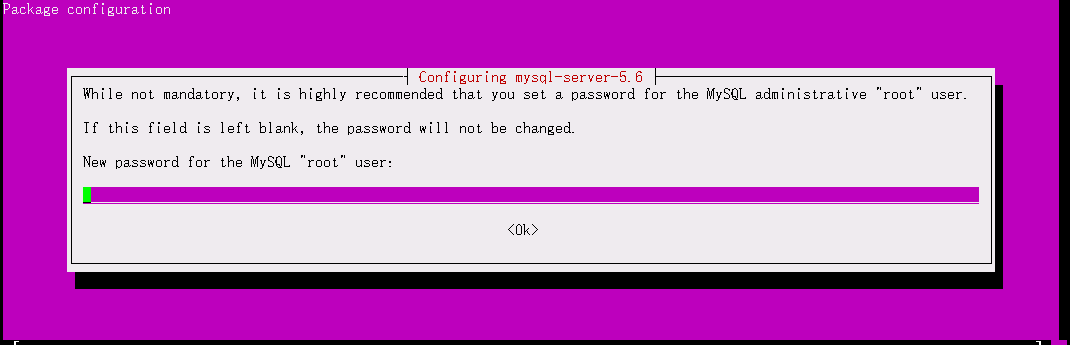
安装mysql server的时候需要手动配置root密码:
3.设置开机自启
update-rc.d mysql defaults
4.创建或修改 my.cnf 文件
在/etc/mysql/目录下添加 my.cnf文件
sudo vim /etc/mysql/my.cnf
复制下面的内容,并保存文件
# The MySQL database server configuration file.

#

# You can copy this to one of:

# - "/etc/mysql/my.cnf" to set global options,

# - "~/.my.cnf" to set user-specific options.

#

# One can use all long options that the program supports.

# Run program with --help to get a list of available options and with

# --print-defaults to see which it would actually understand and use.

#

# For explanations see

# http://dev.mysql.com/doc/mysql/en/server-system-variables.html

# This will be passed to all mysql clients

# It has been reported that passwords should be enclosed with ticks/quotes

# escpecially if they contain "#" chars...

# Remember to edit /etc/mysql/debian.cnf when changing the socket location.

# Here is entries for some specific programs

# The following values assume you have at least 32M ram

!includedir /etc/mysql/conf.d/

# add here

[mysqld]

default-time_zone = '+8:00'

lower_case_table_names=1
5.重启Mysql服务
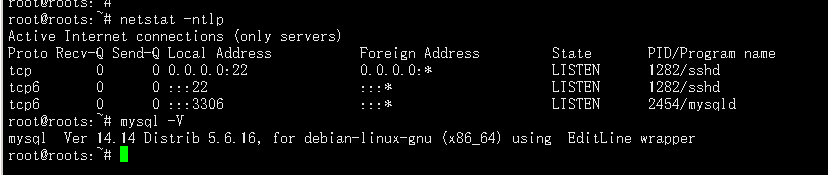
sudo service mysql restart
启动/停止 Mysql
> sudo /etc/init.d/mysql start

> sudo /etc/init.d/mysql stop
修改root密码
sudo /usr/local/mysql/bin/mysqladmin -u root password abc
原文链接:https://blog.csdn.net/qq_36641556/article/details/80921737
ubuntu安装mysql5.6的更多相关文章
- ubuntu 安装mysql5.7
一.Windows mysql5.6 解压版 安装 关于widnows平台上的安装教程,可参考百度经验: 链接:https://jingyan.baidu.com/article/f3ad7d0ffc ...
- ubuntu安装mysql5.7
sudo apt-get updatesudo apt-get upgradesudo apt-get install mysql-server mysql-client #自动安装会装上5.7的 ...
- 转)Ubuntu安装mysql5.7
主要参考http://blog.csdn.net/q894523017/article/details/50705392 包去官网下载,解压,安装步骤如下: 上文中有错误,正确如下: sudo dpk ...
- ubuntu 通过ppa源安装mysql5.6
添加mysql5.6的源 sudo add-apt-repository -y ppa:ondrej/mysql-5.6 更新源 sudo apt-get update 安装mysql5.6 sudo ...
- 安装mysql5.5时候的报错解决办法:
每次安装mysql5.5的时候总会报出一下错误: -- Could NOT find OpenSSL (missing: OPENSSL_LIBRARIES OPENSSL_INCLUDE_DIR) ...
- Ubuntu14.04编译安装mysql5.6.26
Ubuntu14.04编译安装mysql5.6.26 (1)安装编译源码需要的包 sudo apt-get install make cmake gcc g++ bison libncurses5-d ...
- Ubuntu 安装 Mysql 5.6 数据库
Ubuntu 安装 Mysql 5.6 数据库 1)下载: mysql-5.6.13-debian6.0-x86_64.deb http://dev.mysql.com/downloads/mirro ...
- Ubuntu18.04安装mysql5.7
Ubuntu18.04安装mysql5.7 1.1安装 首先执行下面三条命令: # 安装mysql服务 sudo apt-get install mysql-server # 安装客户端 sudo a ...
- 安装mysql5.7与创建用户和远程登录授权
环境:ubuntu18.04 参考文章:安装并远程登录授权:https://www.cnblogs.com/chancy/p/9444187.html 用户管理:https://www.cnblogs ...
随机推荐
- 安装篇一:安装VMware12
#1.安装VMware12 前提:安装不了的解决办法(进入BIOS系统,把虚拟化技术那一项修改为enable) 说明:安装流程(自定义安装) #2.网络适配器设置 虚拟网络编 ...
- asp.net url参数中有中文request.querystring 乱码
说明: 从这点我们发现:所有的参数输入,都调用了一次:HttpUtility.UrlDecode(str2, encoding); 结论出来了: 当客户端js对中文以utf-8编码提交到服务端时,用R ...
- 使用pdf2htmlEX将pdf文件转为html
https://github.com/coolwanglu/pdf2htmlEX 参考github文档,转换出来的的效果貌似很好,可以参考OFFICE 文档转换为html在线预览. pdf2swf 和 ...
- 在vue 中 element-ui table结合Popover使用
在vue 中 element-ui table结合Popover使用 <el-table-column label="操作" > <template slot-s ...
- 如何重新加载 Spring Boot 上的更改,而无需重新启动服务器?
这可以使用 DEV 工具来实现.通过这种依赖关系,您可以节省任何更改,嵌入式 tomcat将重新启动.Spring Boot 有一个开发工具(DevTools)模块,它有助于提高开发人员的生产力.Ja ...
- JDBC删除
1 if(conn != null){ 2 String temps="3"; 3 conn.setAutoCommit(false); 4 PreparedStatement p ...
- Beta冲刺--总结随笔
一.项目预期计划 时间 (天) 预期计划 完成情况 1-2 登录注册页面美化 完成 3-5 完善寻/失物登记以及管理页面 完成 6-9 实现剩下的用户管理.我的账号等页面 50% 9-10 最终测试与 ...
- hadoop集群中zkfc的作用和工作过程
一. 简单了解NameNode的ZKFC机制 NameNode的HA可以个人认为简单分为共享editLog机制和ZKFC对NameNode状态的控制 一般导致NameNode切换的原因 ZKFC的作用 ...
- idea中maven的安装与配置
说明:类似maven安装和配置的帖子在网上有很多,本人也有做过参照,但是有些帖子的步骤跳跃性比较大,故此,本人整理了一下,给大家做个参考. 一.下载安装 一般都是在官网进行下载 https://mav ...
- PHP 导入Excel数据 到数据库
/** * 导入excel * @throws \PHPExcel_Exception * @throws \PHPExcel_Reader_Exception */ public function ...