
pub package all in one
pub package all in one
best practice
The pubspec file
https://dart.dev/tools/pub/pubspec
demo
name: dart_library_package

# name: dart-library-package

description: A dart-library-package for Flutter application.

homepage: https://github.com/xgqfrms/dart-library-package

# The following line prevents the package from being accidentally published to

# pub.dev using `pub publish`. This is preferred for private packages.

# publish_to: 'none'

# Remove this line if you wish to publish to pub.dev

# The following defines the version and build number for your application.

# A version number is three numbers separated by dots, like 1.2.43

# followed by an optional build number separated by a +.

# Both the version and the builder number may be overridden in flutter

# build by specifying --build-name and --build-number, respectively.

# In Android, build-name is used as versionName while build-number used as versionCode.

# Read more about Android versioning at https://developer.android.com/studio/publish/versioning

# In iOS, build-name is used as CFBundleShortVersionString while build-number used as CFBundleVersion.

# Read more about iOS versioning at

# https://developer.apple.com/library/archive/documentation/General/Reference/InfoPlistKeyReference/Articles/CoreFoundationKeys.html

version: 1.0.2

environment:

  sdk: ">=2.7.0 <3.0.0"

dependencies:

  # flutter:

  #   sdk: flutter

  async: ^2.0.7

  path: ^1.0.0

  # The following adds the Cupertino Icons font to your application.

  # Use with the CupertinoIcons class for iOS style icons.

  # cupertino_icons: ^0.1.3

dev_dependencies:

  # flutter_test:

  #   sdk: flutter

  test: ^1.3.4

# For information on the generic Dart part of this file, see the

# following page: https://dart.dev/tools/pub/pubspec

# The following section is specific to Flutter.

flutter:

  # The following line ensures that the Material Icons font is

  # included with your application, so that you can use the icons in

  # the material Icons class.

  # uses-material-design: true

  # To add assets to your application, add an assets section, like this:

  assets:

    - images/icon.png

  #   - images/a_dot_burr.jpeg

  #   - images/a_dot_ham.jpeg

  # An image asset can refer to one or more resolution-specific "variants", see

  # https://flutter.dev/assets-and-images/#resolution-aware.

  # For details regarding adding assets from package dependencies, see

  # https://flutter.dev/assets-and-images/#from-packages

  # To add custom fonts to your application, add a fonts section here,

  # in this "flutter" section. Each entry in this list should have a

  # "family" key with the font family name, and a "fonts" key with a

  # list giving the asset and other descriptors for the font. For

  # example:

  # fonts:

  #   - family: Schyler

  #     fonts:

  #       - asset: fonts/Schyler-Regular.ttf

  #       - asset: fonts/Schyler-Italic.ttf

  #         style: italic

  #   - family: Trajan Pro

  #     fonts:

  #       - asset: fonts/TrajanPro.ttf

  #       - asset: fonts/TrajanPro_Bold.ttf

  #         weight: 700

  #

  # For details regarding fonts from package dependencies,

  # see https://flutter.dev/custom-fonts/#from-packages
dart_library_package score
https://pub.dev/packages/dart_library_package/score

0/10 points: Provide a valid pubspec.yaml
The package description is too short.
Add more detail to the description field of pubspec.yaml. Use 60 to 180 characters to describe the package, what it does, and its target use case.
description: A dart-library-package for Flutter application. full platform support, including `package:dart_library_package/math.dart`, `package:dart_library_package/math_io.dart`, `package:dart_library_package/math_html.dart`

0/10 points: 20% or more of the public API has dartdoc comments
0 out of 7 API elements (0.0 %) have documentation comments.
Providing good documentation for libraries, classes, functions, and other API elements improves code readability and helps developers find and use your API. Document at least 20% of the public API elements.
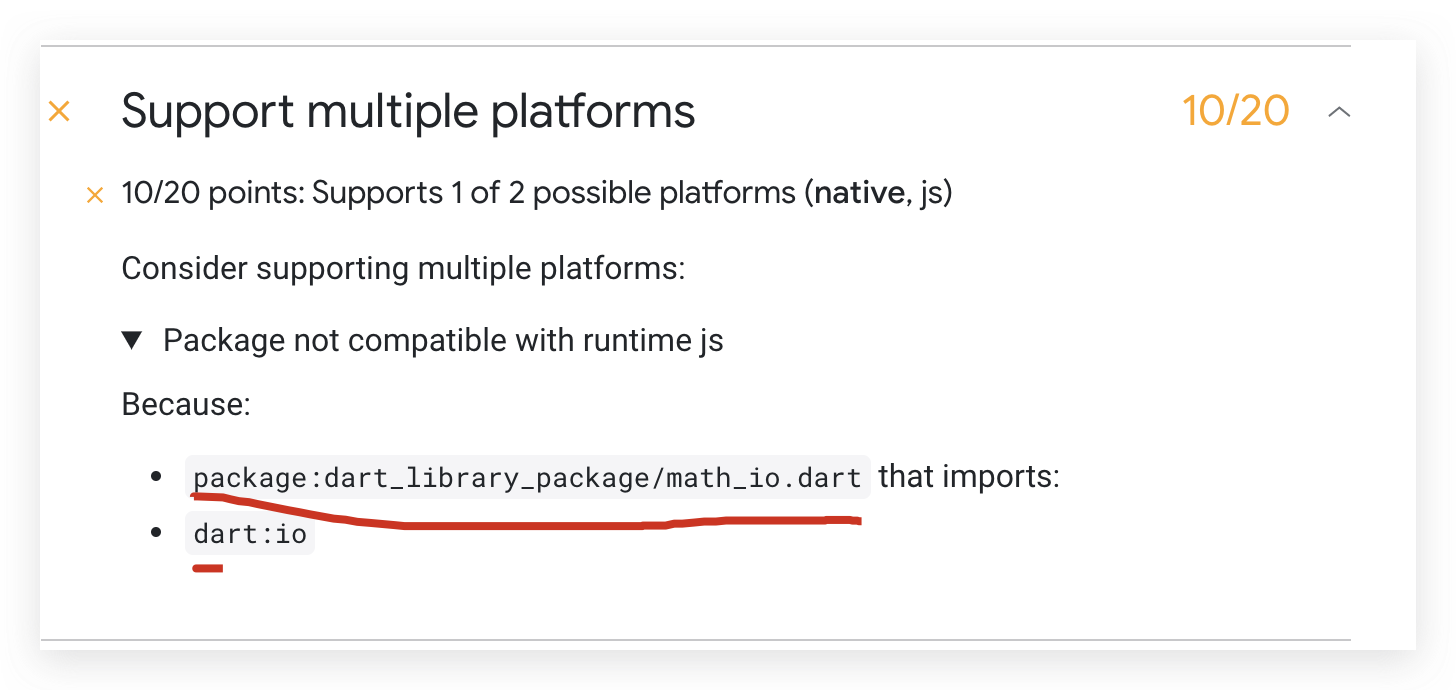
Support multiple platforms
10/20 points: Supports 1 of 2 possible platforms (native, js)
Consider supporting multiple platforms:
Package not compatible with runtime js
Because:
package:dart_library_package/math_io.dart that imports:
dart:io
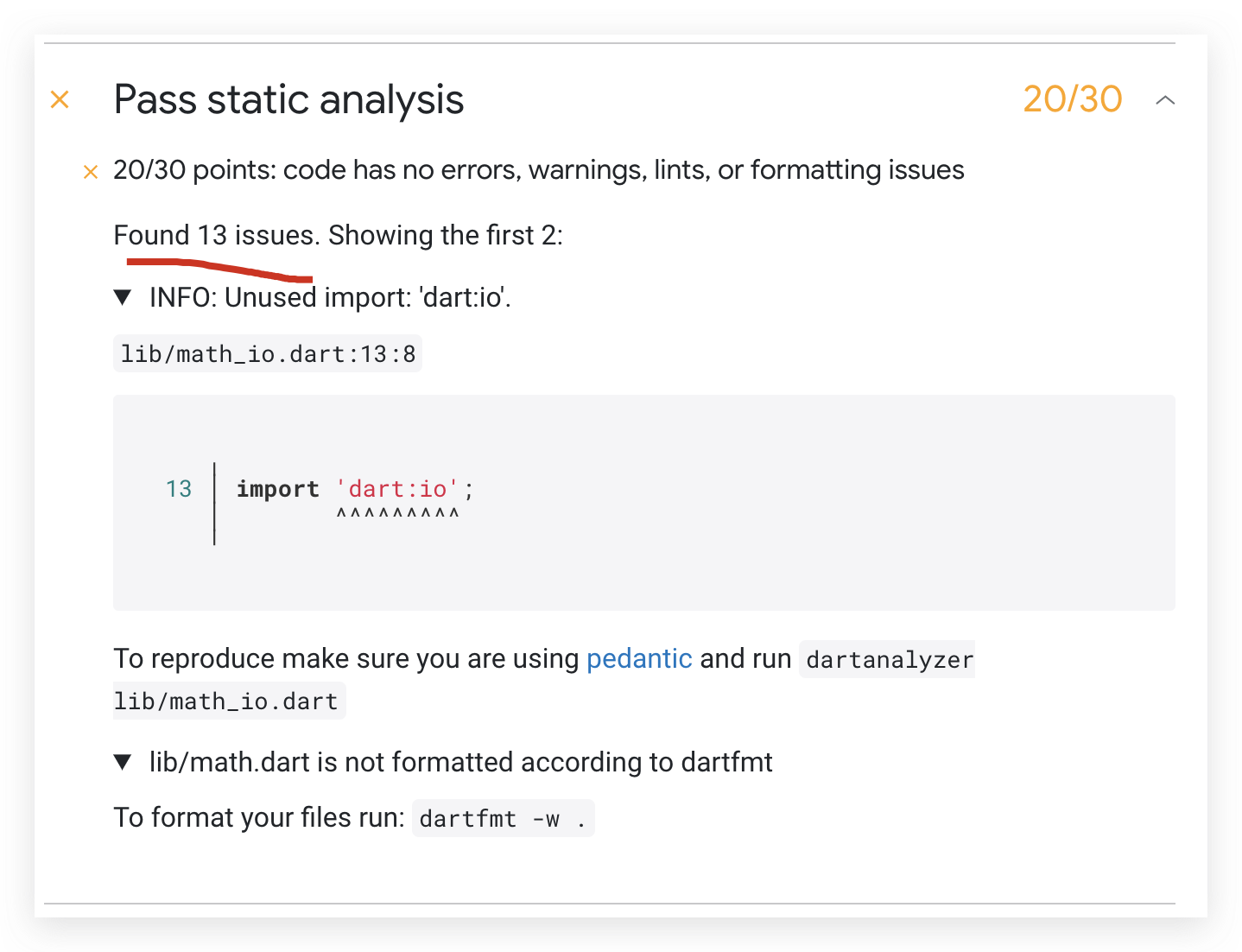
Pass static analysis
20/30 points: code has no errors, warnings, lints, or formatting issues
Found 13 issues. Showing the first 2:
INFO: Unused import: 'dart:io'.
lib/math_io.dart:13:8
╷
13 │ import 'dart:io';
│ ^^^^^^^^^
╵
To reproduce make sure you are using pedantic and run dartanalyzer lib/math_io.dart
lib/math.dart is not formatted according to dartfmt
To format your files run: dartfmt -w .
refs
xgqfrms 2012-2020
www.cnblogs.com 发布文章使用:只允许注册用户才可以访问!
pub package all in one的更多相关文章
- Dependabot 开始支持 pub package 版本检测
今年年初,我们发布了 Flutter 2022 产品路线图,其中「基础设施建设」这部分提到:2022 年 Flutter 团队将增加对供应链的安全的投入,目的是达到符合基础设施 SLSA 4 级别中描 ...
- Dart 基础重点截取 Dart 2 20180417
官网教程 https://www.dartlang.org/guides/language/language-tour dart是一个单线程的语言,没有多线程 Final and const If y ...
- CentOS6.8环境下搭建yum网络仓库
CentOS6.8环境下搭建yum网络仓库 本文利用ftp服务,在CentOS6.8系统下搭建一个yum仓库,然后用另一台虚拟机访问该仓库.并安装程序包 安装ftp服务 查询ftp服务是否安装 [ro ...
- 9.Libraries and visibility 库和可见性
import和liabrary指令可以帮助你创建模块化,可复用的代码.库不仅仅提供API,也是一个私有化单元:库中已下划线(_)开头的类都是对外不可访问的.每个Dart的应用也是一个包,尽管它没有使用 ...
- Fedora 26/27/28网易云音乐安装
信息从 https://www.southcity-oldboy.com/1474.html获取,感谢站长南城旧少年! 以下为前辈网页上的内容 1.安装 RPM Fusion 源 (free): ht ...
- Fedora 28 系统基础配置以及常用软件安装方式
实验说明: 很多人说Linux很难用,很难上手,其实不然,倘若不玩游戏,其实很多发行版Linux都可以成为主力系统,就比如本章要讲的 Fedora 28.本章会从镜像来源.系统安装.基础配置和常用软件 ...
- Dart语法学习
Dart语法学习 目录 参考资料 语言特性 关键字 变量与常量 数据类型 运算符 operators 控制流程语句 异常 Exceptions 函数 Function 类 Class 类-方法 类-抽 ...
- Dart 学习
语言特性 Dart所有的东西都是对象, 即使是数字numbers.函数function.null也都是对象,所有的对象都继承自Object类. Dart动态类型语言, 尽量给变量定义一个类型,会更安全 ...
- Dart 2.15 现已发布
作者 / Michael Thomsen, Dart & Flutter Product Manager, Google 我们已经正式发布了 Dart SDK 的 2.15 版本,该版本新增了 ...
随机推荐
- Maven 知识点总结以及解决jar报冲突的几种方法
1.常见的命令 Compile Test Package Install Deploy Clean 2.坐标的书写规范 groupId 公司或组织域名的倒序 artifactId 项目名或模块名 ve ...
- JVM调优 jdk版本 机器配置 建议jvm参数 备注
https://juejin.im/post/5b091ee35188253892389683 大型跨境电商JVM调优经历 前提:某大型跨境电商业务发展非常快,线上机器扩容也很频繁,但是对于线上机器的 ...
- 符号表 symbol table 符号 地址 互推
https://zh.wikipedia.org/wiki/符号表 https://en.wikipedia.org/wiki/Symbol_table 在计算机科学中,符号表是一种用于语言翻译器(例 ...
- 洛谷P3501
Description 对于一个 \(0/1\) 串,如果取反后再将整个串反过来和原串一样,就称作「反对称」字符串 给出一个长度为 \(n\) 的 \(0/1\) 串,求它有多少个反对称子串 Solu ...
- List对象集合根据组合属性进行差集运算
背景 当List是一个基本数据类型的集合的时候,进行集合运算还比较方便,但是有这么一些业务场景,比如某个用户权限变化的列表,或者取数据的变化结果,当时有时候用笨方法多循环两次也是可以的,只不过代码 ...
- Spark JDBC系列--取数的四种方式
Spark JDBC系列--取数的四种方式 一.单分区模式 二.指定Long型column字段的分区模式 三.高自由度的分区模式 四.自定义option参数模式 五.JDBC To Other Dat ...
- linux shell判断文件,目录是否存在或者具有权限
在linux中判断文件,目录是否存在或则具有的权限,根据最近的学习以及网上的资料,进行了以下的总结: #!/bin/sh myPath="/var/log/httpd/" myFi ...
- 使用FOR XML PATH实现多行数据合并成一列
有时为避免循环操作数据库.列表展示等一些原因需要将数据及关联数据批量加载进行集中处理,一种解决办法可以使用FOR XML PATH将多行数据合并成一列,达到字段拼接的效果.例如有两个表, 部门表T_D ...
- python中numpy库的一些使用
想不用第三方库实现点深度学习的基础部分,发现numpy真的好难(笑),在此做点遇到的函数的笔记 惯例官方文档:https://docs.scipy.org/doc/numpy-1.16.1/refer ...
- linux(6)查看进程ps命令
ps命令 Linux ps (英文全拼:process status)命令用于显示当前进程的状态,类似于 windows 的任务管理器 查看所有进程 ps -A 显示所有进程信息,连同命令行 ps - ...