
错误提示:Access denied for user 'GC'@'localhost' (using password: YES)
错误描述:使用的是C3P0连接池
Spring整合Mybatis时出现错误
java.sql.SQLException: Access denied for user 'GC'@'localhost' (using password: YES)
DEBUG [com.mchange.v2.async.ThreadPoolAsynchronousRunner$PoolThread-#1] - An exception occurred while acquiring a poolable resource. Will retry.

java.sql.SQLException: Access denied for user 'GC'@'localhost' (using password: YES)

    at com.mysql.cj.jdbc.exceptions.SQLError.createSQLException(SQLError.java:129)

    at com.mysql.cj.jdbc.exceptions.SQLError.createSQLException(SQLError.java:97)

    at com.mysql.cj.jdbc.exceptions.SQLExceptionsMapping.translateException(SQLExceptionsMapping.java:122)

    at com.mysql.cj.jdbc.ConnectionImpl.createNewIO(ConnectionImpl.java:835)

    at com.mysql.cj.jdbc.ConnectionImpl.<init>(ConnectionImpl.java:455)

    at com.mysql.cj.jdbc.ConnectionImpl.getInstance(ConnectionImpl.java:240)

    at com.mysql.cj.jdbc.NonRegisteringDriver.connect(NonRegisteringDriver.java:199)

    at com.mchange.v2.c3p0.DriverManagerDataSource.getConnection(DriverManagerDataSource.java:134)

    at com.mchange.v2.c3p0.WrapperConnectionPoolDataSource.getPooledConnection(WrapperConnectionPoolDataSource.java:182)

    at com.mchange.v2.c3p0.WrapperConnectionPoolDataSource.getPooledConnection(WrapperConnectionPoolDataSource.java:171)

    at com.mchange.v2.c3p0.impl.C3P0PooledConnectionPool$1PooledConnectionResourcePoolManager.acquireResource(C3P0PooledConnectionPool.java:137)

    at com.mchange.v2.resourcepool.BasicResourcePool.doAcquire(BasicResourcePool.java:1014)

    at com.mchange.v2.resourcepool.BasicResourcePool.access$800(BasicResourcePool.java:32)

    at com.mchange.v2.resourcepool.BasicResourcePool$AcquireTask.run(BasicResourcePool.java:1810)

    at com.mchange.v2.async.ThreadPoolAsynchronousRunner$PoolThread.run(ThreadPoolAsynchronousRunner.java:547)

Process finished with exit code -1
问题解决:下图中的username、password 改为name、pwd (其实只修改username就可以 为了后面不出问题最好俩个都修改)

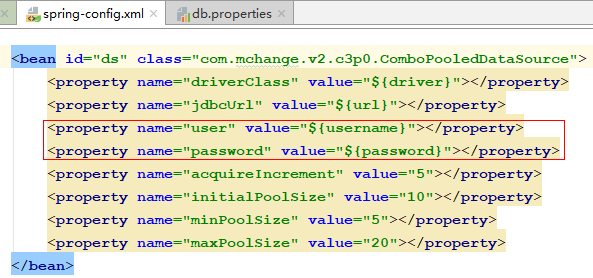
注意:我的错误是因为没有按照C3P0连接池的格式 (这个问题也可能是数据库密码错误)
错误提示:Access denied for user 'GC'@'localhost' (using password: YES)的更多相关文章
- Mysql创建新用户后无法登录,提示 Access denied for user 'username'@'localhost' (using password: YES)
MySQL创建新用户后无法登录,提示 Access denied for user 'username'@'localhost' (using password: YES) ,多半是因为存在匿名用户, ...
- phpMyAdmin提示“Access denied for user 'root'@'localhost' (using password: NO)”的解决办法
一.错误内容 在用thinkPHP登陆phpMyAdmin时遇到以下错误 #1045 - Access denied for user 'root'@'localhost' (using passwo ...
- Django链接Mysql 8.0 出现错误(1045:Access denied for user 'root'@'localhost' (using password: NO) 的一种解决方法
运行环境: Django版本2.0 ; Mysql 版本 8.0.11; 错误代码: django.db.utils.OperationalError: (1045:Access denied fo ...
- JSP连接MySQL时出现--错误:Access denied for user 'root'@'localhost' (using password: YES)'解决方案
用代码进行用户验证的时候总是出现这个错误,翻译一下,应该是root用户的是权限的问题没有放开. 那就想办法解决一下吧,具体的来说可以有这样的几种方式. 解决方法,首先想到的是先重启一下MySQL服务吧 ...
- mysql 8.x 登陆提示 Access denied for user 'root'@'localhost' (using password: YES)
第一步:修改 /etc/mysql/my.cnf. 在[mysql]下添加skip-grant-table:重启. 第二步:通过mysql命令登陆: flush privileges; use mys ...
- MySql错误1045 Access denied for user 'root'@'localhost' (using password:YES) windows下的解决方案(忘记密码)
1.进入管理员控制台停止mysql服务:net stop mysql; 2.进入mysql的安装路径,如我的安装路径为C:\Program Files\MySQL\MySQL Server 5.5,打 ...
- centos 安装mysql 登录进提示 Access denied for user 'root'@'localhost' (using password: NO)
# service mysqld stop # mysqld_safe --user=mysql --skip-grant-tables --skip-networking & # mysql ...
- MySql错误1045 Access denied for user 'root'@'localhost' (using password:YES)
1.先停止mysql服务 2.进入mysql的安装路径,找到并打开my.ini文件,找到[mysqld],在该行下面添加 skip_grant_tables,也就是通知mysql,在登陆的时候跳过密码 ...
- 解决:Access denied for user 'root'@'localhost' (using password: YES)
症状: 重新安装了MySQL,改变了root的密码,因此,在java代码中修改了某个DatabaseConnectionImpl的DBPASSWORD 在java中写了一些代码测试MySQL的插入和查 ...
随机推荐
- angular-2-tutorial-2017
# angular-2-tutorial-2017https://www.sitepoint.com/understanding-component-architecture-angular/http ...
- MySQL 8.x
MySQL 8.x SQL & NoSQL $ mysql --version # mysql Ver 8.0.21 for osx10.15 on x86_64 (Homebrew) # M ...
- javascript nested object merge
javascript nested object merge deep copy Object reference type function namespace(oNamespace, sPacka ...
- nasm astrrev函数 x86
xxx.asm %define p1 ebp+8 %define p2 ebp+12 %define p3 ebp+16 section .text global dllmain export ast ...
- PAA子公司在印度印度成立
近日PAA房产又有大动作啦!在一片期待中,印度分公司正式成立!这是集团继泰国.越南.韩国.上海.成都.中国香港.中国台湾等分公司成立之后的又一扛鼎力作,更是PAA集团全球化战略布局的重要举措. 印度分 ...
- Linux安装MySQL_全网最详细
Linux安装MySQL 编辑于2021-02-19 本文中MySQL安装目录为/usr/local/mysql 上传MySQL安装包至/usr/local目录,执行命令解压 [root@JetXi ...
- ElementUI使用总结
首先声明,我这总结的官网都有,只是将自己使用时遇到的问题,重新记录一下,官网地址:https://element.eleme.cn/ 1.表格内指定行数给定不同样式(类似于隔行变色,也能叫指定行数不同 ...
- 001 说说Python中的深拷贝和浅拷贝
在Python编程中忽略深拷贝和浅拷贝可能会造成未知的风险. 比如我们打算保存一份原始对象的副本作为上一状态的记录,此后修改原始对象数据时,若是副本对象的数据也发生改变,那么这就是一个严重的错误. 注 ...
- 最新版大数据平台安装部署指南,HDP-2.6.5.0,ambari-2.6.2.0
一.服务器环境配置 1 系统要求 名称 地址 操作系统 root密码 Master1 10.1.0.30 Centos 7.7 Root@bidsum1 Master2 10.1.0.105 Cent ...
- MySQL深入研究--学习总结(2)
前言 接上文,继续学习后续章节. 第四章&第五章<深入浅出索引> 这两章节主要介绍的索引结构及其如何合理建立索引,但是我觉得讲的比较简单. 总结回顾下吧,其实在我之前的文章< ...