
talend工具整理文件并出力文件到Excel当中
问题描述:
每天都会生成一定的txt文件,txt文件当中含有复数个个人的信息,把每个个人信息都抽出来之后放到Excel文件的一览里面。
解决思路:
1.txt文件里面的信息有多件,每一件生成一个临时的文件。
2.读取临时的文件之后放到Excel的一览里面。
3.考虑到二次执行的时候,要把临时的文件和前一次的数据给删除。
talend的具体的流程如下图:

解释说明:
①为了第二次可以执行,所以在此处先删除临时文件夹里面的临时文件
代码如下:
// 当「コンポーネント」で、下記コードを書きます
// パラメータ「context.dataSourcePath」がContxtで、設定する、
outputDataConver.fileDel(context.dataSourcePath + "temp");
// 在「コード」⇒「ルーチン」で、新しいクラスを作成し、下記の方法を作成
// 一時ファイル削除
public static void fileDel(String path){
    File file = new File(path);
    if (file.exists()) {
        File[] files = file.listFiles();
        for (File fileItem : files) {
            fileItem.delete();
        }
    }
}
②此处的目的是想把「tJava3」的代码都执行结束之后再向下执行。
生成方式是·「tJava5」⇒「右キーを押し」⇒「トリガー」⇒「サブジョブがOKの場合」
③④⑤为了实现在第二次执行的时候,把第一次执行的数据要删除的功能,再次要检索一下,当前的数据文件里面有没有当天的数据
③的生成方式是·「メタデータ」⇒「Excelファイル」⇒「右キーを押し」⇒「Excelファイル作成する」
④只是匹配两端的数据
⑤要判断有没有执行过一次数据,即当天的数据是否含有
// 当日のデータがあれば、パラメータが”FLASE”を設定する

// パラメータ「context.dataDelFg 」がContxtで、設定する、初期値が”true”に設定する

if(( new SimpleDateFormat("yyyyMMdd").format(new Date())).equals(input_row.O) ){

    context.dataDelFg = "false";

}
⑥临时的一个控件,为了方便加判断条件。添加方式是鼠标选择在控件「tJava5」⇒「右キーを押し」⇒「トリガー」⇒「条件付く実行」
if(order:1)的判断条件("false".equals(context.dataDelFg ))
if(order:2)的判断条件("true".equals(context.dataDelFg ))
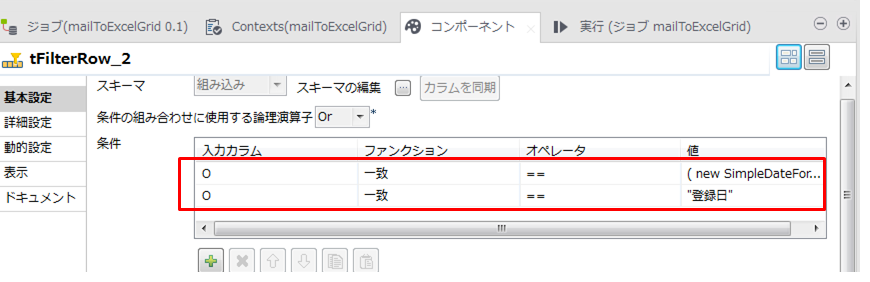
⑦⑧⑨此处是想实现,删除当天的数据生成临时的文件
⑧处的设定如下
⑩处的实现利用临时生成的文件把目标文件给覆盖,即拷贝
⑪利用事前准备好的模板把临时生成的临时文件给恢复到最初的状态
⑫把单个txt文件里面的复数个个人信息给生成到,一个文件一个个人信息里面
			// キーワード:名前

			String keyFileName =context.dataSourcePath + "氏名.txt";

			List<String> keyFileNameList = outputDataConver.getKeyWord(keyFileName);

			// キーワード:性別

			String keyFileSex = context.dataSourcePath + "性別.txt";

			List<String> keyFileSexList = outputDataConver.getKeyWord(keyFileSex);

			// キーワード:年齢

			String keyFileAge = context.dataSourcePath + "年齢.txt";

			List<String> keyFileAgeList = outputDataConver.getKeyWord(keyFileAge);

			// キーワード:経験年数

			String keyFileExperience=context.dataSourcePath + "経験.txt";

			List<String> keyFileExperienceList = outputDataConver.getKeyWord(keyFileExperience);

			// キーワード:最寄駅

			String keyFileStation = context.dataSourcePath + "最寄駅.txt";

			List<String> keyFileStationList = outputDataConver.getKeyWord(keyFileStation);

			// キーワード:日本語レベル

			String keyFileLevel = context.dataSourcePath + "日本語レベル.txt";

			List<String> keyFileLevelList = outputDataConver.getKeyWord(keyFileLevel);

			// キーワード:スキル

			String keyFileSkill = context.dataSourcePath + "スキル.txt";

			List<String> keyFileSkillList = outputDataConver.getKeyWord(keyFileSkill);

			// キーワード:業種

			String keyFileIndustry = context.dataSourcePath + "業種.txt";

			List<String> keyFileIndustryList = outputDataConver.getKeyWord(keyFileIndustry);

			// キーワード:希望単価

			String keyFilePrice = context.dataSourcePath + "希望単価.txt";

			List<String> keyFilePriceList = outputDataConver.getKeyWord(keyFilePrice);

			// 指定のパス下のファイル取得

			String path = context.dataSourcePath +( new SimpleDateFormat("yyyyMMdd").format(new Date()))+ "\\";

			List<String> fileNameList = outputDataConver.traverseFolder(path);

			for(String fi:fileNameList){

				String name = fi.replace(path,"");

			    File file = new File(fi);

			    FileWriter writer=null;

			  	try (InputStreamReader  fr = new InputStreamReader(new FileInputStream(file), "SJIS");

			    BufferedReader reader = new BufferedReader(fr)) {

			        String temp = "";

					String kkcy1 = context.dataSourcePath + "temp/" + name.substring(0,name.length()-4);

					String kkcy2= name.substring(name.length()-4, name.length());

					int index = 0;

					boolean flag = true;

					boolean sexFlag = true;

					boolean ageFlag = true;

					// TXTファイル内容読み取り

					while ((temp = reader.readLine()) != null) {

						String nameStr = outputDataConver.keyWord(temp, keyFileNameList);

						if (!"".equals(nameStr)){

							if(!flag){

								writer.close();

								flag = true;

							}

							File fileText = new File(kkcy1 +"_" + index + kkcy2);

							writer=new FileWriter(fileText);

							index = index + 1;

							writer.write("名前:" + nameStr.trim());

							writer.write("\r\n");

							writer.write("会社:" + name);

							writer.write("\r\n");

							sexFlag = false;

							ageFlag = false;

							flag = false;

						}

						if (!sexFlag){

							String sexStrHs = outputDataConver.keyWordSex(temp);

							if(!sexStrHs.equals("")){

								sexFlag = true;

								writer.write("性別:" + sexStrHs.trim() );

								writer.write("\r\n");

							}

						}

						String sexStr = outputDataConver.keyWord(temp, keyFileSexList);

						if (!"".equals(sexStr)){

							writer.write("性別:" + sexStr.trim() );

							writer.write("\r\n");

						}

						if (!ageFlag){

							String ageStrHs = outputDataConver.keyWordAge(temp);

							if(!ageStrHs.equals("")){

								ageFlag = true;

								writer.write("年齢:" + ageStrHs.trim() );

								writer.write("\r\n");

							}

						}

						String ageStr = outputDataConver.keyWord(temp, keyFileAgeList);

						if (!"".equals(ageStr)){

							writer.write("年齢:" + ageStr.trim());

							writer.write("\r\n");

						}

						String experienceStr = outputDataConver.keyWord(temp, keyFileExperienceList);

						if (!"".equals(experienceStr)){

							writer.write("経験年数:" + experienceStr.trim());

							writer.write("\r\n");

						}

						String stationStr =outputDataConver. keyWord(temp, keyFileStationList);

						if (!"".equals(stationStr)){

							writer.write("最寄駅:" + stationStr.trim());

							writer.write("\r\n");

						}

						String levelStr = outputDataConver.keyWord(temp, keyFileLevelList);

						if (!"".equals(levelStr)){

							writer.write("日本語レベル:" + levelStr.trim());

							writer.write("\r\n");

						}

						String skillStr = outputDataConver.keyWord(temp, keyFileSkillList);

						if (!"".equals(skillStr)){

							writer.write("スキル:" + skillStr.trim().replace(",","、"));

							writer.write("\r\n");

						}

						String industryStr = outputDataConver.keyWord(temp, keyFileIndustryList);

						if (!"".equals(industryStr)){

							writer.write("業種:" + industryStr.trim());

							writer.write("\r\n");

						}

						String priceStr = outputDataConver.keyWord(temp, keyFilePriceList);

						if (!"".equals(priceStr)){

							writer.write("希望単価:" + priceStr.trim());

							writer.write("\r\n");

						}

					}

				  } catch(FileNotFoundException e) {

					throw new Exception(e);

				  }finally{

					 if(writer != null) {

						 writer.close();

					 }

              }

			}
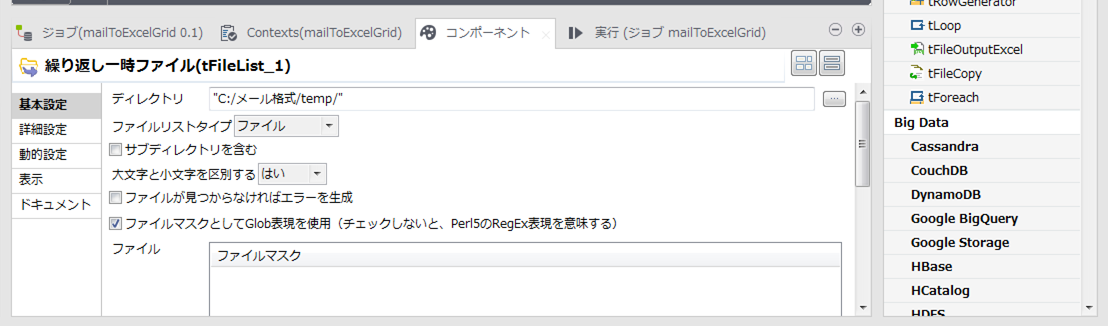
⑬⑭⑮⑯实现把每一个文件的个人信息写到Excel里面
⑬的设定
⑭的代码
			  String fileName = context.dataSourcePath + "temp/"+ ((String)globalMap.get("tFileList_1_CURRENT_FILE"));

			  File file = new File(fileName);

			  try (InputStreamReader  fr = new InputStreamReader(new FileInputStream(file), "SJIS");

			    BufferedReader reader = new BufferedReader(fr)) {

			    String temp = "";

			    String[] strTemp= {" ,"," ,"," ,"," ,"," ,"," ,"," ,"," ,"," ,"," ,",};

			    while ((temp = reader.readLine()) != null) {

			      System.out.print("Excel:"+temp);

			    	if (temp.indexOf("名前:") >= 0){

			    		strTemp[0] = temp.replace("名前:", "") + ",";

			    	}

			    	if (temp.indexOf("性別:") >= 0){

			    		strTemp[1] = temp.replace("性別:", "") + ",";

			    	}

			    	if (temp.indexOf("年齢:") >= 0){

			    		strTemp[2] = temp.replace("年齢:", "") + ",";

			    	}

			    	if (temp.indexOf("経験年数:") >= 0){

			    		strTemp[3] = temp.replace("経験年数:", "") + ",";

			    	}

			    	if (temp.indexOf("最寄駅:") >= 0){

			    		strTemp[4] = temp.replace("最寄駅:", "") + ",";

			    	}

			    	if (temp.indexOf("日本語レベル:") >= 0){

			    		strTemp[5] = temp.replace("日本語レベル:", "") + ",";

			    	}

			    	if (temp.indexOf("スキル:") >= 0){

			    		strTemp[6] =temp.replace("スキル:", "") + ",";

			    	}

			    	if (temp.indexOf("業種:") >= 0){

			    		strTemp[7] = temp.replace("業種:", "") + ",";

			    	}

			    	if (temp.indexOf("希望単価:") >= 0){

			    		strTemp[8] = temp.replace("希望単価:", "") + ",";

			    	}

			    	if (temp.indexOf("会社:") >= 0){

			    		strTemp[9] = temp.replace("会社:", "") + ",";

			    	}

			    }

                StringBuilder strBuData = new StringBuilder();

			    for(int i = 0; i < strTemp.length; i++){

			    		strBuData.append(strTemp[i]);

			    }

			    context.txtStr = strBuData.toString();

			    row1.txtStr = context.txtStr;

			  } catch(FileNotFoundException e) {

			    throw new Exception(e);

			  }
⑯的设定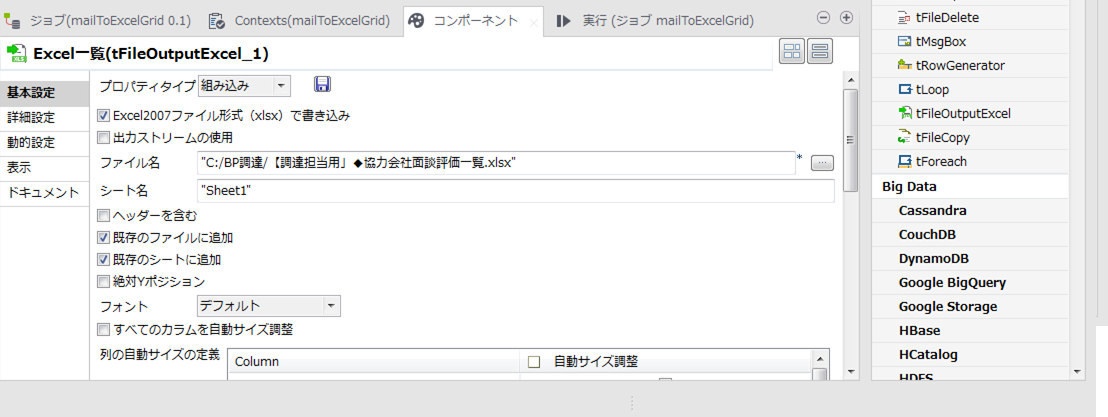
常量的设定

talend工具整理文件并出力文件到Excel当中的更多相关文章
- 从java文件和CS文件里查询方法使用次数工具
前几天,领导让我找一下老系统(Java)里getRemoteUser方法都哪个文件用了,package是什么,方法被调用了多少次,当时因为着急,所以,直接人工找的,但是以后要是再出现,人工找就太讨厌了 ...
- 文件夹差异文件对比工具 meld
/***************************************************************************************** * 文件夹差异文件 ...
- 最终版-perl工具解析数据库的报告文件0120
********************需要根据自己的实际环境修改哦**************************** ******************** 1. 收集awr报告样本 a ...
- java使用io创建文件与删除文件的工具类
java中对于文件的操作,是再常见不过了.以下代码是自己代码中所用到的工具类,仅供参考. import java.io.File; import java.io.IOException; /** * ...
- 文件夹或者文件比对工具 Beyond Compare
文件夹或者文件比对工具 Beyond Compare 之前有同事离职了. 没有工作交接. 同事的代码有一部分也没有提交版本库. 结果就是线上的代码和版本库中的文件数 ...
- 转载:.Net 程序集 签名工具sn.exe 密钥对SNK文件 最基本的用法
.Net 程序集 签名工具sn.exe 密钥对SNK文件 最基本的用法 阐述签名工具这个概念之前,我先说说它不是什么: 1.它不是用于给程序集加密的工具,它与阻止Reflector或ILSpy对程序集 ...
- 使用rdbtools工具来解析redis rdb文件
工欲善其事必先利其器,日常工作中,好的工具能够高效的协助我们工作:今天介绍一款用来解析redis rdb文件的工具,非常好用.会之,受用无穷! 一.rdbtools工具介绍 源码地址:https:// ...
- Windows文件夹、文件源代码对比工具--WinMerge
/********************************************************************** * Windows文件夹.文件源代码对比工具--WinM ...
- 使用 ASMCMD 工具管理ASM目录及文件
============================== -- 使用ASMCMD 工具管理ASM目录及文件 --============================== 在ASM实例中,所有的 ...
随机推荐
- Python怎么测试异步接口
当业务处理比较耗时时, 接口一般会采用异步处理的方式, 这种异步处理的方式又叫Future模式. 一般流程 当你请求一个异步接口,接口会立刻返回你一个结果告诉你已经开始处理,结果中一般会包含一个任务i ...
- Mac佳软之Understand---Android源码分析阅读神器
下载地址, 密码:gebp 供大家体验, 请大家支持正版!!! https://www.jianshu.com/p/06f25d9131de
- 2.线程--线程安全(synchronized)
同步锁:synchronized,(缺点:不能手动开锁 解锁) 1.同步代码块 public void run(){ synchronized(this){/使用this关键字表示同一把锁,非静态 ...
- Hadoop 安装(本地、伪分布、分布式模式)
本地模式 环境介绍 一共三台测试机 master 192.168.4.91 slave1 192.168.4.45 slave2 192.168.4.96 操作系统配置 1.Centos7 ...
- Tkinter 之Combobox下拉
一.参数说明 语法 作用 cv = tk.stringVar() 绑定变量 com = ttk.Combobox(root, textvariable=cv) 创建下拉框 com.pack() 放置下 ...
- Eclipse简明使用教程(java集成开发环境)
说明:我使用的是绿色便携版的Eclipse,免安装,解压就能用.链接:https://download.csdn.net/download/loongstyle/10700321 1_Eclipse中 ...
- Solr 集成ikanalyzer
Solr 不能对中文进行分词,ikanalyzer可以. ikanalyzer下载链接 1.下载 jar形式 2.放到D:\soft\solr-8.1.0\server\solr-webapp\web ...
- Java 程序流程语句
顺序结构 什么是顺序结构:一行一行的执行代码 选择结构 if 什么是选择结构:通过判断条件来做选择的语句,我们称为选择语句或分支语句 定义方式:if语句使用boolean表达式或boolean值作为选 ...
- python中的with的用法,上下文管理器
with是从Python2.5引入的一个新的语法,它是一种上下文管理协议,目的在于从流程图中把 try,except 和finally 关键字和 资源分配释放相关代码统统去掉,简化try….excep ...
- T-MAX——项目需求分析
这个作业属于哪个课程 2019秋福大软件工程实践Z班 这个作业要求在哪里 团队作业第二次-需求规格说明书 团队名称 T-MAX 这个作业的目标 撰写项目需求规格说明书,介绍团队分工 作业正文 T-MA ...