
路由器配置——PAP与CHAP认证
一、实验目的:掌握PAP与CHAP认证配置
二、拓扑图:
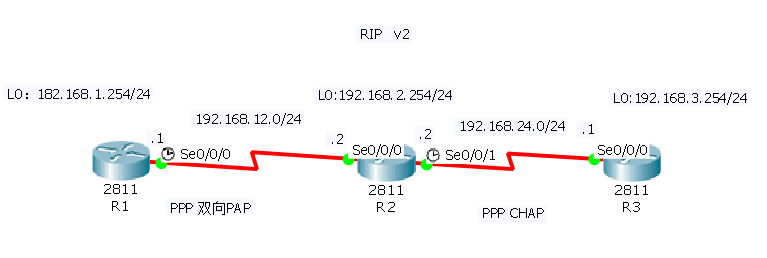
三、具体步骤配置:
(1)R1路由器配置:
Router>enable --进入特权模式
Router#configure terminal --进入全局配置模式
Enter configuration commands, one per line. End with CNTL/Z.
Router(config)#hostname R1 --修改路由器名为R1
R1(config)#interface l0 --进入回环端口
R1(config-if)#ip address 192.168.1.254 255.255.255.0 --配置ip地址
R1(config-if)#no shutdown --激活端口
R1(config-if)#exit --返回上一级
R1(config)#interface s0/0/0 --进入端口
R1(config-if)#ip address 192.168.12.1 255.255.255.0 --为端口配置ip地址
R1(config-if)#clock rate 64000 --设置时钟同步速率
R1(config-if)#no shutdown --激活端口
%LINK-5-CHANGED: Interface Serial0/0/0, changed state to down
R1(config-if)#exit --返回上一级
R1(config)#route rip --开启rip服务
R1(config-router)#version 2 --版本2
R1(config-router)#no auto-summary --关闭路由自动汇总
R1(config-router)#network 192.168.1.0 --添加直连网段到rip
R1(config-router)#network 192.168.12.0
R1(config-router)#exit --返回上一级
R1(config)#username abc1 password 456 --在中心路由器R1上为远程路由器R2设置用户名和密码
R1(config)#interface s0/0/0 --进入端口
R1(config-if)#encapsulation ppp --封装端口为ppp
R1(config-if)#ppp authentication pap --在R1上,配置PAP 验证
R1(config-if)#ppp pap sent-username abc password 123 --在中心路由器R1上为远程路由器R2设置用户名和密码
R1(config-if)#end --返回特权模式
%LINK-5-CHANGED: Interface Loopback0, changed state to up
%LINEPROTO-5-UPDOWN: Line protocol on Interface Loopback0, changed state to up
R1#
%SYS-5-CONFIG_I: Configured from console by console
%LINK-5-CHANGED: Interface Serial0/0/0, changed state to up
%LINEPROTO-5-UPDOWN: Line protocol on Interface Serial0/0/0, changed state to up
(2)R2路由器配置:
Router>enable --进入特权模式
Router#configure terminal --进入全局配置模式
Enter configuration commands, one per line. End with CNTL/Z.
Router(config)#hostname R2 --修改路由器名为R2
R2(config)#interface l0 --进入回环端口
R2(config-if)#ip address 192.168.2.254 255.255.255.0 --配置ip地址
R2(config-if)#no shutdown --激活端口
R2(config-if)#exit --返回上一级
R2(config)#interface s0/0/0 --进入端口
R2(config-if)#ip address 192.168.12.2 255.255.255.0 --为端口配置ip地址
R2(config-if)#no shutdown --激活端口
R2(config-if)#interface s0/0/1 --进入端口
R2(config-if)#ip address 192.168.24.2 255.255.255.0 --为端口配置ip地址
R2(config-if)#clock rate 64000 --设置时钟同步速率
R2(config-if)#no shutdown --激活端口
%LINK-5-CHANGED: Interface Serial0/0/1, changed state to down
R2(config-if)#exit --返回上一级
R2(config)#route rip --开启rip协议
R2(config-router)#version 2 --版本2
R2(config-router)#no auto-summary --关闭路由自动汇总
R2(config-router)#network 192.168.2.0 --添加直连网段到rip
R2(config-router)#network 192.168.12.0
R2(config-router)#network 192.168.24.0
R2(config-router)#exit --返回上一级
R2(config)#username abc password 123 --在R2上为R1设置用户名和密码
R2(config)#username R3 password cisco --在R2上为R3设置用户名和密码(注意两端密码要相同)
R2(config)#interface s0/0/0 --进入端口
R2(config-if)#encapsulation ppp --封装端口为PPP协议
R2(config-if)#ppp authentication pap --配置PAP验证
R2(config-if)#ppp pap sent-username abc1 password 456 --在R2上为R1设置用户名和密码
R2(config-if)#interface s0/0/1 --进入端口
R2(config-if)#encapsulation ppp --封装端口为ppp协议
R2(config-if)#ppp authentication chap --配置chap验证
R2(config-if)#end --返回特权模式
R2#
%LINK-5-CHANGED: Interface Loopback0, changed state to up
%LINEPROTO-5-UPDOWN: Line protocol on Interface Loopback0, changed state to up
%LINK-5-CHANGED: Interface Serial0/0/0, changed state to up
%SYS-5-CONFIG_I: Configured from console by console
%LINEPROTO-5-UPDOWN: Line protocol on Interface Serial0/0/0, changed state to up
R2#
%LINK-5-CHANGED: Interface Serial0/0/1, changed state to up
%LINEPROTO-5-UPDOWN: Line protocol on Interface Serial0/0/1, changed state to up
(3)R3路由器配置:
Router>enable --进特权模式
Router#configure terminal --进入全局配置模式
Enter configuration commands, one per line. End with CNTL/Z.
Router(config)#hostname R3 --修改路由器名为R3
R3(config)#interface l0 --进入回环端口
R3(config-if)#ip address 192.168.3.254 255.255.255.0 --为端口配置ip地址
R3(config-if)#no shutdown --激活端口
R3(config-if)#exit --返回上一级
R3(config)#interface S0/0/0 --进入端口
R3(config-if)#ip address 192.168.24.1 255.255.255.0 --为端口配置ip地址
R3(config-if)#no shutdown --激活端口
R3(config-if)#exit --返回上一级
R3(config)#route rip --开启rip协议
R3(config-router)#version 2 --版本2
R3(config-router)#no auto-summary --关闭路由自动汇总
R3(config-router)#network 192.168.3.0 --添加直连网段到rip
R3(config-router)#network 192.168.24.0
R3(config-router)#exit --返回上一级
R3(config)#username R2 password cisco --在R3上为R2设置用户名和密码
R3(config)#interface s0/0/0 --进入端口
R3(config-if)#encapsulation ppp --封装端口为ppp协议
R3(config-if)#ppp authentication chap --配置chap验证
R3(config-if)#end --返回特权模式
%LINK-5-CHANGED: Interface Loopback0, changed state to up
%LINEPROTO-5-UPDOWN: Line protocol on Interface Loopback0, changed state to up
%LINK-5-CHANGED: Interface Serial0/0/0, changed state to up
%LINEPROTO-5-UPDOWN: Line protocol on Interface Serial0/0/0, changed state to up
R3#
%SYS-5-CONFIG_I: Configured from console by console
四、验证测试:
1、测试是否开启ppp认证
(1)R1:

(2)R2:

(3)R3:

2、查看R1的S0/0/0端口信息

如图,红色标记处表示是PPP认证
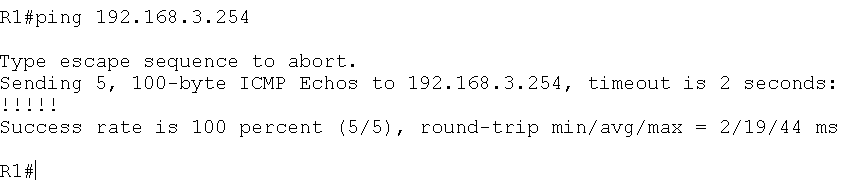
3、测试全网是否互通:
(1)R1与R2
(2)R2与R3
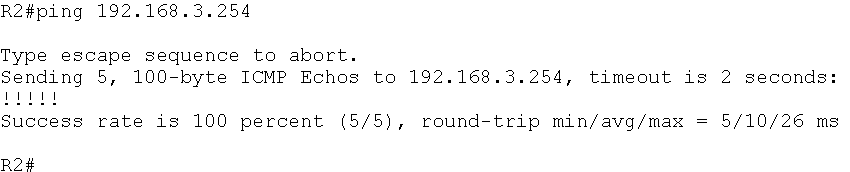
(3)R3与R1

结果:全网互通成功!!!
路由器配置——PAP与CHAP认证的更多相关文章
- 路由器配置PPP协议 CHAP验证 PAP验证
路由器配置PPP协议 CHAP验证 PAP验证 来源 https://www.cnblogs.com/tcheng/p/5967485.html PAP是两次握手,明文传输用户密码进行认证:CHAP是 ...
- 路由器基础配置之ppp封装下的pap,chap认证
我们将以上面的拓扑图完成本次实验,路由器的默认封装为HDLC,要求为把路由器全被更改为ppp封装,并在router3与router4之间用pap认证,在router4与router5之间用chap认证 ...
- 路由器配置深入浅出—路由器接口PPP协议封装及PAP和CHAP验证配置
知识域: 是针对点对点专线连接的接口的二层封装协议配置 PPP的PAP和CHAP验证,cpt支持,不一定要在gns3上做实验. 路由器出厂默认是hdlc封装,修改为ppp封装后,可以采用pap验证或者 ...
- 详解eNSP下的PPP之MP、PAP/CHAP认证实验配置
一.PPP MP实验(用虚拟模板配置) 1.拓扑图
- 路由器配置——基于链路的OSPF简单口令认证
一.实验目的:掌握基于链路的OSPF简单口令认证 二.拓扑图: 三.具体步骤配置: (1)R1路由器配置 Router>enable Router#configure terminal Ente ...
- 路由器配置——基于区域的OSPF,MD5认证
一.实验目的:掌握OSPF基于区域的MD5认证 二.拓扑图: 三.具体步骤配置 (1)R1路由器配置 Router>enable Router#configure terminal Enter ...
- 路由器配置——基于区域的OSPF简单认证
一.实验目的:掌握区域的OSPF简单认证 二.拓扑图: 三.具体步骤配置: (1)R1路由器配置 Router>enable Router#configure terminal Enter co ...
- 神州数码广域网PPP封装CHAP认证配置
实验要求:掌握PPP封装协议下的CHAP认证 拓扑如下 R1 enable 进入特权模式 config 进入全局模式 hostname R1 修改名称 interface s0/1 进入端口 ip a ...
- CHAP认证原理
整个过程就是PPP协商过程,分三步:LCP.认证.NCP. 一 协议概述 PPP包含以下两个层次的协议: ·链路控制协议(LCP):负责建立.配置和测试数据链路连接 ·网络控制协议(NCP):负责建立 ...
随机推荐
- 修改feign解析器替换json
@Bean public Logger.Level getFeignLoggerLevel() { return Logger.Level.FULL ; } @Bean public Response ...
- BZOJ2555 SubString(后缀自动机+LCT)
询问串放在SAM上不跳fail跑到的节点的|right|即为答案.用LCT维护parent树即可.可以直接维护子树信息,也可以转化为路径加.注意强制在线所使用的mask是作为参数传进去的. #incl ...
- linux时间同步ntpdate
1.安装ntpdate,执行以下命令 yum install ntpdate -y 2.手工同步网络时间,执行以下命令,将从time.nist.gov同步时间 ntpdate 0.asia.pool. ...
- 写给Web开发人员看的Nginx介绍
译者注:不知道其他开发者是否和我一样,参与或者写了很多Web项目,但是却没有真正的去完整的部署应用,很多时候都是交给ops即运维的同学帮忙来做.而作为一个有节操的开发者,我认为了解一些服务器方面的知识 ...
- 双重检查加锁机制(并发insert情况下数据重复插入问题的解决方案)
双重检查加锁机制(并发insert情况下数据重复插入问题的解决方案) c#中单例模式和双重检查锁 转:https://blog.csdn.net/zhongliangtang/article/deta ...
- Linux Centos7配置mysql8.0数据库
本文转至:672530440 在此感谢博主,撒花!!! 本文主要从以下几个方面对自己在centos7 下安装mysql8过程做如下总结: CentOS7 安装mysql8 步骤: window下的Na ...
- FastDFS高可用集群架构配置搭建及使用
一,概述FastDFS 是一个开源的高性能分布式文件系统(DFS). 它的主要功能包括:文件存储,文件同步和文件访问,以及高容量和负载平衡.FastDFS 系统有三个角色:跟踪服务器(Tracker ...
- linux命令安装docker
安装: 1.Docker要求CentOS系统的内核版本高于 3.10 ,通过 uname -r 命令查看你当前的内核版本是否支持安账docker 2.更新yum包:sudo yum update 3. ...
- storedownloadd占用cpu高
禁用App Store的自动更新
- Const *ptr ptr
1. const int *ptr = NULL; <=> int const *ptr = NULL; 1) 表示指向符号常量的指针变量,指针变量本身并非const所以可以指向其他变量. ...