
路由器配置——基于链路的OSPF简单口令认证
一、实验目的:掌握基于链路的OSPF简单口令认证
二、拓扑图:

三、具体步骤配置:
(1)R1路由器配置
Router>enable
Router#configure terminal
Enter configuration commands, one per line. End with CNTL/Z.
Router(config)#hostname R1
R1(config)#interface s0/0/0
R1(config-if)#ip address 192.168.1.1 255.255.255.0
R1(config-if)#clock rate 64000
R1(config-if)#no shutdown
%LINK-5-CHANGED: Interface Serial0/0/0, changed state to down
R1(config-if)#exit
R1(config)#interface l0
R1(config-if)#ip address 1.1.1.1 255.255.255.0
R1(config-if)#no shutdown
R1(config-if)#exit
R1(config)#router ospf 1
R1(config-router)#router-id 1.1.1.1
R1(config-router)#network 192.168.1.0 0.0.0.255 area 0
R1(config-router)#network 1.1.1.0 0.0.0.255 area 0
R1(config-router)#interface s0/0/0
R1(config-if)#ip ospf authentication
R1(config-if)#ip ospf authentication-key 123
R1(config-if)#end
(2)R2路由器配置
Router>enable
Router#configure terminal
Enter configuration commands, one per line. End with CNTL/Z.
Router(config)#hostname R2
R2(config)#interface s0/0/0
R2(config-if)#ip address 192.168.1.2 255.255.255.0
R2(config-if)#clock rate 64000
This command applies only to DCE interfaces
R2(config-if)#no shutdown
R2(config-if)#exit
R2(config)#interface l0
R2(config-if)#ip address 2.2.2.2 255.255.255.0
R2(config-if)#no shutdown
R2(config-if)#exit
R2(config)#router ospf 1
R2(config-router)#router-id 2.2.2.2
R2(config-router)#network 192.168.1.0 0.0.0.255 area 0
R2(config-router)#network 2.2.2.0 0.0.0.255 area 0
R2(config-router)#interface s0/0/0
R2(config-if)#ip ospf authentication
R2(config-if)#ip ospf authentication-key 123
R2(config-if)#end
四、验证测试:
(1)检查端口是否启用了简单口令认证。
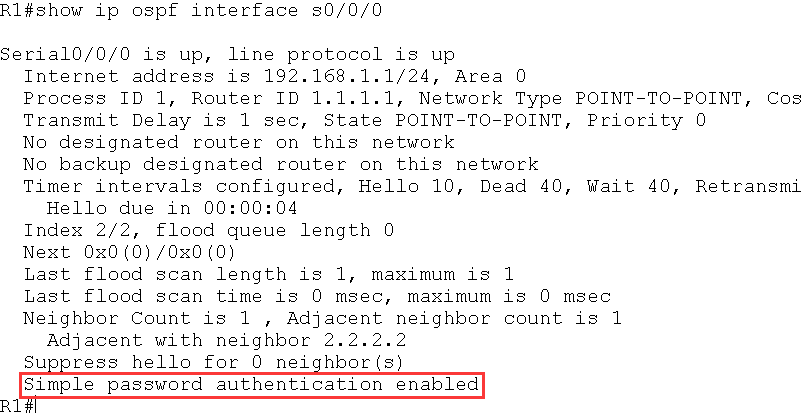
红色标记处表明该端口启用了简单口令认证。
(2)如果R1 的s0/0/0 接口启动简单口令认证,R2 的s0/0/0 接口没有启动认证,则
R2 上出现下面的信息:
*Feb 10 11:19:33.074: OSPF: Rcv pkt from 192.168.12.1, Serial0/0/0 : Mismatch
Authentication type. Input packet specified type 1, we use type 0
(3)如果R1 和R2 的s0/0/0 都启动简单口令认证,但是R2 的接口下没有配置认证密
码或密码错误,则R2 上出现下面的信息:
*Feb 10 11:22:33.074: OSPF: Rcv pkt from 192.168.12.1, Serial0/0/0 : Mismatch
Authentication Key - Clear Text
路由器配置——基于链路的OSPF简单口令认证的更多相关文章
- 基于链路的OSPF简单口令认证
实验要求:掌握基于链路的OSPF简单口令认证 拓扑如下: 配置如下: R1enable configure terminal interface s0/0/0ip address 192.168.1. ...
- 路由器配置——基于链路的OSPF的MD5口令认证
一.实验目的:掌握基于链路的OSPFMD5口令认证 二.拓扑图: 三.具体步骤配置: (1)R1路由器的配置 Router>enable Router#configure terminal En ...
- 路由器配置——基于区域的OSPF简单认证
一.实验目的:掌握区域的OSPF简单认证 二.拓扑图: 三.具体步骤配置: (1)R1路由器配置 Router>enable Router#configure terminal Enter co ...
- 路由器配置——基于区域的OSPF,MD5认证
一.实验目的:掌握OSPF基于区域的MD5认证 二.拓扑图: 三.具体步骤配置 (1)R1路由器配置 Router>enable Router#configure terminal Enter ...
- 基于区域的OSPF简单认证
实验要求:掌握OSPF区域简单认证配置 拓扑如下: 配置如下: R1enable configure terminal interface s0/0/0ip address 192.168.1.1 2 ...
- 基于区域的OSPF的MD5认证
实验要求:掌握OSPF基于区域的MD5认证 拓扑如下: 配置如下: R1enable configure terminal interface s0/0/0ip address 192.168.1.1 ...
- 基于链路的OSPFMD5口令认证
实验要求:掌握基于链路的OSPFMD5口令认证 拓扑如下: 配置如下: R1enable configure terminal interface s0/0/0ip address 192.168.1 ...
- 路由器配置——广播多路访问链路上的OSPF
一.实验目的:作广播形式的OSPF,了解DR与BDR之间的链路关系 二.拓扑图: 三.具体步骤配置 (1)R1路由器配置 enableconfigure terminalhostname R1inte ...
- 路由器配置——OSPF协议(2)
一.实验目的:使用OSPF协议达到全网互通的效果 二.拓扑图 三.具体步骤配置 (1)R1路由器配置 Router>enableRouter#configure terminalEnter co ...
随机推荐
- Ubuntu 搭建 配置 nfs服务器
什么是NFS? NFS(Network File System)即网络文件系统,是FreeBSD支持的文件系统中的一种,它允许网络中的计算机之间通过TCP/IP网络共享资源.在NFS的应用中,本地NF ...
- 此项目与Visual Studio的当前版本不兼容的报错
问题再现:程序是用visual studio 2013开发的,放在本地运行报此项目与Visual Studio的当前版本不兼容.本地是visual studio 2010. 解决办法: <1&g ...
- sql 计算奇数还是偶数
& 运算符来判断奇数还是偶数 sql判断奇数还是偶数 3&1 返回 1 2&1 返回0 0&1 返回 0
- Linux Mysql 备份与还原
1. 备份 cd /var/lib/mysql //进入到MySQL库目录 mysqldump -u root -p 数据库>/root/backup/数据库.sql 然后输入密码 2. 还原 ...
- PAT-1001 A+B Format (20 分) 注意零的特例
Calculate a+b and output the sum in standard format -- that is, the digits must be separated into gr ...
- 搭建SSM环境(淘淘商城)
本文用到的资料: 链接:https://pan.baidu.com/s/1Pk_aI_PRbqRFP9i3o9Xodg 提取码:o4o4 1.1. 数据库 1.1.1. 使用navicat创建数据库连 ...
- POJ2945(Find the Clones)--字典树,map
题意:给你n个规定长度的单词,问你其中出现了1次的单词,出现两次的单词...出现n次单词分别有多少个. 当然这题map也能过,但是这里介绍字典树的做法. 首相对于n个单词存入树中,当然建树过程中遇到一 ...
- C++ raw string literal
raw string literal 以 R"( 开头, )" 结束,是可以跨越多行的字符串字面值,转义字符如 \t\n 在raw string literal中是普通的文本 ...
- IE6图片透明问题
网上很多解决IE6下png透明问题的方案,但是经本人实践,有的时候有用,有的时候并不能解决自己的问题.当是后者的时候,想到另外一种办法,就是当在IE6.IE7下使用gif图片,自己在测试的时候,如果g ...
- Go 缓冲信道
缓冲信道 语法结构:cap为容量 ch := make(chan type, cap) 缓冲信道支持len()和cap(). 只能向缓冲信道发送容量以内的数据. 只能接收缓冲信道长度以内的数据. 缓冲 ...