
oracle报错:The Network Adapter could not establish the connection的解决
进入oracle安装目录\product\11.2.0\dbhome_1\NETWORK\ADMIN,修改listener.ora和tnsnames.ora,修改host
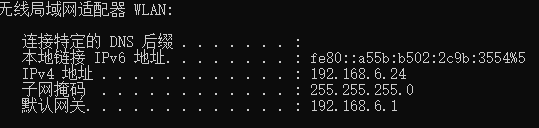
我的网络IP为192.168.6.24:
listener.ora
# listener.ora Network Configuration File: D:\tools\oracle\product\11.2.0\dbhome_1\NETWORK\ADMIN\listener.ora

# Generated by Oracle configuration tools.

SID_LIST_LISTENER =

  (SID_LIST =

    (SID_DESC =

      (SID_NAME = CLRExtProc)

      (ORACLE_HOME = D:\tools\oracle\product\11.2.0\dbhome_1)

      (PROGRAM = extproc)

      (ENVS = "EXTPROC_DLLS=ONLY:D:\tools\oracle\product\11.2.0\dbhome_1\bin\oraclr11.dll")

    )

    (SID_DESC =

        (GLOBAL_DBNAME = ORCL)

        (ORACLE_HOME = D:\tools\oracle\product\11.2.0\dbhome_1)

        (SID_NAME = ORCL)

    )

  )

LISTENER =

  (DESCRIPTION_LIST =

    (DESCRIPTION =

      (ADDRESS = (PROTOCOL = IPC)(KEY = EXTPROC1521))

    )

    (DESCRIPTION =

      (ADDRESS = (PROTOCOL = TCP)(HOST = 192.168.6.24)(PORT = 1521))

    )

  )

ADR_BASE_LISTENER = D:\tools\oracle
tnsnames.ora
# tnsnames.ora Network Configuration File: D:\tools\oracle\product\11.2.0\dbhome_1\network\admin\tnsnames.ora

# Generated by Oracle configuration tools.

LISTENER_ORCL =

  (ADDRESS = (PROTOCOL = TCP)(HOST = 192.168.6.24)(PORT = 1521))

ORACLR_CONNECTION_DATA =

  (DESCRIPTION =

    (ADDRESS_LIST =

      (ADDRESS = (PROTOCOL = IPC)(KEY = EXTPROC1521))

    )

    (CONNECT_DATA =

      (SID = CLRExtProc)

      (PRESENTATION = RO)

    )

  )

ORCL =

  (DESCRIPTION =

    (ADDRESS = (PROTOCOL = TCP)(HOST = 192.168.6.24)(PORT = 1521))

    (CONNECT_DATA =

      (SERVER = DEDICATED)

      (SERVICE_NAME = orcl)

    )

  )
然后,重启以下服务

oracle报错:The Network Adapter could not establish the connection的解决的更多相关文章
- IO 异常:The Network Adapter could not establish the connection 怎么解决
IO 异常:The Network Adapter could not establish the connection 怎么解决
- [Oracle] Io Error: The Network Adapter could not establish the connection 解决方案
Io 异常: The Network Adapter could not establish the connection这个异常的出现一般与数据库和你的PC的设置有关 这种异常的出现大致上有下面几种 ...
- sql developer链接不上oracle 报 The Network Adapter could not establish the connection
安装时候报 : Oracle 支持在具有 DHCP 分配的公共 IP 地址的系统上进行安装.但应使用静态 IP 地址来配置系统的主网络接口, 以便 Oracle 软件正常工作.有关在配置有 DHCP ...
- 数据库连接报错之IO异常(The Network Adapter could not establish the connection)
Io 异常: The Network Adapter could not establish the connection 有以下四个原因: 1.oracle配置 listener.ora 和tnsn ...
- weblogic报错----Received exception while creating connection for pool "TDMSKD": The Network Adapter could not establish the connection
<2017-8-16 上午08时58分37秒 CST> <Info> <WebLogicServer> <BEA-000377> <Startin ...
- Oracle连接报错之IO异常(The Network Adapter could not establish the connection)
简单介绍:自己封装oracle jdbc的一些常用功能jar包,自己本机玩没啥问题,给别人玩儿,发现总是抛异常 IO异常(The Network Adapter could not establish ...
- oracle:程序后台提示Io异常: The Network Adapter could not establish the connection)
今天要用tomcat部署一个系统,windows环境下,oracle和程序在一台机器上. 在配置jndi时,直接写成 jdbc:oracle:thin:@127.0.0.1:1521:orcl.启动程 ...
- Oracle安装后遇到错误:The Network Adapter could not establish the connection
http://note.youdao.com/noteshare?id=e6baee7ea7b7f60d7a265124e2bdd46c&sub=988945C6DDE843D5A7D6588 ...
- The Network Adapter could not establish the connection问题研究
最近一个项目会报上述错误,但也不是经常发生,所以很难跟踪,影响不是很大,但每次看到日志中这个错误就会不舒服,还是要想办法解决才是. 错误提示信息很明确是网络适配器不能创建连接. 查了很多资料,并且Or ...
随机推荐
- 【原创】Linux基础之logrotate
logrotate logrotate ‐ rotates, compresses, and mails system logs logrotate is designed to ease admin ...
- JS基础_基本数据类型和引用数据类型
<!DOCTYPE html> <html> <head> <meta charset="UTF-8"> <title> ...
- 题解 UVA1316 【Supermarket】
题目链接: https://www.luogu.org/problemnew/show/UVA1316 思路: 根据题目意思,我们需要用到贪心的思想,越晚过期的商品当然是越晚卖好.同时你假如有多个商品 ...
- 原生html、js手写 radio与checkbox 美化
原生html.js手写 radio与checkbox 美化 html <!DOCTYPE html> <html> <head> <meta charse ...
- The last packet successfully received from the server was 39,900 milliseconds ago问题解决
1,之前用Mysql或者mycat的时候都没有这个问题.后来改为haproxy+keepalived+mycat后出现这个问题 2,网上查了很多说法,我按照网上说的改了 datasource: url ...
- Nginx作为静态资源web服务之跨域访问
Nginx作为静态资源web服务之跨域访问 首先了解一下什么是跨域 跨域,指的是浏览器不能执行其他网站的脚本.它是由浏览器的同源策略造成的,是浏览器施加的安全限制. 所谓同源是指,域名,协议,端口均相 ...
- 公司最喜欢问的Java集合类
java.util包中包含了一系列重要的集合类,而对于集合类,主要需要掌握的就是它的内部结构,以及遍历集合的迭代模式. 接口:Collection Collection是最基本的集合接口,一个Coll ...
- 9.0.网络编程_IO 通信模型
5. IO 通信模型 网络通信的本质是网络间的数据 IO.只要有 IO,就会有阻塞或非阻塞的问题,无论这个 IO 是网络的,还是硬盘的.原因在于程序是运行在系统之上的, 任何形式的 IO 操作发起都需 ...
- Jmeter (四) 关联
关联: 实例:关联登录请求的 session,方便下次自动登录( 自我理解) 关联用户session 关联 例如 京东秒杀 1000个用户 同时秒杀 怎么模拟?? 使用关联啊! 一.正则表达式提取器 ...
- 需求分析&系统设计
这个作业属于哪个课程 课程链接 这个作业要求在哪里 作业要求 团队名称 朋友 代打了解一下 这个作业的目标 需求分析&系统设计 一.团队成员的姓名学号列表 学号 姓名 特长 061126 黄天 ...