
2602978 - [How to] Content Synchronization between SLDs
http://47.101.174.212:52000/sld
http://47.101.176.136:56000/sld
Symptom
As described in Planning Guide for System Landscape Directory's section Data Distribution Options, there are three options to synchronize data between two or more SLDs:
Full automatic synchronization (Unidirectional or Bidirectional Sync);
Automatic forwarding of data suppliers (Bridge Forwarding);
Manual data export and import functions can be combined with the transport of SLD objects with the enhanced Change and Transport Sysmtes (CTS+).
This KBA will provide details about how to set a Content Full Automatic Synchronization.
Environment
Java SAP system based on SAP NetWeaver 7.1 or higher;
System Landscape Directory;
Operating system independent;
Database independent;
Resolution
Warning: Full Automatic Sync only works for Systems based on SAP NetWeaver 7.1 or higher. If the system is running in a lower release, use Brigde Forwarding option instead (More details in Post-Installation Guide's section 'Configuring the SLD Bridge.
The following steps show how to set the Full Automatic Sync between the SLDs.
For Unidirectional Synchronization, the following steps must be done only in the target SLD (where all content must be stored).
For Bidrectional Synchronization, the following steps must be done in both SLDs.
To synchronize one SLD to another one, follow the steps below. This steps will set the source SLD to get the data from:
Start SLD and choose Administration > Content > Synchronization;
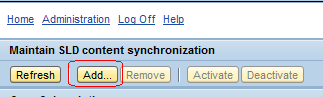
In Maintain SLD content synchronization screen, click button Add:
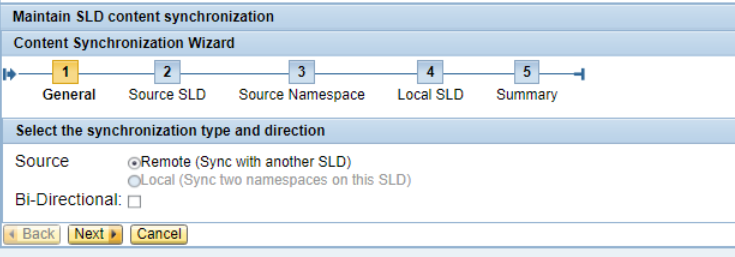
In Content Synchronization Wizard, choose option Remote to field Source and click button Next:

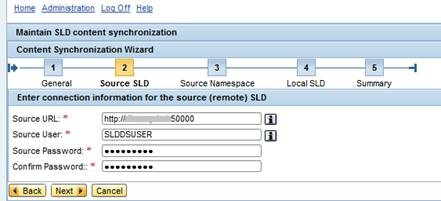
In Enter the connection information from source (remote) SLD screen, provide host name, user and password of Souce SLD (where the data is coming from) and then click Next button. Make sure the Souce User contains UME Role / User Group SAP_SLD_CONTENT_SYNC (for further details, please read Post-Installation Guide's section Configuring SLD Security Roles):
clip_image007.jpg
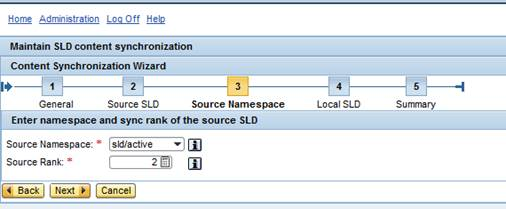
In Enter namespace and sync rank of the source SLD screen, provide Souce Rank of 2 and then click button Next:
clip_image009.jpg
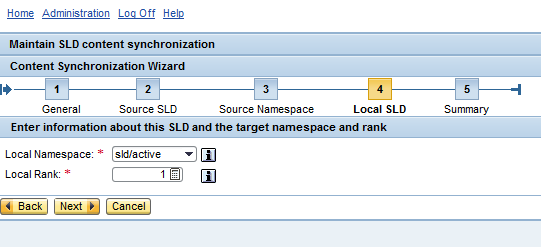
In Enter information about this SLD and the target namespace and rank screen, set the Local Rank of SLD as 1 and click button Next:
clip_image010.png
The Synchronization configuration is finished. Sync Subscriptions shows the SLD set as Source SLD.
See Also
SLD Guided Answer
SAP Wiki: System Landscape Directory (SLD) - Overview
SAP Help: Adding a New Content Synchronization Connection
SAP Blog: How to Get an SAP NetWeaver 7.1 System Landscape Directory?
SAP Guided Answers: BC-CCM-SLD - Content Synchronization Mechanism
SAP Note: 1372683 - SLD content synchronization: Correct configuration of URL
Keywords
System Landscape Directory, Sync, Unilateral, Bilateral
2602978 - [How to] Content Synchronization between SLDs的更多相关文章
- Overview Of Portal Registry And Content References
Portal Registry Each portal is defined by a portal registry.A portal registry has a tree-like struc ...
- Thread Synchronization Queue with Boost
介绍:当开发一个多线程程序时,同步是一个很大的问题.如果你的程序需要数据流包,那么用队列是个好办法. 你可以在 http://www.boost.org/ 发现 boost 库和文档,从它的网站可以看 ...
- Python threads synchronization: Locks, RLocks, Semaphores, Conditions, Events and Queues(Forwarding)
This article describes the Python threading synchronization mechanisms in details. We are going to s ...
- requests的content与text导致lxml的解析问题
title: requests的content与text导致lxml的解析问题 date: 2015-04-29 22:49:31 categories: 经验 tags: [Python,lxml, ...
- Content Security Policy 入门教程
阮一峰文章:Content Security Policy 入门教程
- android 使用Tabhost 发生could not create tab content because could not find view with id 错误
使用Tabhost的时候经常报:could not create tab content because could not find view with id 错误. 总结一下发生错误的原因,一般的 ...
- 【解决方案】cvc-complex-type.2.4.a: Invalid content was found starting with element 'init-param'. One of '{"http://java.sun.com/xml/ns/javaee":run-as, "http://java.sun.com/xml/ns/javaee":security-role-r
[JAVA错误] cvc-complex-type.2.4.a: Invalid content was found starting with element 'init-param'. One o ...
- 注意 AppResLib.dll.*.mui 的生成操作应该为 Content
为 Windows Phone 8 App 添加本地化的时候,发现修改 AppResLib.dll.*.mui 后不仅没有其变化,还发现修改它导致它失效.通过对比代码发现,问题原因是 AppResLi ...
- android Content Provider介绍
ContentProvider(内容提供者)是Android中的四大组件之一.主要用于对外共享数据,也就是通过ContentProvider把应用中的数据共享给其他应用访问,其他应用可以通过Conte ...
随机推荐
- spark.sql.shuffle.partitions和spark.default.parallelism的区别
在关于spark任务并行度的设置中,有两个参数我们会经常遇到,spark.sql.shuffle.partitions 和 spark.default.parallelism, 那么这两个参数到底有什 ...
- Python3基础 函数 参数 多个参数都有缺省值,需要指定参数进行赋值
Python : 3.7.3 OS : Ubuntu 18.04.2 LTS IDE : pycharm-community-2019.1.3 ...
- Spring cloud微服务安全实战-3-3 API安全机制之流控
首先要保证你的服务是可用的,其中一个重要的手段就是流控.就是流量控制.比如我的系统每秒只能处理500个请求,那么多余的请求就拒绝掉.这样我的系统不会被压死 实际的开发中,所要面对的流控场景实际是非常复 ...
- 算法习题---5-6对称轴(UVa1595)
一:题目 判断平面上的一组点,是否关于一条竖线对称.即找到一条垂直对称轴 (一)样例输入 - (二)样例输出 YES NO YES 二:代码实现 #define _CRT_SECURE_NO_WARN ...
- SFTP服务配置以及命令/代码操作
POM <project xmlns="http://maven.apache.org/POM/4.0.0" xmlns:xsi="http://www.w3.or ...
- 简单明了的注解,读取CLASS中的注解
/***********注解声明***************/ /** * 水果名称注解 * @author peida * */ @Target(ElementType.FIELD) @Reten ...
- 推荐一款好用的 office word 的markdown插件 - Writage
软件地址:http://www.writage.com/
- [转]Xmind 8 pro 软件破解版
链接地址:https://blog.csdn.net/qq_16093323/article/details/80967867 作者博客:http://www.carrotchou.blog/
- 【原生JS插件】LoadingBar页面顶部加载进度条
先展示一下已经实现的效果: 预览地址:http://dtdxrk.github.io/js-plug/LoadingBar/index.html 看到手机上的浏览器内置了页面的加载进度条,想用在pc上 ...
- Java进阶教程:使用Lombok提升开发效率
Java进阶教程:使用Lombok提升开发效率 Lombok Lombok是一种Java™实用工具,可用来帮助开发人员消除Java的冗长代码,尤其是对于简单的Java对象(POJO).它通过注释实现这 ...