
零零散散的python笔记
Python strip()方法
用于移除字符串头尾指定的字符(默认为空格或换行符)或字符序列。
#!/usr/bin/python

# -*- coding: UTF-8 -*-

str = "00000003210Runoob01230000000";

print str.strip( '' );  # 去除首尾字符 0

str2 = "   Runoob      ";   # 去除首尾空格

print str2.strip();
random.randint()与np.random.randint()的区别
random.randint()方法里面的取值区间是前闭后闭区间,而np.random.randint()方法的取值区间是前闭后开
import random

for n in range(5):

    for i in range(10):

        print(random.randint(1,5),end=' ')

    print()

#运行结果

1 5 5 3 3 1 3 1 5 2

4 4 4 4 4 4 3 1 5 2

3 2 3 1 1 5 5 1 4 3

3 4 4 2 5 5 3 4 4 4

3 5 4 5 4 5 4 5 2 4

Process finished with exit code 0
import numpy as np

for n in range(5):

    for i in range(10):

        print(np.random.randint(1, 5), end=' ')

    print()

#运行结果

2 4 1 1 1 1 2 2 2 4

3 4 3 2 3 4 3 2 2 4

2 2 1 2 1 1 3 3 3 4

4 1 4 2 4 1 3 4 3 2

2 3 3 2 3 4 4 3 4 4

Process finished with exit code 0
numpy.random.randint: low、high、size三个参数。默认high是None,如果只有low,那范围就是[0,low)。如果有high,范围就是[low,high)。
>>> np.random.randint(2, size=10)

array([1, 0, 0, 0, 1, 1, 0, 0, 1, 0])

>>> np.random.randint(1, size=10)

array([0, 0, 0, 0, 0, 0, 0, 0, 0, 0])

>>> np.random.randint(5, size=(2, 4))

array([[4, 0, 2, 1],

       [3, 2, 2, 0]])
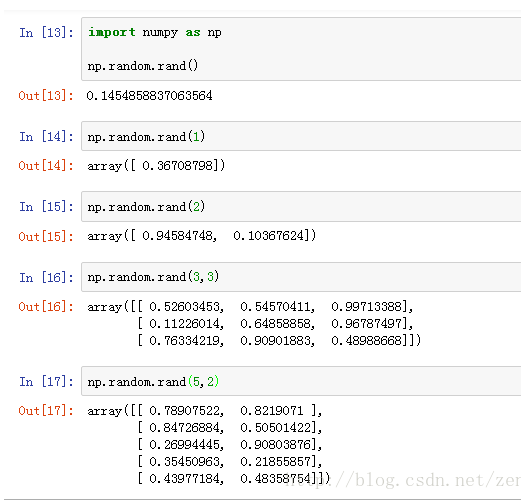
np.random.rand()
Python xrange() 函数
xrange() 函数用法与 range 完全相同,所不同的是生成的不是一个数组,而是一个生成器。
>>>xrange(8)

xrange(8)

>>> list(xrange(8))

[0, 1, 2, 3, 4, 5, 6, 7]

>>> range(8)                 # range 使用

[0, 1, 2, 3, 4, 5, 6, 7]

>>> xrange(3, 5)

xrange(3, 5)

>>> list(xrange(3,5))

[3, 4]

>>> range(3,5)               # 使用 range

[3, 4]

>>> xrange(0,6,2)

xrange(0, 6, 2)              # 步长为 2

>>> list(xrange(0,6,2))

[0, 2, 4]
python强制类型转换astype
- df.astype('数据类型') #改变整个df的数据类型
- df['列名'].astype('数据类型') #仅改变某一列的数据类型
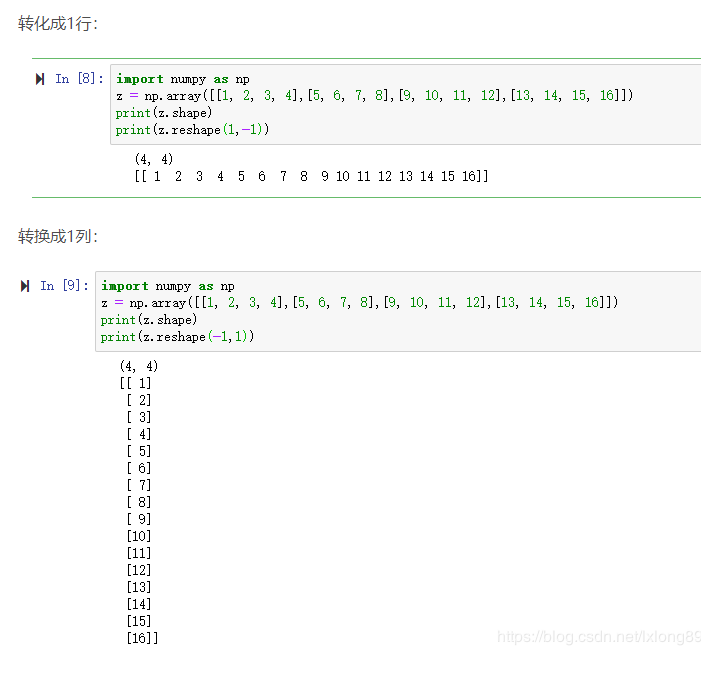
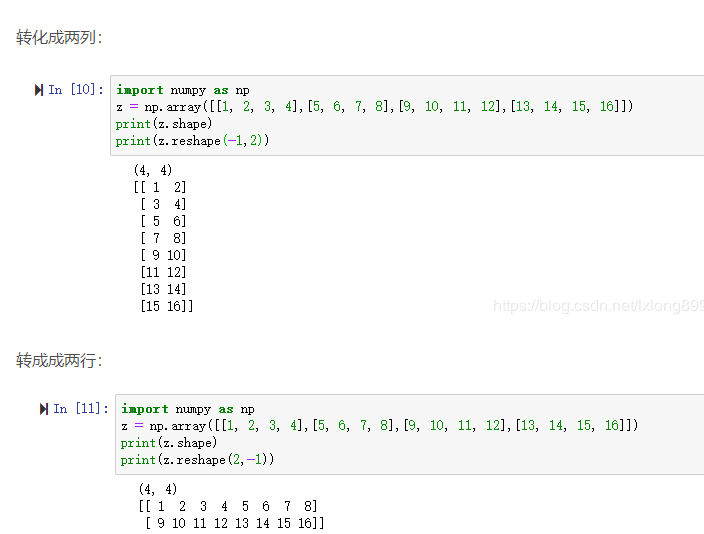
Python的reshape(-1,1)
np.vstack:按垂直方向(行顺序)堆叠数组构成一个新的数组
https://www.jianshu.com/p/2469e0e2a1cf
np.random.seed(0)作用
当我们设置相同的seed,每次生成的随机数相同。
如果不设置seed,则每次会生成不同的随机数。
>>> numpy.random.seed(0) ; numpy.random.rand(4)

array([ 0.55,  0.72,  0.6 ,  0.54])

>>> numpy.random.seed(0) ; numpy.random.rand(4)

array([ 0.55,  0.72,  0.6 ,  0.54])
>>> numpy.random.rand(4)

array([ 0.42,  0.65,  0.44,  0.89])

>>> numpy.random.rand(4)

array([ 0.96,  0.38,  0.79,  0.53])
python3 * 和 **
* 代表乘法
** 代表乘方
>>> 2 * 5

10

>>> 2 ** 5

32
Python3 assert(断言)
Python assert(断言)用于判断一个表达式,在表达式条件为 false 的时候触发异常。
assert expression
等价于
if not expression:

    raise AssertionError
assert expression [, arguments]
等价于
ifnot expression:raiseAssertionError(arguments)
以下为 assert 使用实例:
>>> assert False # 条件为 false 触发异常
Traceback (most recent call last):
File "<stdin>", line 1, in <module>
AssertionError
>>> assert 1==1 # 条件为 true 正常执行
>>> assert 1==2 # 条件为 false 触发异常
Traceback (most recent call last):
File "<stdin>", line 1, in <module>
AssertionError
>>> assert 1==2, '1 不等于 2'
Traceback (most recent call last):
File "<stdin>", line 1, in <module>
AssertionError: 1 不等于 2
>>>
set_printoption
numpy.set_printoptions(precision=None, threshold=None, edgeitems=None, linewidth=None, suppress=None, nanstr=None, infstr=None, formatter=None)
precision : int, optional,float输出的精度,即小数点后维数,默认8( Number of digits of precision for floating point output (default 8))
threshold : int, optional,当数组数目过大时,设置显示几个数字,其余用省略号(Total number of array elements which trigger summarization rather than full repr (default 1000).)
edgeitems : int, optional,边缘数目(Number of array items in summary at beginning and end of each dimension (default 3)).
linewidth : int, optional,The number of characters per line for the purpose of inserting line breaks (default 75).
suppress : bool, optional,是否压缩由科学计数法表示的浮点数(Whether or not suppress printing of small floating point values using scientific notation (default False).)
nanstr : str, optional,String representation of floating point not-a-number (default nan).
infstr : str, optional,String representation of floating point infinity (default inf).
np.set_printoptions(threshold=np.nan)
设置打印时显示方式,threshold=np.nan意思是输出数组的时候完全输出,不需要省略号将中间数据省略
零零散散的python笔记的更多相关文章
- 零零散散的python笔记 2
python2和python3的兼容性方面 工具 2to3 python3中自带的工具,可以检查python2升级到python3的diff: 2to3 x.py 2to3 -w x.py # ...
- Python笔记之不可不练
如果您已经有了一定的Python编程基础,那么本文就是为您的编程能力锦上添花,如果您刚刚开始对Python有一点点兴趣,不怕,Python的重点基础知识已经总结在博文<Python笔记之不可不知 ...
- boost.python笔记
boost.python笔记 标签: boost.python,python, C++ 简介 Boost.python是什么? 它是boost库的一部分,随boost一起安装,用来实现C++和Pyth ...
- 20.Python笔记之SqlAlchemy使用
Date:2016-03-27 Title:20.Python笔记之SqlAlchemy使用 Tags:python Category:Python 作者:刘耀 博客:www.liuyao.me 一. ...
- Python笔记——类定义
Python笔记——类定义 一.类定义: class <类名>: <语句> 类实例化后,可以使用其属性,实际上,创建一个类之后,可以通过类名访问其属性 如果直接使用类名修改其属 ...
- 13.python笔记之pyyaml模块
Date:2016-03-25 Title:13.Python笔记之Pyymal模块使用 Tags:Python Category:Python 博客地址:www.liuyao.me 作者:刘耀 YA ...
- 8.python笔记之面向对象基础
title: 8.Python笔记之面向对象基础 date: 2016-02-21 15:10:35 tags: Python categories: Python --- 面向对象思维导图 (来自1 ...
- python笔记 - day8
python笔记 - day8 参考: http://www.cnblogs.com/wupeiqi/p/4766801.html http://www.cnblogs.com/wupeiqi/art ...
- python笔记 - day7-1 之面向对象编程
python笔记 - day7-1 之面向对象编程 什么时候用面向对象: 多个函数的参数相同: 当某一些函数具有相同参数时,可以使用面向对象的方式,将参数值一次性的封装到对象,以后去对象中取值即可: ...
随机推荐
- vue2 练习
table标签的frame和rules属性,可以控制边框的显示.frame属性控制着表格最外围的四条边框的可见性,而 rules 则控制着表格内部边框的可见性. frame属性可取的值及含义如下: * ...
- 报错Too many connections
com.mysql.jdbc.exceptions.jdbc4.MySQLNonTransientConnectionException: Data source rejected establish ...
- PHP实现省市区关键词搜索邮编
前两天做了一个项目, 其中有一个需求是根据用户输入的关键词查询邮编. 最开始设计的数据库结构是省市区分为三个字段, province, city, area, 但是在写代码实现的过程中发现, 用户只输 ...
- PHP mysqli_init() 函数
定义和用法 mysqli_init() 函数初始化 MySQLi 并返回 mysqli_real_connect() 使用的对象. 语法 mmysqli_init(); 实例 mysqli_ini ...
- 微信小程序地图总结
小程序官方的 map地图说明文档已经非常详细了,但是鉴于如果没有一个合适的使用场景,对于刚接触 map 的初级开发,看着这些繁杂又贼多的属性名和字段,外加急切的开发需求,晕头转向是不可避免的了.接下来 ...
- OnUpdateError
DataSetProvider1.OnUpdateError void __fastcall TFrmItem::Query1UpdateError(TDataSet *ASender, EFDExc ...
- codeforces#1159D. The minimal unique substring(打表找规律+构造)
题目链接: https://codeforces.com/contest/1159/problem/D 题意: 构造一个长度为$n$的$01$串,最小特殊连续字串的长度为$k$ 也就是,存在最小的$k ...
- 2017 ZSTU寒假排位赛 #6
题目链接:https://vjudge.net/contest/149212#overview. A题,水题,略过. B题,水题,读清题意即可. C题,数学题,如果把x表示成x=nb+m,则k=n/m ...
- 利用简易爬虫完成一道基础CTF题
利用简易爬虫完成一道基础CTF题 声明:本文主要写给新手,侧重于表现使用爬虫爬取页面并提交数据的大致过程,所以没有对一些东西解释的很详细,比如表单,post,get方法,感兴趣的可以私信或评论给我.如 ...
- mysql zip方式安装
下载zip文件解压到安装目录,此时是没有data文件夹和my.ini文件的. 1.首先自己新建my.ini,内容如下: [client] port=3306 default-character-set ...