
python 爬虫抓取 MOOC 中国课程的讨论区内容
一:selenium 库
selenium 每次模拟浏览器打开页面,xpath 匹配需要抓取的内容。可以,但是特别慢,相当慢。作为一个对技术有追求的爬虫菜鸡,狂补了一些爬虫知识。甚至看了 scrapy 框架,惊呆了,真棒!
网上很多关于 selenium 库的详细介绍,这里略过此方法。
二: requests 库
编写一个爬虫小脚本,requests 库极为方便。接下来进入正题,如何抓取 MOOC 中国上课程的讨论内容!
1. 分析网页数据
打开你需要抓取数据的课程页面,点击讨论区之后页面加载讨论的主题内容。F12 ---> Network ---> 刷新页面。会看到里面有很多请求的内容,讨论区内容肯定是数据包,类型的话 json 文件或 xhr 文件等。
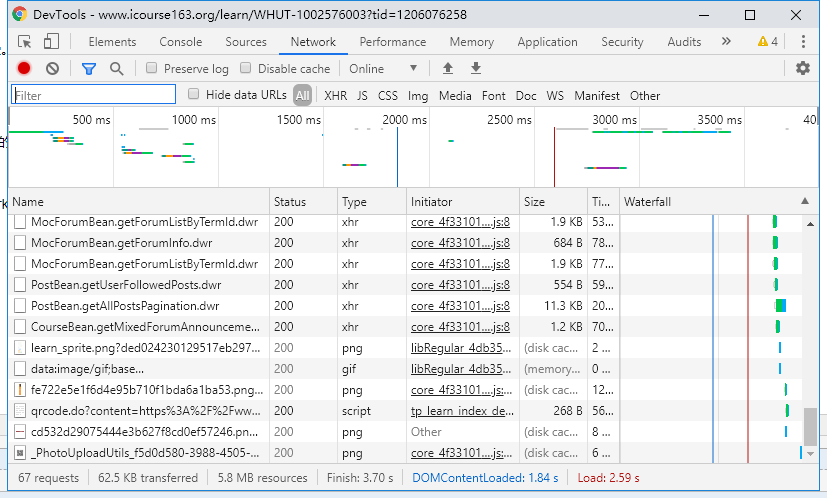
2. 找到讨论区内容的包
按名称分析 xhr 文件,很快就会发现跟讨论区相关的文件:PostBean.getAllPostsPagination.dwr,鼠标点击文件看到该文件的详细情况。

点击 Preview ,看到的是一大段 JS 代码,是否是我们需要的内容呢,得进行验证才可以得知。
3. 分析内容包 URL进行请求
阅读里面的内容,发现 .title .nickname 等字段信息,但是都是 Unicode 编码的。试着把 .title="" 的内容复制出来直接粘贴在 python 解释器里面就会出现该编码的中文字。
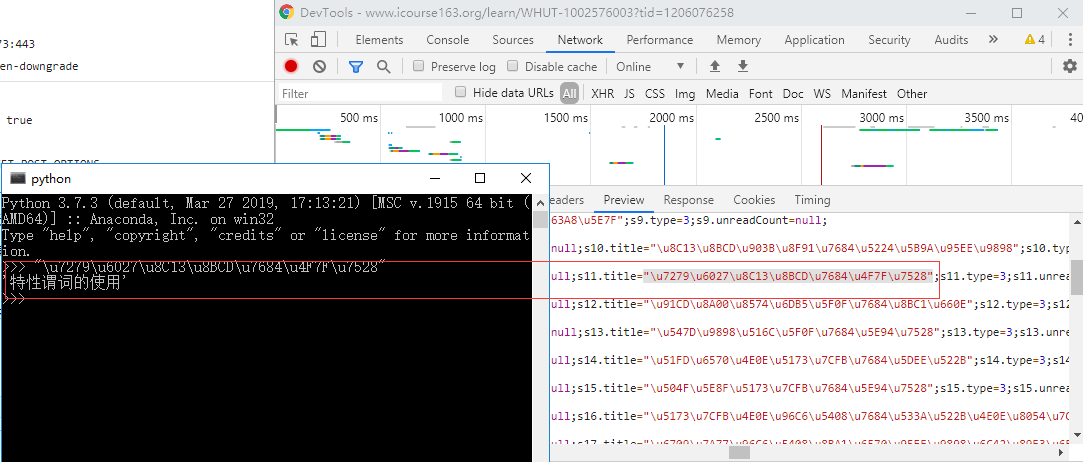
对比讨论区主题,发现是我们需要抓取的内容,
但是当我们复制 Request URL 到浏览器中进行访问时,是得不到需要的内容的,怎么办呢?
4. 根据响应去匹配需要的内容进行保存
继续分析请求头部的信息,最下面是 Request Payload , 存放了一些看不懂的数据内容,它的作用是浏览器发送请求时发送到服务器端的数据信息,和 Data Form 有些区别。但我们撸代码的时候一概作为附带的数据包发送给服务器就行了。其中几个关键的字段在代码里都会有注释信息理解,包括页码,每页数据的大小等。
5. 代码实现
 import requests

 import json

 import time

 import re

 import random

 def get_title_reply(uid, fi, http):

     url = 'https://www.icourse163.org/dwr/call/plaincall/PostBean.getPaginationReplys.dwr'

     headers = {

         'accept': '*/*',

         'accept-encoding': 'gzip, deflate, br',

         'accept-language': 'zh-CN,zh;q=0.9',

         'content-length': '',

         'content-type': 'text/plain',

         'cookie': '',

         'origin': 'https://www.icourse163.org',

         'referer': 'https://www.icourse163.org/learn/WHUT-1002576003?tid=1206076258',

         'sec-fetch-mode': 'cors',

         'sec-fetch-site': 'same-origin',

         'user-agent': 'Mozilla/5.0 (Windows NT 10.0; Win64; x64) AppleWebKit/537.36 (KHTML, like Gecko) Chrome/76.0.3809.132 Safari/537.36',

     }

     data = {

         'httpSessionId': '611437146dd0453d8a7093bfe8f44f17',

         'scriptSessionId': '${scriptSessionId}190',

         'c0-scriptName': 'PostBean',

         'c0-methodName': 'getPaginationReplys',

         'c0-id': 0,

         'callCount': 1,

         # 根据主题楼主的 id 检索回复内容

         'c0-param0': 'number:' + str(uid),

         'c0-param1': 'string:2',

         'c0-param2': 'number:1',

         'batchId': round(time.time() * 1000),

     }

     res = requests.post(url, data=data, headers=headers, proxies=http)

     # js 代码末尾给出回复总数,当前页码等信息。

     totle_count = int(re.findall("totalCount:(.*?)}", res.text)[0])

     try:

         if totle_count:

             begin_reply = int(re.findall("list:(.*?),", res.text)[0][1:]) + 1

             for i in range(begin_reply, begin_reply + totle_count):

                 content_re ='s{}.content="(.*?)";'.format(i)

                 content = re.findall(content_re, res.text)[0]

                 # print(content.encode().decode('unicode-escape'))

                 fi.write('\t' + content.encode().decode('unicode-escape') + '\n')

                 # time.sleep(1)

     except Exception:

         print('回复内容写入错误!')

 def get_response(course_name, url, page_index):

     headers = {

         'accept': '*/*',

         'accept-encoding': 'gzip, deflate, br',

         'accept-language': 'zh-CN,zh;q=0.9',

         'content-length': '',

         'content-type': 'text/plain',

         'cookie': '',

         'origin': 'https://www.icourse163.org',

         'referer': 'https://www.icourse163.org/learn/WHUT-1002576003?tid=1206076258',

         'sec-fetch-mode': 'cors',

         'sec-fetch-site': 'same-origin',

         'user-agent': 'Mozilla/5.0 (Windows NT 10.0; Win64; x64) AppleWebKit/537.36 (KHTML, like Gecko) Chrome/76.0.3809.132 Safari/537.36',

     }

     data = {

         'httpSessionId': '611437146dd0453d8a7093bfe8f44f17',

         'scriptSessionId': '${scriptSessionId}190',

         'c0-scriptName': 'PostBean',

         'c0-methodName': 'getAllPostsPagination',

         'c0-id': 0,

         'callCount': 1,

         # 课程 id

         'c0-param0': 'number:1206076258',

         'c0-param1': 'string:',

         'c0-param2': 'number:1',

         # 当前页码

         'c0-param3': 'string:' + str(page_index),

         # 页码内容量

         'c0-param4': 'number:20',

         'c0-param5': 'boolean:false',

         'c0-param6': 'null:null',

         # 毫秒级时间戳

         'batchId': round(time.time() * 1000),

     }

     # 代理 IP

     proxy = [

         {

             'http': 'http://119.179.132.94:8060',

             'https': 'https://221.178.232.130:8080',

         },

         {

             'http': 'http://111.29.3.220:8080',

             'https': 'https://47.110.130.152:8080',

         },

         {

             'http': 'http://111.29.3.185:8080',

             'https': 'https://47.110.130.152:8080',

         },

         {

             'http': 'http://111.29.3.193:8080',

             'https': 'https://47.110.130.152:8080',

         },

         {

             'http': 'http://39.137.69.10:8080',

             'https': 'https://47.110.130.152:8080',

         },

     ]

     http = random.choice(proxy)

     is_end = False

     try:

         res = requests.post(url, data=data, headers=headers, proxies=http)

         # 评论从 S** 开始,js 代码末尾信息分析

         response_result = re.findall("results:(.*?)}", res.text)[0]

     except Exception:

         print('开头就错,干啥!')

     if response_result == 'null':

         is_end = True

     else:

         try:

             begin_title = int(response_result[1:]) + 1

             with open(course_name+'.txt', 'a', encoding='utf-8') as fi:

                 for i in range(begin_title, begin_title + 21):

                     user_id_re = 's{}.id=([0-9]*?);'.format(str(i))

                     title_re = 's{}.title="(.*?)";'.format(str(i))

                     title_introduction_re = 's{}.shortIntroduction="(.*?)"'.format(str(i))

                     title = re.findall(title_re, res.text)

                     if len(title):

                         user_id = re.findall(user_id_re, res.text)

                         title_introduction = re.findall(title_introduction_re, res.text)

                         # print(f'user_id={user_id[0]},title={(title[0]).encode().decode("unicode-escape")}')

                         fi.write((title[0]).encode().decode("unicode-escape") + '\n')

                         # 主题可能未进行描述

                         if len(title_introduction):

                             # print(title_introduction[0].encode().decode("unicode-escape"))

                             fi.write('\t' + (title_introduction[0]).encode().decode("unicode-escape") + '\n')

                             get_title_reply(user_id[0], fi, random.choice(proxy))

         except Exception:

             print('主题写入错误!')

     return is_end

 def get_pages_comments():

     url = 'https://www.icourse163.org/dwr/call/plaincall/PostBean.getAllPostsPagination.dwr'

     page_index = 1

     course_name = "lisanjiegou"

     while(True):

         # time.sleep(1)

         is_end = get_response(course_name, url, page_index)

         if is_end:

             break

         else:

             print('第{}页写入完成!'.format(page_index))

             page_index += 1

 if __name__ == '__main__':

     start_time = time.time()

     print(time.strftime("%Y-%m-%d %H:%M:%S", time.localtime(start_time)))

     get_pages_comments()

     end_time = time.time()

     print(time.strftime("%Y-%m-%d %H:%M:%S", time.localtime(end_time)))

     print('用时{}秒!'.format(end_time - start_time))
requests 版
 from selenium import webdriver

 from bs4 import BeautifulSoup

 import time

 from selenium.webdriver.chrome.options import Options

 import requests

 def get_connect():

     chrome_driver = 'C:/Program Files (x86)/Google/Chrome/Application/chromedriver.exe'

     browser = webdriver.Chrome(executable_path=chrome_driver)

     url_head = 'https://www.icourse163.org/learn/WHUT-1002576003#/learn/forumindex'

     # 加载网页

     browser.get(url_head)

     # 获取课程标题

     title_link = browser.find_element_by_class_name('courseTxt')

     # 模拟点击进入详情页

     title_link.click()

     content = browser.page_source

     soup = BeautifulSoup(content, 'lxml')

     print(soup.text)

 def get_connect_slow():

     chrome_driver = 'C:/Program Files (x86)/Google/Chrome/Application/chromedriver.exe'

     browser = webdriver.Chrome(executable_path=chrome_driver)

     url_head = 'https://www.icourse163.org/learn/WHUT-1002576003#/learn/forumindex'

     # 加载网页

     browser.get(url_head)

     pages = browser.find_elements_by_class_name('zpgi')

     totle_page = int(pages[-1].text) + 1

     browser.close()

     with open('comments.txt', 'w', encoding='utf-8') as fi:

         for i in range(1, 2):

             browser = webdriver.Chrome(executable_path=chrome_driver)

             url = url_head + '?t=0&p=' + str(i)

             browser.get(url)

             # 多条内容

             comments = browser.find_elements_by_class_name('j-link')

             for comment in comments:

                 fi.write(comment.text + '\n')

             print('第{}页评论写入成功!'.format(i))

             browser.close()

 def get_connect_slow_1(course_url, course_name):

     chrome_driver = 'C:/Program Files (x86)/Google/Chrome/Application/chromedriver.exe'

     browser_1 = webdriver.Chrome(executable_path=chrome_driver)

     url_head = course_url

     # 加载网页

     browser_1.implicitly_wait(3)

     browser_1.get(url_head)

     pages = browser_1.find_elements_by_class_name('zpgi')

     totle_page = 0

     if pages:

         for pg in range(len(pages)-1, 0, -1):

             if pages[pg].text.isdigit():

                 totle_page = int(pages[pg].text) + 1

                 break

     print('评论主题共{}页!'.format(totle_page))

     with open(course_name + '.txt', 'w', encoding='utf-8') as fi:

         for i in range(1, totle_page):

             try:

                 browser = webdriver.Chrome(executable_path=chrome_driver)

                 browser.implicitly_wait(3)

                 url = url_head + str(i)

                 browser.get(url)

                 content = browser.page_source

                 soup = BeautifulSoup(content, 'lxml')

                 # course_title = soup.find('h4', class_='courseTxt')

                 # fi.write(course_title.text + '\n')

                 comment_lists = soup.find_all('li', class_='u-forumli')

                 for comment in comment_lists:

                     reply_num = comment.find('p', class_='reply')

                     reply_num = int(reply_num.text[3:])

                     if reply_num > 0:

                         try:

                             comment_detail = comment.find('a', class_='j-link')

                             fi.write(comment_detail.text + '\n')

                             a_link = comment_detail.get('href')

                             reply_link = url.split('#')[0] + a_link

                             browser_reply = webdriver.Chrome(executable_path=chrome_driver)

                             browser_reply.implicitly_wait(3) #隐式等待 3 秒

                             browser_reply.get(reply_link)

                             test_ = browser_reply.find_element_by_class_name('m-detailInfoItem')

                             reply_soup = BeautifulSoup(browser_reply.page_source, 'lxml')

                             # 楼主对主题的描述

                             own_reply = reply_soup.find('div', class_='j-post')

                             own_reply = own_reply.find('div', class_='j-content')

                             # 有楼主对主题省去描述

                             if own_reply.text:

                                 fi.write('\t' + own_reply.text + '\n')

                             # 别人对该主题的评论回复

                             reply_list = reply_soup.find_all('div', class_='m-detailInfoItem')

                             for reply_item in reply_list:

                                 write_text = reply_item.find('div', class_='j-content')

                                 fi.write('\t' + write_text.text + '\n')

                             browser_reply.close()

                         except Exception :

                             print('评论回复抓取失败!')

                     else:

                         fi.write(comment.find('a', class_='j-link').text + '\n')

                 print('第{}页评论写入成功!'.format(i))

             except Exception:

                 print('第{}页评论抓取失败!'.format(i))

 def run():

     print('https://www.icourse163.org/learn/WHUT-1002576003?tid=1206076258#/learn/forumindex?t=0&p=')

     course_url = input('输入课程地址,输入网址后空格再回车,如上:')

     course_url = course_url.split(' ')[0]

     course_name = input('输入课程名:')

     start_time = time.time()

     get_connect_slow_1(course_url, course_name)

     end_time = time.time()

     print('共用时{}秒!'.format(end_time - start_time))

 if __name__ == '__main__':

     run()

     # 76 页评论

     # 75-150页

     # 共用时13684.964568138123秒!
selenium 版
python 爬虫抓取 MOOC 中国课程的讨论区内容的更多相关文章
- python 爬虫抓取心得
quanwei9958 转自 python 爬虫抓取心得分享 urllib.quote('要编码的字符串') 如果你要在url请求里面放入中文,对相应的中文进行编码的话,可以用: urllib.quo ...
- Python爬虫----抓取豆瓣电影Top250
有了上次利用python爬虫抓取糗事百科的经验,这次自己动手写了个爬虫抓取豆瓣电影Top250的简要信息. 1.观察url 首先观察一下网址的结构 http://movie.douban.com/to ...
- Python爬虫抓取东方财富网股票数据并实现MySQL数据库存储
Python爬虫可以说是好玩又好用了.现想利用Python爬取网页股票数据保存到本地csv数据文件中,同时想把股票数据保存到MySQL数据库中.需求有了,剩下的就是实现了. 在开始之前,保证已经安装好 ...
- python爬虫抓取哈尔滨天气信息(静态爬虫)
python 爬虫 爬取哈尔滨天气信息 - http://www.weather.com.cn/weather/101050101.shtml 环境: windows7 python3.4(pip i ...
- Python爬虫 -- 抓取电影天堂8分以上电影
看了几天的python语法,还是应该写个东西练练手.刚好假期里面看电影,找不到很好的影片,于是有个想法,何不搞个爬虫把电影天堂里面8分以上的电影爬出来.做完花了两三个小时,撸了这么一个程序.反正蛮简单 ...
- Python 爬虫: 抓取花瓣网图片
接触Python也好长时间了,一直没什么机会使用,没有机会那就自己创造机会!呐,就先从爬虫开始吧,抓点美女图片下来. 废话不多说了,讲讲我是怎么做的. 1. 分析网站 想要下载图片,只要知道图片的地址 ...
- python爬虫 抓取一个网站的所有网址链接
sklearn实战-乳腺癌细胞数据挖掘 https://study.163.com/course/introduction.htm?courseId=1005269003&utm_campai ...
- Python爬虫抓取某音乐网站MP3(下载歌曲、存入Sqlite)
最近右胳膊受伤,打了石膏在家休息.为了实现之前的想法,就用左手打字.写代码,查资料完成了这个资源小爬虫.网页爬虫, 最主要的是协议分析(必须要弄清楚自己的目的),另外就是要考虑对爬取的数据归类,存储. ...
- Python爬虫--抓取糗事百科段子
今天使用python爬虫实现了自动抓取糗事百科的段子,因为糗事百科不需要登录,抓取比较简单.程序每按一次回车输出一条段子,代码参考了 http://cuiqingcai.com/990.html 但该 ...
随机推荐
- ORM学习笔记
19周 11章 django ORM基本创建类型以及生成数据库结构 类型: dbfirst :通过数据库创建类 codefirst:先创建类 再创建数据库 --最常用 ORM的意思: 通过类创建数据库 ...
- DB2函数简单示例
DB2中的函数原理同其他编程语言中的函数,均为输入几个参数,同时返回一个值. 下面的例子演示一个寻找某一次考试中成绩最好的学生的姓名. 首先,我们新建一个表SCORE用于表示考试,并插入几条数据: D ...
- FCKEDITOR在.NET中的使用
FCKEDITOR在.NET中的使用 FCKeditor介绍 FCKeditor是一个功能强大支持所见即所得功能的文本编辑器,可以为用户提供微软office软件一样的在线文档编辑服务.它不需要安装任何 ...
- 【Leetcode_easy】754. Reach a Number
problem 754. Reach a Number solution1: class Solution { public: int reachNumber(int target) { target ...
- 游戏开发中伪随机正态分布JavaScript
在游戏开发中经常遇到随机奖励的情况,一般会采取先生成数组,再一个一个取的方式发随机奖励. 下面是js测试正态分布代码: <!DOCTYPE html> <html lang=&quo ...
- Unity3D 原来Unity比较新的版本支持中文
注意: Unity 2018.2 以上版本才可以
- markdown语法(测试自用)
Markdown语法主要分为几大部分:标题.段落.区块引用.代码区块.强调.列表.分割线.链接.图片.反斜杠.符号'`' 1.标题 两种形式 1)使用 = 和 - 标记一级标题和二级标题 一级标题 二 ...
- leetcode1186 Maximum Subarray Sum with One Deletion
思路: 最大子段和的变体,前后两个方向分别扫一遍即可. 实现: class Solution { public: int maximumSum(vector<int>& arr) ...
- NET CORE与Spring Boot
NET CORE与Spring Boot 本文分别说明.NET CORE与Spring Boot 编写控制台程序应有的“正确”方法,以便.NET程序员.JAVA程序员可以相互学习与加深了解,注意本文只 ...
- 学习笔记:oracle学习三:SQL语言基础之检索数据:简单查询、筛选查询
目录 1. 检索数据 1.1 简单查询 1.1.1 检索所有列 1.1.2 检索指定的列 1.1.3 查询日期列 1.1.4 带有表达式的select语句 1.1.5 为列指定别名 1.1.6 显示不 ...