
iOS:UIAlertController和UIAlertAction的详解
提示框控制器:UIAlertController
typedef NS_ENUM(NSInteger, UIAlertControllerStyle) {
UIAlertControllerStyleActionSheet = 0, //在视图底部弹出的提示框,它不能添加文本框,而且在ipad中必须使用popover形式展示
UIAlertControllerStyleAlert //在视图中间弹出的提示框
} NS_ENUM_AVAILABLE_IOS(8_0);
typedef NS_ENUM(NSInteger, UIAlertActionStyle) {
UIAlertActionStyleDefault = 0, //默认的确认按钮
UIAlertActionStyleCancel, //默认的取消按钮
UIAlertActionStyleDestructive //默认的红色按钮
}NS_ENUM_AVAILABLE_IOS(8_0);
3、UIAlertController:提示框控制器类
@interface UIAlertController : UIViewController
方法:
//创建提示框控制器的类方法
+ (instancetype)alertControllerWithTitle:(NSString *)title message:(NSString *)message preferredStyle:(UIAlertControllerStyle)preferredStyle;
//在提示框上添加文本框的实例方法(只能在UIAlertView风格的提示框添加)
- (void)addTextFieldWithConfigurationHandler:(void (^)(UITextField *textField))configurationHandler;
//在提示框上添加按钮
- (void)addAction:(UIAlertAction *)action;
属性:
//提示框上存放所有按钮的数组
@property (nonatomic, readonly) NSArray *actions;
//提示框上存放所有文本框的数组
@property (nonatomic, readonly) NSArray *textFields;
//提示框的标题
@property (nonatomic, copy) NSString *title;
//提示信息
@property (nonatomic, copy) NSString *message;
//提示框控制器的风格
@property (nonatomic, readonly) UIAlertControllerStyle preferredStyle;
@end
4、UIAlertAction:提示框按钮
@interface UIAlertAction : NSObject <NSCopying>
方法:
//创建提示框按钮的类方法
+ (instancetype)actionWithTitle:(NSString *)title style:(UIAlertActionStyle)style handler:(void (^)(UIAlertAction *action))handler;
属性:
//按钮标题
@property (nonatomic, readonly) NSString *title;
//按钮的风格
@property (nonatomic, readonly) UIAlertActionStyle style;
//按钮是否有效
@property (nonatomic, getter=isEnabled) BOOL enabled;
@end
具体的实例如下:
创建步骤:
1、布局故事板,在控制器的视图中拖入一个按钮,并关联IBAction事件
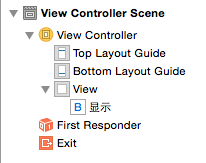


2、在按钮的关联事件中的主要代码如下:
//创建提示框控制器
    //创建提示框控制器

    UIAlertController *alertController = [UIAlertController alertControllerWithTitle:@"提示框" message:@"消息" preferredStyle:UIAlertControllerStyleAlert];

    alertController.view.backgroundColor = [UIColor purpleColor];
//创建提示框按钮
    //创建提示按钮

    UIAlertAction *action1 = [UIAlertAction actionWithTitle:@"默认Cancel" style:UIAlertActionStyleCancel handler:nil];

    UIAlertAction *action2 = [UIAlertAction actionWithTitle:@"默认Default" style:UIAlertActionStyleDefault handler:nil];

    UIAlertAction *action3 = [UIAlertAction actionWithTitle:@"默认Destructive" style:UIAlertActionStyleDestructive handler:nil];
//添加提示按钮到提示框中
    //添加提示按钮

    [alertController addAction:action1];

    [alertController addAction:action2];

    [alertController addAction:action3];
//添加文本框到提示框中(只适合提示框风格为:UIAlertControllerStyleAlert)
    //添加文本框(只适合alertview类型的提示框)

    [alertController addTextFieldWithConfigurationHandler:^(UITextField *textField) {

        textField.placeholder = @"账号";

    }];

    [alertController addTextFieldWithConfigurationHandler:^(UITextField *textField) {

        textField.placeholder = @"密码";

        textField.secureTextEntry = YES; //安全输入模式

    }];
//给文本框添加监听事件
    //给文本框添加监听事件(文本框的开始、结束、状态改变等)

    [alertController addTextFieldWithConfigurationHandler:^(UITextField *textField) {

        textField.placeholder = @"添加监听事件";

        [textField addTarget:self action:@selector(alertTextFiledDidChanged:) forControlEvents:UIControlEventEditingChanged];

    }];
//以模态窗口的形式显示提示框
[self presentViewController:alertController animated:YES completion:nil];
//实现文本框事件
#pragma mark 文本框监听事件

-(void)alertTextFiledDidChanged:(NSNotification *)notification

{

    NSLog(@"Enditing changed");

}
//点击按钮,显示演示结果
当没有添加action3按钮到提示框,即按钮个数<=2时,两种提示框的样式截图为:
UIAlertControllerStyleAlert:从屏幕中间弹出

UIAlertControllerStyleActionSheet:从屏幕底部弹出(不能添加文本框)
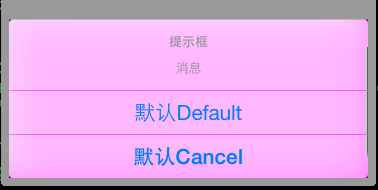
当没有添加action3按钮到提示框,即按钮个数>=3时,两种提示框的样式截图为:
UIAlertControllerStyleAlert:从屏幕中间弹出
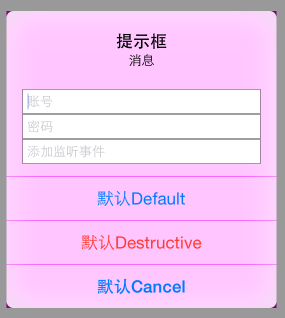
UIAlertControllerStyleActionSheet:从屏幕底部弹出(不能添加文本框)

iOS:UIAlertController和UIAlertAction的详解的更多相关文章
- iOS 视图控制器转场详解
iOS 视图控制器转场详解 前言的前言 唐巧前辈在微信公众号「iOSDevTips」以及其博客上推送了我的文章后,我的 Github 各项指标有了大幅度的增长,多谢唐巧前辈的推荐.有些人问我相关的问题 ...
- iOS 开发之照片框架详解(2)
一. 概况 本文接着 iOS 开发之照片框架详解,侧重介绍在前文中简单介绍过的 PhotoKit 及其与 ALAssetLibrary 的差异,以及如何基于 PhotoKit 与 AlAssetLib ...
- iOS中MVC等设计模式详解
iOS中MVC等设计模式详解 在iOS编程,利用设计模式可以大大提高你的开发效率,虽然在编写代码之初你需要花费较大时间把各种业务逻辑封装起来.(事实证明这是值得的!) 模型-视图-控制器(MVC)设计 ...
- iOS 证书与签名 解惑详解
iOS 证书与签名 解惑详解 分类: iPhone2012-06-06 19:57 9426人阅读 评论(1) 收藏 举报 iosxcodecryptographyappleiphone测试 目录 ...
- iOS 6分享列表——UIActivityViewController详解
iOS 6分享列表——UIActivityViewController详解 2013-06-03 01:42:33 发表评论 在iOS 6之后提供了一个分享列表视图,它通过UIActivity ...
- IOS数据库操作SQLite3使用详解(转)
iPhone中支持通过sqlite3来访问iPhone本地的数据库.具体使用方法如下1:添加开发包libsqlite3.0.dylib首先是设置项目文件,在项目中添加iPhone版的sqlite3的数 ...
- iOS 开发之照片框架详解之二 —— PhotoKit 详解(下)
本文链接:http://kayosite.com/ios-development-and-detail-of-photo-framework-part-three.html 这里接着前文<iOS ...
- iOS 开发之照片框架详解
转载自:http://kayosite.com/ios-development-and-detail-of-photo-framework.html 一. 概要 在 iOS 设备中,照片和视频是相当重 ...
- iOS 开发之照片框架详解之二 —— PhotoKit 详解(上)
转载自:http://kayosite.com/ios-development-and-detail-of-photo-framework-part-two.html 一. 概况 本文接着 iOS 开 ...
随机推荐
- Notes of the scrum meeting(11/2)
meeting time:13:00~13:30p.m.,November 2nd,2013 meeting place:3号公寓楼一层 attendees: 顾育豪 ...
- Bootstrap入门一:Hello Bootstrap
一.Bootstrap简介 Bootstrap,来自 Twitter,是目前很受欢迎的前端框架.Bootstrap是基于 HTML5.CSS3和Javascriopt开发的,它在 jQuery的基础上 ...
- Linux常用命令查看日志
cattail -f日 志 文 件 说 明 /var/log/message 系统启动后的信息和错误日志,是Red Hat Linux中最常用的日志之一 /var/log/secure 与安全相关的日 ...
- 查看Android应用签名信息
本文档介绍在Android下如何查看自己的应用签名及三方APK或系统APK签名信息,包含其中的MD5.SHA1.SHA256值和签名算法等信息. 1.查看自己的应用签名 可以通过两种方式查看 (1) ...
- Netsharp产品标识自定义设置:产品名称、版权、LOGO等
阅读本文请先阅读Netsharp下载及环境搭建 Netsharp本身是一个业务基础平台,Netsharp本身基础上开发的业务产品对客户才有价值,客户看到的产品应该不是Netsharp而是具体的业务产品 ...
- IIS OCIEnvCreate failed with return code -1
现象:windows server2008服务器,MVC使用NHiberate连接Oracle11g,程序部署到IIS后无法访问数据库,抛上述异常:在服务器上安装VS调试可以访问数据库 解决方法:连接 ...
- DOM操作样式表及其兼容性
DOM操作样式表的时候,存在很多浏览器兼容上的问题,测试的时候用的是Firefox 28.0.IE11.IE8.Chrome.测试的时候发现,不兼容问题基本上都是IE8和非IE浏览器之家的问题,很多I ...
- 【BZOJ】【4010】【HNOI2015】菜肴制作
拓扑排序 这题是要求N个点的一个拓扑序,且满足以下条件:编号1的位置尽可能靠前,在此基础上编号2的位置尽可能靠前…… 我看到这题的第一感觉:将拓扑排序用的队列改为优先队列,编号越小越早出来. 但是连样 ...
- 【BZOJ】【1202】【HNOI2005】狡猾的商人
Orz iwtwiioi http://www.cnblogs.com/iwtwiioi/p/3887617.html 并查集+前缀和 啊……这题应该是水题吧?但是我这个大沙茶居然一天都没想出来…… ...
- 了解javascript中的事件(一)
本人目录如下: 零.寒暄 一.事件概念 二.事件流 三.事件处理程序 四.总结 零.寒暄 由于刚入职,近期事情繁多,今天好不容易中期答辩完事,晚上有一些时间,来给大家分享一篇博文. 这段时间每天写js ...