
IT该忍者神龟Instant client required
Apply Navicat Product : Navicat for Oracle, Navicat Premium
Apply Navicat Version No. : All
Instant Client package is required for Basic and TNS connection type. To download Instant Client package (Instant Client Package - Basic), please go to http://www.oracle.com/technetwork/database/features/instant-client/index-097480.html
Note: Navicat version 9 or above, instant client is bundled in Navicat.
Connection Type
- Basic
In Basic mode, Navicat Oracle connects to Oracle through the Oracle Call Interface (OCI). OCI is an application programming interface that allows an application developer to use a third-generation language's native procedure or function calls to access the
Oracle database server and control all phases of SQL statement execution. OCI is a library of standard database access and retrieval functions in the form of a dynamic-link library. - TNS
In TNS mode, Navicat Oracle connects to Oracle server using an alias entry from a tnsnames.ora file.
Windows
Installation Instructions
Note: Navicat version 10 or below, Navicat only support 32-bit instant client.
- Download the appropriate Instant Client packages for your platform. All installations REQUIRE the Basic or Basic Lite package.
Note:- For Oracle 9i or above, you need Instant Client 11 or below
- For Oracle 8 and 8i server, you need Instant Client 10 or below
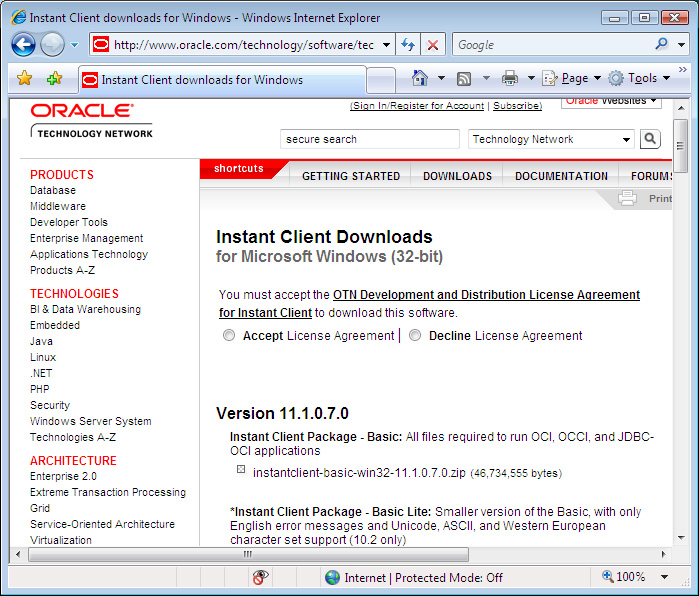
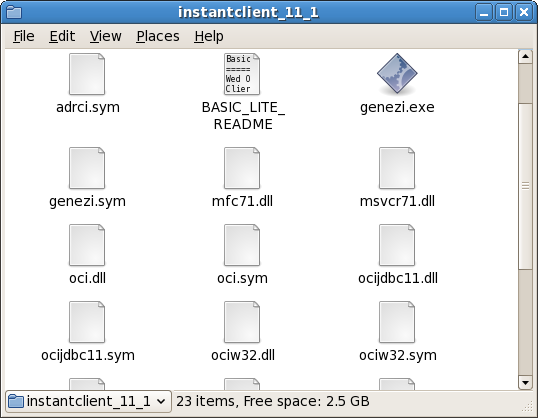
- Unzip the packages into a single directory such as "C:\instantclient_11_1".
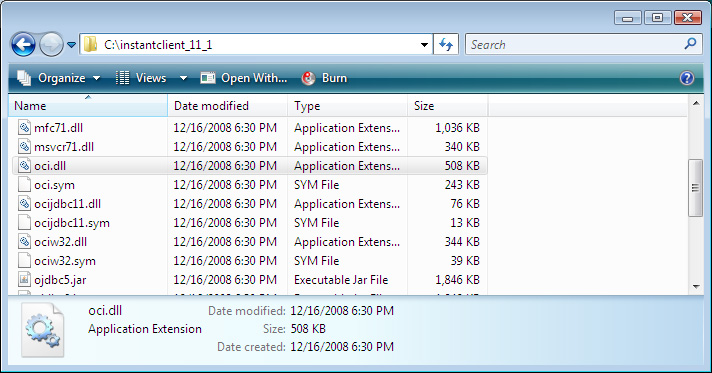
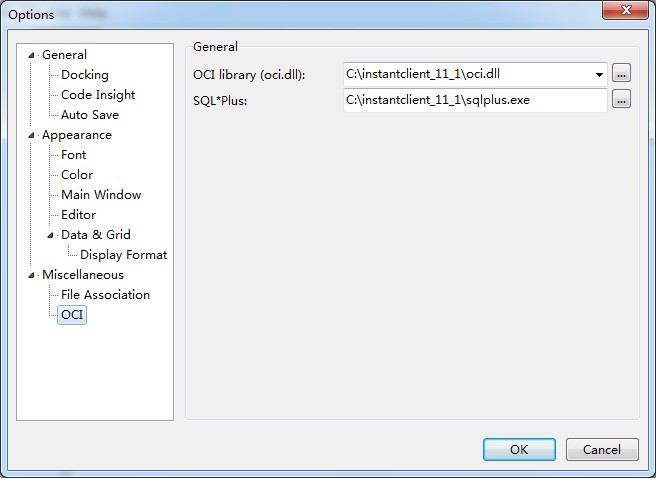
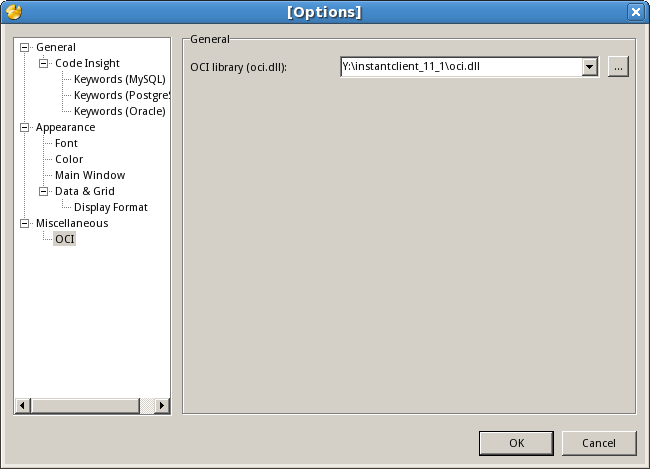
- In Options -> OCI, choose the oci.dll in the directory you defined in Step 2 ("C:\instantclient_11_1\oci.dll").
- Restart Navicat.
Mac
Installation Instructions
Note: Navicat version 10 or below, Navicat only support 32-bit instant client.
- Download the appropriate Instant Client packages for your platform. All installations REQUIRE the Basic or Basic Lite package.
Hint:- MAC OSX any versions running on PPC cpu should use PPC Navicat and PPC Instant Client.
- MAC OSX 10.4 or below running on INTEL cpu should use PPC Navicat and PPC Instant Client.
- MAC OSX 10.5 up running on INTEL cpu should use X86 Navicat and x86 Instant Client.
- Just simply unzip the packages and copy all files under /usr/lib or ~/lib. (Copy all files under /usr/lib for Mac OS X 10.3, otherwise, copy all files under /usr/lib or ~/lib for Mac OS X 10.4 or above.)
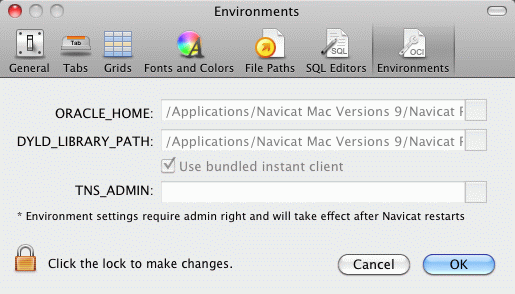
Tips: Besides, you can place the instant client in anywhere you like and then specify the path in Preference.
- Restart Navicat.
Linux
Installation Instructions
- Download Instant Client packages for Microsoft Windows (32-bit). All installations REQUIRE the Basic or Basic Lite package.
Note:- For Oracle 9i or above, you need Instant Client 11 or below
- For Oracle 8 and 8i server, you need Instant Client 10 or below
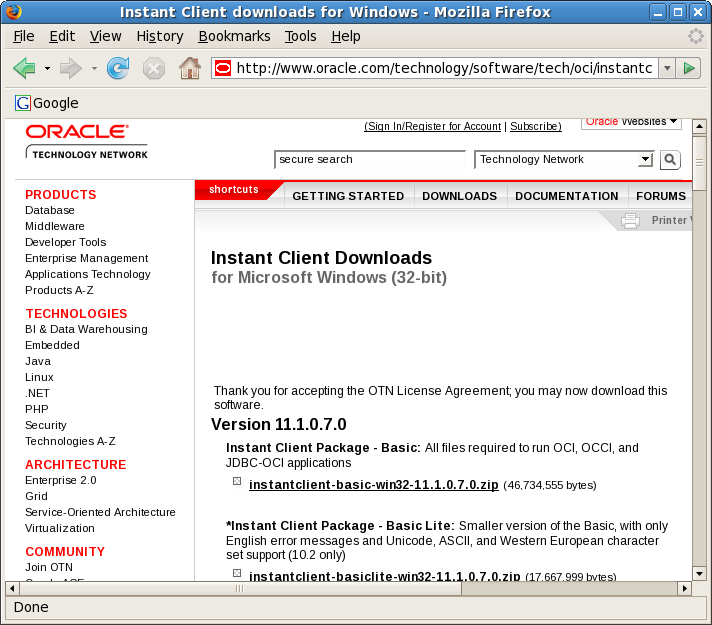
- Unzip the packages into a single directory such as "/home/test/instantclient_11_1".
- In Options -> OCI, choose the oci.dll in the directory you defined in Step 2 ("/home/test/instantclient_11_1").
- Restart Navicat.
ORA-12737: Instant Client Light: unsupported server character set CHS16GBK
Google,解释例如以下:
ORA-12737:
Instant Client Light: unsupported server character set string
Cause: The character set specified is not allowed for this operation or is invalid. Instant Client Light has only minimal character sets.
Action: Do not use Instant Client Light for this character set
2、首先,我们打开“tools”-->"options"菜单,见到例如以下界面。根据OCI library(oci.dll) 路径,导航到 navicat oci 文件夹下,备份里面的文件(通过在该文件夹新建bak文件夹,将“%dir%/Navicat
Lite\instantclient_10_2”路径下的全部dll文件剪切到bak目录)。
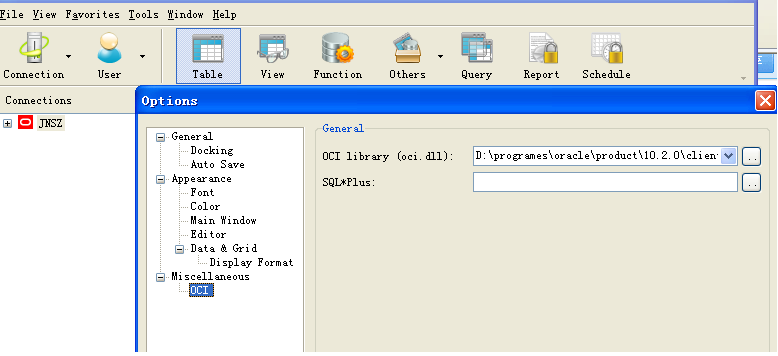
3、在oracle client安装文件夹bin/文件夹下,找到例如以下几个.dll文件
4、将上面所列文件放置到“%dir%/Navicat Lite\instantclient_10_2” 文件夹下,又一次启动navcat就可以。
版权声明:本文博客原创文章,博客,未经同意,不得转载。
IT该忍者神龟Instant client required的更多相关文章
- Oracle Instant Client的安装和使用
转自:https://www.cnblogs.com/chinalantian/archive/2011/09/09/2172145.html 根据自己需求到Oracle网站(http://www.o ...
- win7 PLSQL Developer 10/11/12 连接 Oracle 10/11/12 x64位数据库配置详解(与32位一样,只要注意对应Oracle Instant Client版本) tns 错误和 nls错误
环境win7 x64 PLSQL Developer 10 与 11 Oracle Instant Client 10 与 12 参考http://blog.csdn.net/chen_zw/arti ...
- 如何安装Oracle Instant Client
Oracle Instant Client是Oracle发布的轻量级数据库客户端,下面我们来看看官方的定义: Instant Client allows you to run your applica ...
- ORA-12737: Instant Client Light: unsupported server character set CHS16GBK/ZHS16GBK解决方案
二.Navicat for Oracle的配置 1.启动该工具,出现如下的开始界面,单击“连接”选项,进行连接数据库,如图所示: 6.在“新建连接”对话框中,输入任意的连接名,选择默认的连接类型,输入 ...
- navicat连接oracle报错ORA-12737: Instant Client Light: unsupported server character set CHS16GBK”
原文如下http://blog.163.com/cp7618@yeah/blog/static/7023477720142154449893/?COLLCC=1318255100& 这个工具可 ...
- ORACLE Instant Client 配置
http://www.oracle.com/technetwork/cn/database/features/instant-client/index-092699-zhs.html 在官网下载对应的 ...
- 通过Instant Client包来使用SQL*PLUS
1.首先下载两个程序包: Instant Client Package - Basic(或Instant Client Package - Basic Lite)包 Instant Client Pa ...
- 使用Instant Client配置PL/SQL Developer
之前使用PL/SQL Developer都是直接在本机安装完整版的Oracle Database,一是省事,二是可以在本机做一些demo测试:最近换了台电脑,感觉Instant Client更简单一些 ...
- navicat连接oracle一个错误:ORA-12737 Instant Client Light:unsupported server character set ZHS16GBK
今天使用Navicat连接Oracle数据库.它报告了以下错误:"ORA-12737 Instant Client Light:unsupported server character se ...
随机推荐
- HttpContext的解释意义
在.ashx中,我们HttpContext这个词,到底是什么意思?下面给大家说说 HttpContext 类:封装有关个别 HTTP 请求的所有 HTTP 特定的信息. 在处理请求执行链的各个阶段中, ...
- 【转】Nginx+Tomcat搭建高性能负载均衡集群
最近对负载均衡比较感兴趣,研究了公司的负载均衡的配置,用的是阿里的SLB,相当于不用运维,只需要在后台进行简单的配置就能完成Tomcat的负载均衡,索性在网上找了几篇文章去尝试搭建一个集群,然而很多都 ...
- js中设置setInterval的注意点
<html> <head> <meta http-equiv="Content-Type" content="text/html; char ...
- C#变量命名规范
1.1命名 1. 所有命名必须有意义 2. 成员变量声明在类的顶端,并且每个变量一行 3. 局部变量声明在引用之前 1.1.1 常量命名 1. 常量名用全大写:MAX_PARAMETER_C ...
- GIT简易使用流程
git是目前世界上最先进的分布式版本控制系统(摘自廖雪峰官网) 首先需要在系统上安装git: Windows系统在这下载: RHEL/Centos/Fedora用户可以用以下命令安装:yum -y i ...
- http://riddle.arthurluk.net walkthrough
MSVFMyU4MCU4MWh0dHAlM0ElMkYlMkZyaWRkbGUuYXJ0aHVybHVrLm5ldCUyRnN0YWdlb25lLnBocCUwRCUwQTIlRTMlODAlODFo ...
- design pattern factory method #Reprinted#
引入人.工厂.和斧子的问题: (1),原始社会时,劳动社会基本没有分工,需要斧子的人(调用者)只好自己去磨一把斧子,每个人拥有自己的斧子,如果把大家的石斧改为铁斧,需要每个人都要学会磨铁斧的本领,工作 ...
- linux下观看b站视频,解决字体乱码
如图: 各种字体都显示为方块,解决办法也很简单. 点击视频右边的齿轮,也就是设置,更改字体. 默认的微软雅黑字体,一般换成其他的字体应该都能正常显示. 这是为更改后:
- 解题报告 HDU1087 Super Jumping! Jumping! Jumping!
Super Jumping! Jumping! Jumping! Time Limit: 2000/1000 MS (Java/Others) Memory Limit: 65536/32768 ...
- Robotium之Android控件定位实践和建议(Appium/UIAutomator姊妹篇)
本人之前以前撰文描写叙述Appium和UIAutomator框架是怎样定位Android界面上的控件的. UIAutomator定位Android控件的方法实践和建议 Appium基于安卓的各种Fin ...