
xvcd – The Xilinx Virtual Cable Daemon
http://debugmo.de/2012/02/xvcd-the-xilinx-virtual-cable-daemon/
I recently discovered an almost undocumented function in Xilinx ISE: the Xilinx virtual cable driver. It’s basically “a platform cable without a platform cable” (as marcan said so nicely) – it allows you use Impact (and Chipscope, and all other tools) over TCP/IP.
Normally, ISE comes with a limited set of cable drivers: It supports cables on the parallel port, such as the Xilinx Parallel Cable III (DLC5), which can be DIY’ed easily, or the faster Xilinx Parallel Cable IV (which has an integrated CPLD), or the – quite expensive, but also sophisticated – USB Platform cables. There are also cheap clones of the platform cables (the first version used an FX2+CPLD), which I won’t link to, and then there’s Digilent Inc., which build actually useful FPGA development board, which have a USB platform cable on board (like the very cool, but slightly outdated Spartan-3A starter kit). Unfortunately, the USB platform cable itself is mysteriously missing in the schematics. Newer boards as the Digilent Atlys or the Avnet Spartan-6 LX9 MicroBoard (an, excuse me, terrible board – but that aside) don’t have the clumsy and expensive FX2+CPLD combination anymore. Instead, they come with a cheaper solution and a corresponding plugin for the Xilinx tools. However, the plugin SDK is not available publicly, so it’s not easily possible to write a plugin for arbitrary JTAG dongles (like a generic FTDI 2232 board) without either licensing the SDK or reversing the API.
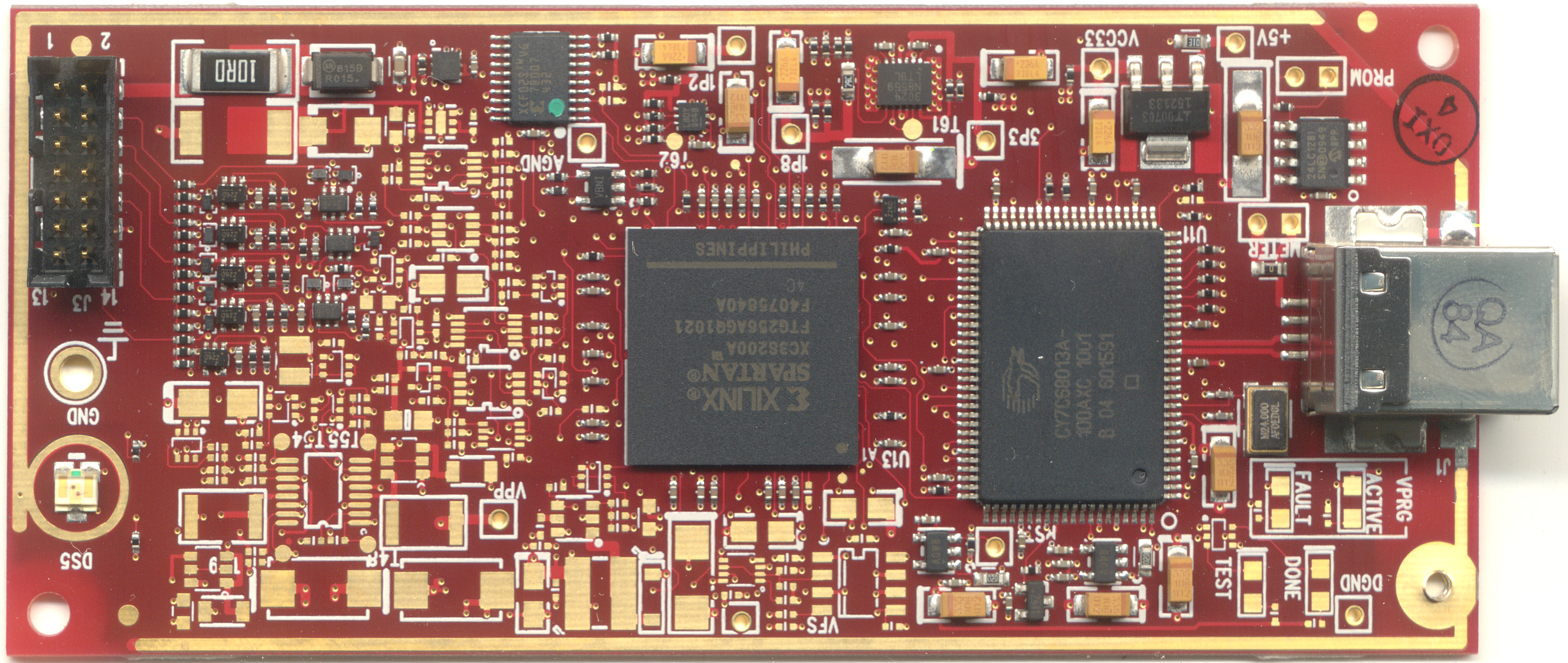
For OpenVizsla I wanted to get programming working from Impact. Programming the CPLD and FPGA is supported via an on-board FTDI chip, and usually done with urjtag. However, you can’t use – for example – Chipscope.
There are solutions like this neat hack, which basically LD_PRELOADs into ISE, pretends to be libusb, provides a virtualized platform cable, and then talks to some different back end.
But it turns out – there’s a much easier, albeit undocumented, solution. It’s called xilinx_xvc, or “Xilinx Virtual Cable”. It’s a plugin – the only one next to the Digilent plugin – that can be used as a cable. It opens a TCP connection to a specific host, and sends JTAG “shift” instructions over TCP. The protocol is really, really simple: There’s only one command that I ever saw being used, calledshift:. After that, a 32-bit little endian word specifies the number of bits, and after that, two byte-padded strings are the bits to be shifted out on TMS and TDI (in that order). The response is a byte-padded string of the bits shifted out on TDO. That’s all – a nice, abstracted JTAG PHY.
I implemented a client for this for the awesome NeTV here (requires some hardware hacking though to get the JTAG pins connected), and a generic FTDI version (based on libftdi) here (feel free to merge and send me a pull request!).
The xvcd is a daemon that listens on port 2542, and allows multiple programs to access the JTAG chain at the same point (it switches between them only when it’s “safe”; it relies on the programs to idle the chain every once in a while by going through TLR and then staying in RTI). It also works around a weirdness where Impact, whenever an IR or DR is written, goes back to the Capture-IR/DR state before exiting back to RTI (which almost always screws up the register). xvcd follow the JTAG state machine and just ignores this these instructions.
xvcd – The Xilinx Virtual Cable Daemon的更多相关文章
- Xilinx Zynq FPGA Boards板
Xilinx Zynq FPGA Boards板 Xilinx Zynq FPGA Boards 介绍 Styx是一个易于使用的Zynq开发模块,具有Xilinx的Zynq ZC7020 SoC和FT ...
- 2.Kali安装VMware tools(详细+异常处理)
dnt@MT:~$ cd /media/cdrom0 进入光驱内 dnt@MT:/media/cdrom0$ ls 查看当前目录下有哪些内容manifest.txt run_upgrader.sh V ...
- 【转】虚拟机VMware与主机共享文件介绍
from: http://www.cnblogs.com/kerrycode/p/3818095.html 写的比较详细,但是vm版本较旧. 2:通过共享文件夹功能 虚拟机VMware提供了在宿主机与 ...
- Oracle Linux 5.7安装VMware Tools的问题
案例环境介绍: 虚拟机的版本:VMware® Workstation 8.0.3 build-703057 操作系统版本:Oracle Linux Server release 5.7 ...
- 虚拟机VMware与主机共享文件介绍
我们经常会在Windows平台安装虚拟机VMware,不管是出于实验测试还是工作需要,伴随而来的就是经常需要在Windows系统和虚拟机系统之间进行共享数据文件,例如,需要将Window主机上的Ora ...
- 【转】linux network namespace 学习
原文地址:https://segmentfault.com/a/1190000004059167 介绍 在专业的网络世界中,经常使用到Virtual Routing and Forwarding(VR ...
- VM的Linux CentOS系统的VMTools的手动安装
VM的Linux CentOS系统的VMTools的手动安装 一是没时间安装,另外是一直用的是VM的绿色版,里面没有Linux.iso 文件 今天晚上安装上了 linux 的vmtools ,再也不用 ...
- ZYNQ-7000 Unable to connect to ps7_cortexa9 解决方案
图1 开发工具:Xilinx SDk 14.4(基于Eclipse,ISE suite 14.4组件之一) 开发板:Xilinx ZYNQ-7000 zc702 rev 1.0(注意:这个板子的版本说 ...
- 如何在windows xp下实现声音内录
问题描述: 用屏幕录制软件录制一个视频,能够成功录制视频,但无法录制视频里面的声音. 问题原因: 因为现在的多数声卡,均无法直接通过声卡自身的功能实现内录和立体声混音. 这是由于声卡芯片厂商迫于RIA ...
随机推荐
- Git 撤销操作、删除文件和恢复文件
大致介绍 经过前面的学习,已经建立了版本库,并上传了文件,这次来学习对这些文件进行基本的操作,即: ◆ 撤销操作 ◆ 删除文件 ◆ 恢复文件 我在此之前,已经将三个文件提交到了版本库 撤销操作 撤销操 ...
- Baidu软件研发工程师笔试题整理
Hadoop Map/Reduce Hadoop Map/Reduce是一个使用简易的软件框架,基于它写出来的应用程序能够运行在由上千个商用机器组成的大型集群上,并以一种可靠容错的方式并行处理上T级别 ...
- wordpress 常用函数-wpdb类
与数据库建立接口 WordPress为用户提供了一系列用于数据库操作的函数类——wpdb.Wpdb类建立在Justin Vincent编写并维护的ezSQL类的基础上. 使用须知 不可直接调用wpdb ...
- 美团外卖商家获取订单-signToken取值
需要抓取美团历史订单,请联系QQ:858-048-581所需工具: findller chrome 获取外卖历史订单地址为: http://e.waimai.meituan.com/v2/order/ ...
- Phoenix的安装使用与SQL查询HBase
一. Phoenix的简介 1. 什么是phoenix 现有hbase的查询工具有很多如:Hive,Tez,Impala,Shark/Spark,Phoenix等.今天主要说Phoenix.phoen ...
- 【LOJ】#2443. 「NOI2011」智能车比赛
题解 显然是个\(n^2\)的dp 我们要找每个点不穿过非赛道区域能到达哪些区域的交点 可以通过控制两条向量负责最靠下的上边界,和最靠上的下边界,检查当前点在不在这两条向量之间即可,对于每个点可以\( ...
- codeforces 354 D. Transferring Pyramid
D. Transferring Pyramid time limit per test 3 seconds memory limit per test 256 megabytes input stan ...
- Educational Codeforces Round 44 (Rated for Div. 2) F - Isomorphic Strings
F - Isomorphic Strings 题目大意:给你一个长度为n 由小写字母组成的字符串,有m个询问, 每个询问给你两个区间, 问你xi,yi能不能形成映射关系. 思路:这个题意好难懂啊... ...
- Tomcat基于MSM+Memcached实现Session共享
简述 上一篇文章,分别演示了session sticky 和 session cluster来实现会话保持的问题,但是它们缺点都不少,实际中用的很少,所以这篇文章我们还是通过Tomcat来演示一下实际 ...
- jump game(贪心算法)
Given an array of non-negative integers, you are initially positioned at the first index of the arra ...