
Service Fabric Cluster Manager
作者:潘罡 (Van Pan)@ Microsoft
我们回到Service Fabric最底层的话题,谈谈Service Fabric是怎么工作的。
首先,我们回到下面的文档,看看Service Fabric的整体架构
https://docs.microsoft.com/en-us/azure/service-fabric/service-fabric-architecture
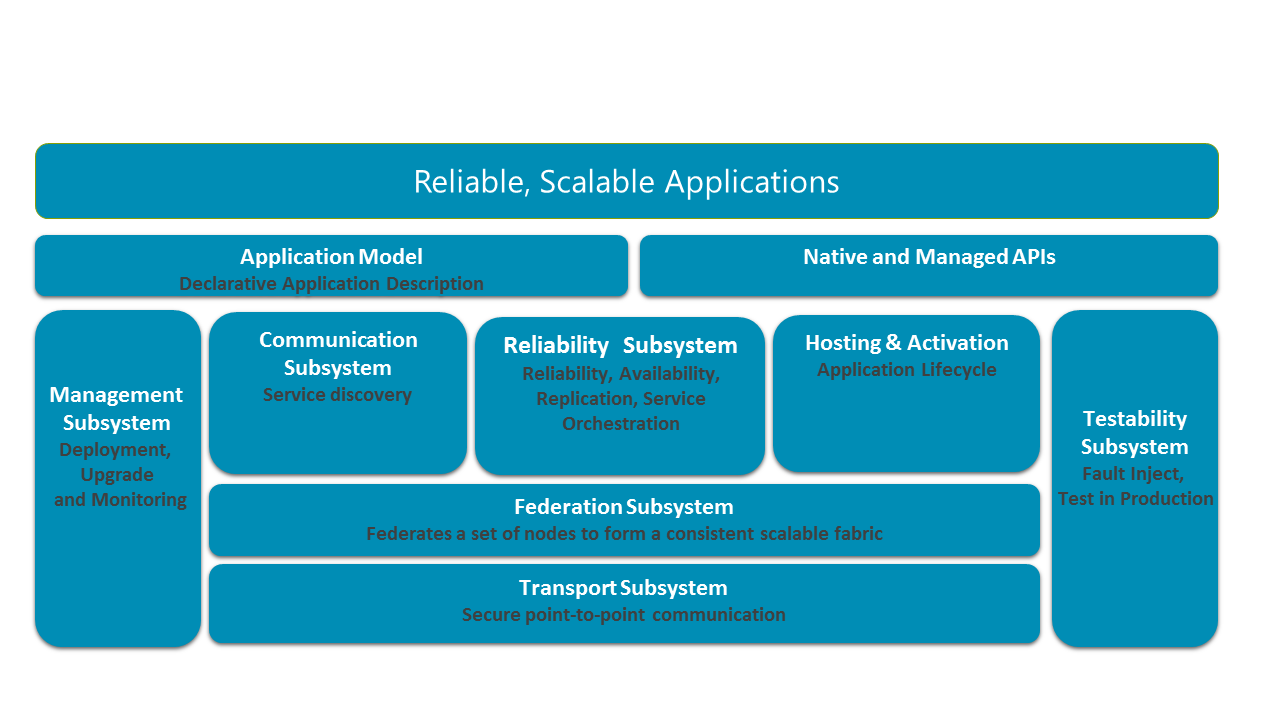
文档中有一段对于CM的定义:CM和Failover Manager进行交互,主要负责可靠性和服务运行位置分配。Resource Manager保证约束不被打破,CM管理Application的整个生命周期。同时它还和Health Manger进行交互并确保application在升级过程中在语义层面不会出现可用性问题。
CM工作流程
我们回到一个场景,SF管理员更新一个Application。他会使用下面的步骤
https://docs.microsoft.com/en-us/azure/service-fabric/service-fabric-automate-powershell
按步解释,他需要对SF进行如下操作:
1. 上传SF Application的package
2. 注册Application type
3. 命令SF升级
从顺序而言,SF的各个系统服务是这样工作的
1. 上传SF package,SF Image Store Service会将package储存至本地
2. 注册Application type,命令发至CM,CM进行初始化处理
3. 升级SF第一步,创建Application。CM会和Naming Service通讯并告知新的type以及版本号的一系列信息。
4. 升级SF第二步,创建Service。CM同样会先和Naming Service通讯。随后Naming Service会和FM通讯并告知服务信息,FM根据算法统计Service需要跑在哪些Node上,随后FM通知Node进行Service部署。Node根据需要部署的Service信息,从Image Store中获取Service exe文件等运行数据,并且启动服务。
5. 如果是升级Application操作,CM同样会做初始化操作。随后CM直接和FM通讯升级操作,FM随后将升级Service的工作部署到各个Node。
CM配置信息解析
CM是如何读取Application和Service的详细信息的呢?
它是读取ServiceManifest.xml和ApplicationManifest.xml
你可以在本地源代码中找到这两个文件
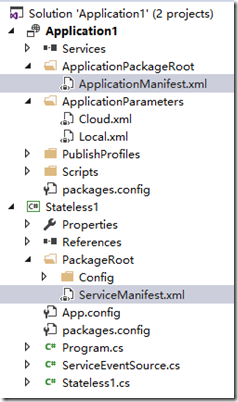
我们先看ServiceManifest.xml,默认情况下它是这样子的
<?xml version="1.0" encoding="utf-8"?>

<ServiceManifest Name="Stateless1Pkg"

                 Version="1.0.0"

                 xmlns="http://schemas.microsoft.com/2011/01/fabric"

                 xmlns:xsd="http://www.w3.org/2001/XMLSchema"

                 xmlns:xsi="http://www.w3.org/2001/XMLSchema-instance">

  <ServiceTypes>

    <!-- This is the name of your ServiceType.

         This name must match the string used in RegisterServiceType call in Program.cs. -->

    <StatelessServiceType ServiceTypeName="Stateless1Type" />

  </ServiceTypes>

  <!-- Code package is your service executable. -->

  <CodePackage Name="Code" Version="1.0.0">

    <EntryPoint>

      <ExeHost>

        <Program>Stateless1.exe</Program>

      </ExeHost>

    </EntryPoint>

  </CodePackage>

  <!-- Config package is the contents of the Config directoy under PackageRoot that contains an

       independently-updateable and versioned set of custom configuration settings for your service. -->

  <ConfigPackage Name="Config" Version="1.0.0" />

  <Resources>

    <Endpoints>

      <!-- This endpoint is used by the communication listener to obtain the port on which to

           listen. Please note that if your service is partitioned, this port is shared with

           replicas of different partitions that are placed in your code. -->

      <Endpoint Name="ServiceEndpoint" />

    </Endpoints>

  </Resources>

</ServiceManifest>
请注意以下描述:
在ServiceTypes中,其实你可以添加多个ServiceType。也就是说,你完全可以在同一个Service的源代码中定义多个Micro-Service。
CodePackage定义了以上Service的Exe入口,你同样可以添加多个EXE。
在Program.cs中,定义了如何将Exe和ServiceType进行连接。
ServiceRuntime.RegisterServiceAsync("Stateless1Type",

                    context => new Stateless1(context)).GetAwaiter().GetResult();

                ServiceEventSource.Current.ServiceTypeRegistered(Process.GetCurrentProcess().Id, typeof(Stateless1).Name);
换言之,我们完全可以在同一个项目中定义多种Service并让他们Host在同一个EXE中。
再回到ApplicationManifest.xml
<?xml version="1.0" encoding="utf-8"?>

<ApplicationManifest ApplicationTypeName="Application1Type"

                     ApplicationTypeVersion="1.0.0"

                     xmlns="http://schemas.microsoft.com/2011/01/fabric"

                     xmlns:xsd="http://www.w3.org/2001/XMLSchema"

                     xmlns:xsi="http://www.w3.org/2001/XMLSchema-instance">

  <Parameters>

    <Parameter Name="Stateless1_InstanceCount" DefaultValue="-1" />

  </Parameters>

  <!-- Import the ServiceManifest from the ServicePackage. The ServiceManifestName and ServiceManifestVersion

       should match the Name and Version attributes of the ServiceManifest element defined in the

       ServiceManifest.xml file. -->

  <ServiceManifestImport>

    <ServiceManifestRef ServiceManifestName="Stateless1Pkg" ServiceManifestVersion="1.0.0" />

    <ConfigOverrides />

  </ServiceManifestImport>

  <DefaultServices>

    <!-- The section below creates instances of service types, when an instance of this

         application type is created. You can also create one or more instances of service type using the

         ServiceFabric PowerShell module.

         The attribute ServiceTypeName below must match the name defined in the imported ServiceManifest.xml file. -->

    <Service Name="Stateless1">

      <StatelessService ServiceTypeName="Stateless1Type" InstanceCount="[Stateless1_InstanceCount]">

        <SingletonPartition />

      </StatelessService>

    </Service>

  </DefaultServices>

</ApplicationManifest>
CM通过ServiceManifestName和ServiceTypeName找到Service的定义。
Service Fabric Cluster Manager的更多相关文章
- Service Fabric Failover Manager
作者:潘罡 (Van Pan)@ Microsoft 什么是Failover Manager 我们回到Service Fabric系统架构图. Failover Manager是Reliability ...
- Service Fabric SfDevCluster目录从默认的C盘移动
管理员权限打开Powershell CD\ 回车 CD "C:\Program Files\Microsoft SDKs\Service Fabric\ClusterSetup" ...
- ServiceFabric极简文档-1.1 附属文件:规划和准备 Service Fabric 独立群集部署
准备好要充当节点的计算机 下面是要添加到群集的每台计算机的建议规格: 至少 16 GB RAM 至少 40 GB 可用磁盘空间 4 核或更高规格的 CPU 所有计算机与安全网络连接 Windows S ...
- How to deploy JAVA Application on Azure Service Fabric
At this moment, Azure Service Fabric does not support JAVA application natively (but it's on the sup ...
- 微服务框架之微软Service Fabric
常见的微服务架构用到的软件&组件: docker(成熟应用) spring boot % spring cloud(技术趋势) Service Fabric(属于后起之秀 背后是微软云的驱动) ...
- Service Fabric基本概念: Node, Application, Service, Partition/Replicas
作者:张鼎松 (Dingsong Zhang) @ Microsoft 在上一节中,为大家简明扼要的介绍了微软针对现代分布式系统在Azure上实现的相关服务组件.紧接上文内容,本节将为大家介绍Azur ...
- 转:微服务框架之微软Service Fabric
常见的微服务架构用到的软件&组件: docker(成熟应用) spring boot % spring cloud(技术趋势) Service Fabric(属于后起之秀 背后是微软云的驱动) ...
- 【Azure微服务 Service Fabric 】如何转移Service Fabric集群中的种子节点(Seed Node)
注意:在对Service Fabric的节点做操作之前,请务必确认是否是种子节点(Seed Node)且当前节点的数量是否与SF的持久层要求的数量一致. 可靠性级别是 Service Fabric 群 ...
- 【Azure微服务 Service Fabric 】使用az命令创建Service Fabric集群
问题描述 在使用Service Fabric的快速入门文档: 将 Windows 容器部署到 Service Fabric. 其中在创建Service Fabric时候,示例代码中使用的是PowerS ...
随机推荐
- 分享一个查找linux命令的网站
http://man.linuxde.net/ 不用每次都找度娘浪费时间了
- Javascript开发者 常用知识
Javascript是一种日益增长的语言,特别是现在ECMAScript规范按照每年的发布时间表发布.伴随着这门语言的规模化和快速发展,掌握JS(不仅仅是jQuery)的重要性,变得更加重要. 这不是 ...
- No.1010_第七次团队会议
渺茫的前景 今天大家都很失望,一来昨天的问题还是继续存在着,仍然没有完成.二来,我们看了一下其余几个组的界面,对自己有些难过. 我们组确实存在人手少的问题,这几天我还因为挑战杯的事情缺席了两天,感觉内 ...
- iOS自学-监听按钮点击、提醒框
//事件监听的问题 CGRect btn2Frame = CGRectMake(100.0, 150.0, 60.0, 44.0); //两种不同的方式创建 UIButton *btn2 = [UIB ...
- Beta Scrum Day 1 — 听说
听说
- Unity发布Exe后,去掉提示分辨率的窗口
Unity版本:2017.4 菜单File->Build Settings...,修改如下图的位置,将“Display Resolution Dialog”从Enabled改为Disabled
- AngularJs 学习 (一)
最近学习了一下关于AngularJs的知识,发现和Vue还是有非常相似的东西.所以对于学过Vue的自己来说,还是比较好理解的 特点:双向数据绑定,单页面应用 控制器: AngularJs控制器可以控制 ...
- Beta阶段DAY2
一.提供当天站立式会议照片一张 二.每个人的工作 1.讨论项目每个成员的昨天进展 刘阳航:删除多余按钮,调整界面. 林庭亦:删除麻烦的颜色设置. 郑子熙:添加新增按钮. 陈文俊:重新规划面板及功能. ...
- Robot Framework 教程 (7) - 使用For循环
在自动化测试过程中,使用For循环来对某个动作进行重复操作是很普遍的行为.在Robot Framework中,各种测试库中均提供了多种方式的For循环结构,在其中覆盖了大部分类型的循环类型.而Robo ...
- PBS命令和使用
PBS是公开源代码的作业管理系统,在此环境下运行,用户不需要指定程序在哪些节点上运行,程序所需的硬件资源由PBS管理和分配. PBS(Portable Batch System)是由NASA开发的灵活 ...