
【wireshark】协议解析
1. 普通解析
Wireshark启动时,所有解析器进行初始化和注册。要注册的信息包括协议名称、各个字段的信息、过滤用的关键字、要关联的下层协议与端口(handoff)等。在解析过程,每个解析器负责解析自己的协议部分, 然后把上层封装数据传递给后续协议解析器,这样就构成一个完整的协议解析链条。
解析链条的最上端是Frame解析器,它负责解析pcap帧头。后续该调用哪个解析器,是通过上层协议注册handoff信息时写在当前协议的hash表来查找的。
例如,考虑ipv4解析器有一个hash表,里面存储的信息形如下表。当它解析完ipv4首部后,就可以根据得到的协议号字段,比如6,那么它就能从此hash表中找到后续解析器tcp。
| 协议号 | 解析器指针 |
| 6 | *tcp |
| 17 | *udp |
| …… | |
Wireshark中实际的解析表有3种,分别是字符串表,整数表和启发式解析表。如下图所示:
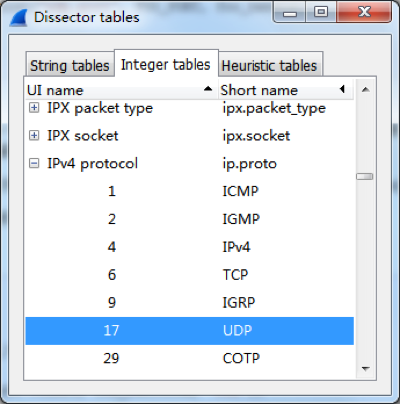
下面以ip协议为例,说明一下它的注册过程。
相关的重要数据结构与全局变量如下。
proto.c
/* Name hashtables for fast detection of duplicate names */

static GHashTable* proto_names        = NULL;

static GHashTable* proto_short_names  = NULL;

static GHashTable* proto_filter_names = NULL;

/** Register a new protocol.

 @param name the full name of the new protocol

 @param short_name abbreviated name of the new protocol

 @param filter_name protocol name used for a display filter string

 @return the new protocol handle */

int

proto_register_protocol(const char *name, const char *short_name, const char *filter_name);
三个全局的哈希表分别用于保存协议名称、协议缩略名和用于过滤器的协议名。
packet.c:
struct dissector_table {

    GHashTable    *hash_table;

    GSList    *dissector_handles;

    const char    *ui_name;

    ftenum_t    type;

    int        base;

};

static GHashTable *dissector_tables = NULL;

/*

 * List of registered dissectors.

 */

static GHashTable *registered_dissectors = NULL;

static GHashTable *heur_dissector_lists = NULL;

/* Register a dissector by name. */

dissector_handle_t

register_dissector(const char *name, dissector_t dissector, const int proto);

/** A protocol uses this function to register a heuristic sub-dissector list.

 *  Call this in the parent dissectors proto_register function.

 *

 * @param name the name of this protocol

 * @param list the list of heuristic sub-dissectors to be registered

 */

void register_heur_dissector_list(const char *name,

    heur_dissector_list_t *list);

/* a protocol uses the function to register a sub-dissector table */

dissector_table_t register_dissector_table(const char *name, const char *ui_name, const ftenum_t type, const int base);
dissector_tables可以说是“哈希表的哈希表”,它以解析表名为键(如“ip.proto”),以dissector_table结构指针为值。在dissector_table中的哈希表以无符号数的指针为键(如协议号,为指针是glib hash表API的参数要求),以解析器handle为值;heur_dissector_lists是启发式解析相关的东西,这个问题留待以后研究;registered_dissectors是解析器哈希表,它以解析器名为键(如”ip”),以解析器句柄为值。
packet.h:
typedef struct dissector_table *dissector_table_t;
packet-ip.c:
static dissector_table_t ip_dissector_table;
proto_register_ip函数中:
 proto_ip = proto_register_protocol("Internet Protocol Version 4", "IPv4", "ip");

...

/* subdissector code */

  ip_dissector_table = register_dissector_table("ip.proto", "IP protocol", FT_UINT8, BASE_DEC);

  register_heur_dissector_list("ip", &heur_subdissector_list);

...

  register_dissector("ip", dissect_ip, proto_ip);

  register_init_routine(ip_defragment_init);

  ip_tap = register_tap("ip");
register_dissector_table这个函数在packet.c中,在此函数内,创建了名为“ip.proto”的哈希表。解析ip协议后,会查询这个表,找出下一个解析器,并将后续数据的解析移交给它。
packet-ip.c,dissect_ip函数内:
dissector_try_uint_new(ip_dissector_table, nxt, next_tvb, pinfo,

                                 parent_tree, TRUE, iph)
packet.c:
/* Look for a given value in a given uint dissector table and, if found, call the dissector with the arguments supplied, and return TRUE, otherwise return FALSE. */

gboolean

dissector_try_uint_new(dissector_table_t sub_dissectors, const guint32 uint_val, tvbuff_t *tvb, packet_info *pinfo, proto_tree *tree, const gboolean add_proto_name, void *data)
在dissector_try_uint_new函数中,会找到协议号对应的解析器句柄,并使用它解析其余数据。
2. 启发式(heuristic)解析
//TODO
3. 参考
Wireshark开发指南第6章"How wireshark works"
【wireshark】协议解析的更多相关文章
- 修改wireshark协议解析规则
不同的协议有不同的解码器,wireshark尝试为每个包尝试找到正确的解码器,特定的情况有可能会选择错误的解码器. 1.使用了其它协议的标准端口,被错误解码,使用udp的80端口发送数据被当作QUIC ...
- 使用 lua 编写 wireshark 协议解析插件
一.平台 操作系统:windows 7 wireshark:1.10.3 lua:5.1 二.准备 lua 语言基本语法,特别是关于表操作和循环 wireshark 文档,包括用户使用文档和开发者文档 ...
- Wireshark无法解析OpenFlow配置协议 解决方法
在使用wireshark对OpenFlow交换机与FlowVisor的通信过程进行抓包分析的时候,在其选项中有openflow_v1选项,但Wireshark竟无法解析OpenFlow协议. 在查阅相 ...
- wireshark 1.10.0 编译 及 协议解析部分的一些变化
wireshark不久前升级到1.10.0稳定版,这个版本正如其版本号一样,相比1.8.x有较大变化. 我们先说说在windows下编译的问题,1.8.4/1.8.6版本的编译见我的文章:http:/ ...
- 欧姆龙FinsTCP与FinsUDP协议解析 —— 利用Wireshark对报文逐字节进行解析详细解析附含报文模拟器等
前言 – Fins欧姆龙这个协议网上极少有相关的模拟器.Tcp的这一块倒是有但是Udp的基本都是不可用 1. Fins协议结构也很简单 协议分为两种 一种tcp一种udp 2. Tcp比Udp的报文会 ...
- python构造wireshark可以解析的LTE空口数据
Wireshark是可以解析LTE的空口数据.但是在wireshark的实现中,这些数据都是被封装到UDP报文中.然后根据wireshark的格式文件对LTE的数据加上头信息.头信息的定义参考附件pa ...
- 协议解析Bug分析
协议解析Bug分析 源自邮件协议RPC(远程过程调用)处理的Request请求数据包的bug. 一.Bug描写叙述 腾讯收购的Foxmailclient能够作为outlookclient ...
- Wireshark DTN解析器拒绝服务漏洞
受影响系统:Wireshark Wireshark 2.2.0 - 2.2.1Wireshark Wireshark 2.0.0 - 2.0.7描述:CVE(CAN) ID: CVE-2016-937 ...
- Wireshark OpenFlow解析器拒绝服务漏洞
受影响系统:Wireshark Wireshark 2.2.0 - 2.2.1Wireshark Wireshark 2.0.0 - 2.0.7描述:CVE(CAN) ID: CVE-2016-937 ...
随机推荐
- 查询yum包安装路径
rpm -ql php71-php yum install json yum install libcurl
- 2.自己搭建的一个简易的ioc容器
1.persondao类namespace MyselfIoC{ public class PersonDao { public override string ToStri ...
- 【转】关于编译链接——gcc/g++
添加运行时共享库目录 运行使用共享库的程序需要加载共享库(不同于G++ 编译时指定的链接库),添加共享库的步骤: 修改文件 /etc/ld.so.conf 添加共享库目录 运行 ldconfig 同步 ...
- 搭建Idea授权服务器用于学习
我自己的搭建服务器http://doit.wenyule.top 懒得看教程或弄不好的小伙伴可以用我搭建的,在激活那选择服务器,输入我上面的地址,注意可以激活2018.2.1之前的.为了防止用的人太多 ...
- python文件对比
#-*- encoding:utf-8 -*- class loadDatas(object): def __init__(self): self.path='./data' def load_com ...
- 4) Maven 安装
# ----------------------------------------------------------------------------# Maven2 Start Up Batc ...
- Android线程和线程Handler基础一览
线程概览 线程是任何多任务系统的基石.可以被认为是一个主进程的多个子进程.这样做的目的就是了增加应用的性能. 应用主线程 当一个Android应用被打开的时候,系统会默认开辟一个线程.这个线程就被叫做 ...
- Win & Mac 系统之间U盘传递的U盘文件格式选取问题
Win & Mac 系统之间U盘传递的U盘文件格式选取问题 1. Win系统与Mac系统之间可以通过 exFat U盘文件系统传递 exFAT(Extended File Allocation ...
- hdu 5037 周期优化
http://acm.hdu.edu.cn/showproblem.php?pid=5037 有只青蛙踩石子过河,河宽m,有n个石子坐标已知.青蛙每次最多跳L.现在可以在河中再放一些石子,使得青蛙过河 ...
- spring boot 使用 HandlerInterceptor
# 背景 在实际项目中,接口出于安全考虑,都会有验签的计算.目前接触的项目来看基本都是时间戳+干扰因子 然后md5计算的方式.现在学习,写一个简单demo, 其实如果不引入拦截器的话,验签计算全部在c ...