
【UE4 C++】Input 输入事件绑定
轴映射与动作映射
编辑器设置input+代码实现具体动作
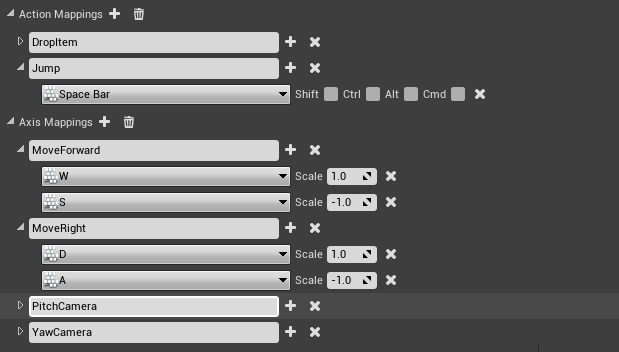
void AMyCharacter::SetupPlayerInputComponent(UInputComponent* PlayerInputComponent)

{

	Super::SetupPlayerInputComponent(PlayerInputComponent);

	PlayerInputComponent->BindAction("DropItem", EInputEvent::IE_Pressed, this, &AMyCharacter::DropItem);

	PlayerInputComponent->BindAction("Jump", IE_Pressed, this, &AMyCharacter::Jump);

	PlayerInputComponent->BindAxis("MoveForward", this, &AMyCharacter::MoveForward);

	PlayerInputComponent->BindAxis("MoveRight", this, &AMyCharacter::MoveRight);

	PlayerInputComponent->BindAxis("PitchCamera", this, &AMyCharacter::PitchCamera);

	PlayerInputComponent->BindAxis("YawCamera", this, &AMyCharacter::YawCamera);

}

void AMyCharacter::MoveForward(float AxisValue)

{

	MovementInput.X = FMath::Clamp<float>(AxisValue, -1.f, 1.f);

}

void AMyCharacter::MoveRight(float AxisValue)

{

	MovementInput.Y = FMath::Clamp<float>(AxisValue, -1.f, 1.f);

}

void AMyCharacter::PitchCamera(float AxisValue)

{

	CameraInput.Y = AxisValue;

}

void AMyCharacter::YawCamera(float AxisValue)

{

	CameraInput.X = AxisValue;

}
从C++中添加轴和动作映射
	//添加、绑定ActionKeyMapping轴映射 方法一

	FInputActionKeyMapping onFire("OnFire", EKeys::LeftMouseButton, 0, 0, 0, 0);

	UPlayerInput::AddEngineDefinedActionMapping(onFire);

	PlayerInputComponent->BindAction("OnFire", IE_Pressed, this, &AMyCharacter::OnFire);

	//添加、绑定ActionKeyMapping轴映射 方法二

	UPlayerInput::AddEngineDefinedActionMapping(FInputActionKeyMapping("Sprint",EKeys::LeftShift));

	PlayerInputComponent->BindAction("Sprint", IE_Pressed,this,&AMyCharacter::StartSprint);

	PlayerInputComponent->BindAction("Sprint", IE_Released,this,&AMyCharacter::StopSprint);

	//添加、绑定AxisMapping轴映射

	UPlayerInput::AddEngineDefinedAxisMapping(FInputAxisKeyMapping("Turn", EKeys::MouseX, 1.0f));

	PlayerInputComponent->BindAxis("Turn", this, &AMyCharacter::OnTurn);
【UE4 C++】Input 输入事件绑定的更多相关文章
- jQuery文本框(input textare)事件绑定方法教程
jquery 的事件绑定已经用on替换了原来的bind,接下来为大家分享下bind的使用方法及input textare事件.目前1.7以上,jquery?的事件绑定已经用on替换了原来的bind,接 ...
- js对键盘输入事件绑定到特定按钮
转自:https://www.cnblogs.com/liluping860122/archive/2013/05/25/3099103.html<script type="text/ ...
- [转] js对键盘输入事件绑定到特定按钮。
<script type="text/javascript" language="javascript"> document.onkeyup = f ...
- js input输入事件兼容性问题
if(navigator.userAgent.indexOf('Android') > -1){ $("#sign").on("input", funct ...
- 关于Unity中的Input输入事件
截获鼠标,键盘的消息 监听事件我们都是在Update里面监听的. Unity的虚拟轴打开:Edit-->Project Settings-->Input,打开的各个Name就是双引号里面要 ...
- [UE4]键盘鼠标输入事件
然后在角色的事件视图就可以使用预先定义好的事件
- input输入子系统
一.什么是input输入子系统? 1.Linux系统支持的输入设备繁多,例如键盘.鼠标.触摸屏.手柄或者是一些输入设备像体感输入等等,Linux系统是如何管理如此之多的不同类型.不同原理.不同的输入信 ...
- INPUT输入子系统【转】
转自:https://www.cnblogs.com/deng-tao/p/6094049.html 1.Linux系统支持的输入设备繁多,例如键盘.鼠标.触摸屏.手柄或者是一些输入设备像体感输入等等 ...
- 通过JS 给这个input加一个事件 获得焦点,回车事件绑定
通过JS 给这个input加一个事件 就是获得焦点就行了 window.onload = function(){ var oInput = document.getElementById(" ...
随机推荐
- 洛谷P1314 聪明的质监员 题解
题目 聪明的质监员 题解 这道题和之前Sabotage G的那道题类似,都是用二分答案求解(这道题还要简单一些,不需要用数学推导二分条件,只需简单判断一下即可). 同时为了降低复杂度,肯定不能用暴力求 ...
- noip模拟19/20
这两场考试大部分的题都考过,然鹅有的 \(trick\) 忘了,有的当时咕了(虽然现在还咕着) 首先是 \(v\) 这道题需要加一个小优化,对于较小的状态应该直接用数组记录,较大的再用 map 记 然 ...
- minio & gitlab runner
Docker安装Minio存储服务器详解 # mkdir -p /data/minio # docker pull nexus3:8089/minio/minio # docker run -p 90 ...
- [Apache Atlas] Atlas 架构设计及源代码简单分析
Apache Atlas 架构图 Atlas 支持多数据源接入:Hive.HBase.Storm等 Type System Type Atlas 中定义了一些元数据类型 ── AtlasBaseTyp ...
- 关于buildroot移植的思考
buildroot是一个成熟的SDK框架,基于它有了openwrt. 曾经有一个项目,需要将原有的OpenWrt SDK改造,并且将软件框架重新定义.尝试精简原来的OpenWrt,并且删除所有的软件包 ...
- 前端常用场景总结CSS/JS/插件(实用篇更新中...)
<div class="box box1"> <span>垂直居中</span> </div> .box1{ display: ta ...
- Docker系列(5)- 常用命令(1) | 帮助命令
帮助命令 [root@localhost ~]# docker version #显示docker的版本信息 [root@localhost ~]# docker info #显示docker的系统信 ...
- Jmeter系列(23)- 常用逻辑控制器(2) | 事务控制器Transaction Controller
事务控制器(Transaction Controller) 作用 选择一些请求,作为事务,放在该控制器下 比如:我有三个请求,注册.登录.下单.这三个请求其实就是一个下单完成过程,可以作为一个下单事务 ...
- whistle浏览器抓包(以火狐浏览器为例)
环境:whistle:1.14.6 whistle浏览器抓包 以火狐浏览器为例 1.启动whistle 使用w2 start启动whistle. 退出cmd后,whistle自动关闭了,所以每次使用w ...
- Expression Tree 遍历集合
场景 从接口返回的数据是集合,却是 object 类型的.这个时候需要遍历这个集合.现提供两种方法. 方法一: 因为集合是可枚举的,所以可以尝试转为 IEnumerable 类型,然后遍历即可. st ...