
Prometheus基于Eureka的服务发现
Prometheus基于Eureka的服务发现
一、背景
目前我们的项目是使用Spring Cloud构建的微服务,使用的是Eureka作为注册中心,且项目中使用到Prometheus做服务监控。此处简单记录一下 eureka 作为 prometheus 的服务发现。
二、实现步骤
1、eureka 客户端注册到prometheus中
修改 application.yml 文件
spring:

  application:

    name: order-provider-10004

server:

  port: 10004

management:

  endpoints:

    web:

      exposure:

        include: 'prometheus,metrics,info,health' # 暴露出 prometheus 端口

  metrics:

    tags:

      application: ${spring.application.name} # 增加每个指标的全局的tag,及给每个指标一个 application的 tag,值是 spring.application.name的值

  server:

    port: 10005

# 注册到 eureka 上

eureka:

  client:

    service-url:

      defaultZone: http://localhost:10003/eureka/   #连接到服务注册中心的地址,如果服务注册中心开启了权限需要设置 http://username:password@ip:port/eureka/格式

  instance:

    prefer-ip-address: true

    metadata-map:

      # 集成到prometheus,以下的这些数据都会加入到prometheus的重新标记之前的标签中,比如sys.module会变成

      "prometheus.scrape": "true"

      "prometheus.path": "/actuator/prometheus"

      "prometheus.port": "${management.server.port}"

      "sys.module": "order"
主要是上方 metadata-map 中的配置。
2、prometheus中的写法
修改 prometheus.yml 文件
  - job_name: 'eureka'

    eureka_sd_configs:

    # 指定 eureka 的服务发现地址

      - server: 'http://localhost:10003/eureka'

    relabel_configs:

    # 重写 metrics 的路径

      - source_labels: ["__meta_eureka_app_instance_metadata_prometheus_path"]

        action: replace

        target_label: __metrics_path__

        regex: (.+)

        # 增加一个自定义label sys_model 它的值从配置eureka中获取

      - source_labels: ["__meta_eureka_app_instance_metadata_sys_module"]

        action: replace

        target_label: sys_module

        regex: (.+)

        # 重写管理端口

      - source_labels: [__address__, __meta_eureka_app_instance_metadata_prometheus_port]

        action: replace

        regex: ([^:]+)(?::\d+)?;(\d+)

        replacement: $1:$2

        target_label: __address__
1、重写 metrics 的 path。
2、重写 管理端口。
3、增加一个自定义的标签。
实现效果查看下方的效果图。
最终实现的抓取端口的路径 http://10.1.129.254:10005/actuator/prometheus
注意:
1、/actuator/prometheus 由上方的 metrics_path 重写。
2、10.1.129.254:10005 由上方的 address 重写。
3、实现效果
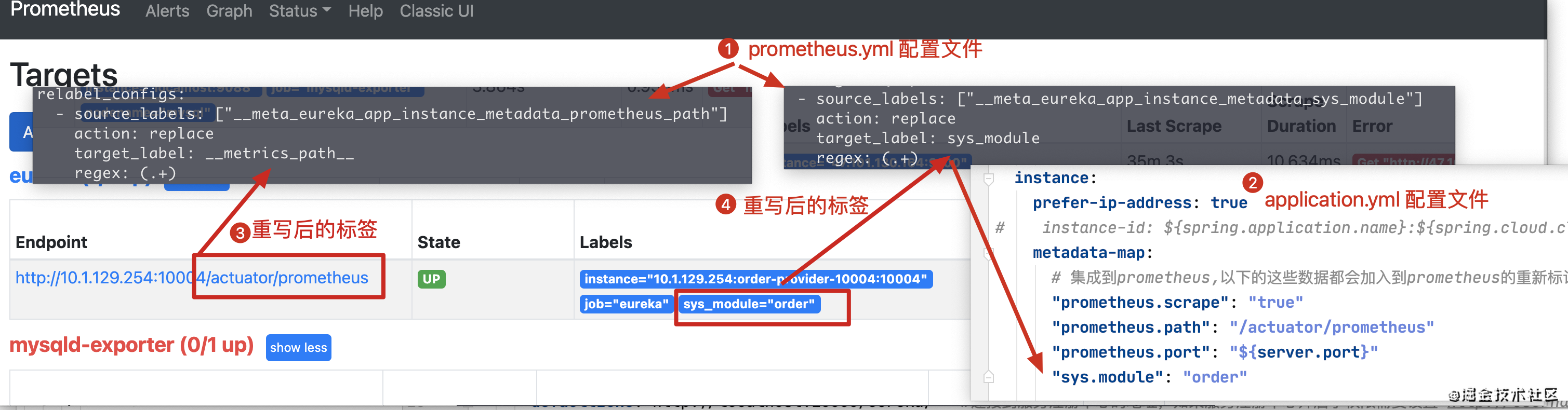
上图展示的短裤是 10004 而不是 10005,是因为我没有在 application.yml 中指定 management.server.port 时截的图。
三、完整代码
https://gitee.com/huan1993/spring-cloud-parent/tree/master/prometheus/eureka-prometheus-parent
四、参考链接
1、https://github.com/prometheus/prometheus/blob/release-2.25/documentation/examples/prometheus-eureka.yml
2、https://prometheus.io/docs/prometheus/latest/configuration/configuration/#eureka_sd_config
Prometheus基于Eureka的服务发现的更多相关文章
- Prometheus 基于文件的服务发现
Prometheus 基于文件的服务发现 官方文档:https://github.com/prometheus/prometheus/tree/master/discovery 服务发现支持: end ...
- Prometheus基于文件的服务发现
Prometheus基于文件的服务发现 一.基于文件的服务发现 1.prometheus.yml 配置文件的写法 2.file_sd 目录下的文件 3.配置结果 二.注意事项 三.参考链接 一.基于文 ...
- prometheus — 基于文件的服务发现
基于文件的服务发现方式不需要依赖其他平台与第三方服务,用户只需将要新的target信息以yaml或json文件格式添加到target文件中 ,prometheus会定期从指定文件中读取target信息 ...
- prometheus 基于DNS的目标发现
prometheus 基于DNS的目标发现 DNS服务发现依赖于查询A.AAAA或SRV DNS记录. 1.基于 SRV 记录发现 scrape_configs: - job_name: 'webap ...
- 基于Eureka的服务治理
代码地址如下:http://www.demodashi.com/demo/11927.html 一.服务的注册与发现 关系调用说明: 服务生产者启动时,向服务注册中心注册自己提供的服务 服务消费者启动 ...
- Prometheus Consul实现自动服务发现
Prometheus Consul实现自动服务发现 1.概述 Consul 是一个支持多数据中心分布式高可用的服务发现和配置共享的服务软件. Consul 由 HashiCorp公司用Go语言开发 ...
- java版gRPC实战之七:基于eureka的注册发现
欢迎访问我的GitHub https://github.com/zq2599/blog_demos 内容:所有原创文章分类汇总及配套源码,涉及Java.Docker.Kubernetes.DevOPS ...
- prometheus 基于文件的目标发现
prometheus 基于文件的目标发现 1.创建目录 cd /usr/local/prometheus/conf mkdir -pv targets/{nodes,docker} 2.修改prome ...
- 【Eureka】服务发现调用
[Eureka]服务发现调用 转载:https://www.cnblogs.com/yangchongxing/p/10779832.html 1.使用 Netfix Feign 客户端调用服务 首先 ...
随机推荐
- OSS对象存储的文件上传、解冻、下载与查看
上传文件 cp命令用于上传.下载.拷贝文件. # 语法 ./ossutil cp [-r] file_url cloud_url # 例如 ossutil64 cp -r /remote/closed ...
- 富文本编辑器-SpringBoot
目录 简介 Editor.md 基础工程搭建 数据库设计 基础项目搭建 文章编辑整合(重点) 图片上传问题 表情包问题 文章展示 简介 项目地址:https://gitee.com/zwtgit/ri ...
- vue-admin-element 页面跳转
1.通过router-link 进行跳转 <router-link to="/china-quotation/business-function/quotation-request&q ...
- Docker 容器间的单向连接
Docker 容器间的单向连接 前言 a. 本文主要为 Docker的视频教程 笔记. b. 环境为 CentOS 7.0 云服务器 c. 上一篇:Dockerfile 自动制作 Docker 镜像( ...
- UVA 506 System Dependencies(模拟 烂题)
https://vjudge.net/problem/UVA-506 题目是给出了五种指令,DEPEND.INSTALL.REMOVE.LIST.END,操作的格式及功能如下: DEPEND item ...
- KMP算法解决字符串匹配问题
要解决的问题 假设字符串str长度为N,字符串match长度为M,M <= N, 想确定str中是否有某个子串是等于match的.返回和match匹配的字符串的首字母在str的位置,如果不匹配, ...
- Docker DevOps实战:Docker+Jenkins+Python+Pytest+Allure(1)- 创建Jenkins容器、安装Python环境、安装项目依赖类库、安装Allure报告插件
前言: 本文实操笔记参照菠萝笔记,安装过程中的坑大家可以参考下 创建Jenkins容器 # 下载Jenkins镜像 [root@localhost ~]# docker pull jenkins/je ...
- PHP 合并2个链表
输入两个单调递增的链表,输出两个链表合成后的链表,当然我们需要合成后的链表满足单调不减规则. <?php class ListNode{ var $val; var $next = NULL; ...
- mumu模拟器使用
连接mumu模拟器 启动mumu模拟器 执行命令:adb connect 127.0.0.1:7555(windows系统推荐使用gitbash) 安装app Gitbash下执行:adb insta ...
- python学习笔记(七)-函数
函数 方法 功能说白了,函数就是把一堆代码组合到一起,变成一个整体.函数不调用不会被执行.作用在于提高代码的复用性.定义函数 def greet_user(): """关 ...