
httprunner3源码解读(3)client.py
源码目录结构
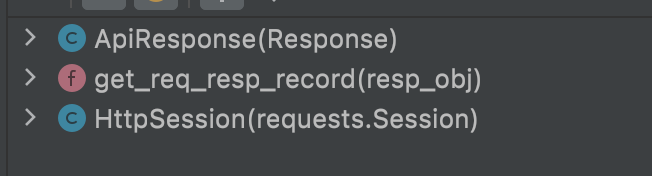
ApiResponse
这个类没啥好说的
class ApiResponse(Response):

    """

    继承了requests模块中的Response类,重写了里面的raise_for_status方法

    """

    def raise_for_status(self):

        if hasattr(self, "error") and self.error:

            raise self.error

        Response.raise_for_status(self)
get_req_resp_record
这个函数的功能是获取请求记录和响应记录,源码分为4段来看
第1段
def get_req_resp_record(resp_obj: Response) -> ReqRespData:

    """

    :param resp_obj: Response响应

    :return: 返回自定义的ReqResData模型类

    """

    def log_print(req_or_resp, r_type):

        """

        日志打印,格式为标准的json

        """

        msg = f"\n================== {r_type} details ==================\n"

        for key, value in req_or_resp.dict().items():

            # 如果value中还包含着dict或者list,就把value转成json格式

            if isinstance(value, dict) or isinstance(value, list):

                value = json.dumps(value, indent=4, ensure_ascii=False)

            msg += "{:<8} : {}\n".format(key, value)

        logger.debug(msg)
第1段代码就是定义了一个打印日志的函数,打印的日志解析为标准的json格式
第2段
# 记录实际请求信息(请求头、cookie信息、请求体)

    request_headers = dict(resp_obj.request.headers)

    request_cookies = resp_obj.request._cookies.get_dict()

    request_body = resp_obj.request.body

    if request_body is not None:

        try:

            request_body = json.loads(request_body)

        except json.JSONDecodeError:

            # str: a=1&b=2

            pass

        except UnicodeDecodeError:

            # bytes/bytearray: request body in protobuf

            pass

        except TypeError:

            # neither str nor bytes/bytearray, e.g. <MultipartEncoder>

            pass

        # lower_dict_keys的作用是将字典中的key大写转小写

        request_content_type = lower_dict_keys(request_headers).get("content-type")

        if request_content_type and "multipart/form-data" in request_content_type:

            # upload file type

            request_body = "upload file stream (OMITTED)"

    request_data = RequestData(

        method=resp_obj.request.method,

        url=resp_obj.request.url,

        headers=request_headers,

        cookies=request_cookies,

        body=request_body,

    )

    # 在debug模式下打印请求日志

    log_print(request_data, "request")
第2段代码是先获取request_headers、request_cookies、request_body,然后将获取到的信息放入RequestData模型中,最后打印请求的信息
第3段
# 记录响应信息

    resp_headers = dict(resp_obj.headers)

    lower_resp_headers = lower_dict_keys(resp_headers)

    content_type = lower_resp_headers.get("content-type", "")

    if "image" in content_type:

        # response is image type, record bytes content only

        response_body = resp_obj.content

    else:

        try:

            # try to record json data

            response_body = resp_obj.json()

        except ValueError:

            # only record at most 512 text charactors

            resp_text = resp_obj.text

            response_body = omit_long_data(resp_text)

    response_data = ResponseData(

        status_code=resp_obj.status_code,

        cookies=resp_obj.cookies or {},

        encoding=resp_obj.encoding,

        headers=resp_headers,

        content_type=content_type,

        body=response_body,

    )

    # 在debug模式下打印响应日志

    log_print(response_data, "response")
第3段代码是获取resp_headers、content_type、response_body,最后将这些数据都放入ResponseData模型类中,最后打印响应日志
第4段
req_resp_data = ReqRespData(request=request_data, response=response_data)

    return req_resp_data
最后这段就是将刚才的请求信息和响应信息全部放入ReqRespData模型中,最后get_req_resp_record函数返回的内容就是ReqRespData模型
HttpSession
在requests.Session上进行了二次封装,该类包含4个方法,下面依次介绍
init
    def __init__(self):

        super(HttpSession, self).__init__()

        self.data = SessionData()
初始化方法,定义了data属性的默认值为SessionData模型,该模型包含了req_resps: List[ReqRespData] = []请求响应内容
update_last_req_resp_record
    def update_last_req_resp_record(self, resp_obj):

        """

        update request and response info from Response() object.

        """

        # TODO: fix

        self.data.req_resps.pop()

        self.data.req_resps.append(get_req_resp_record(resp_obj))
更新最新的请求响应记录,放入req_resps列表中
request
发送requests.Request请求,返回requests.Response响应,还做了以下事情
- 1.设置了超时时间120s
- 2.计算整个请求花费了多少时间
- 3.定义了客户端ip地址和端口号、服务端ip地址和端口号
- 4.计算了响应体的内容大小
- 5.记录了消耗时间
- 6.记录了request和response记录,包括重定向记录
_send_request_safe_mode
发送一个http请求,并捕获由于连接问题可能发生的任何异常
    def _send_request_safe_mode(self, method, url, **kwargs):

        """

        Send a HTTP request, and catch any exception that might occur due to connection problems.

        Safe mode has been removed from requests 1.x.

        """

        try:

            return requests.Session.request(self, method, url, **kwargs)

        except (MissingSchema, InvalidSchema, InvalidURL):

            raise

        except RequestException as ex:

            resp = ApiResponse()

            resp.error = ex

            resp.status_code = 0  # with this status_code, content returns None

            resp.request = Request(method, url).prepare()

            return resp
httprunner3源码解读(3)client.py的更多相关文章
- httprunner3源码解读(2)models.py
源码目录结构 我们首先来看下models.py的代码结构 我们可以看到这个模块中定义了12个属性和22个模型类,我们依次来看 属性源码分析 import os from enum import Enu ...
- httprunner3源码解读(4)parser.py
源码结构目录 可以看到此模块定义了4个属性和12个函数,我们依次来讲解 属性源码分析 # 匹配http://或https:// absolute_http_url_regexp = re.compil ...
- httprunner3源码解读(1)简单介绍源码模块内容
前言 最近想着搭建一个API测试平台,基础的注册登录功能已经完成,就差测试框架的选型,最后还是选择了httprunner,github上已经有很多开源的httprunner测试平台,但是看了下都是基于 ...
- pyspider源码解读--调度器scheduler.py
pyspider源码解读--调度器scheduler.py scheduler.py首先从pyspider的根目录下找到/pyspider/scheduler/scheduler.py其中定义了四个类 ...
- 如何判断一个Http Message的结束——python源码解读
HTTP/1.1 默认的连接方式是长连接,不能通过简单的TCP连接关闭判断HttpMessage的结束. 以下是几种判断HttpMessage结束的方式: 1. HTTP协议约定status ...
- HttpClient 4.3连接池参数配置及源码解读
目前所在公司使用HttpClient 4.3.3版本发送Rest请求,调用接口.最近出现了调用查询接口服务慢的生产问题,在排查整个调用链可能存在的问题时(从客户端发起Http请求->ESB-&g ...
- Alamofire源码解读系列(五)之结果封装(Result)
本篇讲解Result的封装 前言 有时候,我们会根据现实中的事物来对程序中的某个业务关系进行抽象,这句话很难理解.在Alamofire中,使用Response来描述请求后的结果.我们都知道Alamof ...
- MyBatis源码解读(3)——MapperMethod
在前面两篇的MyBatis源码解读中,我们一路跟踪到了MapperProxy,知道了尽管是使用了动态代理技术使得我们能直接使用接口方法.为巩固加深动态代理,我们不妨再来回忆一遍何为动态代理. 我相信在 ...
- php-msf 源码解读【转】
php-msf: https://github.com/pinguo/php-msf 百度脑图 - php-msf 源码解读: http://naotu.baidu.com/file/cc7b5a49 ...
随机推荐
- TP5指定讲师页面文章上下篇
控制器代码 // 查询上下篇 $courseIds = model('course') ->where([ 'isdel' => 0, 'teacherid' => $teacher ...
- springboot 配置 application.properties相关
springboot 有读取外部配置文件的方法,如下优先级: 第一种是在jar包的同一目录下建一个config文件夹,然后把配置文件放到这个文件夹下.第二种是直接把配置文件放到jar包的同级目录.第三 ...
- 虚拟机启动jenkins,访问提示:该Jenkins实例似乎已离线
ubuntu虚拟机使用java命令启动jenkins,本地访问提示:该Jenkins实例似乎已离线. https://www.cnblogs.com/du-hong/p/10655635.html 没 ...
- 你会阅读appium官网文档吗
高效学习appium第一步,学会查看appium官方文档.如果能把appium文档都通读一遍,对学习appium大有益处. 而能做到通读appium官方文档的人,想必不是很多,刚开始学习appium的 ...
- 自动化测试报告----allure2(一)
以前都是使用TestNG自带的报告.jenkins中的报告等但没有个性化装饰报告,然而接触过allure2后发现原来报告还可以这么酷,接下来就带大家一起看一下allure2 报告炫在哪里? 我们先看如 ...
- CF585E-Present for Vitalik the Philatelist【莫比乌斯反演,狄利克雷前缀和】
正题 题目链接:https://www.luogu.com.cn/problem/CF585E 题目大意 给出一个大小为\(n\)的可重集\(T\),求有多少个它的非空子集\(S\)和元素\(x\)满 ...
- P4345-[SHOI2015]超能粒子炮·改【Lucas定理,类欧】
正题 题目链接:https://www.luogu.com.cn/problem/P4345 题目大意 \(T\)组询问,给出\(n,k\)求 \[\sum_{i=0}^{k}\binom{n}{i} ...
- kubelet源码分析——关闭Pod
上一篇说到kublet如何启动一个pod,本篇讲述如何关闭一个Pod,引用一段来自官方文档介绍pod的生命周期的话 你使用 kubectl 工具手动删除某个特定的 Pod,而该 Pod 的体面终止限期 ...
- 记typora美化----让文章更加优美
前言 昨晚偶然间看到一篇介绍记笔记工具以及如何美化的视频,突发奇想我打算也写一篇记录一下自己的美化过程,并会把自己使用的插件,样式文件等提供在下方,觉得不错得可以直接拿去使用,只希望观众能够一键3连, ...
- javascriptRemke之深入迭代
javascriptRemke之深入迭代 前言:"迭代"意为按照顺序反复多次执行一段程序,ECMAscript6中新增了两个高级特性:迭代器与生成器,使用这两个特性能更高效地实现迭 ...