
Pytorch_Part1_简介&张量
VisualPytorch beta发布了!
功能概述:通过可视化拖拽网络层方式搭建模型,可选择不同数据集、损失函数、优化器生成可运行pytorch代码
扩展功能:1. 模型搭建支持模块的嵌套;2. 模型市场中能共享及克隆模型;3. 模型推理助你直观的感受神经网络在语义分割、目标探测上的威力;4.添加图像增强、快速入门、参数弹窗等辅助性功能
修复缺陷:1.大幅改进UI界面,提升用户体验;2.修改注销不跳转、图片丢失等已知缺陷;3.实现双服务器访问,缓解访问压力
访问地址:http://sunie.top:9000
发布声明详见:https://www.cnblogs.com/NAG2020/p/13030602.html
一、Pytorch简介与安装
1. 简介
PyTorch是在Torch基础上用python语言重新打造的一款深度学习框架.增长速度与TensorFlow一致.
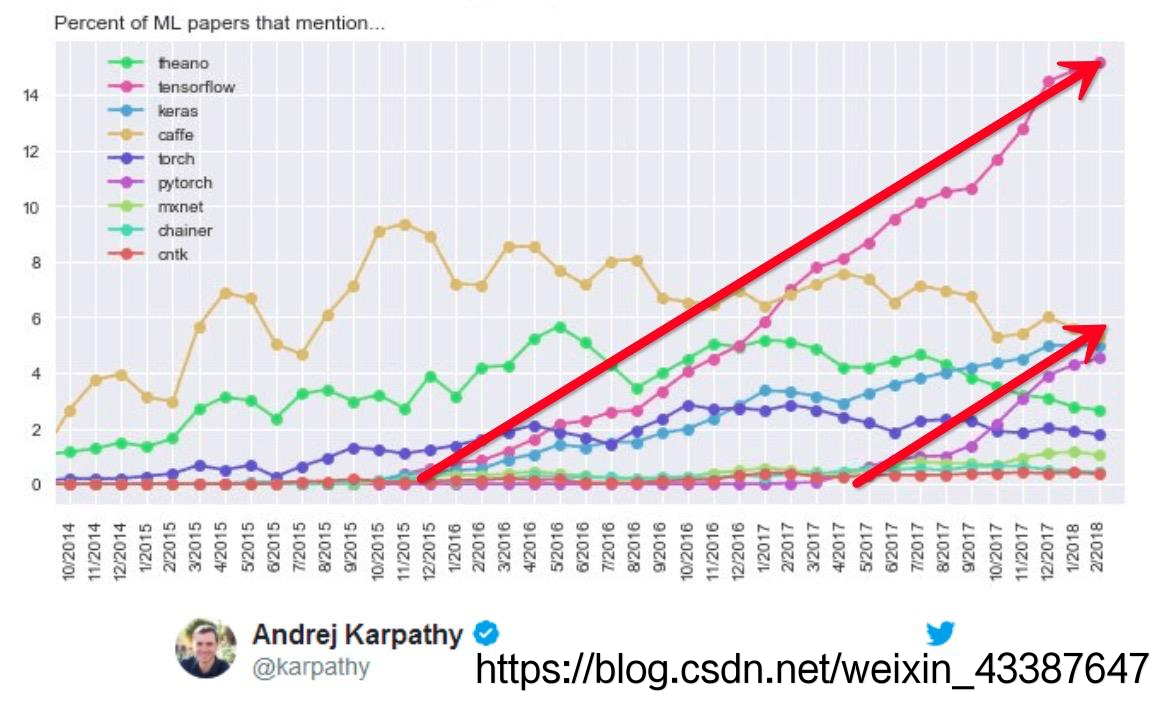
2. 优点:
- 上手快:掌握Numpy和基本深度学习概念即可上手
- 代码简洁灵活:用nn.module封装使网络搭建更方便;基于动态图机制,更灵活
- Debug方便:调试PyTorch就像调试 Python 代码一样简单
- 文档规范:https: //pytorch.org/docs/ 可查各版本文档
- 资源多:arXiv中的新算法大多有PyTorch实现
- 开发者多:GitHub上贡献者(Contributors) 已超过1100+
- 背靠大树:FaceBook维护开发
3. 安装:
anaconda(需添加中科大镜像)
pycharm(将jetbrains-agent.jar 放 到安装目录\bin文件 夹,在 pycharm64.exe.vmoptions 中添加 命令
-javaagent:安装目录\jetbrains-agent.jar. 重启选择网页激活)pytorch(先安装cuda10.0及对应CuDNN版本,通过
nvcc -V验证. 登陆https://download.pytorch.org/whl/torch_stable.html. 下载cu100/torch-1.2.0-cp37-cp37m-win_amd64.whl 及对应 torchvision 的whl文件,进入相应虚拟环境,先创建虚拟环境,再通过pip安装)。最后通过下面指令验证GPU版本Pytorch可以运行:
In [1]: import torch

In [2]: torch.cuda.current_device()

Out[2]: 0

In [3]: torch.cuda.device(0)

Out[3]: <torch.cuda.device at 0x7efce0b03be0>

In [4]: torch.cuda.device_count()

Out[4]: 1

In [5]: torch.cuda.get_device_name(0)

Out[5]: 'GeForce GTX 950M'

In [5]: torch.__version__

Out[5]: '1.2.0'
二、张量简介与创建
1. Tensor属性
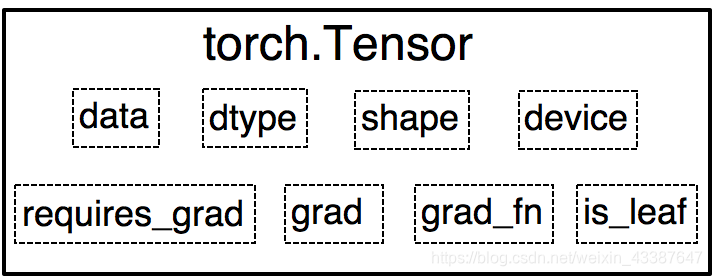
0.4.0之前,Variable是torch.autograd中的数据类型,主要用于封装Tensor,进行自动求导,包含:
- data : 被包装的Tensor
- grad: data的梯度
- grad_fn : 创建Tensor的Function,是自动求导的关键
- requires_ grad : 指示是否需要梯度
- is_ leaf: 指示是否是叶子结点(张量)
之后的Tensor兼容了Variable的所有属性,并添加了下面三个:
- dtype : 张量的数据类型,如 torch .FloatTensor, torch.cuda.FloatTensor
- shape : 张量的形状,如( 64, 3, 224, 224 )
- device : 张量所在设备,GPU /CPU,是加速的关键
2. 创建
A. 直接
torch.tensor(data, dtype=None, device=None, requires_grad=False, pin_memory=False) # 是否锁页内存

torch.from_numpy(...) # 共享内存,参数同上
B. 依据数值
torch.zeros(*size, out=None, dtype=None, layout=torch.strided,device=None, requires_grad=False)

torch.zeros_like(input, dtype=None,layout=None,device=None, requires_grad=False)

torch.ones(...) # 参数同zeros

torch.ones_like(...) # 参数同zeros_like
# 以下函数参数从out起同zeros

torch.full(size, fill_value, ...)

torch.arange(start=0, end, step=1, ...) # step表步长

torch.linspace(start, end, steps=100, ...) # steps表长度 (steps-1)*step=end-start

torch.logspace(start, end, steps=100, base=10.0,...)

torch.eye(n, m=None,..)	# 二维,n行m列
C. 依据概率分布
torch.normal(mean, std, (size,) out=None) # mean, std 均为标量时size表示输出一维张量大小,否则没有size,输出的张量来自于不同分布

torch.randn(*size, out=None, dtype=None, layout=torch.strided,device=None, requires_grad=False) # 标准正太分布

torch.rand(...) # 均匀分布,参数同randn

torch.randint(low=0, high,...) # 均匀整数分布,参数从size同randn

torch.randperm(n,...) # 0到n-1随机排列,参数从out同randn

torch.bernoulli(input, *, generator=None, out=None) # 以input为概率,生成伯努力分布
三、张量操作与线性回归
1. 张量操作
A. 拼接与切分
torch.cat(tensors, dim=0, out=None)

torch.stack(tensors, dim=0, out=None) # 在新维度上拼接

torch.chunk(input, chunks, dim=0)

torch.split(tensor, split_size_or_sections, dim=0)
B. 张量索引
torch.index_select(input, dim, index, out=None)

torch.masked_select(input, mask, out=None) # mask为与input同形状的bool
C. 张量变换
torch.reshape(input, shape)

torch.transpose(input, dim0, dim1) # 交换的两维

torch.t(input)

torch.squeeze(input, dim=None, out=None) # 默认去除所有长度1的维,否则去除指定且长度为1的维

torch.usqueeze(input, dim, out=None)
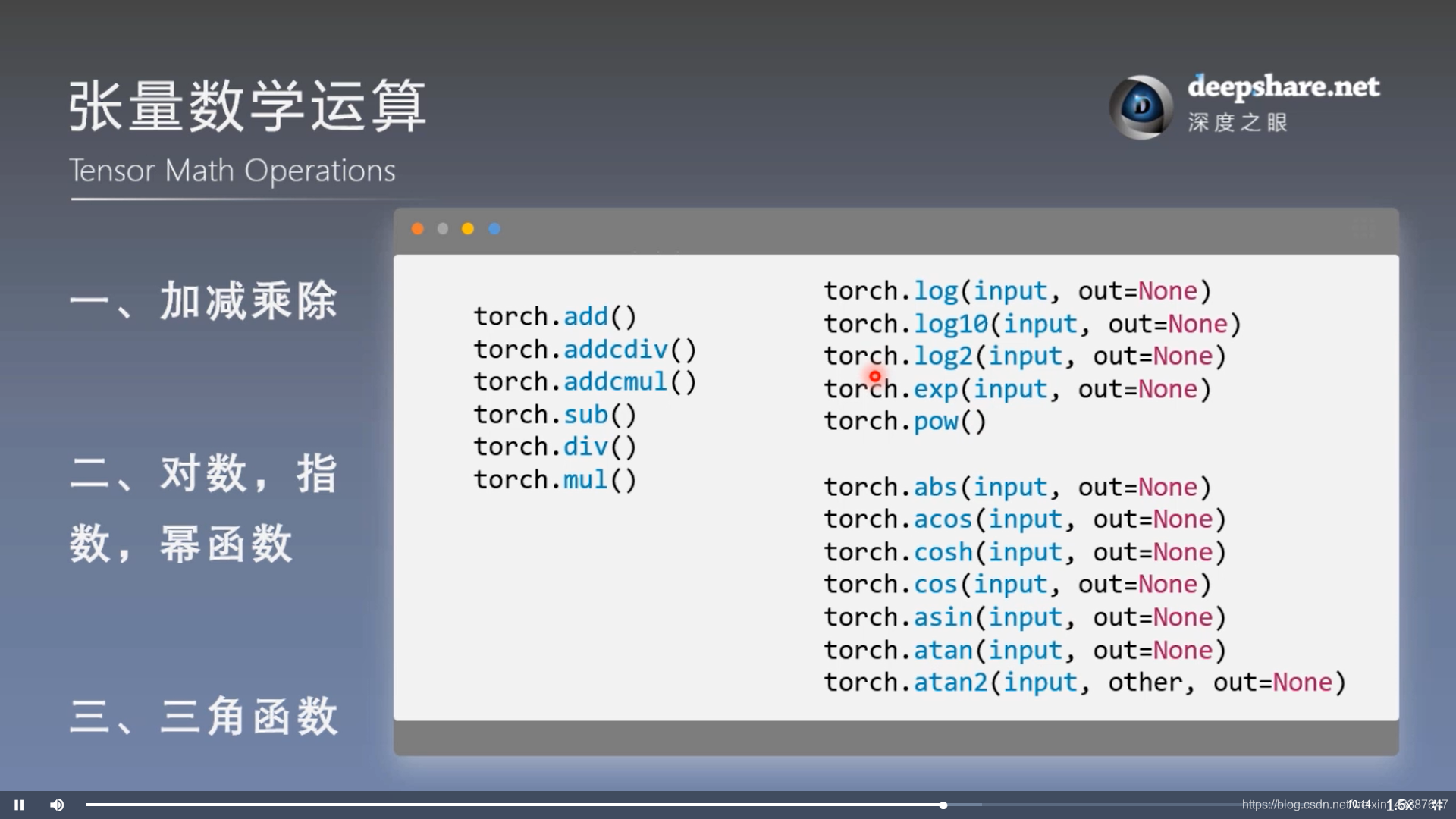
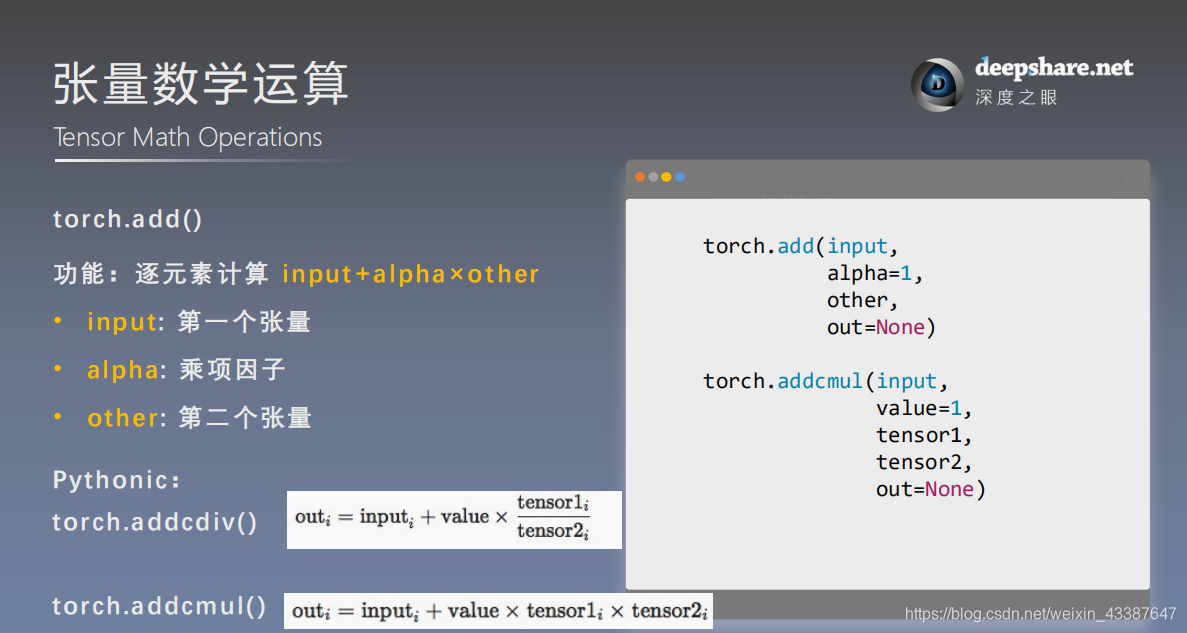
2. 数学运算
3. 线性回归
结果:
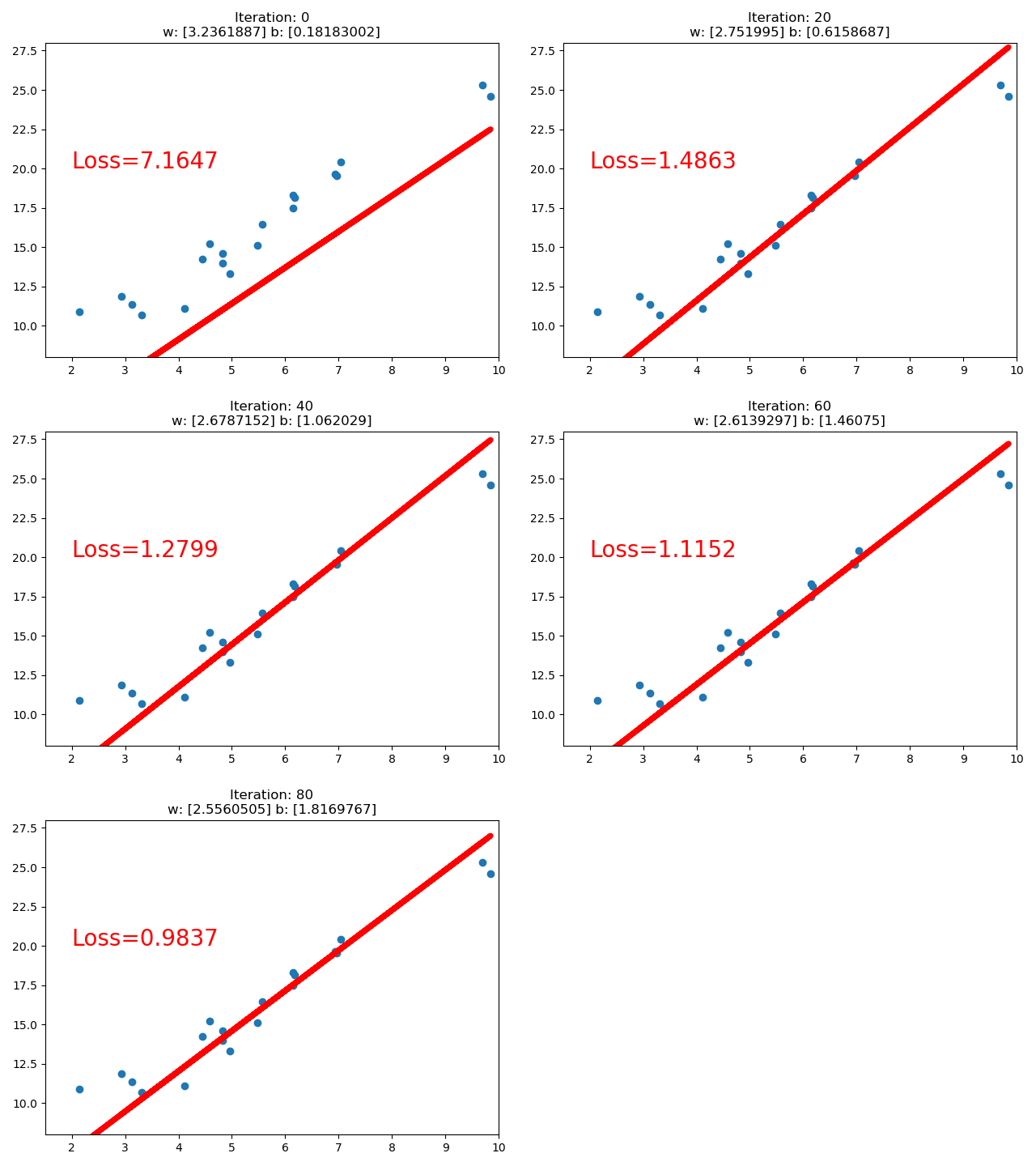
import torch

import matplotlib.pyplot as plt

torch.manual_seed(10)

lr = 0.05  # 学习率    20191015修改

# 创建训练数据

x = torch.rand(20, 1) * 10  # x data (tensor), shape=(20, 1)

y = 2*x + (5 + torch.randn(20, 1))  # y data (tensor), shape=(20, 1)

# 构建线性回归参数

w = torch.randn((1), requires_grad=True)

b = torch.zeros((1), requires_grad=True)

for iteration in range(1000):

    # 前向传播

    wx = torch.mul(w, x)

    y_pred = torch.add(wx, b)

    # 计算 MSE loss

    loss = (0.5 * (y - y_pred) ** 2).mean()

    # 反向传播

    loss.backward()

    # 更新参数

    b.data.sub_(lr * b.grad)

    w.data.sub_(lr * w.grad)

    # 清零张量的梯度   20191015增加

    w.grad.zero_()

    b.grad.zero_()

    # 绘图

    if iteration % 20 == 0:

        plt.scatter(x.data.numpy(), y.data.numpy())

        plt.plot(x.data.numpy(), y_pred.data.numpy(), 'r-', lw=5)

        plt.text(2, 20, 'Loss=%.4f' % loss.data.numpy(), fontdict={'size': 20, 'color':  'red'})

        plt.xlim(1.5, 10)

        plt.ylim(8, 28)

        plt.title("Iteration: {}\nw: {} b: {}".format(iteration, w.data.numpy(), b.data.numpy()))

        plt.pause(0.5)

        if loss.data.numpy() < 1:

            break
四、计算图与动态图机制
1. 计算图
计算图是用来描述运算的有向无环图,有两个主要元素:结点(Node,表示数据,如向量,矩阵,张量) 和边(Edge,表示运算,如加减乘除卷积等)结
用计算图表示:y = (x+ w) * (w+1) 如下
a = x + w

b = w + 1

y = a * b
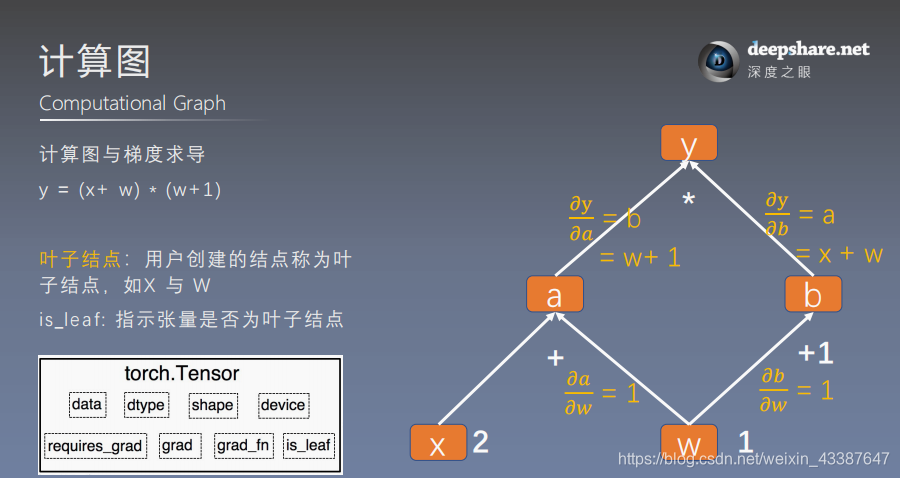
可以根据计算图构建相应的张量并计算梯度:
- 叶子张量:由用户创建的张量,保存梯度,没有梯度函数
- 非叶子张量:通过计算得到,反向传播会释放梯度。除非在反向传播之前
a.retain_grd()
例如x=2 w=1 时,通过计算图得:
\(dw = \frac{\partial y}{\partial w} = \frac{\partial y}{\partial a} \frac{\partial a}{\partial w} + \frac{\partial y}{\partial b} \frac{\partial b}{\partial w} = b *1+a*1=w+1+x+w=5\)
w = torch.tensor([1.], requires_grad=True)

x = torch.tensor([2.], requires_grad=True)

a = torch.add(w, x)     # retain_grad()

b = torch.add(w, 1)

y = torch.mul(a, b)

y.backward()	# 张量内部方法,调用了torch.autograd.backward()

print(w.grad)
tensor([5.])
# 查看叶子结点

print("is_leaf:\n", w.is_leaf, x.is_leaf, a.is_leaf, b.is_leaf, y.is_leaf)

# 查看梯度

print("gradient:\n", w.grad, x.grad, a.grad, b.grad, y.grad)

# 查看 grad_fn

print("grad_fn:\n", w.grad_fn, x.grad_fn, a.grad_fn, b.grad_fn, y.grad_fn)
is_leaf:
True True False False False
gradient:
tensor([5.]) tensor([2.]) None None None
grad_fn:
None None <AddBackward0 object at 0x000001F6AABCB0F0> <AddBackward0 object at 0x000001F6C1A52048> <MulBackward0 object at 0x000001F6AACD7D68>
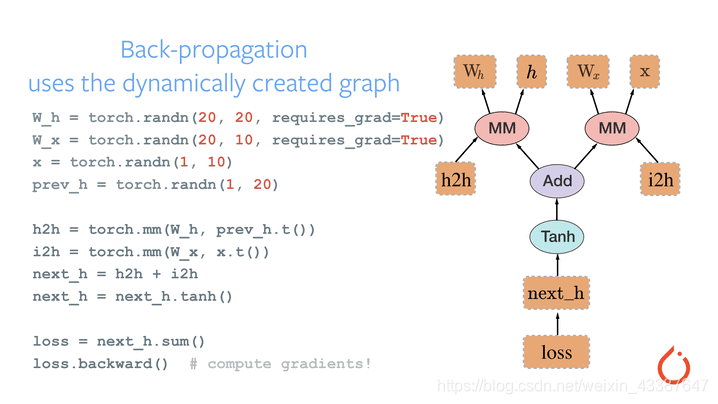
2. 动态图——运算与搭建同时
动态图vs静态图——自由行(灵活易调)vs跟团游
五、autograd与逻辑回归
1. autograd自动求取梯度
torch.autograd.backward(tensors,grad_tensors=None,retain_graph=None,create_graph=False)

torch.autograd.grad(outputs,inputs,grad_outputs=None,retain_graph=None,create_graph=False) # 求指定inputs的梯度
Parameter:
retain_graph保存计算图,可多次w = torch.tensor([1.], requires_grad=True)
x = torch.tensor([2.], requires_grad=True) a = torch.add(w, x)
b = torch.add(w, 1)
y = torch.mul(a, b) y.backward(retain_graph=True)
# print(w.grad)
y.backward()
grad_tensors表示多梯度权重y0 = torch.mul(a, b) # y0 = (x+w) * (w+1)
y1 = torch.add(a, b) # y1 = (x+w) + (w+1) dy1/dw = 2 loss = torch.cat([y0, y1], dim=0) # [y0, y1] loss.backward(gradient=torch.tensor([1., 2.])) print(w.grad) # 1*5+2*2=9
create_graph输出为张量的元组,代表一种求导运算:x = torch.tensor([3.], requires_grad=True)
y = torch.pow(x, 2) # y = x**2 grad_1 = torch.autograd.grad(y, x, create_graph=True) # grad_1 = dy/dx = 2x = 2 * 3 = 6
print(grad_1) grad_2 = torch.autograd.grad(grad_1[0], x) # grad_2 = d(dy/dx)/dx = d(2x)/dx = 2
print(grad_2)
(tensor([6.], grad_fn=),)
(tensor([2.]),)
Note:
梯度不自动清零
w = torch.tensor([1.], requires_grad=True)

x = torch.tensor([2.], requires_grad=True)

for i in range(4):

    a = torch.add(w, x)

    b = torch.add(w, 1)

    y = torch.mul(a, b)

    y.backward()

    print(w.grad)
如果没有
w.grad.zero_(),梯度将会累积依赖于叶子结点的结点,requires_grad默认为True
print(a.requires_grad, b.requires_grad, y.requires_grad)
True True True
叶子结点不可执行in-place
a = torch.ones((1, ))

a = a + torch.ones((1, ))	# a存储位置改变,为inplace操作

a += torch.ones((1, ))
w = torch.tensor([1.], requires_grad=True)

x = torch.tensor([2.], requires_grad=True)

a = torch.add(w, x)

b = torch.add(w, 1)

y = torch.mul(a, b)

w.add_(1)

y.backward()
RuntimeError: a leaf Variable that requires grad has been used in an in-place operation.
2. 逻辑回归 = 对数几率回归
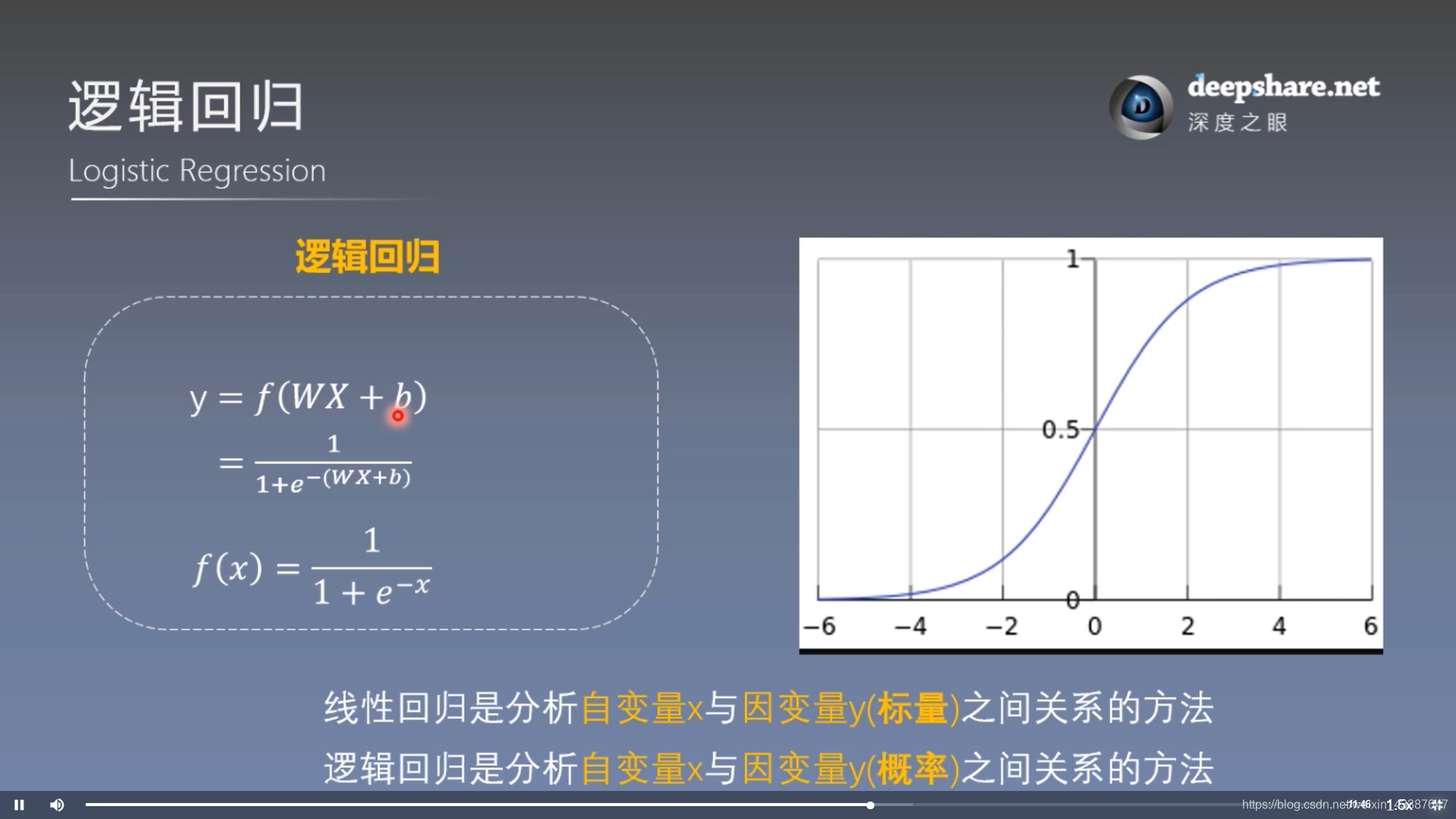
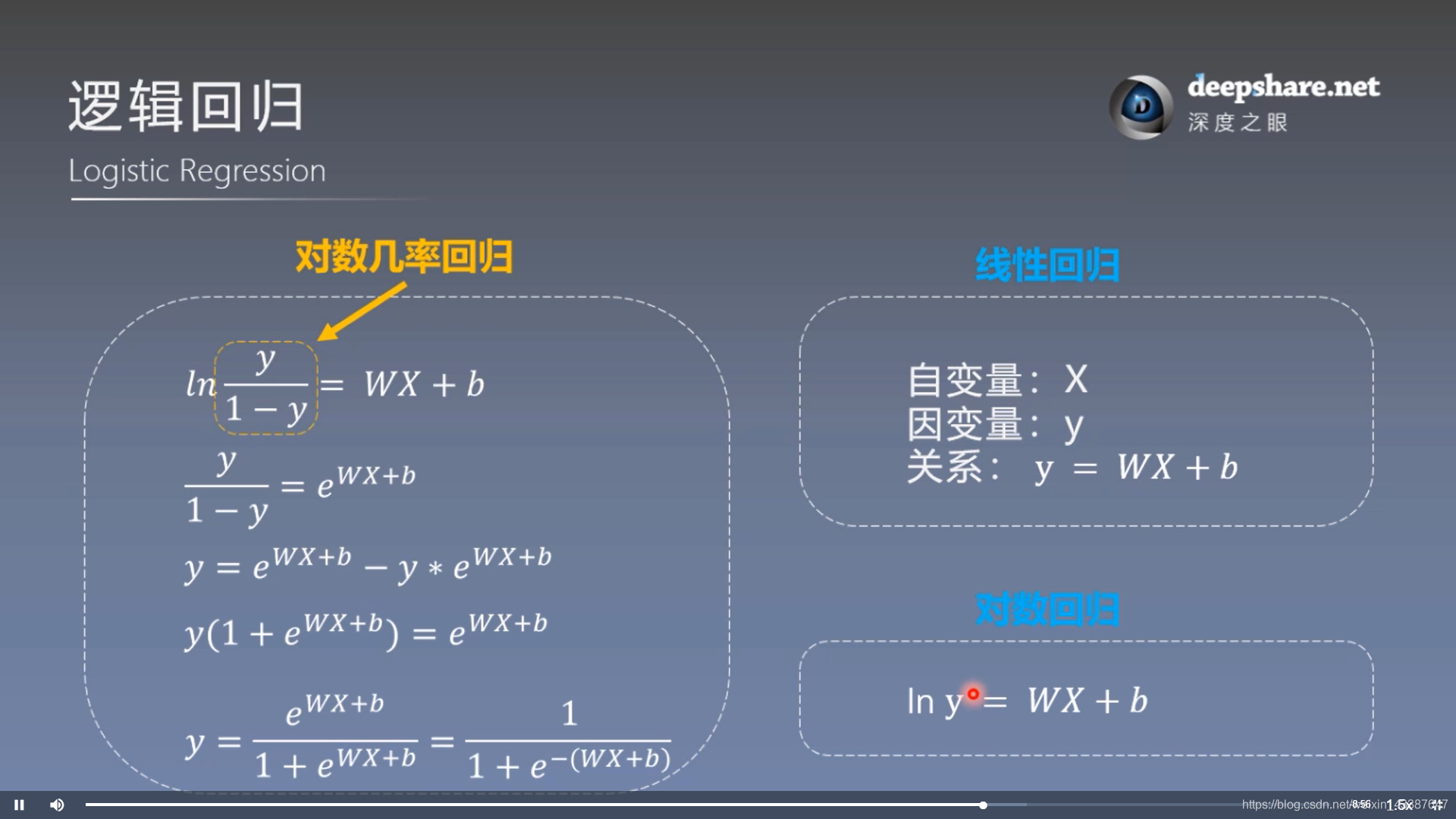
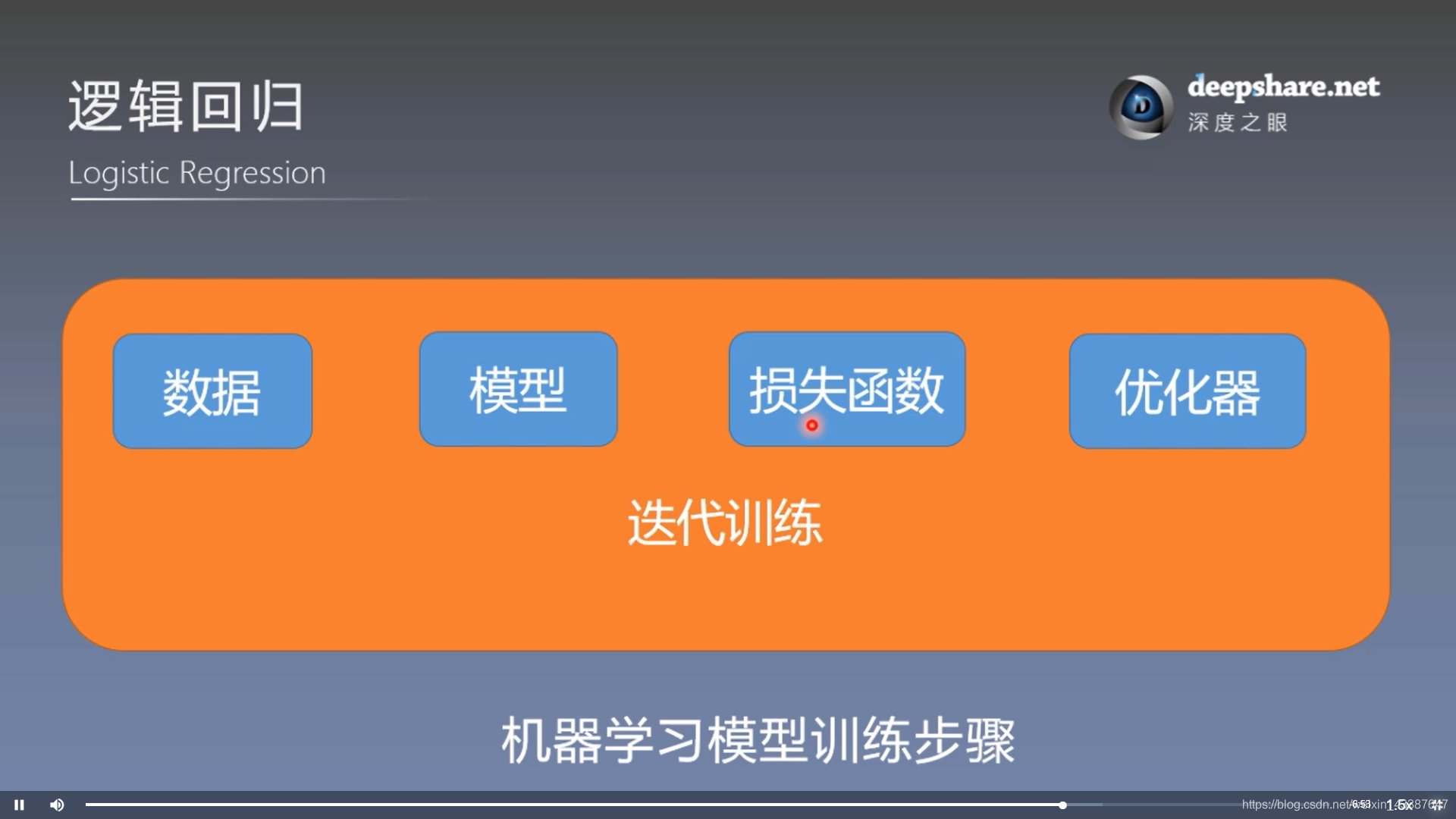
模型训练步骤:
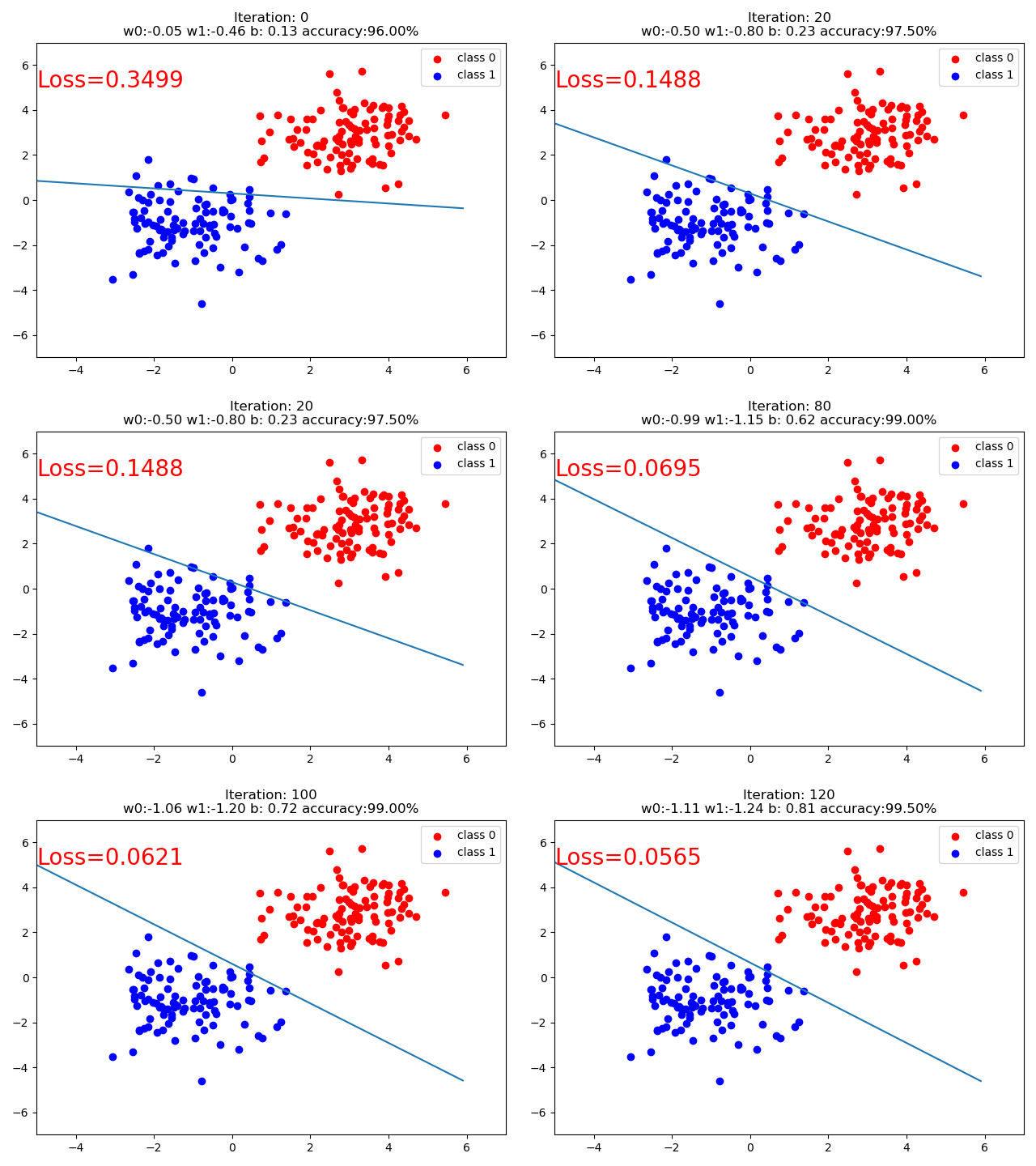
结果:
代码:
import torch

import torch.nn as nn

import matplotlib.pyplot as plt

import numpy as np

torch.manual_seed(10)

# ============================ step 1/5 生成数据 ============================

sample_nums = 100

mean_value = 1.7

bias = 1

n_data = torch.ones(sample_nums, 2)

x0 = torch.normal(mean_value * n_data, 1) + bias      # 类别0 数据 shape=(100, 2)

y0 = torch.zeros(sample_nums)                         # 类别0 标签 shape=(100, 1)

x1 = torch.normal(-mean_value * n_data, 1) + bias     # 类别1 数据 shape=(100, 2)

y1 = torch.ones(sample_nums)                          # 类别1 标签 shape=(100, 1)

train_x = torch.cat((x0, x1), 0)

train_y = torch.cat((y0, y1), 0)

# ============================ step 2/5 选择模型 ============================

class LR(nn.Module):

    def __init__(self):

        super(LR, self).__init__()

        self.features = nn.Linear(2, 1)

        self.sigmoid = nn.Sigmoid()

    def forward(self, x):

        x = self.features(x)

        x = self.sigmoid(x)

        return x

lr_net = LR()   # 实例化逻辑回归模型

# ============================ step 3/5 选择损失函数 ============================

loss_fn = nn.BCELoss()

# ============================ step 4/5 选择优化器   ============================

lr = 0.01  # 学习率

optimizer = torch.optim.SGD(lr_net.parameters(), lr=lr, momentum=0.9)

# ============================ step 5/5 模型训练 ============================

for iteration in range(1000):

    # 前向传播

    y_pred = lr_net(train_x)

    # 计算 loss

    loss = loss_fn(y_pred.squeeze(), train_y)

    # 反向传播

    loss.backward()

    # 更新参数

    optimizer.step()

    # 清空梯度

    optimizer.zero_grad()

    # 绘图

    if iteration % 20 == 0:

        mask = y_pred.ge(0.5).float().squeeze()  # 以0.5为阈值进行分类

        correct = (mask == train_y).sum()  # 计算正确预测的样本个数

        acc = correct.item() / train_y.size(0)  # 计算分类准确率

        plt.scatter(x0.data.numpy()[:, 0], x0.data.numpy()[:, 1], c='r', label='class 0')

        plt.scatter(x1.data.numpy()[:, 0], x1.data.numpy()[:, 1], c='b', label='class 1')

        w0, w1 = lr_net.features.weight[0]

        w0, w1 = float(w0.item()), float(w1.item())

        plot_b = float(lr_net.features.bias[0].item())

        plot_x = np.arange(-6, 6, 0.1)

        plot_y = (-w0 * plot_x - plot_b) / w1

        plt.xlim(-5, 7)

        plt.ylim(-7, 7)

        plt.plot(plot_x, plot_y)

        plt.text(-5, 5, 'Loss=%.4f' % loss.data.numpy(), fontdict={'size': 20, 'color': 'red'})

        plt.title("Iteration: {}\nw0:{:.2f} w1:{:.2f} b: {:.2f} accuracy:{:.2%}".format(iteration, w0, w1, plot_b, acc))

        plt.legend()

        plt.show()

        plt.pause(0.5)

        if acc > 0.99:

            break
Pytorch_Part1_简介&张量的更多相关文章
- [UE4]AnimDynamics简介
AnimDynamics简介 Author:Jia Zhipeng AnimDynamics是UE4.11 Preview 5测试版本发布的AnimationBlueprint中的新节点.功能是通过简 ...
- 人工智能 tensorflow框架-->简介及安装01
简介:Tensorflow是google于2015年11月开源的第二代机器学习框架. Tensorflow名字理解:图形边中流动的数据叫张量(Tensor),因此叫Tensorflow 既 张量流动 ...
- 一、TensorFlow的简介和安装和一些基本概念
1.Tensorflow的简介 就是一个科学计算的库,用于数据流图(张量流,可以理解成一个N维得数组). Tensorflow支持CPU和GPU,内部实现了对于各种目标函数求导的方式. 2.Tenso ...
- pytorch简介
诞生 1.2017年1月,Facebook人工智能研究院(FAIR)团队在GitHub上开源了pyTorch,并迅速占领GitHub热度榜榜首. 常见深度学习框架简介 Theano 1.Theano最 ...
- TensorFlow+Keras 01 人工智能、机器学习、深度学习简介
1 人工智能.机器学习.深度学习的关系 “人工智能” 一词最早是再20世纪50年代提出来的. “ 机器学习 ” 是通过算法,使用大量数据进行训练,训练完成后会产生模型 有监督的学习 supervise ...
- 第四百一十六节,Tensorflow简介与安装
第四百一十六节,Tensorflow简介与安装 TensorFlow是什么 Tensorflow是一个Google开发的第二代机器学习系统,克服了第一代系统DistBelief仅能开发神经网络算法.难 ...
- AnimDynamics简介
转自:http://www.cnblogs.com/corgi/p/5405452.html AnimDynamics简介 AnimDynamics是UE4.11 Preview 5测试版本发布的An ...
- TensorBoard 简介及使用流程【转】
转自:https://blog.csdn.net/gsww404/article/details/78605784 仅供学习参考,转载地址:http://blog.csdn.net/mzpmzk/ar ...
- TensorFlow低阶API(二)—— 张量
简介 正如名字所示,TensorFlow这一框架定义和运行涉及张量的计算.张量是对矢量和矩阵向潜在的更高维度的泛化.TensorFlow在内部将张量表示为基本数据类型的n维数组. 在编写TensorF ...
随机推荐
- (四)SpringBoot启动过程的分析-预处理ApplicationContext
-- 以下内容均基于2.1.8.RELEASE版本 紧接着上一篇(三)SpringBoot启动过程的分析-创建应用程序上下文,本文将分析上下文创建完毕之后的下一步操作:预处理上下文容器. 预处理上下文 ...
- Amundsen在REA Group公司的应用实践
REA Group是一家专门面向房地产与实业资产的跨国数字广告公司. 他们主要为消费者提供房地产购买.出售与租赁服务,同时发布各类房产新闻.装修技巧以及生活方式层面的内容.每一天,都有数百万消费者访问 ...
- 如何配置Nginx,实现http访问重定向到https?
现在越来越多的网站,当我们输入域名时,会自动重定向到https,我们只需要简单修改下Nginx配置文件/usr/local/nginx/conf/nginx.conf(根据个人的实际存储路径)即可. ...
- [图论]最短路径问题 :Floyed-Warshall
最短路径问题 目录 最短路径问题 Description Input Output Sample Input Sample Output 解析 了解Floyed算法 Floyed算法的核心思想: 代码 ...
- js 更改json的 key
let t = data.map(item => { return{ fee: item['费用'], companyName1: item.companyName, remark1: item ...
- ASP.NET网页开发基础(7)
整理了一点的小知识点: 1.ASP.NET网页扩展名: .asax 全局应用程序类的扩展名 .xml 访问网页时的扩展名 .htm .ascx Web用户控件的扩展名 ...
- AI数学基础之:确定图灵机和非确定图灵机
目录 简介 图灵机 图灵机的缺点 等效图灵机 确定图灵机 非确定图灵机 简介 图灵机是由艾伦·麦席森·图灵在1936年描述的一种抽象机器,它是人们使用纸笔进行数学运算的过程的抽象,它肯定了计算机实现的 ...
- starctf_2019_babyshell
starctf_2019_babyshell 有时shellcode受限,最好的方法一般就是勉强的凑出sys read系统调用来注入shellcode主体. 我们拿starctf_2019_babys ...
- 创建逻辑卷,格式化为xfs格式化,在线扩容
创建逻辑卷,并且格式化为xfs格式化好,然后在线扩容 删除逻辑卷组
- day8.函数基础
一.函数介绍 1.什么是函数 函数就是盛放代码的容器,把实现某一功能的一组代码丢到一个函数中 就做成了一个小工具 具备某一功能的工具->函数 事先准备工具的过 ...