
thymeleaf+Springboot实现自定义标签
在项目开发中,有一些组件不能满足我们快速开发的要求,我们需要封装一些组件来更加的便利我们。比如,我们可以封装一个下拉框组件,只要开发人员只有引用这个组件的标签,就能出现效果,而不用再去请求url,渲染等等。以下我们以一个select下拉组件为例
1、我们先自定义一个类:MqInputTagProcessor 并继承了AbstractElementTagProcessor父类
package com.www.baidu.com.web.tag.processor;

import org.apache.commons.lang.StringUtils;
import org.thymeleaf.context.ITemplateContext;
import org.thymeleaf.exceptions.TemplateProcessingException;
import org.thymeleaf.model.IModel;
import org.thymeleaf.model.IModelFactory;
import org.thymeleaf.model.IOpenElementTag;
import org.thymeleaf.model.IProcessableElementTag;
import org.thymeleaf.processor.element.AbstractElementTagProcessor;
import org.thymeleaf.processor.element.IElementTagStructureHandler;
import org.thymeleaf.standard.expression.IStandardExpression;
import org.thymeleaf.standard.expression.IStandardExpressionParser;
import org.thymeleaf.standard.expression.StandardExpressionParser;
import org.thymeleaf.templatemode.TemplateMode;

import java.util.HashMap;
import java.util.Map;

public class MqInputTagProcessor extends AbstractElementTagProcessor
{

    private final static String TAG_NAME = "definitionSelect";
    private final static int PRECEDENCE = 9999;

    /**
     * Description:
     * @param dialectPrefix
     */
    public MqInputTagProcessor(String dialectPrefix)
    {
        super(TemplateMode.HTML, // 模板类型
                dialectPrefix, // 要应用于名称的匹配前缀
                TAG_NAME, // 标签名称
                true, // 将标签前缀应用于标签名称
                null, // 无属性名称:将通过标签名称匹配
                false, // 没有要应用于属性名称的前缀
                PRECEDENCE // 优先级
        );
    }

    @Override
    protected void doProcess(ITemplateContext context, IProcessableElementTag tag,
                             IElementTagStructureHandler structureHandler)
    {
        // 获取我们html中封装的标签上的各个属性值,也可以用tag.getAttributeMap()来获取
        String mqNameValue = tag.getAttributeValue("name");
        String mqValue = tag.getAttributeValue("value");
        String mqId = tag.getAttributeValue("id");
        String mqClass = tag.getAttributeValue("class");
        String mqStyle = tag.getAttributeValue("style");
        String value = evaluateExpression(context, mqValue) + "";
        IModelFactory modelFactory = context.getModelFactory();

     // 模拟从数据库中获取的数据
        Map<String, String> strMap = new HashMap<>(16);
        strMap.put("zhangsan", "张三");
        strMap.put("lisi", "李四");
        strMap.put("wangwu", "王五");
        strMap.put("zhaoliu", "赵六");

        // 创建IModel对象
     IModel model = modelFactory.createModel();
      // 获得IOpenElementTag对象来构建标签模板
        IOpenElementTag openElementTag = modelFactory.createOpenElementTag("select", "class", mqClass);
        openElementTag = modelFactory.setAttribute(openElementTag, "style", mqStyle);
        openElementTag = modelFactory.setAttribute(openElementTag, "id", mqId);
        openElementTag = modelFactory.setAttribute(openElementTag, "value", value);
        openElementTag = modelFactory.setAttribute(openElementTag, "name", mqNameValue);
     // 把IOpenElementTag对象构建的标签模板放入model中
        model.add(openElementTag);
        // 构建select下的option标签
      model.add(modelFactory.createOpenElementTag("option value=''"));
        model.add(modelFactory.createText("选择类别"));
     // 构建结束标签
        model.add(modelFactory.createCloseElementTag("option"));

        // 创建option
        strMap.forEach((k, v) -> {
            IOpenElementTag openElementTag1 = modelFactory.createOpenElementTag(String.format("option value='%s'", k));
            if (k.equals(value))
            {
                openElementTag1 = modelFactory.setAttribute(openElementTag1, "selected", "true");
            }
            model.add(openElementTag1);
            model.add(modelFactory.createText(v));
            model.add(modelFactory.createCloseElementTag("option"));
            modelFactory.createOpenElementTag("option");
        });

        model.add(modelFactory.createCloseElementTag("select"));

        // 指示引擎用指定的模板替换整个元素
     structureHandler.replaceWith(model, false);
    }

    private Object evaluateExpression(ITemplateContext context, String expression) throws TemplateProcessingException
    {
        if (StringUtils.isEmpty(expression))
        {
            return null;
        }
        final IStandardExpressionParser parser = new StandardExpressionParser();

        final IStandardExpression evaluableExpression = parser.parseExpression(context, expression);

        return evaluableExpression.execute(context);
    }
}
2、定义方言
package com.xxxx.web.tag.dialect;

import com.skywares.web.tag.processor.*;

import org.thymeleaf.dialect.AbstractProcessorDialect;

import org.thymeleaf.processor.IProcessor;

import java.util.HashSet;

import java.util.Set;

public class StDialect extends AbstractProcessorDialect

{

    private static final int PROCESSOR_PRECEDENCE = 1000;// 方言(标签)优先级

    private static final String DIALECT_NAME = "ai Dialect";// 方言(标签)名称

    private static final String PREFIX = "ai";// 方言(标签)前缀

    protected StDialect(String name, String prefix, int processorPrecedence)

        super(name, prefix, processorPrecedence);

    }

    public StDialect()

    {

        // 我们将设置此方言与“方言处理器”优先级相同

        // 标准方言, 以便处理器执行交错。

        super(DIALECT_NAME, PREFIX, PROCESSOR_PRECEDENCE);

    }

    /**

     * 注册标签

     */

    @Override

    public Set<IProcessor> getProcessors(String dialectPrefix)

    {

        return createStandardProcessorsSet(dialectPrefix);

    }

    public static Set<IProcessor> createStandardProcessorsSet(final String dialectPrefix)

    {

        Set<IProcessor> processors = new HashSet<IProcessor>();

        processors.add(new DefinitionsSelectTagProcessor(dialectPrefix));

        return processors;

    }

}
3、界面上的使用:
// qo为回显的Map集合,itemId为key
<ai:definitionSelect id="oidjf" name="stuNo" th:value="{qo['stuNo']}" />
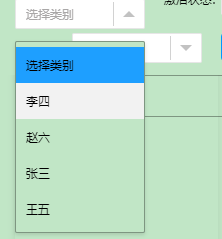
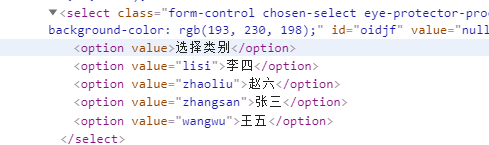
4、实现的效果:
thymeleaf+Springboot实现自定义标签的更多相关文章
- spring thymeleaf 自定义标签
概述 thymeleaf2.1.5自定义标签及自定义属性案例,类似于JSP中的自定义JSTL标签 详细 代码下载:http://www.demodashi.com/demo/10495.html 一. ...
- thymeleaf教程-springboot项目中实现thymeleaf自定义标签
转载: http://www.9191boke.com/466119140.html 91博客网 开始: 在使用thymeleaf的过程中有时候需要公共部分渲染页面,这个时候使用自定义标签实现自 ...
- thymeleaf自定义标签方言处理
项目背景:springboot+thymeleaf thymeleaf两种方式处理自定义标签:AbstractAttributeTagProcessor 和 AbstractElementTagPro ...
- Java Spring Boot VS .NetCore (十一)自定义标签 Java Tag Freemarker VS .NetCore Tag TagHelper
Java Spring Boot VS .NetCore (一)来一个简单的 Hello World Java Spring Boot VS .NetCore (二)实现一个过滤器Filter Jav ...
- spring Cache + Redis 开发数据字典以及自定义标签
一.数据库表结构 1. 分类表:dict_type 2. 子项表:dict_entry 二.页面维护功能示意图: 1. 分类管理 点击子项管理进入子项管理页面 2.子项管理 三.数据字典添加到缓 ...
- OneBlog开源博客-详细介绍如何实现freemarker自定义标签
前言 OneBlog中使用到了springboot + freemarker的技术,同时项目里多个controller中都需要查询一个公有的数据集合,一般做法是直接在每个controller的方法中通 ...
- [JSP]自定义标签库taglib
自定义标签的步骤 自定义标签的步骤大概有三步: 1.继承javax.servlet.jsp.tagext.*下提供的几个标签类,如Tag.TagSupport.BodyTagSupport.Simpl ...
- [Java] JSP笔记 - 自定义标签
自定义标签的创建步骤: 自定义标签的四大功能: 自定义标签的类结构: 在 1.0 中呢, 可以将 <body-content> 的值设置为 JSP, 2.0中则不允许在自定义标签体中出现j ...
- thinkphp自定义标签库
thinkphp ~ php中 的类, 的成员变量, 本身是没有类型说明的, 那么我怎么知道它的类型呢? 或初始值呢? 通常在类定义中, 如果能给一个初始值的(对于已知简单类型的),最好给一个初始值, ...
随机推荐
- hdu 4309 最大流 + DFS
题意: 给以三种有向边 (1) 隧道,可以过无数人,也可以藏c个人. (2) 路,只能过人(流量INF). (3)古桥,如果不修理可以过1个人,修理可以过无数个人,但 ...
- Android敲诈者病毒“安卓性能激活”分析(2015年9月版)
一.情况简介 前几天分析了论坛里的一个Android敲诈者病毒,感觉还是很有收获,后面有空多研究研究Android病毒.说句题外话, 根据前面分析的Android敲诈者病毒的隐藏手法,应该可以实现&q ...
- PAT 乙级 -- 1002 -- 写出这个数
题目: 读入一个自然数n,计算其各位数字之和,用汉语拼音写出和的每一位数字. 输入格式:每个测试输入包含1个测试用例,即给出自然数n的值.这里保证n小于10100. 输出格式:在一行内输出n的各位数字 ...
- POJ2308连连看dfs+bfs+优化
DFS+BFS+MAP+剪枝 题意: 就是给你一个10*10的连连看状态,然后问你最后能不能全部消没? 思路: 首先要明确这是一个搜索题目,还有就是关键的一点就是连连看这个游戏是 ...
- Android系统自带的android.util.Base64的实现源码
由于Android逆向还原的时候,经常需要用到android.util.Base64的代码,因此从Android 4.4.4的 系统里抠出来进行备份,懒得用其他的代码进行修改替换了. /* * Cop ...
- node-OS&Domain&Net&Path
OS--------------------------------------------- Node.js os 模块提供了一些基本的系统操作函数. var os = require(" ...
- SpringBoot日志输出定义
在application.yml配置文件中添加 logging: level: root: INFO #根日志输出级别 com.juyss.dao: DEBUG #自定义包的日志输出级别 file: ...
- CentOS安装Redis报错[server.o] Error 1
原因 准备安装的Redis服务版本为6.0.8, gcc的版本为4.8.5,可能是gcc版本过低到导致的 解决办法 安装低版本Redis或者安装高版本gcc
- 【maven】You may use+to add a project ro to let the plugin find all pom.xml files...
错误显示 解决方法 点击pom.xml,再Add as Maven Project 如果还不能解决,点击idea的log 复制报错(技巧:可以先将idea.log删除,比较好定位) Caused by ...
- 『动善时』JMeter基础 — 17、JMeter配置元件【HTTP请求默认值】
目录 1.HTTP请求默认值介绍 2.HTTP请求默认值界面 3.HTTP请求默认值的使用 (1)用于演示的项目说明 (2)测试计划内包含的元件 (3)说明HTTP请求默认值用法 4.总结 5.拓展知 ...