
AOP实现方式一
1.创建相应的类
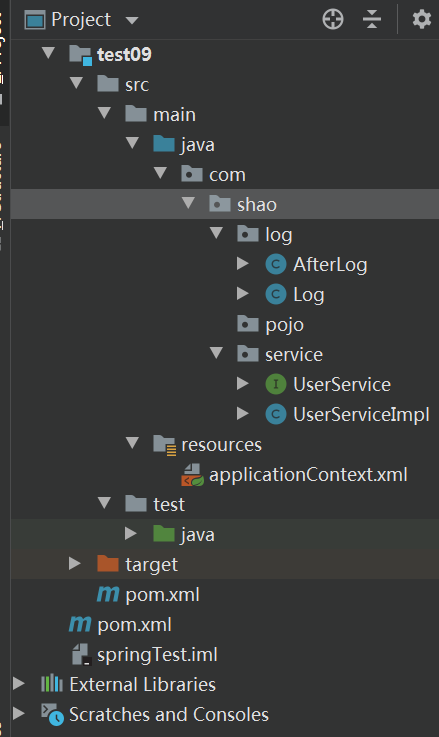
2.代码
service沿用前面的
增加两个log
Log.java
package com.shao.log;

import org.springframework.aop.MethodBeforeAdvice;

import java.lang.reflect.Method;

public class Log implements MethodBeforeAdvice {

    //Method:受执行的目标对象的方法

    //objects: 参数

    //o:目标对象

    public void before(Method method, Object[] objects, Object o) throws Throwable {

        assert o != null;

        System.out.println(o.getClass().getName()+"的"+method.getName()+"被执行了");

    }

}
AfterLog.java
package com.shao.log;

import org.springframework.aop.AfterAdvice;

import org.springframework.aop.AfterReturningAdvice;

import java.lang.reflect.Method;

public class AfterLog implements AfterReturningAdvice {

    //执行之后拿回了返回值

    public void afterReturning(Object o, Method method, Object[] objects, Object o1) throws Throwable {

        System.out.println("执行了"+method.getName()+", 返回了"+o);

    }

}
applicationContext.xml
<?xml version="1.0" encoding="UTF-8"?>

<beans xmlns:xsi="http://www.w3.org/2001/XMLSchema-instance"

       xmlns="http://www.springframework.org/schema/beans"

       xmlns:context="http://www.springframework.org/schema/context"

       xmlns:aop="http://www.springframework.org/schema/aop"

       xmlns:mvc="http://www.springframework.org/schema/mvc"

       xsi:schemaLocation="http://www.springframework.org/schema/beans

       http://www.springframework.org/schema/beans/spring-beans-4.2.xsd

       http://www.springframework.org/schema/mvc

       https://www.springframework.org/schema/mvc/spring-mvc.xsd

       http://www.springframework.org/schema/context

       https://www.springframework.org/schema/context/spring-context-4.2.xsd

       http://www.springframework.org/schema/aop

       https://www.springframework.org/schema/aop/spring-aop-4.2.xsd">

    <bean id="userService" class="com.shao.service.UserServiceImpl"/>

    <bean id="log" class="com.shao.log.Log"/>

    <bean id="afterLog" class="com.shao.log.AfterLog"/>

    <!--配置Aop:导入AOP约束-->

    <aop:config>

        <!--切入点:expression表达式:要执行的位置-->

        <!--这个类的所有方法-->

        <aop:pointcut id="pointcut" expression="execution(* com.shao.service.UserServiceImpl.*(..))"/>

        <!--执行环绕增加-->

        <!--把log这个类切入到这个方法中去-->

        <aop:advisor advice-ref="log" pointcut-ref="pointcut"/>

        <aop:advisor advice-ref="afterLog" pointcut-ref="pointcut"/>

    </aop:config>

</beans>
3.测试
import com.shao.service.UserService;

import com.shao.service.UserServiceImpl;

import org.springframework.context.ApplicationContext;

import org.springframework.context.support.ClassPathXmlApplicationContext;

public class Test {

    @org.junit.Test

    public void test01(){

        ApplicationContext context = new ClassPathXmlApplicationContext("applicationContext.xml");

        //一定要注意:动态代理的是接口

        UserService userService = (UserService) context.getBean("userService");

        userService.add();

    }

}
AOP实现方式一的更多相关文章
- Spring两种实现AOP的方式
有两种实现AOP的方式:xml配置文件的方式和注解的形式 我们知道通知Advice是指对拦截到的方法做什么事,可以细分为 前置通知:方法执行之前执行的行为. 后置通知:方法执行之后执行的行为. 异常通 ...
- 来一手 AOP 注解方式进行日志记录
系统日志对于定位/排查问题的重要性不言而喻,相信许多开发和运维都深有体会. 通过日志追踪代码运行状况,模拟系统执行情况,并迅速定位代码/部署环境问题. 系统日志同样也是数据统计/建模的重要依据,通过分 ...
- 做接口自动化时候,一些登录头信息可以通过aop的方式进行增强
做接口自动化时候,一些登录头信息可以通过aop的方式进行增强
- Spring AOP配置方式
AOP 面向切面编程,允许在 java 应用中的方法调用的前后做一些处理. 本文通过实例介绍两种主要的Spring AOP 配置方式:xml 方式配置,注解方式配置 XML 方式配置 1. 项目包类结 ...
- 在.NET Core中三种实现“可插拔”AOP编程方式(附源码)
一看标题肯定会联想到使用动态编织的方式实现AOP编程,不过这不是作者本文讨论的重点. 本文讨论另外三种在netcore中可实现的方式,Filter(过滤器,严格意义上它算是AOP方式),Dynamic ...
- Spring里的aop实现方式和源码分析
使用"横切"技术,AOP把软件系统分为两个部分:核心关注点和横切关注点.业务处理的主要流程是核心关注点,与之关系不大的部分是横切关注点.横切关注点的一个特点是,他们经常发生在核心关 ...
- AOP注解方式ApsectJ开发
AOP注解方式ApsectJ开发 引入配置文件 编写切面类配置 使用注解的AOP对象目标类进行增强 在配置文件中开启以注解形式进行AOP开发 在切面类上添加注解 注解AOP通知类型 @Before前置 ...
- Spring系列之aAOP AOP是什么?+xml方式实现aop+注解方式实现aop
Spring系列之aop aop是什么?+xml方式实现aop+注解方式实现aop 什么是AOP? AOP为Aspect Oriented Programming 的缩写,意识为面向切面的编程,是通过 ...
- spring aop注解方式与xml方式配置
注解方式 applicationContext.xml 加入下面配置 <!--Spring Aop 启用自动代理注解 --> <aop:aspectj-autoproxy proxy ...
- (转)Spring AOP实现方式(转)
我们可以通过三种方式来使用Spring AOP,它们分别是:@Aspect-based(Annotation),Schema-based(XML),以及底层的Spring AOP API 底层的Spr ...
随机推荐
- 技术番外篇丨Github Action CI/CD
起源 看到.Net群里再聊CI/CD,我就这里分享一下我目前自己一些小东西的做法,我目前在Github有一个自己私有的组织,里面存放了我的部分商业化项目,早期我采用Jenkins用Webhooks进行 ...
- pycharm设置文件中显示模板内容
pycharm中设置自己的文件模板 File>>Settings>>Editor>>File and Code Templates 选择文件类型或者输入文件类型 ...
- 接口自动化-Python3+request上传文件,发送multipart/form-data编码
1.安装requests_toolbelt pip install requests-toolbelt 2.发送文件中的数据 from requests_toolbelt import Multi ...
- IEEE 754 浮点数加减运算
电子科技大学 - 计算机组成原理 小数的十进制和二进制转换 移码 定义:[X]移 = X + 2n ( -2n ≤ X < 2n ) X为真值,n为整数的位数 数值位和X的补码相同,符号位与补码 ...
- vue.$nextTick实现原理
源码: const callbacks = [] let pending = false function flushCallbacks () { pending = false const copi ...
- MAC 安装 apache ab 压力测试工具以及遇到的坑
ab 是apache对 http服务器进行压力测试的工具,它可以测试出服务器每秒可以处理多少请求.本文记录mac版本安装 ab 的步骤以及遇到的坑. 下载 进入 apache ab官网 下载页面. 安 ...
- 【数据结构与算法Python版学习笔记】树——平衡二叉搜索树(AVL树)
定义 能够在key插入时一直保持平衡的二叉查找树: AVL树 利用AVL树实现ADT Map, 基本上与BST的实现相同,不同之处仅在于二叉树的生成与维护过程 平衡因子 AVL树的实现中, 需要对每个 ...
- Coursera Deep Learning笔记 改善深层神经网络:优化算法
笔记:Andrew Ng's Deeping Learning视频 摘抄:https://xienaoban.github.io/posts/58457.html 本章介绍了优化算法,让神经网络运行的 ...
- mysql all_ip_test局域网IP测试工具,有需要的改一改.
1 import threading 2 import subprocess 3 import pymysql 4 # threading.Lock() 5 6 7 class Link(object ...
- BF算法和KMP算法
这两天复习数据结构(严蔚敏版),记录第四章串中的两个重要算法,BF算法和KMP算法,博主主要学习Java,所以分析采用Java语言,后面会补上C语言的实现过程. 1.Brute-Force算法(暴力法 ...