
SpringBoot-Web-初见
怎么开发一个网站?
目前后端通过修改基本都是可以实现,主要是前端还存在不少问题,所以还是推荐使用
- 模板,更改别人的,成为自己的
- 使用框架,组件,自己手动拼接
- 前端搞定:页面写出来
- 设计数据库(难点)
- 前端可以独立的自动运行,独立化工程
- 数据接口怎么对接:json,对象all in one
- 前后端联调测试
有一个熟悉的后台模板,前端页面自己可以组合出来一个网站的页面,让它独立运行。
静态资源
SpringMVC中所有静态资源或者页面应该放在web目录下,不能直接访问的会放在web/WEB-INF下
找到静态资源的存放目录
SpringBoot项目的静态资源应该放在哪个目录下?
WebMvcAutoConfiguration
//添加资源处理器

public void addResourceHandlers(ResourceHandlerRegistry registry) {

      //如果静态资源已经被自定义了 那么就自定义的生效

            if (!this.resourceProperties.isAddMappings()) {

                logger.debug("Default resource handling disabled");

            } else {

                Duration cachePeriod = this.resourceProperties.getCache().getPeriod();

                CacheControl cacheControl = this.resourceProperties.getCache().getCachecontrol().toHttpCacheControl();

                //获取静态资源方式一:找到webjars/路径下的静态资源 (此方式了解即可 一般不使用)

                if (!registry.hasMappingForPattern("/webjars/**")) {

                    this.customizeResourceHandlerRegistration(registry.addResourceHandler(new String[]{"/webjars/**"}).addResourceLocations(new String[]{"classpath:/META-INF/resources/webjars/"}).setCachePeriod(this.getSeconds(cachePeriod)).setCacheControl(cacheControl));

                }

                String staticPathPattern = this.mvcProperties.getStaticPathPattern();

                //获取静态资源方式二: 获取当前目录下的静态资源 staticPathPattern

                if (!registry.hasMappingForPattern(staticPathPattern)) {

                    this.customizeResourceHandlerRegistration(registry.addResourceHandler(new String[]{staticPathPattern})

                    .addResourceLocations(WebMvcAutoConfiguration.getResourceLocations(this.resourceProperties.getStaticLocations()))

                    .setCachePeriod(this.getSeconds(cachePeriod)).setCacheControl(cacheControl));

                }

            }

        }
点进staticPathPattern继续查看源码,staticPathPattern代表/**
点进(this.resourceProperties.getStaticLocations())会发现以下路径定义
// 访问 /** 会去这几个目录下寻找静态资源

 private static final String[] CLASSPATH_RESOURCE_LOCATIONS = new String[]

 {"classpath:/META-INF/resources/",

 "classpath:/resources/",

 "classpath:/static/",

 "classpath:/public/"};
优先级
| 目录 | 优先级 |
|---|---|
| resources | 高 |
| static | 中 |
| public | 低 |
扩展自定义路径
从源码的第一行我们可以看出,如果静态资源路径被自定义了,那么就会生效自定义的
# 在application配置文件中 设置如下 覆盖默认路径

spring.mvc.static-path-pattern=/tutony
首页定制
在WebMvcAutoConfiguration有:
     //最后会被注入到bean

        @Bean //欢迎页的处理映射

        public WelcomePageHandlerMapping welcomePageHandlerMapping(ApplicationContext applicationContext, FormattingConversionService mvcConversionService, ResourceUrlProvider mvcResourceUrlProvider) {

            WelcomePageHandlerMapping welcomePageHandlerMapping = new WelcomePageHandlerMapping(new TemplateAvailabilityProviders(applicationContext), applicationContext,

            this.getWelcomePage(),

            //可以寻找自定义欢迎页

            this.mvcProperties.getStaticPathPattern());

            welcomePageHandlerMapping.setInterceptors(this.getInterceptors(mvcConversionService, mvcResourceUrlProvider));

            welcomePageHandlerMapping.setCorsConfigurations(this.getCorsConfigurations());

            return welcomePageHandlerMapping;

        }

       // 在静态目录下寻找

        private Optional<Resource> getWelcomePage() {

            String[] locations = WebMvcAutoConfiguration.getResourceLocations(this.resourceProperties.getStaticLocations());

            return Arrays.stream(locations).map(this::getIndexHtml).filter(this::isReadable).findFirst();

        }

        //返回静态资源目录下一个叫 index.html的文件

        private Resource getIndexHtml(String location) {

            return this.resourceLoader.getResource(location + "index.html");

        }
因此从源码可以看出我们在静态资源目录下定义一个index.html文件
SpringBoot将自动识别为首页(欢迎页)
模板引擎Thymeleaf
前端交给我们的页面,是html页面。
如果是我们以前开发,我们需要把他们转成jsp页面,
SpringBoot这个项目首先是以jar的方式,不是war,像第二,我们用的还是嵌入式的Tomcat,所以呢,他现在默认是不支持jsp的。
那不支持jsp,如果我们直接用纯静态页面的方式,那给我们开发会带来非常大的麻烦,那怎么办呢,SpringBoot推荐你可以来使用模板引擎。
模板引擎有非常多,但再多的模板引擎,他们的思想都是一样的:
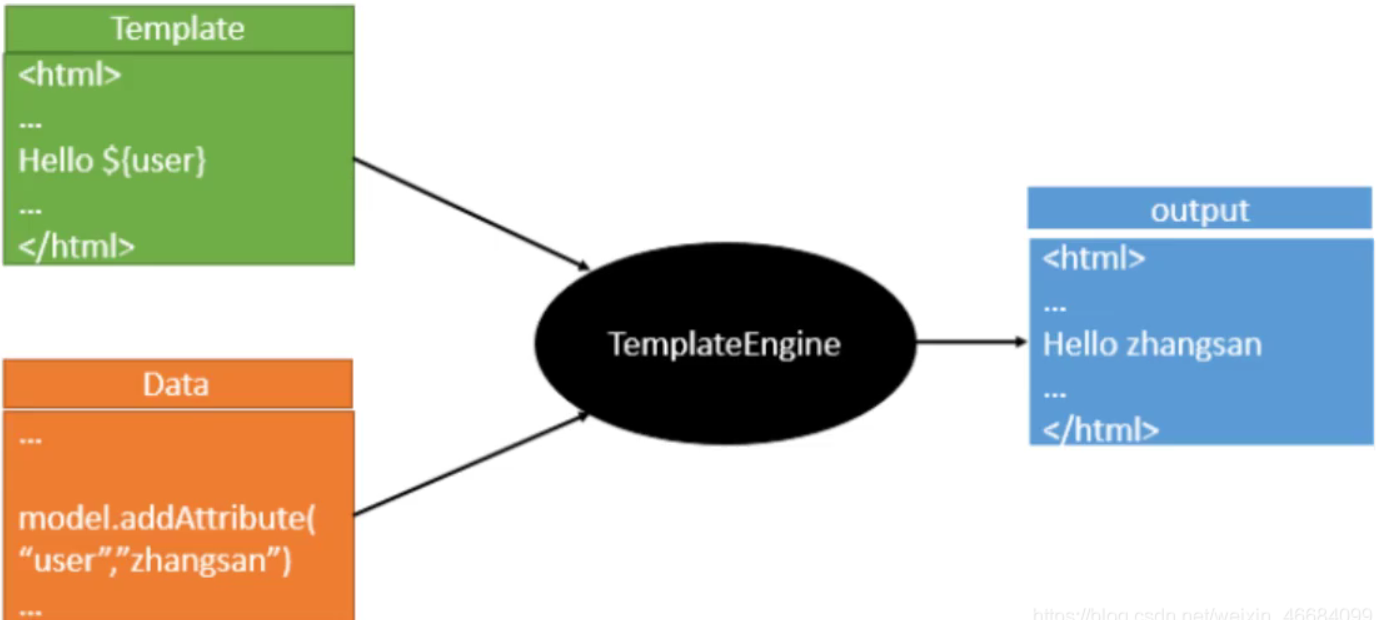
thymeleaf中文文档:https://raledong.gitbooks.io/using-thymeleaf/content/Chapter1/
员工管理系统-初见
员工管理系统-初见 地址:https://gitee.com/zwtgit/spring-boot-web
关于Thymeleaf相关的操作我就不说了,本人不推荐使用。
下面主要说一下SpringBoot的特殊操作。
国际化
什么是页面国际化?
我们在很多网站上看到的中英文切换,这个就叫做国际化
Spring Boot 和 Spring 一脉相承,对于国际化的支持,
默认是通过 AcceptHeaderLocaleResolver 解析器来完成的,
这个解析器,默认是通过请求头的 Accept-Language 字段来判断当前请求所属的环境的,进而给出合适的响应。
国际化实现
1.在resource目录下新建i18n(国际化单词的简写)文件夹
国际化,也叫 i18n,为啥叫这个名字呢?因为国际化英文是 internationalization ,

在 i 和 n 之间有 18 个字母,所以叫 i18n。

我们的应用如果做了国际化就可以在不同的语言环境下,方便的进行切换,

最常见的就是中文和英文之间的切换,国际化这个功能也是相当的常见。
2.创建Login.properties三个配置文件
Login_en_US.properties(英语)

Login.tip=Please sign in

Login.password=Password

Login.remenber=Remember me

Login.username=Username

Login.sign=Sign in

Login_zh_CN.properties(中文)

Login.tip=用户登录

Login.password=密码

Login.remenber=记住我

Login.username=用户名

Login.sign=登录
4.在springboot配置文件application.properties中指定国际化配置文件路径
# 配置国际化文件位置

spring.messages.basename=i18n.Login
5.在Thymeleaf中国际化的配置需要使用#{}包裹
编写国际化配置类
/**

 * 国际化配置类

 * 需要实现LocaleResolver

 */

public class MyLocaleResolover implements LocaleResolver {

    //解析请求

    @Override

    public Locale resolveLocale(HttpServletRequest httpServletRequest) {

        //获取请求中的语言参数

        String languge = httpServletRequest.getParameter("l");

        Locale locale = Locale.getDefault();//如果没有泽使用默认的

        //如果请求的链接携带了国际化参数

        if(!StringUtils.isEmpty(languge)){

            //zh_CN

            String[] s = languge.split("_");

            //国际 地区

            locale = new Locale(s[0], s[1]);

        }

        return locale;

    }

    @Override

    public void setLocale(HttpServletRequest httpServletRequest, HttpServletResponse httpServletResponse, Locale locale) {

    }

}
将国际化配置类放入spring容器
/**

 * 扩展MVC

 */

@Configuration

public class MyMvcConfig implements WebMvcConfigurer {

    /**

     * 视图跳转

     * 添加首页控制

     * url:localhost:8080/ 跳转到首页

     * url:localhost:8080/index.html 跳转到首页

     * @param registry

     */

    @Override

    public void addViewControllers(ViewControllerRegistry registry) {

        registry.addViewController("/").setViewName("index");

        registry.addViewController("/index.html").setViewName("index");

    }

    /**

     * 讲国际化配置放到spring容器管理

     * @return 自定义的国际化配置

     */

    @Bean

    public LocaleResolver localeResolver(){

        return new MyLocaleResolover();

    }

}
页面国际化∶
- 我们需要配置
i18n文件 - 我们如果需要在项目中进行按钮自动切换,我们需要自定义一个组件
LocaleResolver - 记得将自己写的组件配置到spring容器
@Bean - 国际化使用:#{}
登陆功能
编写index.html设置请求路径
编写html
编写LoginController
/**

 * 登录功能实现

 */

@Controller

public class LoginController {

    //登录功能 伪造假数据

    @RequestMapping("/user/login")

    public String login(@RequestParam("username") String username, @RequestParam("password")String password, Model model){

        if (!StringUtils.isEmpty(username.trim()) && password.trim().equals("123456")){

            model.addAttribute("msg","登录成功");

            return "redirect: /main.html"; //重定向

        }

        model.addAttribute("msg","账号或密码错误");

        return "index";

    }

}
编写MVC自定义配置
   /**

     * 视图跳转

     * 添加首页控制

     * url:localhost:8080/ 跳转到首页

     * url:localhost:8080/index.html 跳转到首页

     * @param registry

     */

    @Override

    public void addViewControllers(ViewControllerRegistry registry) {

        registry.addViewController("/").setViewName("index");

        registry.addViewController("/index.html").setViewName("index");

        //登录重定向

        registry.addViewController("/main.html").setViewName("dashboard");

    }
拦截器
修改LoginController
修改LoginController代码,登录成功以后将用户信息放在session中:
   //登录功能 伪造假数据

    @RequestMapping("/user/login")

    public String login(@RequestParam("username") String username, @RequestParam("password")String password, Model model, HttpSession httpSession){

        if (!StringUtils.isEmpty(username.trim()) && password.trim().equals("123456")){

            model.addAttribute("msg","登录成功");

            httpSession.setAttribute("userLoginInfo",username);//登录成功以后将用户信息放置在Session中

            return "redirect:/main.html"; //重定向

        }

        model.addAttribute("msg","账号或密码错误");

        return "index";

    }
编写拦截器
/**

 * 自定义拦截器

 * 拦截未登录的用户

 */

public class MyInterceptor implements HandlerInterceptor {

    //判断用户是否登录 从session中判断

    @Override

    public boolean preHandle(HttpServletRequest request, HttpServletResponse response, Object handler) throws Exception {

        //获取Session

        HttpSession session = request.getSession();

        //判断是否在登录页面

        if(request.getRequestURI().contains("index")){

            return true;

        }

        //判断是否登录过了

        if(session.getAttribute("userLogin")!=null){

            return true;

        }

        // 用户没有登陆跳转到登陆页面

        request.setAttribute("msg","没有登录请先登录!");

        request.getRequestDispatcher("/").forward(request, response);

        return false;

    }

}
在MVC自定义配置类中设置
 //配置拦截器

    @Override

    public void addInterceptors(InterceptorRegistry registry) {

        registry.addInterceptor(new MyInterceptor())

                //拦截哪些请求

                .addPathPatterns("/**")

                //不拦截哪些请求 首页 登录请求 静态资源

                .excludePathPatterns("/","/index.html","/user/login","/css/**","/js/**","/img/**");

    }
SpringBoot-Web-初见的更多相关文章
- springboot+web文件上传和下载
一.首先安装mysql数据库,开启web服务器. 二.pom.xml文件依赖包配置如下: <?xml version="1.0" encoding="UTF-8&q ...
- 如何在spring-boot web项目中启用swagger
swagger的三个项目及其作用 我们打开swagger的官网,会发现有三个swagger相关的项目,它们分别是 swagger-editor 作用是通过写代码,生成文档描述(一个json文件或其他格 ...
- SpringBoot Web开发(5) 开发页面国际化+登录拦截
SpringBoot Web开发(5) 开发页面国际化+登录拦截 一.页面国际化 页面国际化目的:根据浏览器语言设置的信息对页面信息进行切换,或者用户点击链接自行对页面语言信息进行切换. **效果演示 ...
- SpringBoot Web开发(4) Thymeleaf模板与freemaker
SpringBoot Web开发(4) Thymeleaf模板与freemaker 一.模板引擎 常用得模板引擎有JSP.Velocity.Freemarker.Thymeleaf SpringBoo ...
- SpringBoot Web项目中中如何使用Junit
Junit这种老技术,现在又拿出来说,不为别的,某种程度上来说,更是为了要说明它在项目中的重要性. 凭本人的感觉和经验来说,在项目中完全按标准都写Junit用例覆盖大部分业务代码的,应该不会超过一半. ...
- SpringBoot Web篇(二)
摘要 继上一篇 SpringBoot Web篇(一) 文件上传 当我们服务器需要接收用户上传的文件时,就需要使用MultipartFile作为参数接收文件.如下: @PostMapping(" ...
- SpringBoot web获取请求数据【转】
SpringBoot web获取请求数据 一个网站最基本的功能就是匹配请求,获取请求数据,处理请求(业务处理),请求响应,我们今天来看SpringBoot中怎么获取请求数据. 文章包含的内容如下: 获 ...
- springboot web项目创建及自动配置分析(thymeleaf+flyway)
@ 目录 源码分析 webjars thymeleaf thymeleaf语法 springmvc 启动配置原理 集成flyway插件 springboot 创建web项目只需要引入对应的web-st ...
- SpringBoot Web 学习
SpringBoot Web 开发 静态资源 打开WebMvcAutoConfiguration类里面的静态类WebMvcAutoConfigurationAdapter里面的addResourceH ...
- SpringBoot Web学习笔记
一.资源的访问: 情形一.所有的 /webjars/** 都会去 classpath:/META_INFO/resource/webjars/ 下找资源: webjars:以jar包的方式引入静态 ...
随机推荐
- 「Leetcode-算法_Easy461」通过「简单」题目学习位运算
Easy 461.汉明距离 因为原题目翻译效果不佳,这里是笔者自己的理解. 输入两个二进制数 x.y, 输出将 y 变为 x 所需改变的二进制位数,成为汉明距离. 注意: 0 ≤ x, y < ...
- 如何根治慢SQL?
本文摘自:CodeSheep 今天和大家聊一个常见的问题:慢SQL. 包括以下内容: 慢SQL的危害 SQL语句的执行过程 存储引擎和索引的那些事儿 慢SQL解决之道 后续均以MySQL默认存储引擎I ...
- 利用支付宝Cookie监听交易订单实现个人支付宝收款实时回调通知
在网上.社区里搜了一下好像没找到什么文章详细分享这种方式的,这些天我花了些时间研究整理了一下,发现这种方式能实时获取到支付宝里的二维码收款记录,从而很好地实现个人支付宝免签约收款实时回调,于是在这里分 ...
- 方法对了,你做1年Android开发能顶别人做10年
前几天后台有读者问我这样的问题.他在一家互联网公司工作3年了,每天都很忙,事情又多又杂. 本想着学习多一些东西也不是坏事,可到头来一无所获,什么都没学会,满腔的热情也被消磨得差不多. 三天两头动辞职的 ...
- MobSF移动安全扫描平台本地化部署与简单汉化
在之前的文章MobSF移动安全扫描平台环境搭建与试用中,我们用docker进行了搭建,那么我们如何在本地直接搭建呢,其实也是很简单的. 本地化部署 我们在本地安装 其实是很简单的,里面有两个文件,在不 ...
- springboot项目出现Whitelabel Error Page的问题
springboot项目出现Whitelabel Error Page的问题 大概就是这种情况,然而昨天还是没问题的,通过对比就发现,是自己手欠了 简单来说解决办法就是将springboot的启动项目 ...
- 一文搞懂Java/Spring/Dubbo框架中的SPI机制
几天前和一位前辈聊起了Spring技术,大佬突然说了SPI,作为一个熟练使用Spring的民工,心中一紧,咱也不敢说不懂,而是在聊完之后赶紧打开了浏览器,开始的学习之路,所以也就有了这篇文章.废话不多 ...
- SQL 练习38
查询选修了全部课程的学生信息 SELECT * from Student WHERE SId IN ( SELECT sid from sc GROUP BY sid HAVING COUNT(cid ...
- MYSQL数据库查询索引
1.查看数据库所有索引 SELECT * FROM mysql.`innodb_index_stats` a WHERE a.`database_name` = '数据库名'; 2.查看某一表索引 S ...
- MySQL:互联网公司常用分库分表方案汇总!
转载别人 一.数据库瓶颈 不管是IO瓶颈,还是CPU瓶颈,最终都会导致数据库的活跃连接数增加,进而逼近甚至达到数据库可承载活跃连接数的阈值.在业务Service来看就是,可用数据库连接少甚至无连接可用 ...