
Django(47)drf请求生命周期分析
前言
一般我们写完序列化以后,我们就会开始写视图了,drf中我们一般使用CBV的方式,也就是类视图的方式,最基础的我们会使用from rest_framework.views import APIView,APIView继承自View,关于视图的详解,我们后续再细讲。本章介绍drf的请求生命周期
前置准备工作
我们先写一个视图类TestView,代码如下:
from rest_framework.views import APIView

from rest_framework.response import Response

class TestView(APIView):

    def get(self, request, *args, **kwargs):

        return Response("drf get ok")

    def post(self, request, *args, **kwargs):

        return Response("drf post ok")
注意:这里的Response必须是drf下的Response,不能是Django原生的HttpResponse或者是JsonResponse,否则会出错
接着,在urls.py中配置路由,如下
urlpatterns = [

    path('test/', views.TestView.as_view(), name="Test"),

]
然后我们访问http://127.0.0.1:8000/drf/test/,会出现下图样式,代表请求成功
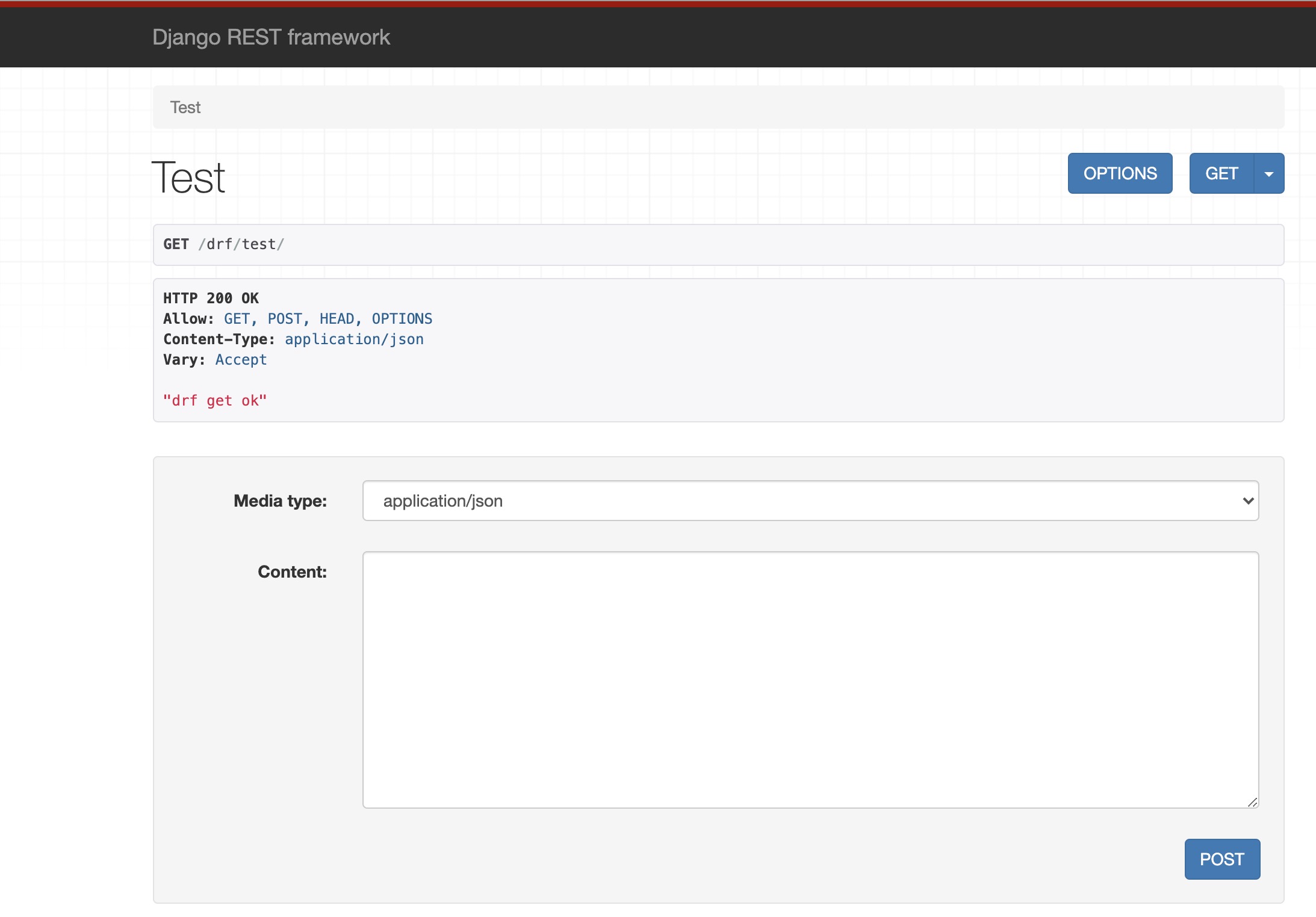
接着我们在接口工具中使用POST请求方式访问,返回结果如下:
"drf post ok"
以上2种访问方式都成功了,接下来我们分析其中的请求过程以及原理
请求生命周期分析
首先我们先从路由配置中看到views.TestView.as_view(),调用的是TestView类视图下的as_view方法,但是我们上面定义该方法的时候,没有重写as_view()方法,所以会调用父类APIView中的as_view方法,源码如下:
@classmethod

def as_view(cls, **initkwargs):

    """

    Store the original class on the view function.

    This allows us to discover information about the view when we do URL

    reverse lookups.  Used for breadcrumb generation.

    """

    # 判断queryset是否是QuerySet对象

    if isinstance(getattr(cls, 'queryset', None), models.query.QuerySet):

        def force_evaluation():

            raise RuntimeError(

                'Do not evaluate the `.queryset` attribute directly, '

                'as the result will be cached and reused between requests. '

                'Use `.all()` or call `.get_queryset()` instead.'

            )

        cls.queryset._fetch_all = force_evaluation

    # 调用父类的as_view方法

    view = super().as_view(**initkwargs)

    view.cls = cls

    view.initkwargs = initkwargs

    # Note: session based authentication is explicitly CSRF validated,

    # all other authentication is CSRF exempt.

    # 禁用了csrf认证

    return csrf_exempt(view)
通过这行代码view = super().as_view(**initkwargs),可以知道APIView的as_view方法也调用了父类View的as_view方法,源码如下:
def as_view(cls, **initkwargs):

    """Main entry point for a request-response process."""

    for key in initkwargs:

        if key in cls.http_method_names:

            raise TypeError("You tried to pass in the %s method name as a "

                            "keyword argument to %s(). Don't do that."

                            % (key, cls.__name__))

        if not hasattr(cls, key):

            raise TypeError("%s() received an invalid keyword %r. as_view "

                            "only accepts arguments that are already "

                            "attributes of the class." % (cls.__name__, key))

    def view(request, *args, **kwargs):

        self = cls(**initkwargs)

        # 如果有get属性,没有head属性,那么head就是get

        if hasattr(self, 'get') and not hasattr(self, 'head'):

            self.head = self.get

        # 初始化所有视图方法共享的属性

        self.setup(request, *args, **kwargs)

        # 如果没有request属性,报异常

        if not hasattr(self, 'request'):

            raise AttributeError(

                "%s instance has no 'request' attribute. Did you override "

                "setup() and forget to call super()?" % cls.__name__

            )

        # 返回一个`dispatch`方法

        return self.dispatch(request, *args, **kwargs)

    view.view_class = cls

    view.view_initkwargs = initkwargs

    # take name and docstring from class

    update_wrapper(view, cls, updated=())

    # and possible attributes set by decorators

    # like csrf_exempt from dispatch

    update_wrapper(view, cls.dispatch, assigned=())

    return view
as_view方法返回的是view,view返回的是dispatch方法,dispatch方法也是调用的APIView下的dispatch方法,源码如下:
def dispatch(self, request, *args, **kwargs):

    """

    `.dispatch()` is pretty much the same as Django's regular dispatch,

    but with extra hooks for startup, finalize, and exception handling.

    """

    self.args = args

    self.kwargs = kwargs

    # 初始化请求,返回的是Request对象

    request = self.initialize_request(request, *args, **kwargs)

    self.request = request

    self.headers = self.default_response_headers  # deprecate?

    try:

        # 在调用方法处理程序之前运行任何需要发生的操作

        self.initial(request, *args, **kwargs)

        # Get the appropriate handler method

        # 获取request的请求方法

        if request.method.lower() in self.http_method_names:

            handler = getattr(self, request.method.lower(),

                              self.http_method_not_allowed)

        else:

            handler = self.http_method_not_allowed

        response = handler(request, *args, **kwargs)

    except Exception as exc:

        # 在调用方法处理程序之前出现异常,则跑出异常

        response = self.handle_exception(exc)

    # 返回一个response响应对象

    self.response = self.finalize_response(request, response, *args, **kwargs)

    return self.response
dispatch返回一个response响应对象,得到请求的响应结果,返回给前台
总结
- url请求走的是
APIView的as_view函数 - 在
APIView的as_view调用父类(django原生)的as_view,还禁用了csrf认证 - 在父类的
as_view中的dispatch方法请求走的又是APIView的dispatch - 完成任务方法交给视图类函数处理,得到请求的响应结果,返回给前台
Django(47)drf请求生命周期分析的更多相关文章
- DRF框架(一)——restful接口规范、基于规范下使用原生django接口查询和增加、原生Django CBV请求生命周期源码分析、drf请求生命周期源码分析、请求模块request、渲染模块render
DRF框架 全称:django-rest framework 知识点 1.接口:什么是接口.restful接口规范 2.CBV生命周期源码 - 基于restful规范下的CBV接口 3.请求组件 ...
- drf复习(一)--原生djangoCBV请求生命周期源码分析、drf自定义配置文件、drf请求生命周期dispatch源码分析
admin后台注册model 一.原生djangoCBV请求生命周期源码分析 原生view的源码路径(django/views/generic/base.py) 1.从urls.py中as_view ...
- Django(35)Django请求生命周期分析(超详细)
Django请求生命周期分析 1.客户端发送请求 在浏览器输入url地址,例如www.baidu.com,浏览器会自动补全协议(http),变为http://www.baidu.com,现在部分网站都 ...
- DRF 请求生命周期以及各模块解析
目录 rest_framework框架的封装特点 原生Django与DRF比较 APIView 的请求生命周期 请求模块(request) 解析模块(parser_classes) 异常模块(exce ...
- Django简介,请求生命周期,静态文件配置
Web框架 Web框架(Web framework)是一种开发框架,用来支持动态网站.网络应用和网络服务的开发.这大多数的web框架提供了一套开发和部署网站的方式,也为web行为提供了一套通用的方 ...
- drf框架概况-resful接口规范-请求模块-渲染模块-Postman-drf请求生命周期
drf框架 全称:django-rest- framework 知识点: """ 1.接口:什么是接口.restful接口规范 2.CBV生命周期源码-基于restful ...
- 3) drf 框架生命周期 请求模块 渲染模块 解析模块 自定义异常模块 响应模块(以及二次封装)
一.DRF框架 1.安装 pip3 install djangorestframework 2.drf框架规矩的封装风格 按功能封装,drf下按不同功能不同文件,使用不同功能导入不同文件 from r ...
- Django框架深入了解_01(Django请求生命周期、开发模式、cbv源码分析、restful规范、跨域、drf的安装及源码初识)
一.Django请求生命周期: 前端发出请求到后端,通过Django处理.响应返回给前端相关结果的过程 先进入实现了wsgi协议的web服务器--->进入django中间件--->路由f分 ...
- APIview的请求生命周期源码分析
目录 APIview的请求生命周期源码分析 请求模块 解析模块 全局配置解析器 局部配置解析器 响应模块 异常处理模块 重写异常处理函数 渲染模块 APIview的请求生命周期源码分析 Django项 ...
随机推荐
- 一文上手Python3
案例参考:廖雪峰--Python教程 基础知识 基本数据类型 用type()来判断数据类型: In [1]: type(1) Out[1]: int In [2]: type(1.0) O ...
- PHP版DES算法加密数据
php7之后的版本 php的mcrypt 扩展已经过时了大约10年,并且用起来很复杂.因此它被废弃并且被 OpenSSL 所取代. 从PHP 7.2起它将被从核心代码中移除并且移到PECL中.PHP手 ...
- php中var关键字用法
见很多朋友说在php中定义变量用不用var都没关系,其实不然. 看看例子,如果我这样使用var: 1 var $a=123; 2 echo $a; 3 //那么程序会提示语法错误,要去掉var这个变量 ...
- 简谈Mysql悲观锁和乐观锁
悲观锁: 其实理解起来非常简单,当数据被外界修改持保守态度,包括自身系统当前的其他事务,以及来自外部系统的事务处理,因此,在整个数据处理过程中,将数据处于锁定状态.悲观锁的实现,往往依靠数据库提供的锁 ...
- 「编程羽录」上线,程序员必备的这些技能你能get到嘛?
大家好,我是小羽. 好久不见,给大家带来个好消息,小羽的全新专题「编程羽录」系列正式上新,主要是介绍一些关于面试题和经验总结的文章. 会为大家提供一些技术栈之外,程序员还需要的其他方面硬核知识,做到全 ...
- Oracle 数据库裸设备扩容处理
前段时间,我管理的一台Oracle数据库表空间容量不足了,由于本人以前没有接触过Oracle的使用所以,就自己查资料来研究如何扩容,网上的文档多数都是在物理机上扩容,而偏偏我的数据文件是存储在裸设备上 ...
- 对c语言回调函数的理解
对于回调函数,可以简单的理解为一种特别的函数调用方法,我们可以对比一下回调函数与普通函数在调用方法上的区别. 1. 普通函数调用 一般为实现方在其函数体执行过程中直接调用. 代码示例: #includ ...
- 数据链路层协议(Ethernet、IEEE802.3、PPP、HDLC)
目录 数据链路层协议 Ethernet以太网协议 以太网数据帧的封装 IEEE802.3协议 PPP协议 HDLC协议 数据链路层协议 首先Ethernet.IEEE802.3.PPP和HDLC都是数 ...
- 5分钟,教你用Python每天跟女朋友说1000遍土味情话!
- 使用C#进行数据库增删改查ADO.NET(三)
文章代码如下: class Program { static void Main (string[] args) { //连接数据库 string connString = "server= ...