
vim编辑器设置
由于ubantu自带的vi编辑器并不好用,而开发一般使用vim编辑器,vim需要自己安装(sudo apt-get install vim 即可安装),但是默认的设置使用起来很不舒服,因此可以通过修改相关设置来提高vim编辑器的实用性。
下面先给出自己的vim效果图(自己认为还不错 ):
):
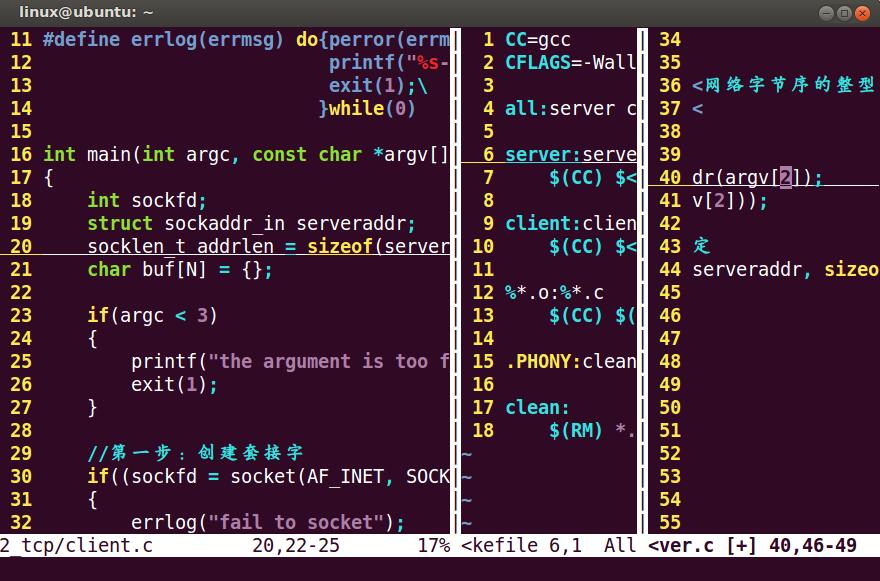
下面是配置文件;
" .vimrc - Vim configuration file.

"

" Copyright (c) 2010 Jeffy Du. All Rights Reserved.

"

" Maintainer: Jeffy Du <jeffy.du@gmail.com>

"    Created: 2010-01-01

" LastChange: 2010-04-22

" GENERAL SETTINGS: {{{1

" To use VIM settings, out of VI compatible mode.

set nocompatible

" Enable file type detection.

filetype plugin indent on

" Syntax highlighting.

syntax on

" Setting colorscheme

color mycolor

" Other settings.

set   autoindent

set   autoread

set   autowrite

set   background=dark

set   backspace=indent,eol,start

set nobackup

set   cindent

set   cinoptions=:0

set   cursorline

set   completeopt=longest,menuone

set noexpandtab

set   fileencodings=utf-8,gb2312,gbk,gb18030

set   fileformat=unix

set   foldenable

set   foldmethod=marker

set   guioptions-=T

set   guioptions-=m

set   guioptions-=r

set   guioptions-=l

set   helpheight=10

set   helplang=cn

set   hidden

set   history=100

set   hlsearch

set   ignorecase

set   incsearch

set   laststatus=2

set   mouse=a

set   number

set   pumheight=10

set   ruler

set   scrolloff=5

set   shiftwidth=4

set   showcmd

set   smartindent

set   smartcase

set   tabstop=4

set   termencoding=utf-8

set   textwidth=80

set   whichwrap=h,l

set   wildignore=*.bak,*.o,*.e,*~

set   wildmenu

set   wildmode=list:longest,full

set nowrap

" AUTO COMMANDS: {{{1

" auto expand tab to blanks

"autocmd FileType c,cpp set expandtab

" Restore the last quit position when open file.

autocmd BufReadPost *

    \ if line("'\"") > 0 && line("'\"") <= line("$") |

    \     exe "normal g'\"" |

    \ endif

" SHORTCUT SETTINGS: {{{1

" Set mapleader

let mapleader=","

" Space to command mode.

nnoremap <space> :

vnoremap <space> :

" Switching between buffers.

nnoremap <C-h> <C-W>h

nnoremap <C-j> <C-W>j

nnoremap <C-k> <C-W>k

nnoremap <C-l> <C-W>l

inoremap <C-h> <Esc><C-W>h

inoremap <C-j> <Esc><C-W>j

inoremap <C-k> <Esc><C-W>k

inoremap <C-l> <Esc><C-W>l

" "cd" to change to open directory.

let OpenDir=system("pwd")

nmap <silent> <leader>cd :exe 'cd ' . OpenDir<cr>:pwd<cr>

" PLUGIN SETTINGS: {{{1

" taglist.vim

let g:Tlist_Auto_Update=1

let g:Tlist_Process_File_Always=1

let g:Tlist_Exit_OnlyWindow=1

let g:Tlist_Show_One_File=1

let g:Tlist_WinWidth=25

let g:Tlist_Enable_Fold_Column=0

let g:Tlist_Auto_Highlight_Tag=1

" NERDTree.vim

let g:NERDTreeWinPos="right"

let g:NERDTreeWinSize=25

let g:NERDTreeShowLineNumbers=1

let g:NERDTreeQuitOnOpen=1

" cscope.vim

if has("cscope")

    set csto=1

    set cst

    set nocsverb

    if filereadable("cscope.out")

        cs add cscope.out

    endif

    set csverb

endif

" OmniCppComplete.vim

let g:OmniCpp_DefaultNamespaces=["std"]

let g:OmniCpp_MayCompleteScope=1

let g:OmniCpp_SelectFirstItem=2

" VimGDB.vim

if has("gdb")

	set asm=0

	let g:vimgdb_debug_file=""

	run macros/gdb_mappings.vim

endif

" LookupFile setting

let g:LookupFile_TagExpr='"./tags.filename"'

let g:LookupFile_MinPatLength=2

let g:LookupFile_PreserveLastPattern=0

let g:LookupFile_PreservePatternHistory=1

let g:LookupFile_AlwaysAcceptFirst=1

let g:LookupFile_AllowNewFiles=0

" Man.vim

source $VIMRUNTIME/ftplugin/man.vim

" snipMate

let g:snips_author="Du Jianfeng"

let g:snips_email="cmdxiaoha@163.com"

let g:snips_copyright="SicMicro, Inc"

" plugin shortcuts

function! RunShell(Msg, Shell)

	echo a:Msg . '...'

	call system(a:Shell)

	echon 'done'

endfunction

nmap  <F2> :TlistToggle<cr>

nmap  <F3> :NERDTreeToggle<cr>

nmap  <F4> :MRU<cr>

nmap  <F5> <Plug>LookupFile<cr>

nmap  <F6> :vimgrep /<C-R>=expand("<cword>")<cr>/ **/*.c **/*.h<cr><C-o>:cw<cr>

nmap  <F9> :call RunShell("Generate tags", "ctags -R --c++-kinds=+p --fields=+iaS --extra=+q .")<cr>

nmap <F10> :call HLUDSync()<cr>

nmap <F11> :call RunShell("Generate filename tags", "~/.vim/shell/genfiletags.sh")<cr>

nmap <F12> :call RunShell("Generate cscope", "cscope -Rb")<cr>:cs add cscope.out<cr>

nmap <leader>sa :cs add cscope.out<cr>

nmap <leader>ss :cs find s <C-R>=expand("<cword>")<cr><cr>

nmap <leader>sg :cs find g <C-R>=expand("<cword>")<cr><cr>

nmap <leader>sc :cs find c <C-R>=expand("<cword>")<cr><cr>

nmap <leader>st :cs find t <C-R>=expand("<cword>")<cr><cr>

nmap <leader>se :cs find e <C-R>=expand("<cword>")<cr><cr>

nmap <leader>sf :cs find f <C-R>=expand("<cfile>")<cr><cr>

nmap <leader>si :cs find i <C-R>=expand("<cfile>")<cr><cr>

nmap <leader>sd :cs find d <C-R>=expand("<cword>")<cr><cr>

nmap <leader>zz <C-w>o

nmap <leader>gs :GetScripts<cr>
配置文件里有几个快捷键还是很舒服的(比如:‘Esc’+'Space' 可以从编辑模式切换到低行模式、 通过配置ab命令来实现自动补全等等)。
vim编辑器设置的更多相关文章
- Vim编辑器设置及其使用
一.vim编辑器的相关配置文件 /etc/vimrc:vim编辑器的全局配置文件,针对所有用户有效 /etc/virc:vi编辑器的全局配置文件,针对所有用户有效 ~/.vimrc:vim编辑器的其他 ...
- linux系统下Vi编辑器或者Vim编辑器设置显示行号、自动缩进、调整tab键宽度的技巧?
工作中嫌vim 中一个tab键的宽度太大,linux系统默认,没改之前是一个tab键宽度是8个字符,想改成4个字符, 操作如下:(注意:这是在root用户下)cd ~vim .vimrc添加如下几行: ...
- vim编辑器设置文件的fileformat
问题:dos格式文件传输到centos系统时,会在每行的结尾多一个^M,即dos文件中的换行符"\r\n"会被转换为unix文件中的换行符"\n",而此文件若是 ...
- vim编辑器设置缩进!
转载自 http://blog.chinaunix.net/uid-27213819-id-3813909.html 1.在自己的home目录下建立.vimrc文件.控制台输入vi ~/.vimrc ...
- vim 编辑器设置tab缩进
创建 ~/.vimrc文件,写入 set tabstop=4 ,保存 原文
- vim编辑器的设置
1.vim编辑器设置分为两种设置,临时设置和永久设置 2.临时设置开启和关闭高亮模式(目前高亮模式是开启的) etc/ man.config vim man.config 在文本编辑器中命令行模式下输 ...
- Linux学习Day5:Vim编辑器、配置网卡、配置Yum软件仓库
今天首先学习Vim编辑器的使用,通过它可以对Linux系统的文件进行编写和修改.在Linux系统中一切都是文件,所以熟练掌握Vim编辑器的使用十分重要.最后通过配置主机网卡的实验,来加深Vim编辑器中 ...
- vim 编辑器的设置
vi编辑器的配置:http://blog.mcuol.com/User/fenghua/Article/17411_1.htm ******************************vim ~/ ...
- windows下vim编辑器,字符编码设置。
在windows下的vim默认字符集修改 之前使用vim编辑器的时候碰到乱码的问题,后来在网上看了记下了:在vim编辑器中按esc进入命令模式 1.修改vim内部编码 set encoding= ...
随机推荐
- 创建函数function
1.创建普通函数 function 函数名称(){ 函数体://封装的代码 } 函数名称()://调用函数 function getSum(){ for(var i=1,sum=0;i<=100 ...
- 就这?Spring 事务失效场景及解决方案
小明:靓仔,我最近遇到了很邪门的事. 靓仔:哦?说来听听. 小明:上次看了你的文章<就这?一篇文章让你读懂 Spring 事务>,对事务有了详细的了解,但是在项目中还是遇到了问题,明明加了 ...
- 关于C语言中对数字的扩展和缩短
关于对数字的扩展:如果需要在不改变他的类型的情况下去扩展一个数字 有符号数字: 如果最高位为0---向左按位复制0 如果最高位为1---向左按位复制1 无符号数字:向左按位复制0即可 对于数字的缩短: ...
- 一文读懂Spring动态配置多数据源---源码详细分析
Spring动态多数据源源码分析及解读 一.为什么要研究Spring动态多数据源 期初,最开始的原因是:想将答题服务中发送主观题答题数据给批改中间件这块抽象出来, 但这块主要使用的是mq消息的方式 ...
- RHCE_DAY07
文件共享服务FTP介绍 FTP(File Transfet Protocol):文件传输协议 FTP是一种在互联网中基于TCP协议端到端的数据传输协议 基于C/S架构,默认使用20.21号端口 端口2 ...
- Vue-Router学习第二弹动态路由\懒加载\嵌套路由
在我们做项目时肯定会有出现动态路由: 举个栗子: 一个品种的商品页面会有同类不同样的商品就要在路由的后面加一个id: Vue的路由id是这样添加的: 两种动态路由 一种是params参数添加: 首先现 ...
- Spring Boot 配置中的敏感信息如何保护?
在之前的系列教程中,我们已经介绍了非常多关于Spring Boot配置文件中的各种细节用法,比如:参数间的引用.随机数的应用.命令行参数的使用.多环境的配置管理等等. 这些配置相关的知识都是Sprin ...
- spring学习07(整合MyBatis)
10.整合MyBatis 10.1 相关jar包 junit <dependency> <groupId>junit</groupId> <artifactI ...
- 遗传算法Genetic Algorithm
遗传算法Genetic Algorithm 好家伙,回回都是这个点,再这样下去人估计没了,换个bgm<夜泊秦淮>,要是经典咏流传能投票选诗词,投票选歌,俺一定选这个 开始瞎叨叨 遗传算法的 ...
- 【笔记】浅谈支持向量机(SVM)
SVM支持向量机 支持向量机的思想原理 使用支持向量机的思想,既可以解决回归问题,又可以解决分类问题 那么支持向量机的思想是什么? 已经知道逻辑回归这种算法的本质就是在一个平面中寻找决策边界,而分类算 ...