
wpf 中 theme 的使用 和 listview 模板的使用.
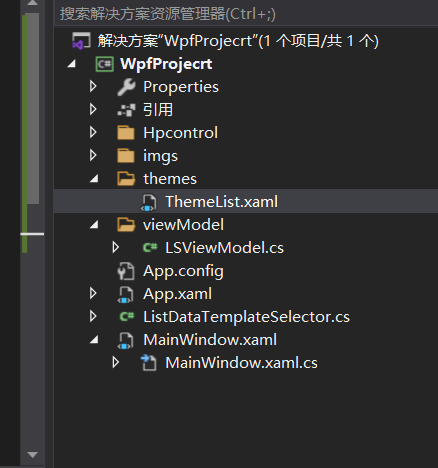
theme 文件
<ResourceDictionary xmlns="http://schemas.microsoft.com/winfx/2006/xaml/presentation"
xmlns:x="http://schemas.microsoft.com/winfx/2006/xaml"
xmlns:local="clr-namespace:WpfProjecrt.Hpcontrol">
<DataTemplate x:Key="HumanMessageDataTemplate">
<TextBlock Text="hello world"
Margin="0,0,0,0"
HorizontalAlignment="Right"
Foreground="#4d4d4d"
TextWrapping="Wrap"
FontSize="16"
FontFamily="楷体"/>
</DataTemplate>
<DataTemplate x:Key="DriverMessageDataTemplate">
<Grid HorizontalAlignment="Left">
<Grid Background="#ffffff">
<local:TestControl></local:TestControl>
</Grid>
</Grid>
</DataTemplate>
</ResourceDictionary>
2, 将theme 文件添加到App.xaml文件
<Application x:Class="WpfProjecrt.App"
xmlns="http://schemas.microsoft.com/winfx/2006/xaml/presentation"
xmlns:x="http://schemas.microsoft.com/winfx/2006/xaml"
xmlns:local="clr-namespace:WpfProjecrt"
StartupUri="MainWindow.xaml">
<Application.Resources>
<ResourceDictionary>
<ResourceDictionary.MergedDictionaries>
<ResourceDictionary Source="/themes/ThemeList.xaml"/>
</ResourceDictionary.MergedDictionaries>
</ResourceDictionary>
</Application.Resources>
</Application>
3, 添加listview 的选择器 ListDataTemplateSelector
public class ListDataTemplateSelector : DataTemplateSelector
{
public override DataTemplate SelectTemplate(object item, DependencyObject container)
{
DataTemplate dt= App.Current.Resources["DriverMessageDataTemplate"] as DataTemplate;
return dt;
// return App.Current.Resources["DriverMessageDataTemplate"] as DataTemplate;
}
}
4, 使用 现实的xml文件
<Window x:Class="WpfProjecrt.MainWindow"
xmlns="http://schemas.microsoft.com/winfx/2006/xaml/presentation"
xmlns:x="http://schemas.microsoft.com/winfx/2006/xaml"
xmlns:d="http://schemas.microsoft.com/expression/blend/2008"
xmlns:mc="http://schemas.openxmlformats.org/markup-compatibility/2006"
xmlns:local="clr-namespace:WpfProjecrt"
xmlns:local2="clr-namespace:WpfProjecrt.Hpcontrol"
mc:Ignorable="d"
Title="MainWindow" Height="450" Width="800">
<Grid>
<Grid>
<Grid.RowDefinitions>
<RowDefinition Height="auto"></RowDefinition>
<RowDefinition></RowDefinition>
</Grid.RowDefinitions>
<StackPanel Grid.Row="0">
<Image x:Name="mg" Height="100" Width="100"></Image>
<TextBlock Name="tb" >open web page</TextBlock>
<ComboBox x:Name="cb" DisplayMemberPath="name" ItemsSource="{Binding mm}"></ComboBox>
</StackPanel>
<ListView ItemsSource="{Binding mm}" ItemTemplateSelector="{Binding lss}" Grid.Row="1" x:Name="lw" Padding="0,16,0,0">
</ListView>
</Grid>
</Grid>
</Window>
对应后面的cs 文件
public class Meal
{
public string name
{
set;
get;
}
}
public partial class MainWindow : Window
{
public MainWindow()
{
InitializeComponent();
this.Loaded += MainWindow_Loaded;
this.DataContext = this;
// cb.ItemsSource = mcollection;
//lw.ItemsSource = mcollection;
//lw.ItemTemplateSelector = ListViewDataTemplateSelector;
}
private void MainWindow_Loaded(object sender, RoutedEventArgs e)
{
var link = new Hyperlink()
{
NavigateUri = new Uri("https://www.baidu.com"),
Inlines = { new Run() { Text = "baidu" } }
};
link.Click += Link_Click;
tb.Inlines.Add( link );
for(int i=0; i<100; i++)
{
Meal m = new Meal();
m.name = i.ToString();
mcollection.Add(m);
}
// mg.Source=new ImageSource()
BitmapImage image = new BitmapImage(new Uri("./imgs/123.jpg", UriKind.Relative));
mg.Source = image;
}
private ObservableCollection<Meal> mcollection = new ObservableCollection<Meal>();
public ObservableCollection<Meal> mm
{
get
{
return mcollection;
}
}
public ListDataTemplateSelector lss
{
get
{
return ls;
}
}
private ListDataTemplateSelector ls = new ListDataTemplateSelector();
private void Link_Click(object sender, RoutedEventArgs e)
{
System.Diagnostics.Process.Start(((Hyperlink)sender).NavigateUri.ToString());
}
}
总结, xml 文件绑定属性最好用CLR的包装器包装一下,
否则可能包装不上。
wpf 中 theme 的使用 和 listview 模板的使用.的更多相关文章
- 在WPF中自定义控件(3) CustomControl (上)
原文:在WPF中自定义控件(3) CustomControl (上) 在WPF中自定义控件(3) CustomControl (上) 周银辉 ...
- WPF 显示文件列表中使用 ListBox 变到ListView 最后使用DataGrid
WPF 显示文件列表中使用 ListBox 变到ListView 最后使用DataGrid 故事背景: 需要检索某目录下文件,并列出来,提供选择和其他功能. 第一版需求: 列出文件供选择即可,代码如下 ...
- WPF 中获取DataGrid 模板列中控件的对像
WPF 中获取DataGrid 模板列中控件的对像 #region 当前选定行的TextBox获得焦点 /// <summary> /// 当前选定行的TextBox获得焦点 /// &l ...
- WPF中的数据模板(DataTemplate)(转)
原文地址 http://www.cnblogs.com/zhouyinhui/archive/2007/03/30/694388.html WPF中的数据模板(DataTemplate) ...
- WPF中的ControlTemplate(控件模板)(转)
原文地址 http://www.cnblogs.com/zhouyinhui/archive/2007/03/28/690993.html WPF中的ControlTemplate(控件模板) ...
- WPF中通过代码定义模板
WPF中可以再XAML中定义模板,也可以通过C#代码定义模板,通过代码可能更清楚的看清其逻辑,而且代码的好处就是可以随时动态的去操作,而在XAML中定义的一般都是静态的. //控件呈现的显示内容1(这 ...
- wpf中的数据模板
wpf中的模板分为数据模板和控件模板,我们可以通过我们自己定制的数据模板来制定自己想要的数据表现形式.例如:时间的显示可以通过图片,也可以通过简单数字表现出来. 例如: (1)先在Demo这个命名空间 ...
- WPF中ListBox /ListView如何改变选中条背景颜色
适用ListBox /ListView WPF中LISTVIEW如何改变选中条背景颜色 https://www.cnblogs.com/sjqq/p/7828119.html
- WPF中的数据模板(DataTemplate)
原文:WPF中的数据模板(DataTemplate) WPF中的数据模板(DataTemplate) ...
随机推荐
- Jmeter常见报错信息: ERROR - jmeter.protocol.http.proxy.ProxyControl: Could not initialise key store java.io.IOException: Cannot run program "keytool"
JMeter 2.10 用的新方法来录制HTTPS请求Java 7. 录制的过程中会碰到一些问题或者报错,就目前碰到的,做出一些总结. ERROR - jmeter.protocol.http.pro ...
- C语言:输出各位整数的数字
#include <stdio.h> main() { int i,a,b,c,d,e; printf("请输入四位整数:\n"); scanf("%d&qu ...
- Python之手把手教你用JS逆向爬取网易云40万+评论并用stylecloud炫酷词云进行情感分析
本文借鉴了@平胸小仙女的知乎回复 https://www.zhihu.com/question/36081767 写在前面: 文章有点长,操作有点复杂,需要代码的直接去文末即可.想要学习的需要有点耐心 ...
- [009] - JavaSE面试题(九):集合之Set
第一期:Java面试 - 100题,梳理各大网站优秀面试题.大家可以跟着我一起来刷刷Java理论知识 [009] - JavaSE面试题(九):集合之Set 第1问:List和Set的区别? List ...
- [刘阳Java]_Spring对Dao的支持_第10讲
Spring框架优秀就是在于MVC开发的时候一旦需要对底层的数据库操作,它可以很好的支持JDBC技术,还有现在主流的ORM框架(Hibernate, MyBatis)技术. 重点先介绍Spring对J ...
- 龙芯 loongnix20 rc2 初体验
2021-07-24 v0.0.1 版权声明:原创文章,未经博主允许不得转载 3A5000 昨天发布啦,历史上的昨天是中共一大的第一天. 3A5000 的团购还没开始(大概还是3999左右整机的样子) ...
- 一张图概括mysql的各种join用法
- pytest框架
1.添加日志 import logging logging.debug('This is debug message') logging.info('This is info message') lo ...
- jvm源码解读--08 创建oop对象,将static静态变量放置在oop的96 offset处
之前分析的已经加载的.Class文件中都没有Static 静态变量,所以也就没这部分的解析,自己也是不懂hotspot 将静态变量放哪里去了,追踪源码之后,看清楚了整个套路,总体上来说,可以举例来说对 ...
- Aria2 任意文件写入
访问aria2,发现服务已启动并且返回404页面 打开http://binux.github.io/yaaw/demo/#打开yaaw,点击配置按钮,填入运行aria2的目标域名:http://you ...