
【spring boot】SpringBoot初学(2) - properties配置和读取
前言
只是简单的properties配置学习,修改部分“约定”改为自定义“配置”。真正使用和遇到问题是在细看。
一、主要
核心只是demo中的: @PropertySource(value = "classpath:/config/custom.properties", ignoreResourceNotFound = true)
二、demo

// application 注解

@Configuration

@ComponentScan

@EnableAutoConfiguration

@PropertySource(value = "classpath:/config/custom.properties", ignoreResourceNotFound = true)

// Controller 注解

@Controller

public class PropertiesController {

    @Value("${CONSTANT_PASSWORD}")

    private String password;

    @Autowired

    private ConfigBean configBean;

    @RequestMapping("/custom")

    public String custom(@RequestParam(value="name", required=false, defaultValue="${CONSTANT_USER}") String name

            , Model model) {

        model.addAttribute("name", name);

        model.addAttribute("password", password);

        System.out.println(configBean);

        return "custom";

    }

    public static void main(String[] args) {

        SpringApplication.run(PropertiesController.class, args);

    }

}
config/custom.properties
## 常量配置

CONSTANT_USER=vergiyln

CONSTANT_PASSWORD=中文123

## thymeleaf 配置

spring.thymeleaf.prefix=classpath:/templates/properties/

spring.thymeleaf.suffix=.html

spring.thymeleaf.mode=HTML5

spring.thymeleaf.encoding=UTF-8

spring.thymeleaf.content-type=text/html

    # set to false for hot refresh

spring.thymeleaf.cache=false
config/ConfigBean.properties 注入bean配置(日期暂时不知道怎么注入)
vergilyn.map[blog]=http://www.cnblogs.com/VergiLyn/

vergilyn.map[name]=VergiLyn

vergilyn.map[remark]=备注,中文23333

vergilyn.list[0]=Carpenters

vergilyn.list[1]=Celine Dion

vergilyn.list[2]=Bon Jovi

vergilyn.list[3]=Taylor Swift

vergilyn.str=string

vergilyn.num=124

vergilyn.date=2017-01-14 23:55:19

vergilyn.isSuccess=false
properties对应的JavaBean
@Configuration

// prefix = value,看源码

@ConfigurationProperties(prefix = "vergilyn")

@PropertySource("classpath:config/ConfigBean.properties")

@Component

public class ConfigBean implements Serializable{

    private String str;

    private Integer num;

//  注意:要是setIsSuccess(),不能是setSuccess()    private boolean isSuccess;

//  日期不知道怎么注入//  private Date date;

    private Map<String, String> map;

    private List<String> list;

    public String getStr() {

        return str;

    }

    public void setStr(String str) {

        this.str = str;

    }

    public Integer getNum() {

        return num;

    }

    public void setNum(Integer num) {

        this.num = num;

    }

    public Map<String, String> getMap() {

        return map;

    }

    public void setMap(Map<String, String> map) {

        this.map = map;

    }

    public List<String> getList() {

        return list;

    }

    public void setList(List<String> list) {

        this.list = list;

    }

    public Boolean isSuccess() {

        return isSuccess;

    }

    public void setIsSuccess(Boolean success) {

        isSuccess = success;

    }

}
custom.html
<!DOCTYPE HTML>

<html xmlns:th="http://www.thymeleaf.org">

<head>

    <title>测试properties</title>

    <meta http-equiv="Content-Type" content="text/html; charset=UTF-8" />

</head>

<body>

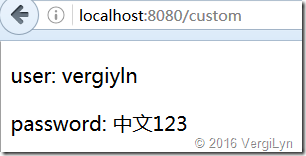
<p th:text="'user: ' + ${name}" />

<p th:text="'password: ' + ${password}" />

</body>

</html>
测试结果:

二、扩展
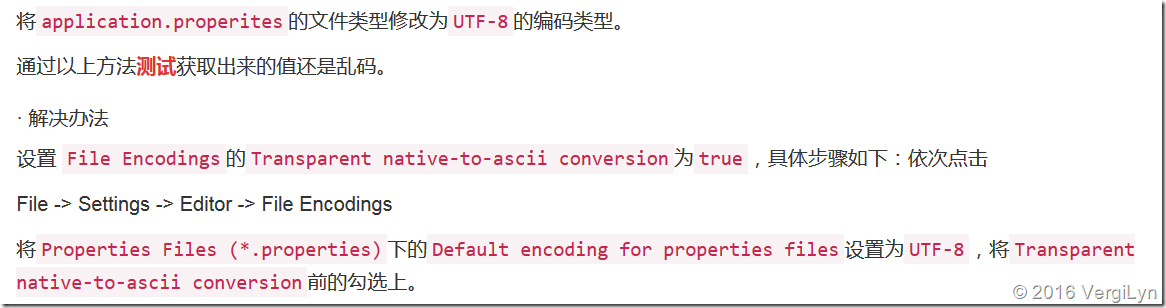
1、idea中注入properties中文乱码。
起初,我以为需要*.properties或者*.xml或者别的什么配置中要配置编码,但发现并不是。
参考:Springboot 之 解决IDEA读取properties配置文件的中文乱码问题
2、注入属性类型。
如demo,基本上string、int是可以的,不用多余的配置。但测试date并不知道怎么注入。
特别需要注意的是isSuccess;生成的set是setSuccess(),但properties中确实isSuccess导致注入失败。
3、@ConfigurationProperties中可以设置前缀
Target({ElementType.TYPE, ElementType.METHOD})

@Retention(RetentionPolicy.RUNTIME)

@Documented

public @interface ConfigurationProperties {

    @AliasFor("prefix")

    String value() default "";

    @AliasFor("value")

    String prefix() default "";

    boolean ignoreInvalidFields() default false;

    boolean ignoreNestedProperties() default false;

    boolean ignoreUnknownFields() default true;

    boolean exceptionIfInvalid() default true;

    /** @deprecated */

    @Deprecated

    String[] locations() default {};

    /** @deprecated */

    @Deprecated

    boolean merge() default true;

}
如源码,可以看出prefix与value是一样的。
4、thymeleaf 表达式、方言
${...}:变量表达式;
*{...}:选择变量表达式;
#{...}:消息表达式;
@{...}:链接url表达式
有待了解,现在还不清楚具体是什么、如何使用、什么时候用。
参考:
5分钟了解Thymeleaf的标准方言(Standard dialects)
附录
【spring boot】SpringBoot初学(2) - properties配置和读取的更多相关文章
- Spring Boot项目简单上手+swagger配置+项目发布(可能是史上最详细的)
Spring Boot项目简单上手+swagger配置 1.项目实践 项目结构图 项目整体分为四部分:1.source code 2.sql-mapper 3.application.properti ...
- Spring Boot 的配置文件application.properties
Spring Boot 中的application.properties 是一个全局的配置文件,放在src/main/resources 目录下或者类路径的/config下. 作为全局配置文件的app ...
- Spring boot运行原理-自定义自动配置类
在前面SpringBoot的文章中介绍了SpringBoot的基本配置,今天我们将给大家讲一讲SpringBoot的运行原理,然后根据原理我们自定义一个starter pom. 本章对于后续继续学习S ...
- Spring Boot加载application.properties配置文件顺序规则
SpringApplication会从以下路径加载所有的application.properties文件: 1.file:./config/(当前目录下的config文件夹) 2.file:./(当前 ...
- Spring Boot应用的后台运行配置
酱油一篇,整理一下关于Spring Boot后台运行的一些配置方式.在介绍后台运行配置之前,我们先回顾一下Spring Boot应用的几种运行方式: 运行Spring Boot的应用主类 使用Mave ...
- Spring Boot 启动(二) 配置详解
Spring Boot 启动(二) 配置详解 Spring 系列目录(https://www.cnblogs.com/binarylei/p/10198698.html) Spring Boot 配置 ...
- spring boot中的约定优于配置
Spring Boot并不是一个全新的框架,而是将已有的Spring组件整合起来. Spring Boot可以说是遵循约定优于配置这个理念产生的.它的特点是简单.快速和便捷. 既然遵循约定优于配置,则 ...
- JAR(Spring Boot)应用的后台运行配置
酱油一篇,整理一下关于Spring Boot后台运行的一些配置方式.在介绍后台运行配置之前,我们先回顾一下Spring Boot应用的几种运行方式: 运行Spring Boot的应用主类 使用Mave ...
- Spring Boot应用的后台运行配置(转载)
作者:程序猿DD 酱油一篇,整理一下关于Spring Boot后台运行的一些配置方式.在介绍后台运行配置之前,我们先回顾一下Spring Boot应用的几种运行方式: 运行Spring Boot的应用 ...
- [转]Spring Boot应用的后台运行配置
转自:http://blog.didispace.com/spring-boot-run-backend/ 酱油一篇,整理一下关于Spring Boot后台运行的一些配置方式.在介绍后台运行配置之前, ...
随机推荐
- 杭电15题 The Cow Lexicon
Problem Description Few know that the cows have their own dictionary with W (1 ≤ W ≤ 600) words, eac ...
- 查找一个数组中最小的前n项
/****************************************************************** find the biggest x number in a s ...
- GO对象和指针初始化
转自http://www.cnblogs.com/tianyajuanke/p/5234205.html
- CodeFroces--Good Bye 2016-B--New Year and North Pole(水题-模拟)
B. New Year and North Pole time limit per test 2 seconds memory limit per test 256 megabytes input s ...
- oracle 存储过程(1)
--建一张user_info表create table user_info (id varchar2(10),name varchar2(20),password varchar2(20),addre ...
- MFC创建动态链接库DLL并调用方法详解
实例一: 1.创建一个动态链接库工程,如login_dll. 2.在原工程头文件或者新建头文件如showdlg.h定义动态链接库的导出函数,代码如下: #include "stdafx.h& ...
- CSS3秘笈:第十章
CSS的transform.transition和animation属性 1.transform(倾斜):利用transform属性可以使导航栏稍微倾斜,或者使图片在访问者的鼠标经过它时放大两倍,甚至 ...
- hdu_3067_小t的游戏(脑洞)
题目连接:http://acm.hdu.edu.cn/showproblem.php?pid=3067 题意:中文,不解释 题解:一看就知道是要找规律的题,都是有循环节的,看代码. #include ...
- List列表 OrderBy
一个条件排序情况 list.OrderBy(item => tem.State); 多个条件的情况下 list.OrderBy(item => new {item.State, item. ...
- 在centos中部署jenkins
在centos中部署jenkins,需要的环境:安装jdk,Apache-tomcat 这两步我前面文章里已写,再次忽略 到官网下载最新的jenkins 我这里的是 jenkins.war 把该文件 ...