
Vim插件之Command-T使用问题
最近在使用vim插件CommandT时出现问题其实就是vim没有支持ruby,不过google之后找到了解决方法,老外的态度还是很让人敬佩的,度娘搜索的结果太让人呕心了。。
贴下,以后再次遇到解决。
One of the first things I do after installing a fresh copy of Ubuntu is grab an updated Vim with RubySupport and proceed to install the amazing Command-t plugin. However, this isn't exactly the most straightforward process. So I thought it would be a good idea to document the process and share it with you all. So without further ado, let's get started!
Install Vim with Ruby Support
The first thing you want to do is open your terminal and install vim-nox. Vim-nox is a minimal version of Vim that allows you to run Vim in your terminal, and comes compiled with Ruby support. Here is a link that will explain all the Vim versions in detail.
sudo apt-get install vim-noxYour vi and vim commands should now call vim-nox instead of your system's default Vim. Let's restart our terminal after you have installed this just to make sure.
Install Pathogen - Vim Plugin Manager
I highly recommend installing Pathogen for managing your Vim plugins. Pathogen just makes installing plugins simpler and keeps them organized better. Run the following install Pathogen.
mkdir -p ~/.vim/autoload ~/.vim/bundle; \

curl -Sso ~/.vim/autoload/pathogen.vim \

    https://raw.github.com/tpope/vim-pathogen/master/autoload/pathogen.vim
Now at the top of your ~/.vimrc file, add this line:
execute pathogen#infect()Alternatively, if you don't already have a ~/.vimrc, you can create this minimal version of a .vimrc:
execute pathogen#infect()

syntax on

filetype plugin indent on
This is the Github page for Pathogen, I recommend skimming over it if you have time.
Install Command-t
To install the Command-t plugin, you can either use git, or manually download and install it to your~/.vim/bundle directory.
Using git
cd ~/.vim/bundle

git clone https://github.com/wincent/Command-T.git
Manually installing
Go to the Command-t Github page and click the Download Zip button. Extract the contents of zip file to the~/.vim/bundle directory.
Pathogen will automatically run plugins in
~/.vim/bundlewhen you start Vim
Install RVM and Ruby
Skip this next part if you already have Ruby and RVM installed already
You can check if you have Ruby installed by doing
ruby -vandrvm -v
If you get a message saying The program 'ruby' can be found in the following packages, you need to install Ruby and rvm.
1. Install rvm dependencies
sudo apt-get install build-essential openssl libreadline6 libreadline6-dev \

curl git-core zlib1g zlib1g-dev libssl-dev libyaml-dev libsqlite3-dev \

sqlite3 libxml2-dev libxslt-dev autoconf libc6-dev ncurses-dev automake \

libtool bison subversion nodejs
2. Install rvm
curl -L https://get.rvm.io | bash -s stable --ruby3. Set .bashrc for rvm scripting
echo '[[ -s "$HOME/.rvm/scripts/rvm" ]] && source "$HOME/.rvm/scripts/rvm"' >> ~/.bashrcNow you can restart your terminal, and ruby -v should work.
Compile Command-t using the Ruby version that your Vim is installed with
If you see the error: command-t.vim could not load the C extension when you try to runCommand-t in your Vim, this section will help solve that problem.
This is the part that trips most people up. You must compile Command-t using the same version of Ruby that your Vim is linked against. This basically means that if your Command-t's Ruby version doesn't match your Vim's Ruby version, Command-t will not work. First let's find your system's version of Ruby.
Compare the versions of Ruby from the following two commands:
ruby -v

vim --version | grep ruby
You should see something similar to the following screenshot:

Here are the following steps to now compile Command-t with the correct Ruby version:
1. Install and use the version of Ruby that matches your Vim's
Find the version of Vim from the command we ran earlier vim --version | grep ruby (in my case, it's1.8). Just look through the output and it should be a number like 1.8 or 1.9.1 or 2.0.0, something similar to that. Next do:
rvm use #YOUR_VIM's_VERSION_OF_RUBYFor example, in my case, my Vim was compiled with Ruby version 1.8, so my command would bervm use 1.8. If you get a message saying like ruby-1.8.7-p374 is not installed., follow theTo install do: 'rvm install ruby-1.8.7-p374' warning in your console. Again please use the version of Ruby that your Vim is installed with.
After you have installed the proper version of Ruby, make sure that your system is actually using it.
rvm use #YOUR_VIM's_VERSION_OF_RUBY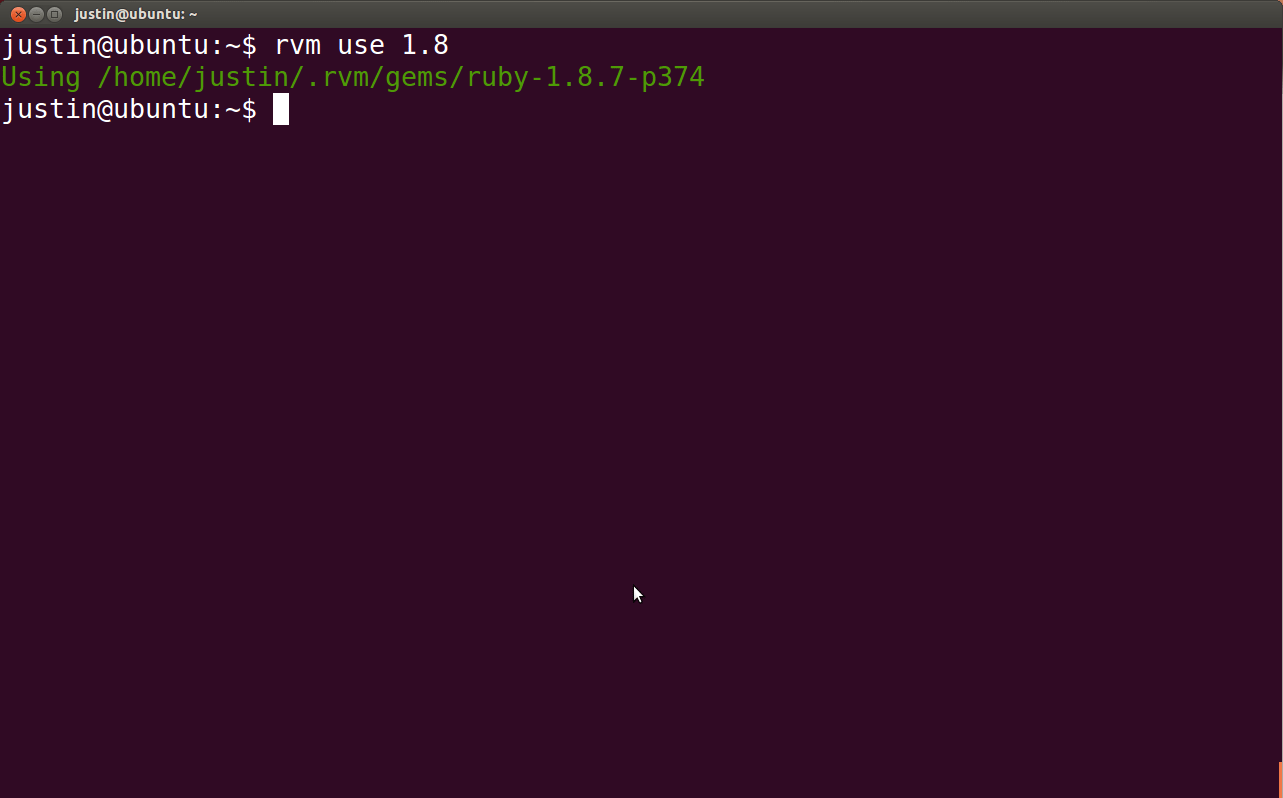
2. Navigate to your Command-t bundle directory
cd ~/.vim/bundle/Command-T3. Compile Command-t using your Vim's Ruby Version
Now that you are in your Command-t bundle directory. Do the following:
rake makeThat should recompile Command-t with the proper version of Ruby, and your Command-t's and Vim's Ruby versions should now match.
Run Command-t
Now for all of your hard work, reward yourself by opening Vim and running Command-t to see its awesomeness.
vim

:CommandT
If you have any problems, comment below and I will try to answer ASAP. Well, hope this helps someone out, thanks for reading!
不过其中有些注意点需要知道的就是vim的版本和ruby版本一定要对应关联起来,这是个大坑。。。
Vim插件之Command-T使用问题的更多相关文章
- vim 插件管理
1 进入自己的vim mkdir ./bundle/vundle 2 在vimrc同级中执行 git clone https://github.com/gmarik/vundle.git ./bund ...
- 使用pathogen管理Vim插件并托管到Github
参照文章[1][2]的办法,将vim打造成一个Python开发环境.文章中使用的是 pathogen + git 来管理 Vim 插件的.对这种方式还不太明白的同学可以参考[3]中的介绍.pathog ...
- 每日vim插件--vim中的文本对象及相关插件
最近在个人博客上 http://foocoder.com 每天都会介绍一个vim插件,想起来园子也好久没更新了,也来更新一篇. 今天按读者留言的要求,介绍下文本对象.同时还会介绍我在用的几个文本相关 ...
- Vim插件之插件管理器Vundle
Vim插件之插件管理器Vundle 1.介绍下载 相比Sublime.Text2等现代编辑器,Vim缺乏默认的插件管理器,所有插件的文件都散布在~/.vim下的几个文件夹中,配置Vim的过程, 就是在 ...
- vim插件安装总结
vim插件安装总结 vim 插件 vundle 插件对于vim来说是一个杀手级别的神器助手,能自动补全,语法高亮,文件搜索等等,有效地提升了编程效率.下面就个人的一些安装和使用进行一个总结. 自动管理 ...
- 【linux】vim常用操作及vim插件的安装使用
vim是linux下一个非常好用的文本编辑器,在linux下开发的人员要熟练掌握vim常用命令. 1. 打开在第n行 vim +143 filename.txt 2. 只读模式打开 vim -R / ...
- linux 下程序员专用搜索源码用来替代grep的软件ack(后来发现一个更快的: ag), 且有vim插件的
发现一个比ack更快更好用的: https://github.com/ggreer/the_silver_searcher , 使用时命令为ag,它是基于ack的代码二次开发的,所有使用方法基本 ...
- vim插件的安装方式 -- vim注释插件和doxygen函数注释生成插件-ctrlp插件-tabular等号对齐 插件
使用unzip的时候 指定 -d选项, 是说明解压到的 目标地址. 这个参数还是比较方便的, 比直接unzip到当前目录, 然后在去拷贝到目标目录, 然后再删除当前目录中的解压文件夹, 方便多了. 使 ...
- 使用 Python 编写 vim 插件
使用 Python 编写 vim 插件 - 技术翻译 - 开源中国社区 code {margin: 0;padding: 0;white-space: pre;border: none;backgro ...
随机推荐
- Fitnesse集成TestLink
TestLink作为开源测试管理工具,可以进行测试工程.测试计划以及执行计划的管理,而且TestLink团队提供了XML-PRC的接口供第三方工具调用,接口支持程度也比较好. Fitnesse作为开源 ...
- Mvc的多层架构
分享一个Mvc的多层架构,欢迎大家拍砖斧正 多层架构是什么? 多层架构是开发人员在开发过程当中面对复杂且易变的需求采取的一种以隔离控制为主的应对策略,关于多层架构的标准,我认为有一句话是比较有代表 ...
- JavaScript插件——模态框
Bootstrap3.0学习第十七轮(JavaScript插件——模态框) 前言 阅读之前您也可以到Bootstrap3.0入门学习系列导航中进行查看http://www.cnblogs.com/ ...
- [转]unload dynamic library needs two dlclose() calls?
src: http://stackoverflow.com/questions/8793099/unload-dynamic-library-needs-two-dlclose-calls Quest ...
- cocos2d-x-2.2.0_win7+vs2010
cocos2d-x-2.2.0_win7+vs2010搭建_eclipse+ndk-r9+cygwin搭建_教程以及编译问题汇总 声明:我是才用c/c++和cocos2d-x的如果有错误欢迎指出 文章 ...
- CSS 选择器的学习
从蛋学习 CSS 选择器 + 做一个 Jumony 桌面工具,真费劲,目前Jumony Tool两大问题无法解决,完美的显示 html 文档和根据结果在文档中定位,有点儿跑题了…… 1. 选择“cla ...
- ios学习之常见问题记录
使用Core Data的好处和缺点? 首先这是apple官方极力推荐的,使用它而不是SQLite.好处有大概这么几点:1.减少你model层的代码量,减少50%-70%.无需测试和优化.2.提供了内存 ...
- HDU 4618 - Palindrome Sub-Array(2013MUTC2-1008)(DP)
d(i,j,k)表示左上角坐标为(i,j),k为正方形边长 d(i,j,k)=1,如果d(i+1,j+1,k-2)=0,且上下两个外围的相等且回文,左右两个外围的相等且回文:否则d(i,j,k)=0 ...
- xhEditor入门基础
一.下载最新版本xhEditor:http://xheditor.com/download (官网无法下载,CSDN提供下载:http://download.csdn.net/detail/itmy ...
- Httphelper工具1
[苏飞开发助手V1.0测试版]官方教程与升级报告导读部分------------------------------------------------------------------------ ...