
Httpd服务入门知识-Httpd服务常见配置案例之定义站点主页面及错误页面配置
Httpd服务入门知识-Httpd服务常见配置案例之定义站点主页面及错误页面配置
作者:尹正杰
版权声明:原创作品,谢绝转载!否则将追究法律责任。
一.定义站点主页面
[root@node101.yinzhengjie.org.cn ~]# egrep -v "^ *#|^$" /etc/httpd/conf/httpd.conf  | grep DirectoryIndex

    DirectoryIndex index.html

[root@node101.yinzhengjie.org.cn ~]#

[root@node101.yinzhengjie.org.cn ~]# ll /data/www/html/

total

-rw-r--r--  root root  Dec   : index.html

-rw-r--r--  root root  Dec   : info.html

[root@node101.yinzhengjie.org.cn ~]#

[root@node101.yinzhengjie.org.cn ~]# cat /data/www/html/index.html

/data/www/html

[root@node101.yinzhengjie.org.cn ~]#

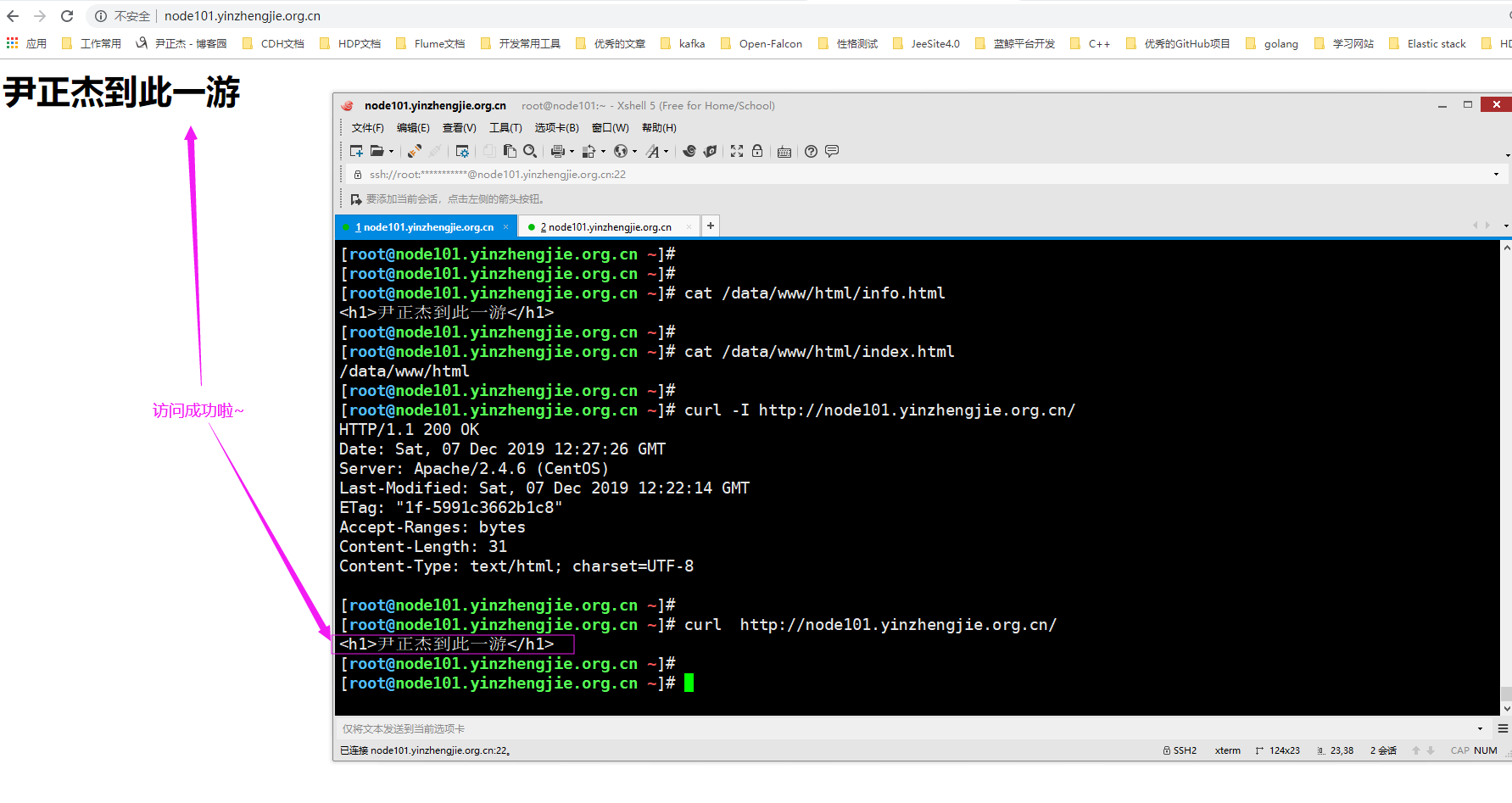
[root@node101.yinzhengjie.org.cn ~]# cat /data/www/html/info.html

<h1>尹正杰到此一游</h1>

[root@node101.yinzhengjie.org.cn ~]#

[root@node101.yinzhengjie.org.cn ~]# vim /etc/httpd/conf/httpd.conf

[root@node101.yinzhengjie.org.cn ~]#

[root@node101.yinzhengjie.org.cn ~]# egrep -v "^ *#|^$" /etc/httpd/conf/httpd.conf  | grep DirectoryIndex

    DirectoryIndex info.html

[root@node101.yinzhengjie.org.cn ~]#

[root@node101.yinzhengjie.org.cn ~]# httpd -t

Syntax OK

[root@node101.yinzhengjie.org.cn ~]#

[root@node101.yinzhengjie.org.cn ~]# systemctl restart httpd.service

[root@node101.yinzhengjie.org.cn ~]#
二.错误页面配置
1>.删除站点主页文件
[root@node101.yinzhengjie.org.cn ~]# egrep -v "^ *#|^$" /etc/httpd/conf/httpd.conf  | grep DocumentRoot

DocumentRoot "/data/www/html"

[root@node101.yinzhengjie.org.cn ~]#

[root@node101.yinzhengjie.org.cn ~]# egrep -v "^ *#|^$" /etc/httpd/conf/httpd.conf  | grep DirectoryIndex

    DirectoryIndex info.html

[root@node101.yinzhengjie.org.cn ~]#

[root@node101.yinzhengjie.org.cn ~]# rm -f /data/www/html/info.html

[root@node101.yinzhengjie.org.cn ~]#

[root@node101.yinzhengjie.org.cn ~]# ll /data/www/html/

total

-rw-r--r--  root root  Dec   : index.html

[root@node101.yinzhengjie.org.cn ~]#

[root@node101.yinzhengjie.org.cn ~]#
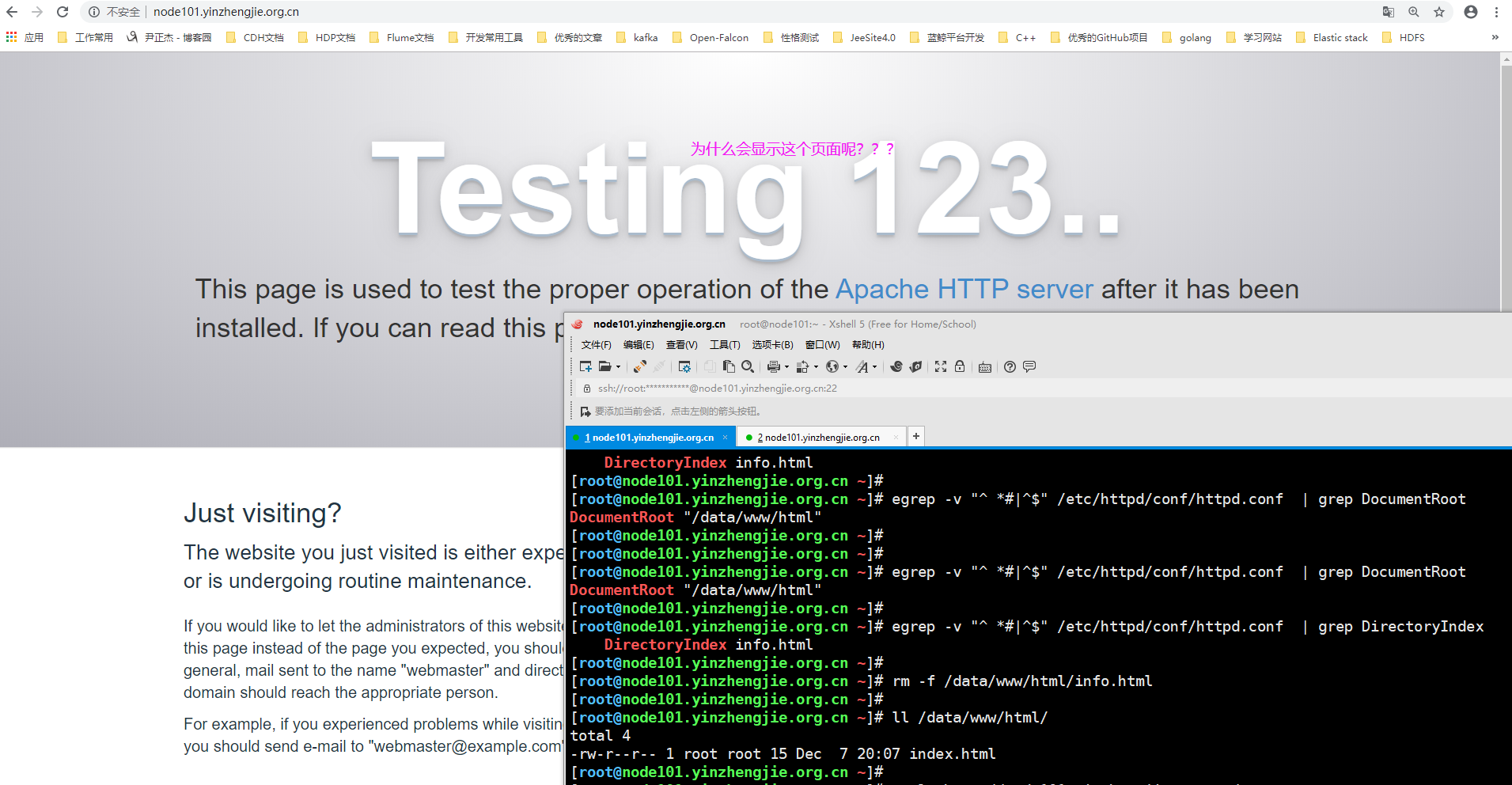
2>.查看"/etc/httd/conf.d"目录下的"welcome.conf"配置文件
[root@node101.yinzhengjie.org.cn ~]# egrep -v "^ *#|^$" /etc/httpd/conf/httpd.conf  | grep ServerRoot

ServerRoot "/etc/httpd"

[root@node101.yinzhengjie.org.cn ~]#

[root@node101.yinzhengjie.org.cn ~]# egrep -v "^ *#|^$" /etc/httpd/conf/httpd.conf  | grep IncludeOptional

IncludeOptional conf.d/*.conf

[root@node101.yinzhengjie.org.cn ~]#

[root@node101.yinzhengjie.org.cn ~]# ll /etc/httpd/conf.d/              #从主配置文件中可以看到启动httpd服务时会加载该目录下的文件哟~

total 20

-rw-r--r-- 1 root root 2926 Aug  8 19:41 autoindex.conf

-rw-r--r-- 1 root root   66 Dec  7 20:15 document_root.conf

-rw-r--r-- 1 root root  366 Aug  8 19:42 README

-rw-r--r-- 1 root root 1252 Aug  6 21:44 userdir.conf

-rw-r--r-- 1 root root  824 Aug  6 21:44 welcome.conf

[root@node101.yinzhengjie.org.cn ~]#

[root@node101.yinzhengjie.org.cn ~]# cat /etc/httpd/conf.d/welcome.conf

#

# This configuration file enables the default "Welcome" page if there

# is no default index page present for the root URL.  To disable the

# Welcome page, comment out all the lines below.

#

# NOTE: if this file is removed, it will be restored on upgrades.

#

<LocationMatch "^/+$">

    Options -Indexes

    ErrorDocument 403 /.noindex.html                  #不难发现,如果有403的错误,就会使用"/.noindex.html"的别名文件来替换错误网页

</LocationMatch>

<Directory /usr/share/httpd/noindex>

    AllowOverride None

    Require all granted

</Directory>

Alias /.noindex.html /usr/share/httpd/noindex/index.html      #我们看到"/.noindex.html"的别名真正存放路径为"/usr/share/httpd/noindex/index.html"

Alias /noindex/css/bootstrap.min.css /usr/share/httpd/noindex/css/bootstrap.min.css

Alias /noindex/css/open-sans.css /usr/share/httpd/noindex/css/open-sans.css

Alias /images/apache_pb.gif /usr/share/httpd/noindex/images/apache_pb.gif

Alias /images/poweredby.png /usr/share/httpd/noindex/images/poweredby.png

[root@node101.yinzhengjie.org.cn ~]#

[root@node101.yinzhengjie.org.cn ~]#
3>.经过上一步骤的分析,我们将"/etc/httpd/conf.d/welcome.conf"配置文件改成不以".conf"结尾的文件名
[root@node101.yinzhengjie.org.cn ~]# egrep -v "^ *#|^$" /etc/httpd/conf/httpd.conf  | grep ServerRoot

ServerRoot "/etc/httpd"

[root@node101.yinzhengjie.org.cn ~]#

[root@node101.yinzhengjie.org.cn ~]# egrep -v "^ *#|^$" /etc/httpd/conf/httpd.conf  | grep IncludeOptional

IncludeOptional conf.d/*.conf

[root@node101.yinzhengjie.org.cn ~]#

[root@node101.yinzhengjie.org.cn ~]# ll /etc/httpd/conf.d/

total 20

-rw-r--r-- 1 root root 2926 Aug  8 19:41 autoindex.conf

-rw-r--r-- 1 root root   66 Dec  7 20:15 document_root.conf

-rw-r--r-- 1 root root  366 Aug  8 19:42 README

-rw-r--r-- 1 root root 1252 Aug  6 21:44 userdir.conf

-rw-r--r-- 1 root root  824 Aug  6 21:44 welcome.conf

[root@node101.yinzhengjie.org.cn ~]#

[root@node101.yinzhengjie.org.cn ~]# mv /etc/httpd/conf.d/welcome.conf /etc/httpd/conf.d/welcome.conf-`date +%F`       #我们暂时修改文件名的后缀

[root@node101.yinzhengjie.org.cn ~]#

[root@node101.yinzhengjie.org.cn ~]# ll /etc/httpd/conf.d/

total 20

-rw-r--r-- 1 root root 2926 Aug  8 19:41 autoindex.conf

-rw-r--r-- 1 root root   66 Dec  7 20:15 document_root.conf

-rw-r--r-- 1 root root  366 Aug  8 19:42 README

-rw-r--r-- 1 root root 1252 Aug  6 21:44 userdir.conf

-rw-r--r-- 1 root root  824 Aug  6 21:44 welcome.conf-2019-12-07

[root@node101.yinzhengjie.org.cn ~]#

[root@node101.yinzhengjie.org.cn ~]#
4>.重启httpd服务,观察页面出现了如下图所示的界面
[root@node101.yinzhengjie.org.cn ~]# systemctl restart httpd

[root@node101.yinzhengjie.org.cn ~]#

[root@node101.yinzhengjie.org.cn ~]# ss -ntl

State      Recv-Q Send-Q                                         Local Address:Port                                                        Peer Address:Port

LISTEN                                                                   *:                                                                     *:*

LISTEN                                                                   *:                                                                     *:*

LISTEN                                                                  :::                                                                    :::*

[root@node101.yinzhengjie.org.cn ~]#

[root@node101.yinzhengjie.org.cn ~]# systemctl status httpd

● httpd.service - The Apache HTTP Server

   Loaded: loaded (/usr/lib/systemd/system/httpd.service; disabled; vendor preset: disabled)

   Active: active (running) since Sat -- :: CST; 11s ago

     Docs: man:httpd()

           man:apachectl()

  Process:  ExecStop=/bin/kill -WINCH ${MAINPID} (code=exited, status=/SUCCESS)

  Process:  ExecReload=/usr/sbin/httpd $OPTIONS -k graceful (code=exited, status=/SUCCESS)

 Main PID:  (httpd)

   Status: "Total requests: 0; Current requests/sec: 0; Current traffic:   0 B/sec"

   CGroup: /system.slice/httpd.service

           ├─ /usr/sbin/httpd -DFOREGROUND

           ├─ /usr/sbin/httpd -DFOREGROUND

           ├─ /usr/sbin/httpd -DFOREGROUND

           ├─ /usr/sbin/httpd -DFOREGROUND

           └─ /usr/sbin/httpd -DFOREGROUND

Dec  :: node101.yinzhengjie.org.cn systemd[]: Starting The Apache HTTP Server...

Dec  :: node101.yinzhengjie.org.cn systemd[]: Started The Apache HTTP Server.

[root@node101.yinzhengjie.org.cn ~]#

[root@node101.yinzhengjie.org.cn ~]#
5>.总结
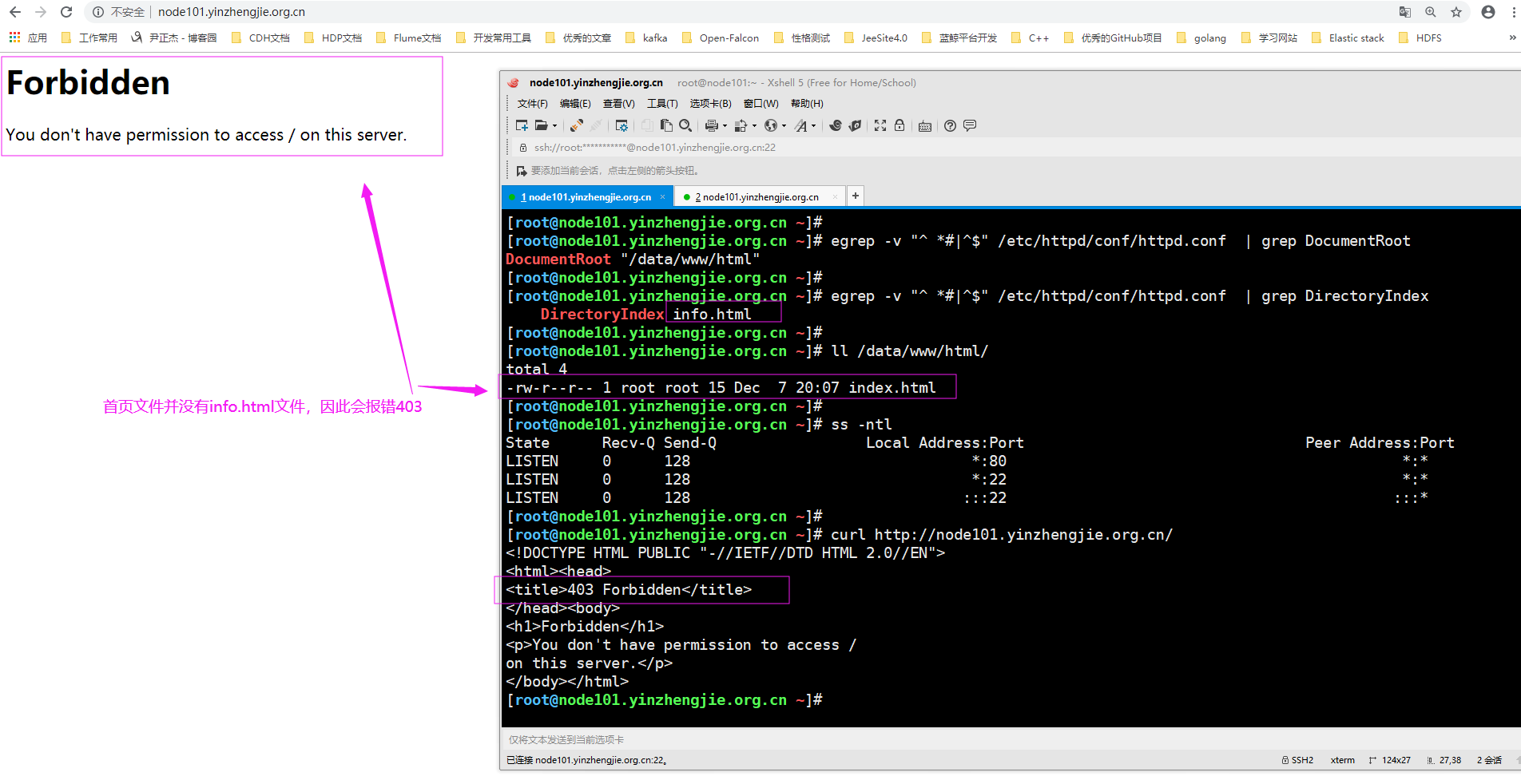
根据上面的操作,如果出现错误的403网页,咱们也可以自定义自己的错误页面哟~
Httpd服务入门知识-Httpd服务常见配置案例之定义站点主页面及错误页面配置的更多相关文章
- Httpd服务入门知识-Httpd服务常见配置案例之虚拟主机
Httpd服务入门知识-Httpd服务常见配置案例之虚拟主机 作者:尹正杰 版权声明:原创作品,谢绝转载!否则将追究法律责任. 一.虚拟主机实现方案 1>.Apache httpd 有三种实现虚 ...
- Httpd服务入门知识-Httpd服务常见配置案例之Apache的工作做状态status页面
Httpd服务入门知识-Httpd服务常见配置案例之Apache的工作做状态status页面 作者:尹正杰 版权声明:原创作品,谢绝转载!否则将追究法律责任. 一.status功能概述 status页 ...
- Httpd服务入门知识-Httpd服务常见配置案例之ServerSignature指令选项
Httpd服务入门知识-Httpd服务常见配置案例之ServerSignature指令选项 作者:尹正杰 版权声明:原创作品,谢绝转载!否则将追究法律责任. 一.ServerSignature指令概述 ...
- Httpd服务入门知识-Httpd服务常见配置案例之实现用户家目录的http共享
Httpd服务入门知识-Httpd服务常见配置案例之实现用户家目录的http共享 作者:尹正杰 版权声明:原创作品,谢绝转载!否则将追究法律责任. 一.实现用户家目录的http共享前提 在配置家目录共 ...
- Httpd服务入门知识-Httpd服务常见配置案例之定义路径别名
Httpd服务入门知识-Httpd服务常见配置案例之定义路径别名 作者:尹正杰 版权声明:原创作品,谢绝转载!否则将追究法律责任. 一.创建测试数据 [root@node101.yinzhengj ...
- Httpd服务入门知识-Httpd服务常见配置案例之设定默认字符集
Httpd服务入门知识-Httpd服务常见配置案例之设定默认字符集 作者:尹正杰 版权声明:原创作品,谢绝转载!否则将追究法律责任. 一.查看生产环境中使用的字符集案例 1>.查看腾讯设置的默认 ...
- Httpd服务入门知识-Httpd服务常见配置案例之日志设定
Httpd服务入门知识-Httpd服务常见配置案例之日志设定 作者:尹正杰 版权声明:原创作品,谢绝转载!否则将追究法律责任. 一.日志类型 [root@node101.yinzhengjie.org ...
- Httpd服务入门知识-Httpd服务常见配置案例之基于客户端来源地址实现访问控制
Httpd服务入门知识-Httpd服务常见配置案例之基于客户端来源地址实现访问控制 作者:尹正杰 版权声明:原创作品,谢绝转载!否则将追究法律责任. 一.Options 1>.OPTIONS指 ...
- Httpd服务入门知识-Httpd服务常见配置案例之基于用户账号实现访问控制
Httpd服务入门知识-Httpd服务常见配置案例之基于用户账号实现访问控制 作者:尹正杰 版权声明:原创作品,谢绝转载!否则将追究法律责任. 一.基于用户的访问控制概述 认证质询: WWW-Auth ...
随机推荐
- [技术博客]ubuntu+nginx+uwsgi+Django+https的部署
ubuntu+nginx+uwsgi+Django+https部署文档 配置机器介绍 操作系统:Ubuntu 18.04.2 LTS 64位 python版本:Python 3.6.7 Django版 ...
- 《Linux就该这么学》培训笔记_ch05_用户身份与文件权限
<Linux就该这么学>培训笔记_ch05_用户身份与文件权限 文章最后会post上书本的笔记照片. 文章主要内容: 用户身份与能力 文件权限与归属 文件的特殊权限 文件的隐藏属性 文件访 ...
- 《Linux就该这么学》培训笔记_ch17_使用iSCSI服务部署网络存储
<Linux就该这么学>培训笔记_ch17_使用iSCSI服务部署网络存储 文章最后会post上书本的笔记照片. 文章主要内容: iSCSI技术介绍 创建RAID磁盘阵列 配置iSCSI服 ...
- mysql 基本操作 一
1.mysql 管理语句 1)展示数据库列表 mysql> show databases; +--------------------+ | Database | +-------------- ...
- docker 学习操作记录 5
记录5 * Overheard at KubeCon: "microk8s.status just blew my mind". https://microk8s.io/docs/ ...
- @AspectJ注解的value属性
@Component @Scope("prototype") @Aspect(value="perthis(execution(* com.helius.service. ...
- C#实现ActiveMQ消息队列
本文使用C#实现ActiveMQ消息队列功能. 一.首先需要导入两个包,分别是:Apache.NMS 和 Apache.NMS.ActiveMQ 二.创建Winform程序实现生产者功能. 三.Pro ...
- Markdown_word_chain_test2222
# Flutter ![Flutter logo][] [![Gitter Channel][]][Gitter badge] [![Build Status - Cirrus][]][Build ...
- 『LCA 树链剖分』
LCA Description 给出一个n个节点的有根树(编号为0到n-1,根节点为0).一个点的深度定义为这个节点到根 的距离+1. 设dep[i]表示点i的深度,LCA(i,j)表示i与j的最近公 ...
- 『金字塔 区间dp』
金字塔 Description 虽然探索金字塔是极其老套的剧情,但是这一队 探险家还是到了某金字塔脚下.经过多年的研究,科 学家对这座金字塔的内部结构已经有所了解.首先, 金字塔由若干房间组成,房间之 ...