
Httpd服务入门知识-Httpd服务常见配置案例之虚拟主机
Httpd服务入门知识-Httpd服务常见配置案例之虚拟主机
作者:尹正杰
版权声明:原创作品,谢绝转载!否则将追究法律责任。
一.虚拟主机实现方案
1>.Apache httpd 有三种实现虚拟主机的方案
  基于ip:
    为每个虚拟主机准备至少一个ip地址

  基于port:
    为每个虚拟主机使用至少一个独立的port

  基于FQDN:
    为每个虚拟主机使用至少一个FQDN
2>.创建测试网页文件
[root@node101.yinzhengjie.org.cn ~]# mkdir /var/www/html/{a,b,c}site

[root@node101.yinzhengjie.org.cn ~]#

[root@node101.yinzhengjie.org.cn ~]# echo "<h1>www.a.com</h1>" > /var/www/html/asite/index.html

[root@node101.yinzhengjie.org.cn ~]#

[root@node101.yinzhengjie.org.cn ~]# echo "<h1>www.b.org</h1>" > /var/www/html/bsite/index.html

[root@node101.yinzhengjie.org.cn ~]#

[root@node101.yinzhengjie.org.cn ~]# echo "<h1>www.c.net</h1>" > /var/www/html/csite/index.html

[root@node101.yinzhengjie.org.cn ~]#

[root@node101.yinzhengjie.org.cn ~]# cat /var/www/html/asite/index.html

<h1>www.a.com</h1>

[root@node101.yinzhengjie.org.cn ~]#

[root@node101.yinzhengjie.org.cn ~]# cat /var/www/html/bsite/index.html

<h1>www.b.org</h1>

[root@node101.yinzhengjie.org.cn ~]#

[root@node101.yinzhengjie.org.cn ~]# cat /var/www/html/csite/index.html

<h1>www.c.net</h1>

[root@node101.yinzhengjie.org.cn ~]#

[root@node101.yinzhengjie.org.cn ~]#
二.基于不同的IP地址实现虚拟主机配置实战案例
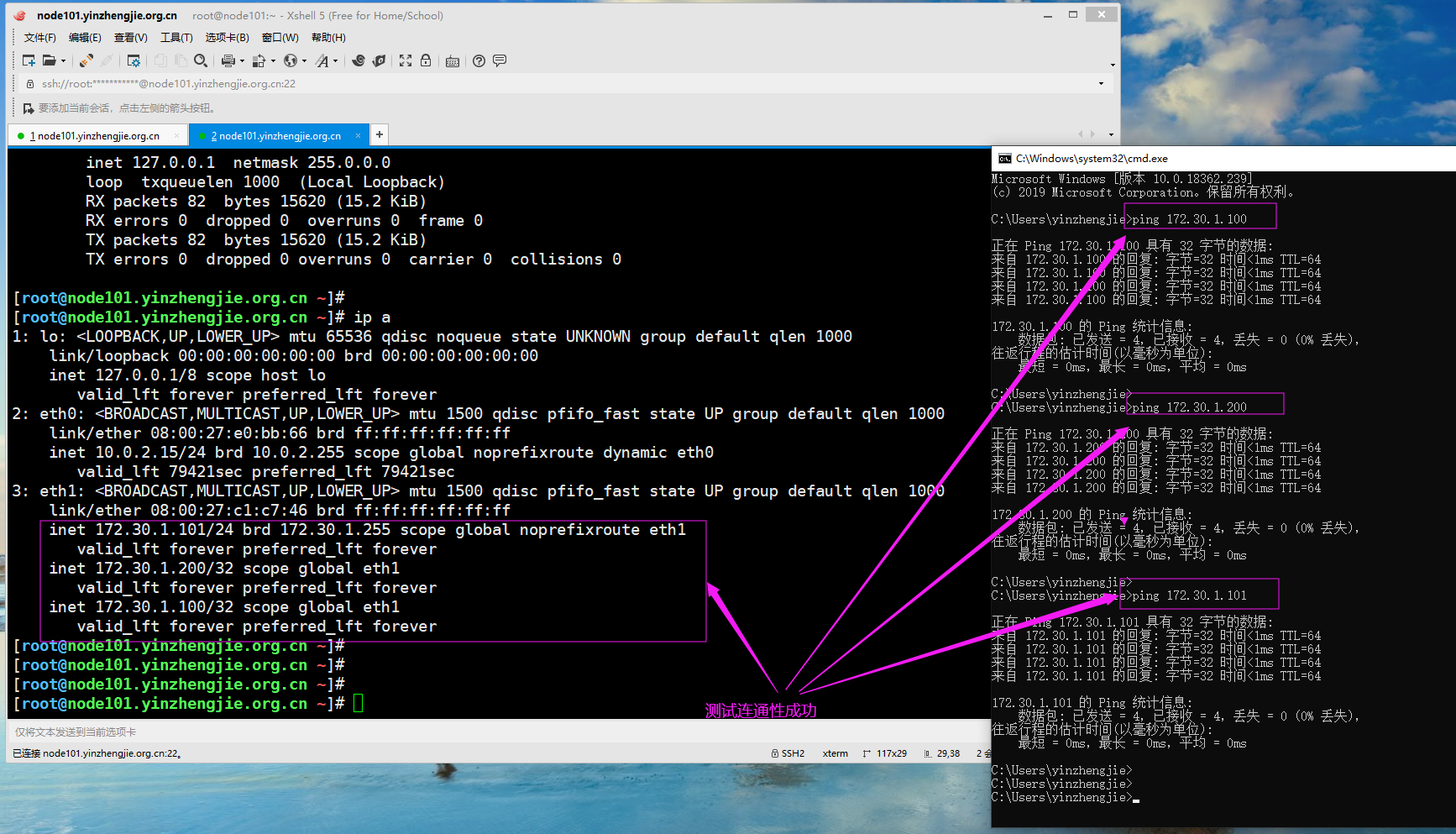
1>.给一块网卡临时配置多个IP地址测试使用
[root@node101.yinzhengjie.org.cn ~]# ifconfig

eth0: flags=<UP,BROADCAST,RUNNING,MULTICAST>  mtu

        inet 10.0.2.15  netmask 255.255.255.0  broadcast 10.0.2.255

        ether :::e0:bb:  txqueuelen   (Ethernet)

        RX packets   bytes  (2.0 KiB)

        RX errors   dropped   overruns   frame

        TX packets   bytes  (1.5 KiB)

        TX errors   dropped  overruns   carrier   collisions

eth1: flags=<UP,BROADCAST,RUNNING,MULTICAST>  mtu

        inet 172.30.1.101  netmask 255.255.255.0  broadcast 172.30.1.255

        ether :::c1:c7:  txqueuelen   (Ethernet)

        RX packets   bytes  (1.6 MiB)

        RX errors   dropped   overruns   frame

        TX packets   bytes  (2.0 MiB)

        TX errors   dropped  overruns   carrier   collisions

lo: flags=<UP,LOOPBACK,RUNNING>  mtu

        inet 127.0.0.1  netmask 255.0.0.0

        loop  txqueuelen   (Local Loopback)

        RX packets   bytes  (15.2 KiB)

        RX errors   dropped   overruns   frame

        TX packets   bytes  (15.2 KiB)

        TX errors   dropped  overruns   carrier   collisions

[root@node101.yinzhengjie.org.cn ~]#

[root@node101.yinzhengjie.org.cn ~]# ip addr a 172.30.1.200 dev eth1

[root@node101.yinzhengjie.org.cn ~]#

[root@node101.yinzhengjie.org.cn ~]# ip addr a 172.30.1.100 dev eth1

[root@node101.yinzhengjie.org.cn ~]#

[root@node101.yinzhengjie.org.cn ~]# ip a

: lo: <LOOPBACK,UP,LOWER_UP> mtu  qdisc noqueue state UNKNOWN group default qlen

    link/loopback ::::: brd :::::

    inet 127.0.0.1/ scope host lo

       valid_lft forever preferred_lft forever

: eth0: <BROADCAST,MULTICAST,UP,LOWER_UP> mtu  qdisc pfifo_fast state UP group default qlen

    link/ether :::e0:bb: brd ff:ff:ff:ff:ff:ff

    inet 10.0.2.15/ brd 10.0.2.255 scope global noprefixroute dynamic eth0

       valid_lft 79421sec preferred_lft 79421sec

: eth1: <BROADCAST,MULTICAST,UP,LOWER_UP> mtu  qdisc pfifo_fast state UP group default qlen

    link/ether :::c1:c7: brd ff:ff:ff:ff:ff:ff

    inet 172.30.1.101/ brd 172.30.1.255 scope global noprefixroute eth1

       valid_lft forever preferred_lft forever

    inet 172.30.1.200/ scope global eth1

       valid_lft forever preferred_lft forever

    inet 172.30.1.100/ scope global eth1

       valid_lft forever preferred_lft forever

[root@node101.yinzhengjie.org.cn ~]#
2>.编辑httpd的配置文件
[root@node101.yinzhengjie.org.cn ~]# egrep -v "^ *#|^$" /etc/httpd/conf/httpd.conf

ServerRoot "/etc/httpd"

Listen

Include conf.modules.d/*.conf

User apache

Group apache

ServerAdmin root@localhost

<Directory />

    AllowOverride none

    Require all denied

</Directory>

DocumentRoot "/var/www/html"

<Directory "/var/www">

    AllowOverride None

    Require all granted

</Directory>

<Directory "/var/www/html">

    Options Indexes FollowSymLinks

    AllowOverride None

    Require all granted

</Directory>

<IfModule dir_module>

    DirectoryIndex index.html

</IfModule>

<Files ".ht*">

    Require all denied

</Files>

ErrorLog "logs/error_log"

LogLevel warn

<IfModule log_config_module>

    LogFormat "%h %l %u %{%Y-%m-%d %H:%M:%S}t \"%r\" %>s %b \"%{Referer}i\" \"%{User-Agent}i\"" testlog

    LogFormat "%h %l %u %t \"%r\" %>s %b" common

    <IfModule logio_module>

      LogFormat "%h %l %u %t \"%r\" %>s %b \"%{Referer}i\" \"%{User-Agent}i\" %I %O" combinedio

    </IfModule>

    CustomLog "logs/access_log" testlog

</IfModule>

<IfModule alias_module>

    ScriptAlias /cgi-bin/ "/var/www/cgi-bin/"

</IfModule>

<Directory "/var/www/cgi-bin">

    AllowOverride None

    Options None

    Require all granted

</Directory>

<IfModule mime_module>

    TypesConfig /etc/mime.types

    AddType application/x-compress .Z

    AddType application/x-gzip .gz .tgz

    AddType text/html .shtml

    AddOutputFilter INCLUDES .shtml

</IfModule>

AddDefaultCharset UTF-8

<IfModule mime_magic_module>

    MIMEMagicFile conf/magic

</IfModule>

EnableSendfile on

IncludeOptional conf.d/*.conf

[root@node101.yinzhengjie.org.cn ~]#

[root@node101.yinzhengjie.org.cn ~]#
[root@node101.yinzhengjie.org.cn ~]# egrep -v "^ *#|^$" /etc/httpd/conf/httpd.conf #查看主配置文件内容
[root@node101.yinzhengjie.org.cn ~]# egrep -v "^ *#|^$" /etc/httpd/conf/httpd.conf  | grep ServerRoot

ServerRoot "/etc/httpd"

[root@node101.yinzhengjie.org.cn ~]#

[root@node101.yinzhengjie.org.cn ~]# egrep -v "^ *#|^$" /etc/httpd/conf/httpd.conf  | grep IncludeOptional

IncludeOptional conf.d/*.conf

[root@node101.yinzhengjie.org.cn ~]#

[root@node101.yinzhengjie.org.cn ~]# cat /etc/httpd/conf.d/virtualHost.conf

<VirtualHost "172.30.1.100:80">

    DocumentRoot "/var/www/html/asite"

    <Directory "/var/www/html/asite">

        Require all granted

    </Directory>

    CustomLog "/var/log/httpd/access_asite_log" testlog        #注意这个testlog变量需要在主配置文件中定义哟~

</VirtualHost>

<VirtualHost "172.30.1.101:80">

    DocumentRoot "/var/www/html/bsite"

    <Directory "/var/www/html/bsite">

        Require all granted

    </Directory>

    CustomLog "/var/log/httpd/access_bsite_log" testlog

</VirtualHost>

<VirtualHost "172.30.1.200:80">

    DocumentRoot "/var/www/html/csite"

    <Directory "/var/www/html/csite">

        Require all granted

    </Directory>

    CustomLog "/var/log/httpd/access_csite_log" testlog

</VirtualHost>

[root@node101.yinzhengjie.org.cn ~]#

[root@node101.yinzhengjie.org.cn ~]# httpd -t

Syntax OK

[root@node101.yinzhengjie.org.cn ~]#

[root@node101.yinzhengjie.org.cn ~]# systemctl reload httpd

[root@node101.yinzhengjie.org.cn ~]#

[root@node101.yinzhengjie.org.cn ~]# ss -ntl

State       Recv-Q Send-Q             Local Address:Port                            Peer Address:Port

LISTEN      0      128                            *:80                                         *:*

LISTEN      0      128                            *:22                                         *:*

LISTEN      0      128                           :::22                                        :::*

[root@node101.yinzhengjie.org.cn ~]#

[root@node101.yinzhengjie.org.cn ~]#
3>.验证客户端是否可以正常访问
[root@node101.yinzhengjie.org.cn ~]# tail /var/log/httpd/access_asite_log

172.30.1.100 - - -- :: "GET / HTTP/1.1"   "-" "curl/7.29.0"

172.30.1.254 - - -- :: "GET / HTTP/1.1"   "-" "Mozilla/5.0 (Windows NT 10.0; Win64; x64) AppleWebK

it/537.36 (KHTML, like Gecko) Chrome/78.0.3904.108 Safari/537.36"172.30.1.254 - - 2019-12-09 16:01:24 "GET /favicon.ico HTTP/1.1" 404 209 "http://172.30.1.100/" "Mozilla/5.0 (Windows

 NT 10.0; Win64; x64) AppleWebKit/537.36 (KHTML, like Gecko) Chrome/78.0.3904.108 Safari/537.36"[root@node101.yinzhengjie.org.cn ~]#
[root@node101.yinzhengjie.org.cn ~]# tail /var/log/httpd/access_asite_log
[root@node101.yinzhengjie.org.cn ~]# tail /var/log/httpd/access_bsite_log

172.30.1.101 - - -- :: "GET / HTTP/1.1"   "-" "curl/7.29.0"

172.30.1.254 - - -- :: "GET / HTTP/1.1"   "-" "Mozilla/5.0 (Windows NT 10.0; Win64; x64) AppleWebK

it/537.36 (KHTML, like Gecko) Chrome/78.0.3904.108 Safari/537.36"172.30.1.254 - - 2019-12-09 16:02:25 "-" 408 - "-" "-"

[root@node101.yinzhengjie.org.cn ~]#
[root@node101.yinzhengjie.org.cn ~]# tail /var/log/httpd/access_bsite_log
[root@node101.yinzhengjie.org.cn ~]# tail /var/log/httpd/access_csite_log

172.30.1.200 - - -- :: "GET / HTTP/1.1"   "-" "curl/7.29.0"

172.30.1.254 - - -- :: "GET / HTTP/1.1"   "-" "Mozilla/5.0 (Windows NT 10.0; Win64; x64) AppleWebK

it/537.36 (KHTML, like Gecko) Chrome/78.0.3904.108 Safari/537.36"172.30.1.254 - - 2019-12-09 16:01:39 "GET /favicon.ico HTTP/1.1" 404 209 "http://172.30.1.200/" "Mozilla/5.0 (Windows

 NT 10.0; Win64; x64) AppleWebKit/537.36 (KHTML, like Gecko) Chrome/78.0.3904.108 Safari/537.36"172.30.1.254 - - 2019-12-09 16:02:31 "-" 408 - "-" "-"

[root@node101.yinzhengjie.org.cn ~]#
[root@node101.yinzhengjie.org.cn ~]# tail /var/log/httpd/access_csite_log

三.基于相同IP地址的不同端口实现虚拟主机配置实战案例
1>.编辑httpd的配置文件
[root@node101.yinzhengjie.org.cn ~]# egrep -v "^ *#|^$" /etc/httpd/conf/httpd.conf

ServerRoot "/etc/httpd"

Listen

Include conf.modules.d/*.conf

User apache

Group apache

ServerAdmin root@localhost

<Directory />

    AllowOverride none

    Require all denied

</Directory>

DocumentRoot "/var/www/html"

<Directory "/var/www">

    AllowOverride None

    Require all granted

</Directory>

<Directory "/var/www/html">

    Options Indexes FollowSymLinks

    AllowOverride None

    Require all granted

</Directory>

<IfModule dir_module>

    DirectoryIndex index.html

</IfModule>

<Files ".ht*">

    Require all denied

</Files>

ErrorLog "logs/error_log"

LogLevel warn

<IfModule log_config_module>

    LogFormat "%h %l %u %{%Y-%m-%d %H:%M:%S}t \"%r\" %>s %b \"%{Referer}i\" \"%{User-Agent}i\"" testlog

    LogFormat "%h %l %u %t \"%r\" %>s %b" common

    <IfModule logio_module>

      LogFormat "%h %l %u %t \"%r\" %>s %b \"%{Referer}i\" \"%{User-Agent}i\" %I %O" combinedio

    </IfModule>

    CustomLog "logs/access_log" testlog

</IfModule>

<IfModule alias_module>

    ScriptAlias /cgi-bin/ "/var/www/cgi-bin/"

</IfModule>

<Directory "/var/www/cgi-bin">

    AllowOverride None

    Options None

    Require all granted

</Directory>

<IfModule mime_module>

    TypesConfig /etc/mime.types

    AddType application/x-compress .Z

    AddType application/x-gzip .gz .tgz

    AddType text/html .shtml

    AddOutputFilter INCLUDES .shtml

</IfModule>

AddDefaultCharset UTF-8

<IfModule mime_magic_module>

    MIMEMagicFile conf/magic

</IfModule>

EnableSendfile on

IncludeOptional conf.d/*.conf

[root@node101.yinzhengjie.org.cn ~]#

[root@node101.yinzhengjie.org.cn ~]#
[root@node101.yinzhengjie.org.cn ~]# egrep -v "^ *#|^$" /etc/httpd/conf/httpd.conf #查看主配置文件内容
[root@node101.yinzhengjie.org.cn ~]# egrep -v "^ *#|^$" /etc/httpd/conf/httpd.conf  | grep ServerRoot

.ServerRoot "/etc/httpd"

[root@node101.yinzhengjie.org.cn ~]#

[root@node101.yinzhengjie.org.cn ~]# egrep -v "^ *#|^$" /etc/httpd/conf/httpd.conf  | grep IncludeOptional

IncludeOptional conf.d/*.conf

[root@node101.yinzhengjie.org.cn ~]#

[root@node101.yinzhengjie.org.cn ~]# cat /etc/httpd/conf.d/virtualHost.conf

Listen 8080          #注意,千万别忘记监听不同的端口哟~

Listen 8081

Listen 8082

<VirtualHost "*:8080">

    DocumentRoot "/var/www/html/asite"

    <Directory "/var/www/html/asite">

        Require all granted

    </Directory>

    CustomLog "/var/log/httpd/access_asite_log" testlog

</VirtualHost>

<VirtualHost "*:8081">

    DocumentRoot "/var/www/html/bsite"

    <Directory "/var/www/html/bsite">

        Require all granted

    </Directory>

    CustomLog "/var/log/httpd/access_bsite_log" testlog

</VirtualHost>

<VirtualHost "*:8082">

    DocumentRoot "/var/www/html/csite"

    <Directory "/var/www/html/csite">

        Require all granted

    </Directory>

    CustomLog "/var/log/httpd/access_csite_log" testlog

</VirtualHost>

[root@node101.yinzhengjie.org.cn ~]#

[root@node101.yinzhengjie.org.cn ~]# httpd -t

Syntax OK

[root@node101.yinzhengjie.org.cn ~]#

[root@node101.yinzhengjie.org.cn ~]# systemctl reload httpd

[root@node101.yinzhengjie.org.cn ~]#

[root@node101.yinzhengjie.org.cn ~]# ss -ntl

State       Recv-Q Send-Q             Local Address:Port                            Peer Address:Port

LISTEN      0      128                            *:8080                                       *:*

LISTEN      0      128                            *:80                                         *:*

LISTEN      0      128                            *:8081                                       *:*

LISTEN      0      128                            *:8082                                       *:*

LISTEN      0      128                            *:22                                         *:*

LISTEN      0      128                           :::22                                        :::*

[root@node101.yinzhengjie.org.cn ~]#

[root@node101.yinzhengjie.org.cn ~]#
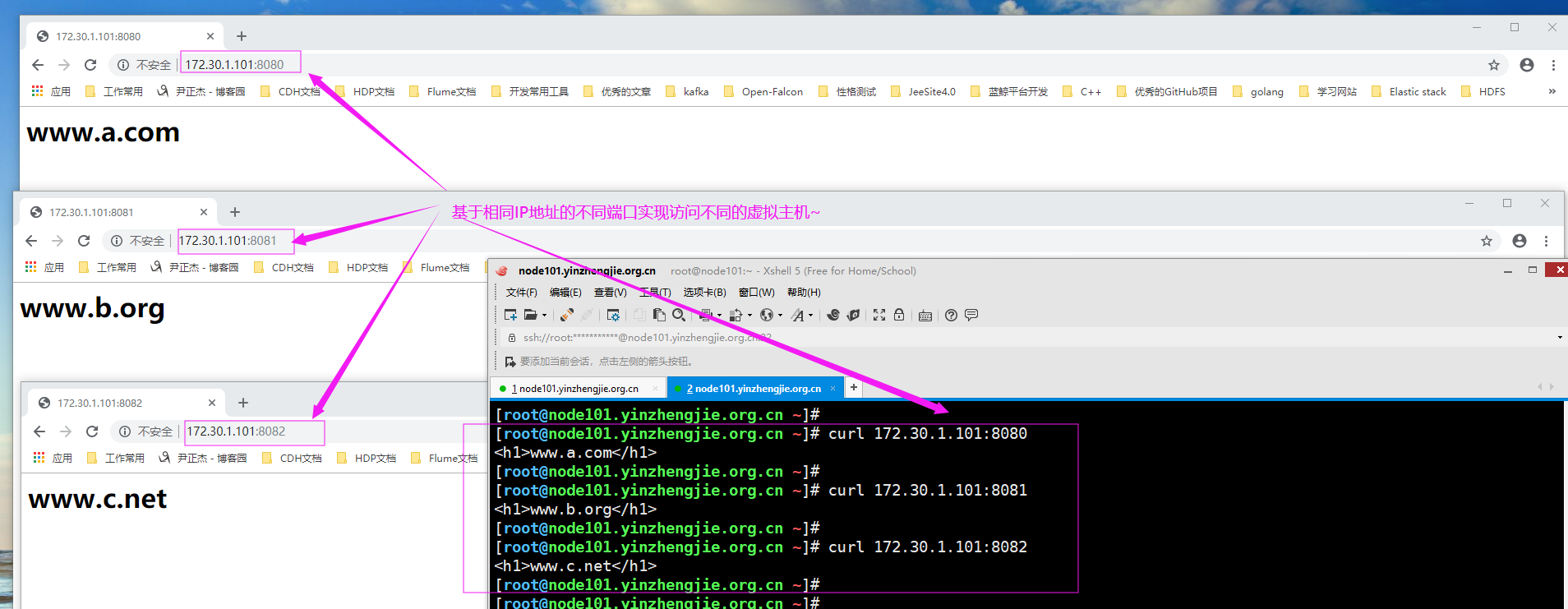
2>.验证客户端是否可以正常访问
四.基于FQDN实现虚拟主机配置实战案例
1>.配置hosts文件解析
[root@node101.yinzhengjie.org.cn ~]# hostname

node101.yinzhengjie.org.cn

[root@node101.yinzhengjie.org.cn ~]#

[root@node101.yinzhengjie.org.cn ~]# hostname -i

172.30.1.101

[root@node101.yinzhengjie.org.cn ~]#

[root@node101.yinzhengjie.org.cn ~]# grep 172.30.1.101 /etc/hosts          #添加咱们要配置的虚拟主机FQDN解析,我这里是实验环境添加本地解析即可,生产环境需要添加DNS解析哟~

172.30.1.101 node101.yinzhengjie.org.cn www.a.com www.b.org www.c.net

[root@node101.yinzhengjie.org.cn ~]#
[root@node101.yinzhengjie.org.cn ~]# ping www.a.com

PING node101.yinzhengjie.org.cn (172.30.1.101) () bytes of data.

 bytes from node101.yinzhengjie.org.cn (172.30.1.101): icmp_seq= ttl= time=0.011 ms

^C

--- node101.yinzhengjie.org.cn ping statistics ---

 packets transmitted,  received, % packet loss, time 0ms

rtt min/avg/max/mdev = 0.011/0.011/0.011/0.000 ms

[root@node101.yinzhengjie.org.cn ~]#
[root@node101.yinzhengjie.org.cn ~]# ping www.a.com
[root@node101.yinzhengjie.org.cn ~]# ping www.b.org

PING node101.yinzhengjie.org.cn (172.30.1.101) () bytes of data.

 bytes from node101.yinzhengjie.org.cn (172.30.1.101): icmp_seq= ttl= time=0.010 ms

^C

--- node101.yinzhengjie.org.cn ping statistics ---

 packets transmitted,  received, % packet loss, time 0ms

rtt min/avg/max/mdev = 0.010/0.010/0.010/0.000 ms

[root@node101.yinzhengjie.org.cn ~]#
[root@node101.yinzhengjie.org.cn ~]# ping www.b.org
[root@node101.yinzhengjie.org.cn ~]# ping www.c.net

PING node101.yinzhengjie.org.cn (172.30.1.101) () bytes of data.

 bytes from node101.yinzhengjie.org.cn (172.30.1.101): icmp_seq= ttl= time=0.015 ms

^C

--- node101.yinzhengjie.org.cn ping statistics ---

 packets transmitted,  received, % packet loss, time 0ms

rtt min/avg/max/mdev = 0.015/0.015/0.015/0.000 ms

[root@node101.yinzhengjie.org.cn ~]#
[root@node101.yinzhengjie.org.cn ~]# ping www.c.net
2>.修改httpd的配置文件
[root@node101.yinzhengjie.org.cn ~]# egrep -v "^ *#|^$" /etc/httpd/conf/httpd.conf

ServerRoot "/etc/httpd"

Listen

Include conf.modules.d/*.conf

User apache

Group apache

ServerAdmin root@localhost

<Directory />

    AllowOverride none

    Require all denied

</Directory>

DocumentRoot "/var/www/html"

<Directory "/var/www">

    AllowOverride None

    Require all granted

</Directory>

<Directory "/var/www/html">

    Options Indexes FollowSymLinks

    AllowOverride None

    Require all granted

</Directory>

<IfModule dir_module>

    DirectoryIndex index.html

</IfModule>

<Files ".ht*">

    Require all denied

</Files>

ErrorLog "logs/error_log"

LogLevel warn

<IfModule log_config_module>

    LogFormat "%h %l %u %{%Y-%m-%d %H:%M:%S}t \"%r\" %>s %b \"%{Referer}i\" \"%{User-Agent}i\"" testlog

    LogFormat "%h %l %u %t \"%r\" %>s %b" common

    <IfModule logio_module>

      LogFormat "%h %l %u %t \"%r\" %>s %b \"%{Referer}i\" \"%{User-Agent}i\" %I %O" combinedio

    </IfModule>

    CustomLog "logs/access_log" testlog

</IfModule>

<IfModule alias_module>

    ScriptAlias /cgi-bin/ "/var/www/cgi-bin/"

</IfModule>

<Directory "/var/www/cgi-bin">

    AllowOverride None

    Options None

    Require all granted

</Directory>

<IfModule mime_module>

    TypesConfig /etc/mime.types

    AddType application/x-compress .Z

    AddType application/x-gzip .gz .tgz

    AddType text/html .shtml

    AddOutputFilter INCLUDES .shtml

</IfModule>

AddDefaultCharset UTF-8

<IfModule mime_magic_module>

    MIMEMagicFile conf/magic

</IfModule>

EnableSendfile on

IncludeOptional conf.d/*.conf

[root@node101.yinzhengjie.org.cn ~]#

[root@node101.yinzhengjie.org.cn ~]#
[root@node101.yinzhengjie.org.cn ~]# egrep -v "^ *#|^$" /etc/httpd/conf/httpd.conf #查看主配置文件内容
[root@node101.yinzhengjie.org.cn ~]# egrep -v "^ *#|^$" /etc/httpd/conf/httpd.conf  | grep ServerRoot

ServerRoot "/etc/httpd"

[root@node101.yinzhengjie.org.cn ~]#

[root@node101.yinzhengjie.org.cn ~]# egrep -v "^ *#|^$" /etc/httpd/conf/httpd.conf  | grep IncludeOptional

IncludeOptional conf.d/*.conf

[root@node101.yinzhengjie.org.cn ~]#

[root@node101.yinzhengjie.org.cn ~]# cat /etc/httpd/conf.d/virtualHost.conf

<VirtualHost "*:80">

    DocumentRoot "/var/www/html/asite"

    ServerName "www.a.com"        #别忘记在这里写上相应的虚拟主机的名称哟~以下配置类似修改即可。

    <Directory "/var/www/html/asite">

        Require all granted

    </Directory>

    CustomLog "/var/log/httpd/access_asite_log" testlog

</VirtualHost>

<VirtualHost "*:80">

    DocumentRoot "/var/www/html/bsite"

    ServerName "www.b.org"

    <Directory "/var/www/html/bsite">

        Require all granted

    </Directory>

    CustomLog "/var/log/httpd/access_bsite_log" testlog

</VirtualHost>

<VirtualHost "*:80">

    DocumentRoot "/var/www/html/csite"

    ServerName "www.c.net"

    <Directory "/var/www/html/csite">

        Require all granted

    </Directory>

    CustomLog "/var/log/httpd/access_csite_log" testlog

</VirtualHost>

[root@node101.yinzhengjie.org.cn ~]#

[root@node101.yinzhengjie.org.cn ~]# httpd -t

Syntax OK

[root@node101.yinzhengjie.org.cn ~]#

[root@node101.yinzhengjie.org.cn ~]# systemctl reload httpd

[root@node101.yinzhengjie.org.cn ~]#

[root@node101.yinzhengjie.org.cn ~]# ss -ntl

State       Recv-Q Send-Q             Local Address:Port                            Peer Address:Port

LISTEN      0      128                            *:80                                         *:*

LISTEN      0      128                            *:22                                         *:*

LISTEN      0      128                           :::22                                        :::*

[root@node101.yinzhengjie.org.cn ~]#
3>.如下图所示,编辑windows系统的本地解析文件("C:\Windows\System32\drivers\etc\hosts")

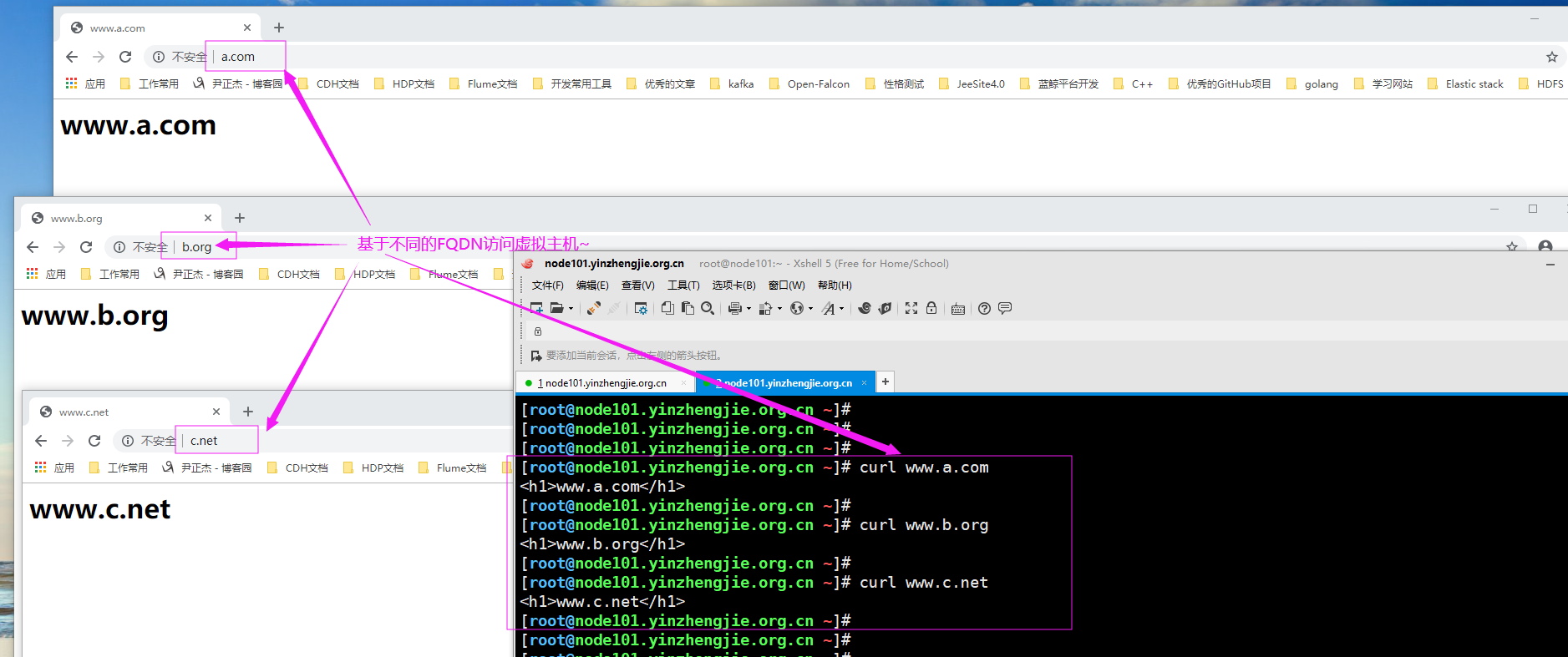
4>.验证客户端是否可以正常访问
五.总结
  上面我们已经演示了基于IP,端口和FQDN来实现虚拟主机的实战案例,接下来我们分析一下这3种方案的区别。

    基于IP:
      需要使用多个不同的IP地址实现虚拟主机,无疑是会浪费多余的公网IP地址。

    基于端口:
      只需要一个公网IP地址即可,并将多个端口的绑定到同一个IP地址上,相对于基于IP实现的虚拟主机要更加节省IP地址,但会占多个端口号实,从而浪费多余的套接字文件。

    FQDN:
      基于FQDN只需要一个IP地址和一段端口即可,所有的虚拟主机只绑定在同一个端口即可,不同的虚拟主机根据客户端的请求报文中的"HOST"参数来判断是要访问哪个虚拟主机。如果客户端不指定"HOST"的属性,而是直接输入的是IP地址,则默认使用虚拟主机配置文件中的第一个虚拟主机来进行响应哟~
      基于FQDN实现虚拟主机要比基于IP实现虚拟主机更加节省公网IP地址。
      基于FQDN实现虚拟主机要比基于端口实现虚拟主机更加节省公网IP地址的端口数量。

  综上所述,我们生产环境中实现虚拟主机大多数运维人员都会选用基于FQDN的方案实现。
Httpd服务入门知识-Httpd服务常见配置案例之虚拟主机的更多相关文章
- Httpd服务入门知识-Httpd服务常见配置案例之Apache的工作做状态status页面
Httpd服务入门知识-Httpd服务常见配置案例之Apache的工作做状态status页面 作者:尹正杰 版权声明:原创作品,谢绝转载!否则将追究法律责任. 一.status功能概述 status页 ...
- Httpd服务入门知识-Httpd服务常见配置案例之ServerSignature指令选项
Httpd服务入门知识-Httpd服务常见配置案例之ServerSignature指令选项 作者:尹正杰 版权声明:原创作品,谢绝转载!否则将追究法律责任. 一.ServerSignature指令概述 ...
- Httpd服务入门知识-Httpd服务常见配置案例之实现用户家目录的http共享
Httpd服务入门知识-Httpd服务常见配置案例之实现用户家目录的http共享 作者:尹正杰 版权声明:原创作品,谢绝转载!否则将追究法律责任. 一.实现用户家目录的http共享前提 在配置家目录共 ...
- Httpd服务入门知识-Httpd服务常见配置案例之定义路径别名
Httpd服务入门知识-Httpd服务常见配置案例之定义路径别名 作者:尹正杰 版权声明:原创作品,谢绝转载!否则将追究法律责任. 一.创建测试数据 [root@node101.yinzhengj ...
- Httpd服务入门知识-Httpd服务常见配置案例之设定默认字符集
Httpd服务入门知识-Httpd服务常见配置案例之设定默认字符集 作者:尹正杰 版权声明:原创作品,谢绝转载!否则将追究法律责任. 一.查看生产环境中使用的字符集案例 1>.查看腾讯设置的默认 ...
- Httpd服务入门知识-Httpd服务常见配置案例之日志设定
Httpd服务入门知识-Httpd服务常见配置案例之日志设定 作者:尹正杰 版权声明:原创作品,谢绝转载!否则将追究法律责任. 一.日志类型 [root@node101.yinzhengjie.org ...
- Httpd服务入门知识-Httpd服务常见配置案例之基于客户端来源地址实现访问控制
Httpd服务入门知识-Httpd服务常见配置案例之基于客户端来源地址实现访问控制 作者:尹正杰 版权声明:原创作品,谢绝转载!否则将追究法律责任. 一.Options 1>.OPTIONS指 ...
- Httpd服务入门知识-Httpd服务常见配置案例之基于用户账号实现访问控制
Httpd服务入门知识-Httpd服务常见配置案例之基于用户账号实现访问控制 作者:尹正杰 版权声明:原创作品,谢绝转载!否则将追究法律责任. 一.基于用户的访问控制概述 认证质询: WWW-Auth ...
- Httpd服务入门知识-Httpd服务常见配置案例之定义站点主页面及错误页面配置
Httpd服务入门知识-Httpd服务常见配置案例之定义站点主页面及错误页面配置 作者:尹正杰 版权声明:原创作品,谢绝转载!否则将追究法律责任. 一.定义站点主页面 [root@node101.yi ...
随机推荐
- shell脚本显示字体颜色
shell脚本中echo显示内容带颜色显示,echo显示带颜色,需要使用参数-e 格式如下: echo -e "\033[字背景颜色:文字颜色m字符串\033[0m" 例如: ec ...
- Android Studio 之 GridView
1. 数据源 ArrayList Cursor 2. 适配器 Adapter ArrayAdapter SmipleAdapter SmipleCursorAdapter BaseAdapter
- Java通过poi创建Excel文件并分页追加数据
以下的main函数,先生成一个excel文件,并设置sheet的名称,设置excel头:而后,以分页的方式,向文件中追加数据 maven依赖 <dependency> <groupI ...
- 《Linux就该这么学》培训笔记_ch03_管道符、重定向与环境变量
<Linux就该这么学>培训笔记_ch03_管道符.重定向与环境变量 文章最后会post上书本的笔记照片. 文章主要内容: 输入输出重定向 管道命令符 命令行的通配符 常用的转义字符 重要 ...
- 【转】android实时视频网络传输方案总结(一共有五套)
最近研究了Android的实时视频网络传输问题,在视频处理方面花费了大量精力进行研究,总结出以下五套方案,并加以比较 以320×240大小的视频传输为例 方案 压缩率 压缩/传输方式 实时性 平均流量 ...
- phpcms发布文章自定义字段
phpcms发布文章自定义字段1 进入后台 模型管理 新建模型 里面可以自定义字段了
- 第一次使用Vue
什么是Vue? 接触前端时,一直在想,网页中那么多数据,怎么一次性渲染到页面中?通过js可以实现,但是比较繁琐,需要组合字符串,很麻烦.还有更好的办法吗? 直到我遇见了Vue...... 首次接触到V ...
- FreeSWITCH 总体架构
[1]总体结构 [2]代码结构目录 [3]模块简介 Applications应用 mod_abstraction – 提供了一个抽象的API调用(未来有更多功能)Provides an abstrac ...
- LR编写grammar中的问题和解决方法
本文主要说明LR解析过程中关于BNF的典型冲突如何在LR中解决 冲突一般分为两种: shift/reduce错误 redure/redure错误 下面分别解释两种冲突 1. shift/reduce错 ...
- c#创建windows服务(代码方式安装、启动、停止、卸载服务)
转载于:https://www.cnblogs.com/mq0036/p/7875864.html 一.开发环境 操作系统:Windows 10 X64 开发环境:VS2015 编程语言:C# .NE ...