
Httpd服务入门知识-Httpd服务常见配置案例之定义站点主页面及错误页面配置
Httpd服务入门知识-Httpd服务常见配置案例之定义站点主页面及错误页面配置
作者:尹正杰
版权声明:原创作品,谢绝转载!否则将追究法律责任。
一.定义站点主页面
[root@node101.yinzhengjie.org.cn ~]# egrep -v "^ *#|^$" /etc/httpd/conf/httpd.conf  | grep DirectoryIndex

    DirectoryIndex index.html

[root@node101.yinzhengjie.org.cn ~]#

[root@node101.yinzhengjie.org.cn ~]# ll /data/www/html/

total

-rw-r--r--  root root  Dec   : index.html

-rw-r--r--  root root  Dec   : info.html

[root@node101.yinzhengjie.org.cn ~]#

[root@node101.yinzhengjie.org.cn ~]# cat /data/www/html/index.html

/data/www/html

[root@node101.yinzhengjie.org.cn ~]#

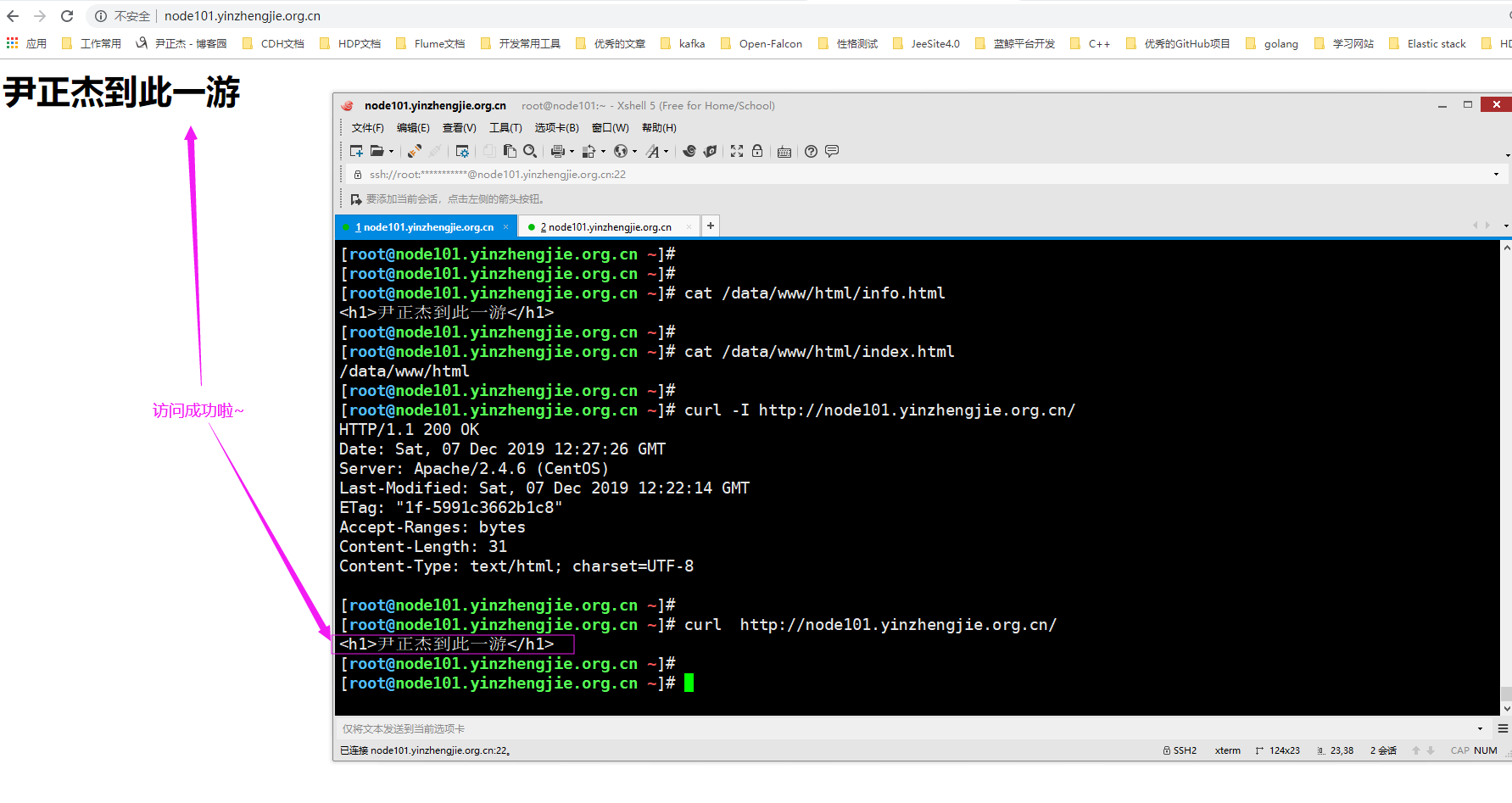
[root@node101.yinzhengjie.org.cn ~]# cat /data/www/html/info.html

<h1>尹正杰到此一游</h1>

[root@node101.yinzhengjie.org.cn ~]#

[root@node101.yinzhengjie.org.cn ~]# vim /etc/httpd/conf/httpd.conf

[root@node101.yinzhengjie.org.cn ~]#

[root@node101.yinzhengjie.org.cn ~]# egrep -v "^ *#|^$" /etc/httpd/conf/httpd.conf  | grep DirectoryIndex

    DirectoryIndex info.html

[root@node101.yinzhengjie.org.cn ~]#

[root@node101.yinzhengjie.org.cn ~]# httpd -t

Syntax OK

[root@node101.yinzhengjie.org.cn ~]#

[root@node101.yinzhengjie.org.cn ~]# systemctl restart httpd.service

[root@node101.yinzhengjie.org.cn ~]#
二.错误页面配置
1>.删除站点主页文件
[root@node101.yinzhengjie.org.cn ~]# egrep -v "^ *#|^$" /etc/httpd/conf/httpd.conf  | grep DocumentRoot

DocumentRoot "/data/www/html"

[root@node101.yinzhengjie.org.cn ~]#

[root@node101.yinzhengjie.org.cn ~]# egrep -v "^ *#|^$" /etc/httpd/conf/httpd.conf  | grep DirectoryIndex

    DirectoryIndex info.html

[root@node101.yinzhengjie.org.cn ~]#

[root@node101.yinzhengjie.org.cn ~]# rm -f /data/www/html/info.html

[root@node101.yinzhengjie.org.cn ~]#

[root@node101.yinzhengjie.org.cn ~]# ll /data/www/html/

total

-rw-r--r--  root root  Dec   : index.html

[root@node101.yinzhengjie.org.cn ~]#

[root@node101.yinzhengjie.org.cn ~]#
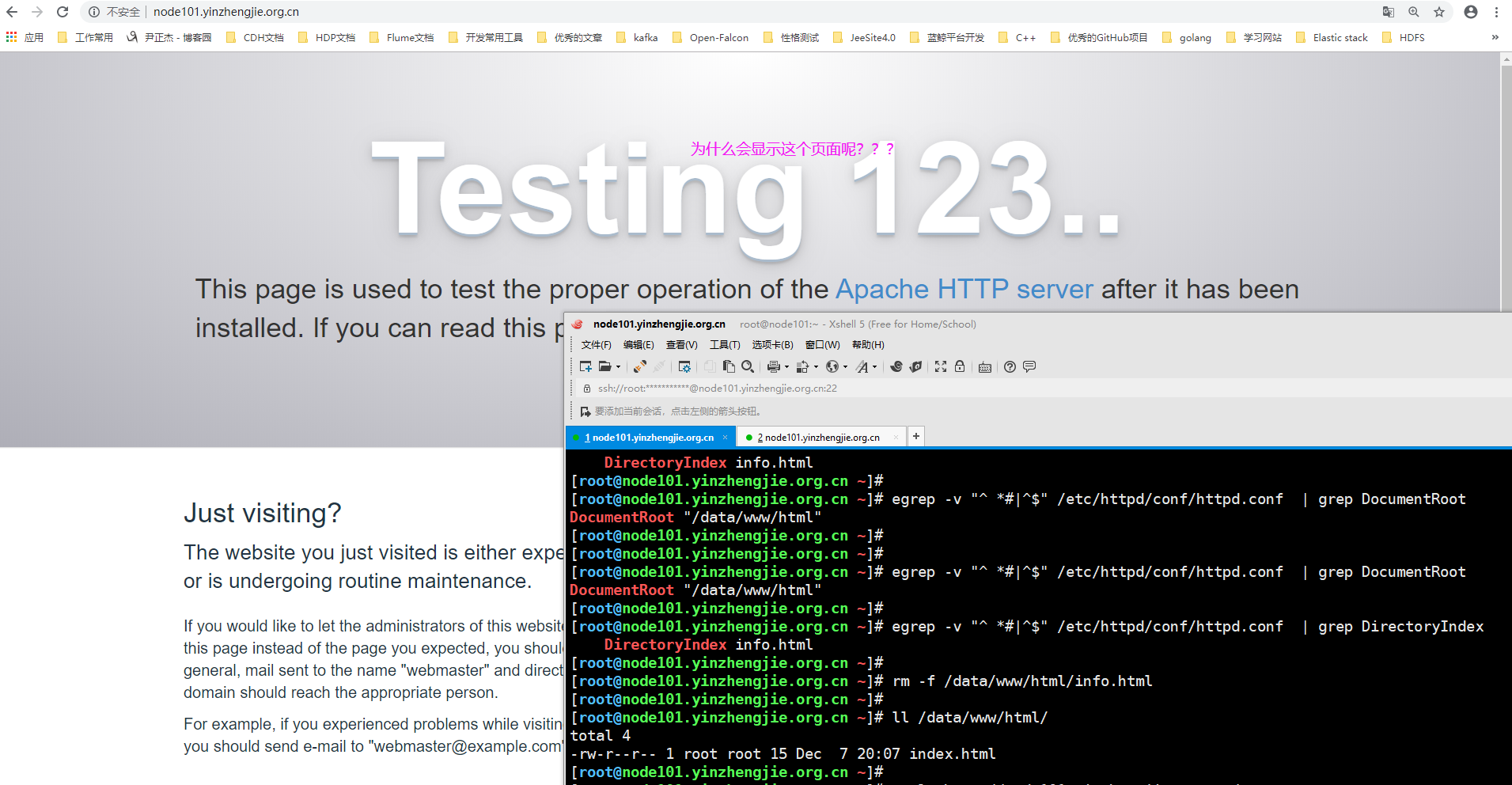
2>.查看"/etc/httd/conf.d"目录下的"welcome.conf"配置文件
[root@node101.yinzhengjie.org.cn ~]# egrep -v "^ *#|^$" /etc/httpd/conf/httpd.conf  | grep ServerRoot

ServerRoot "/etc/httpd"

[root@node101.yinzhengjie.org.cn ~]#

[root@node101.yinzhengjie.org.cn ~]# egrep -v "^ *#|^$" /etc/httpd/conf/httpd.conf  | grep IncludeOptional

IncludeOptional conf.d/*.conf

[root@node101.yinzhengjie.org.cn ~]#

[root@node101.yinzhengjie.org.cn ~]# ll /etc/httpd/conf.d/              #从主配置文件中可以看到启动httpd服务时会加载该目录下的文件哟~

total 20

-rw-r--r-- 1 root root 2926 Aug  8 19:41 autoindex.conf

-rw-r--r-- 1 root root   66 Dec  7 20:15 document_root.conf

-rw-r--r-- 1 root root  366 Aug  8 19:42 README

-rw-r--r-- 1 root root 1252 Aug  6 21:44 userdir.conf

-rw-r--r-- 1 root root  824 Aug  6 21:44 welcome.conf

[root@node101.yinzhengjie.org.cn ~]#

[root@node101.yinzhengjie.org.cn ~]# cat /etc/httpd/conf.d/welcome.conf

#

# This configuration file enables the default "Welcome" page if there

# is no default index page present for the root URL.  To disable the

# Welcome page, comment out all the lines below.

#

# NOTE: if this file is removed, it will be restored on upgrades.

#

<LocationMatch "^/+$">

    Options -Indexes

    ErrorDocument 403 /.noindex.html                  #不难发现,如果有403的错误,就会使用"/.noindex.html"的别名文件来替换错误网页

</LocationMatch>

<Directory /usr/share/httpd/noindex>

    AllowOverride None

    Require all granted

</Directory>

Alias /.noindex.html /usr/share/httpd/noindex/index.html      #我们看到"/.noindex.html"的别名真正存放路径为"/usr/share/httpd/noindex/index.html"

Alias /noindex/css/bootstrap.min.css /usr/share/httpd/noindex/css/bootstrap.min.css

Alias /noindex/css/open-sans.css /usr/share/httpd/noindex/css/open-sans.css

Alias /images/apache_pb.gif /usr/share/httpd/noindex/images/apache_pb.gif

Alias /images/poweredby.png /usr/share/httpd/noindex/images/poweredby.png

[root@node101.yinzhengjie.org.cn ~]#

[root@node101.yinzhengjie.org.cn ~]#
3>.经过上一步骤的分析,我们将"/etc/httpd/conf.d/welcome.conf"配置文件改成不以".conf"结尾的文件名
[root@node101.yinzhengjie.org.cn ~]# egrep -v "^ *#|^$" /etc/httpd/conf/httpd.conf  | grep ServerRoot

ServerRoot "/etc/httpd"

[root@node101.yinzhengjie.org.cn ~]#

[root@node101.yinzhengjie.org.cn ~]# egrep -v "^ *#|^$" /etc/httpd/conf/httpd.conf  | grep IncludeOptional

IncludeOptional conf.d/*.conf

[root@node101.yinzhengjie.org.cn ~]#

[root@node101.yinzhengjie.org.cn ~]# ll /etc/httpd/conf.d/

total 20

-rw-r--r-- 1 root root 2926 Aug  8 19:41 autoindex.conf

-rw-r--r-- 1 root root   66 Dec  7 20:15 document_root.conf

-rw-r--r-- 1 root root  366 Aug  8 19:42 README

-rw-r--r-- 1 root root 1252 Aug  6 21:44 userdir.conf

-rw-r--r-- 1 root root  824 Aug  6 21:44 welcome.conf

[root@node101.yinzhengjie.org.cn ~]#

[root@node101.yinzhengjie.org.cn ~]# mv /etc/httpd/conf.d/welcome.conf /etc/httpd/conf.d/welcome.conf-`date +%F`       #我们暂时修改文件名的后缀

[root@node101.yinzhengjie.org.cn ~]#

[root@node101.yinzhengjie.org.cn ~]# ll /etc/httpd/conf.d/

total 20

-rw-r--r-- 1 root root 2926 Aug  8 19:41 autoindex.conf

-rw-r--r-- 1 root root   66 Dec  7 20:15 document_root.conf

-rw-r--r-- 1 root root  366 Aug  8 19:42 README

-rw-r--r-- 1 root root 1252 Aug  6 21:44 userdir.conf

-rw-r--r-- 1 root root  824 Aug  6 21:44 welcome.conf-2019-12-07

[root@node101.yinzhengjie.org.cn ~]#

[root@node101.yinzhengjie.org.cn ~]#
4>.重启httpd服务,观察页面出现了如下图所示的界面
[root@node101.yinzhengjie.org.cn ~]# systemctl restart httpd

[root@node101.yinzhengjie.org.cn ~]#

[root@node101.yinzhengjie.org.cn ~]# ss -ntl

State      Recv-Q Send-Q                                         Local Address:Port                                                        Peer Address:Port

LISTEN                                                                   *:                                                                     *:*

LISTEN                                                                   *:                                                                     *:*

LISTEN                                                                  :::                                                                    :::*

[root@node101.yinzhengjie.org.cn ~]#

[root@node101.yinzhengjie.org.cn ~]# systemctl status httpd

● httpd.service - The Apache HTTP Server

   Loaded: loaded (/usr/lib/systemd/system/httpd.service; disabled; vendor preset: disabled)

   Active: active (running) since Sat -- :: CST; 11s ago

     Docs: man:httpd()

           man:apachectl()

  Process:  ExecStop=/bin/kill -WINCH ${MAINPID} (code=exited, status=/SUCCESS)

  Process:  ExecReload=/usr/sbin/httpd $OPTIONS -k graceful (code=exited, status=/SUCCESS)

 Main PID:  (httpd)

   Status: "Total requests: 0; Current requests/sec: 0; Current traffic:   0 B/sec"

   CGroup: /system.slice/httpd.service

           ├─ /usr/sbin/httpd -DFOREGROUND

           ├─ /usr/sbin/httpd -DFOREGROUND

           ├─ /usr/sbin/httpd -DFOREGROUND

           ├─ /usr/sbin/httpd -DFOREGROUND

           └─ /usr/sbin/httpd -DFOREGROUND

Dec  :: node101.yinzhengjie.org.cn systemd[]: Starting The Apache HTTP Server...

Dec  :: node101.yinzhengjie.org.cn systemd[]: Started The Apache HTTP Server.

[root@node101.yinzhengjie.org.cn ~]#

[root@node101.yinzhengjie.org.cn ~]#
5>.总结
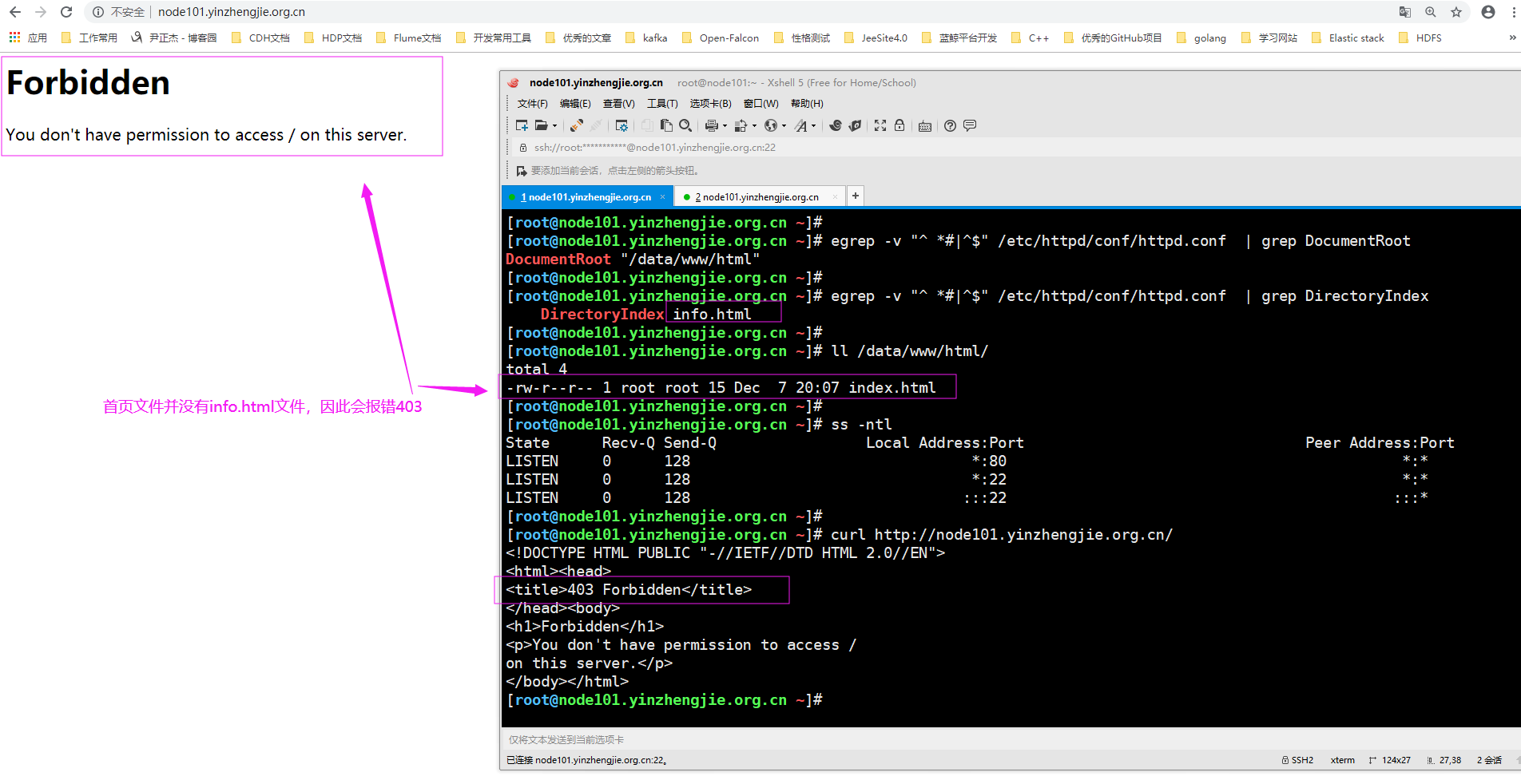
根据上面的操作,如果出现错误的403网页,咱们也可以自定义自己的错误页面哟~
Httpd服务入门知识-Httpd服务常见配置案例之定义站点主页面及错误页面配置的更多相关文章
- Httpd服务入门知识-Httpd服务常见配置案例之虚拟主机
Httpd服务入门知识-Httpd服务常见配置案例之虚拟主机 作者:尹正杰 版权声明:原创作品,谢绝转载!否则将追究法律责任. 一.虚拟主机实现方案 1>.Apache httpd 有三种实现虚 ...
- Httpd服务入门知识-Httpd服务常见配置案例之Apache的工作做状态status页面
Httpd服务入门知识-Httpd服务常见配置案例之Apache的工作做状态status页面 作者:尹正杰 版权声明:原创作品,谢绝转载!否则将追究法律责任. 一.status功能概述 status页 ...
- Httpd服务入门知识-Httpd服务常见配置案例之ServerSignature指令选项
Httpd服务入门知识-Httpd服务常见配置案例之ServerSignature指令选项 作者:尹正杰 版权声明:原创作品,谢绝转载!否则将追究法律责任. 一.ServerSignature指令概述 ...
- Httpd服务入门知识-Httpd服务常见配置案例之实现用户家目录的http共享
Httpd服务入门知识-Httpd服务常见配置案例之实现用户家目录的http共享 作者:尹正杰 版权声明:原创作品,谢绝转载!否则将追究法律责任. 一.实现用户家目录的http共享前提 在配置家目录共 ...
- Httpd服务入门知识-Httpd服务常见配置案例之定义路径别名
Httpd服务入门知识-Httpd服务常见配置案例之定义路径别名 作者:尹正杰 版权声明:原创作品,谢绝转载!否则将追究法律责任. 一.创建测试数据 [root@node101.yinzhengj ...
- Httpd服务入门知识-Httpd服务常见配置案例之设定默认字符集
Httpd服务入门知识-Httpd服务常见配置案例之设定默认字符集 作者:尹正杰 版权声明:原创作品,谢绝转载!否则将追究法律责任. 一.查看生产环境中使用的字符集案例 1>.查看腾讯设置的默认 ...
- Httpd服务入门知识-Httpd服务常见配置案例之日志设定
Httpd服务入门知识-Httpd服务常见配置案例之日志设定 作者:尹正杰 版权声明:原创作品,谢绝转载!否则将追究法律责任. 一.日志类型 [root@node101.yinzhengjie.org ...
- Httpd服务入门知识-Httpd服务常见配置案例之基于客户端来源地址实现访问控制
Httpd服务入门知识-Httpd服务常见配置案例之基于客户端来源地址实现访问控制 作者:尹正杰 版权声明:原创作品,谢绝转载!否则将追究法律责任. 一.Options 1>.OPTIONS指 ...
- Httpd服务入门知识-Httpd服务常见配置案例之基于用户账号实现访问控制
Httpd服务入门知识-Httpd服务常见配置案例之基于用户账号实现访问控制 作者:尹正杰 版权声明:原创作品,谢绝转载!否则将追究法律责任. 一.基于用户的访问控制概述 认证质询: WWW-Auth ...
随机推荐
- Google Spreadsheet Add-on Links Extractor 谷歌表格插件链接提取器的制作与发布(附源码)
引言 为什么想到制作这么一个插件呢,是因为博主在更新微信公众号[刷尽天下]的后台数据库时,需要有博客园题目帖子的链接,那么就要从这篇帖子 LeetCode All in One 题目讲解汇总(持续更新 ...
- Java 集合系列之三:Set基本操作
1. Java Set 1. Java Set 重要观点 Java Set接口是Java Collections Framework的成员. Set不允许出现重复元素-----------无重复 Se ...
- go 优秀文档
go语言资料汇总 : https://blog.zhnytech.com/articles/2016/07/15/Golang%E5%AD%A6%E4%B9%A0%E8%B5%84%E6%96%99% ...
- JavaScript如何实现日期的前一天后一天转变
1.生成时间 var data =new Date(); 2.获得时间戳 什么是时间戳? 时间戳是指格林威治时间自1970年1月1日(00:00:00 GTM)至当前时间的总秒数.它也被称为U ...
- Prometheus + Consul 自动发现服务监控
一.Prometheus支持的多种服务发现机制(常用如下) static_configs: 静态服务发现 file_sd_configs: 文件服务发现 dns_sd_configs: DNS 服务发 ...
- (转)解决mybatis的mapper.xml查询不出数据,结果一直为null问题
背景:记录mybatis使用过程中遇到的相关问题. 解决mybatis的mapper.xml查询不出数据,结果一直为null问题 解决方案: 1 修改实体类与数据库字段名相同 2 修改sql查询语句, ...
- Linux 下杀毒软件 clamav 的安装和使用
安装依赖: 1 2 3 yum install -y pcre* zlib zlib-devel libssl-devel libssl yum install -y openssl yum inst ...
- storm单机运行报错 ERROR backtype.storm.daemon.executor -
单机本地运行storm报错: 错误如下: java.lang.NullPointerException: null at test2.Spot2.nextTuple(Spot2.java:) ~[cl ...
- spring cloud 客户端负载均衡 - Ribbon
Spring Cloud Ribbon是一个基于HTTP和TCP的客户端负载均衡工具,基于Netflix Ribbon实现的,Ribbon不像注册中心.网关那样需要单独部署,它是作为一个工具直接集成到 ...
- my first blog by cnblogs
#include <stdio.h> int main() { printf("hello everyone."); ; } 上面为我的第一个C语言测试代码,仅供初学者 ...