
Django 之 ContentType组件
一、什么是 ContentTypes
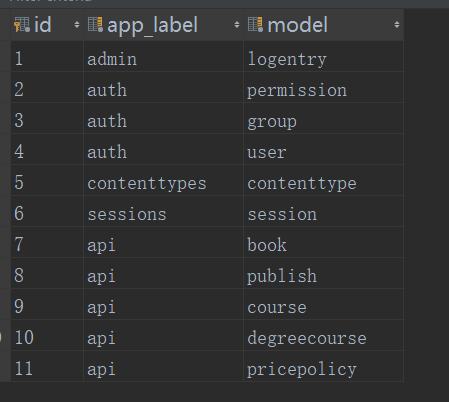
ContentTypes 是 Django 内置的一个应用,它可以追踪记录项目中所有 app 和 model 的对应关系,并记录在 django_content_type 表中。
二、ContentTypes 的应用场景
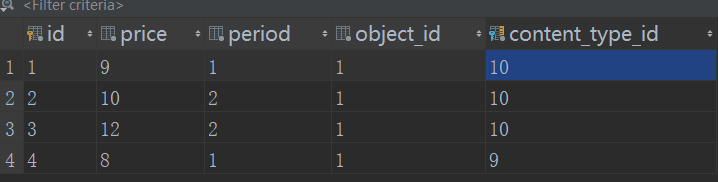
ContentTypes 适用于一张表与多张表相关关联的场景,如:一个卖课程的网站,它主要售卖两类课程(普通课程和学位课程)。不同课程之间因学习周期不同,价格也不尽相同。因此就形成了每个课程可能有一个或多个价格策略。类似于下面这种:

如果我们自己设计表结构可能就会这样设计:
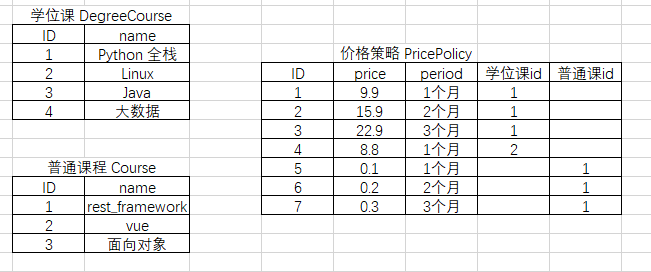
这样设计有个隐患,那就是当课程数目越来越多时,则意味着价格策略表 PricePolicy 必然要与多张表外键关联,导致越来越复杂,对查找造成很大的不便。
为此我们可以采取仅在 PricePolicy 中存储关联的表名称与相应课程 ID 的方式:
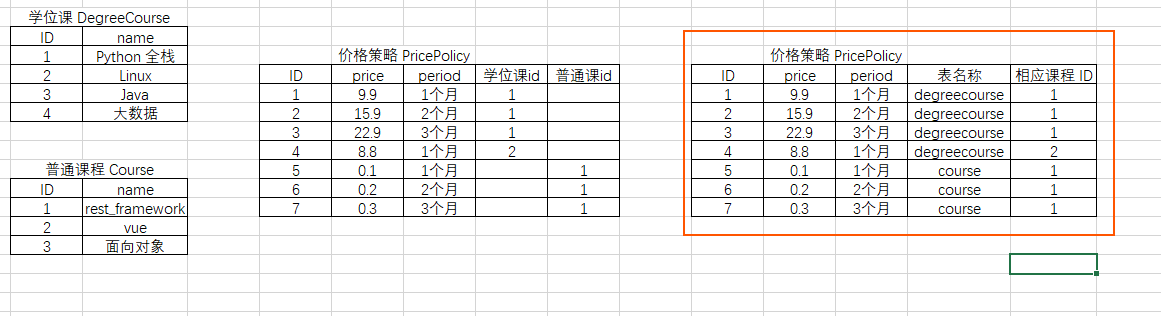
这样一来不论新增多少课程种类,我们只需在 PricePolicy 中新增表名和 ID 即可,其实这一步 ContentTypes 早已帮我们实现。
三、实践一:课程
需求一
- 为学位课
DegreeCoursePython 全栈添加一条价格策略:1个月、12元 - 为普泰课
Courserest_framework 添加一个新的价格策略:1个月、8 元
1、app/models.py
from django.contrib.contenttypes.models import ContentType

from django.contrib.contenttypes.fields import GenericForeignKey

class Course(models.Model):

    """普通课程"""

    title = models.CharField(max_length=64, verbose_name='课程名')

class DegreeCourse(models.Model):

    """学位课程"""

    title = models.CharField(max_length=64, verbose_name='课程名')

class PricePolicy(models.Model):

    """价格策略"""

    price = models.IntegerField()

    period = models.IntegerField()

    # 自己实现

    # table_name = models.CharField(verbose_name='关联的表名称')

    # object_id = models.CharField(verbose_name='关联的表中数据行的 ID')

    # 使用 ContentType

    content_type = models.ForeignKey(ContentType, verbose_name='关联普通课程或者学位课程', on_delete=models.CASCADE)

    object_id = models.IntegerField(verbose_name='关联普通或学位课中的课程 ID')

    # 帮助快速实现 content_type 操作

    content_object = GenericForeignKey('content_type', 'object_id')     # 不会添加字段,只是为了插入或者查询时使用
2、app/urls.py
from django.urls import path, re_path

from api import views

urlpatterns = [

    path('test/', views.test, name='test'),

]
3、app/views.py
from django.shortcuts import render

from django.http import HttpResponse

from app import models

from .models import DegreeCourse, ContentType, PricePolicy

def test(request):

    # 自己实现

    # obj = DegreeCourse.objects.filter(title='Python 全栈').first()

    # # content_type_id

    # cobj = ContentType.objects.filter(model='course').first()

    # # object_id

    # PricePolicy.objects.create(price='11', period=3, content_type_id=cobj.id, object_id=obj.id)

    # 利用 contenttype 实现

    # 为学位课 Python 全栈添加一个新的价格策略:一月 12 元

    # obj1 = models.DegreeCourse.objects.filter(title='Python 全栈').first()

    # models.PricePolicy.objects.create(price=12, period=2.5, content_object=obj1)

    # 为普通课 rest_framework 添加一个新的价格策略:一月 8 元

    obj2 = models.Course.objects.filter(title='rest_framework').first()

    models.PricePolicy.objects.create(price=8, period=1, content_object=obj2)

    return HttpResponse('OK')
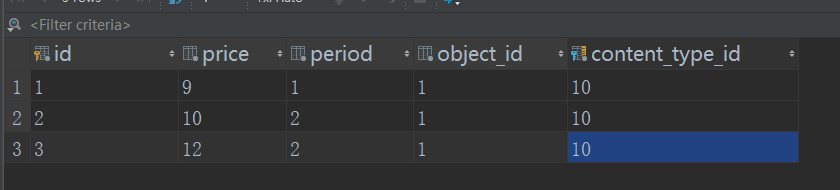
由上可见,如果我们自己实现的话,需要先查找 content_type_id 和 object_id,而使用 ContentType 只需给 content_object 传值即可。
需求二
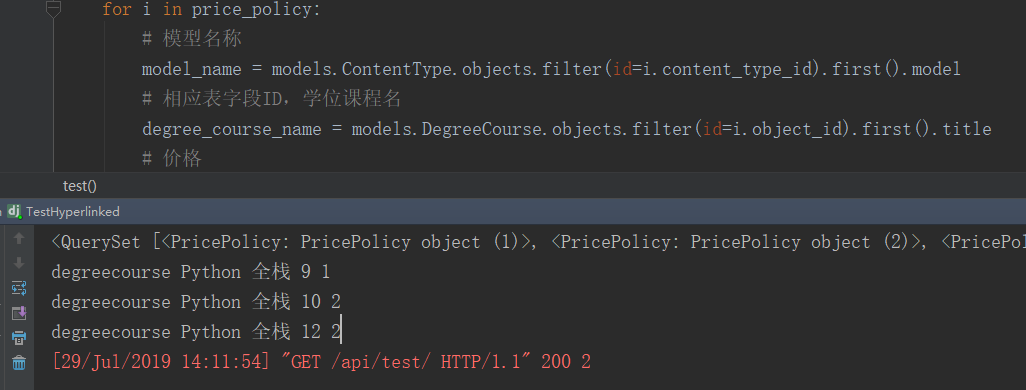
已知某个课程 ID,获取该课程,并获取该课程所有价格策略
1、app/models.py
from django.contrib.contenttypes.models import ContentType

from django.contrib.contenttypes.fields import GenericForeignKey, GenericRelation

class Course(models.Model):

    """普通课程"""

    title = models.CharField(max_length=64, verbose_name='课程名')

    # 不会创建数据表列,仅用于反向查找

    price_policy_list = GenericRelation('PricePolicy')      # 新增

class DegreeCourse(models.Model):

    """学位课程"""

    title = models.CharField(max_length=64, verbose_name='课程名')

    # 不会创建数据表列,仅用于反向查找

    price_policy_list = GenericRelation('PricePolicy')
2、app/views.py
def test(request):

    # 已知某个课程 ID,获取该课程,并获取该课程所有价格策略

    course_obj = models.DegreeCourse.objects.filter(id=1).first()

    price_policy = course_obj.price_policy_list.all()

    print(price_policy)

    for i in price_policy:

        # 模型名称

        model_name = models.ContentType.objects.filter(id=i.content_type_id).first().model

        # 相应表字段ID,学位课程名

        degree_course_name = models.DegreeCourse.objects.filter(id=i.object_id).first().title

        # 价格

        price = i.price

        # 周期

        period = i.period

        print(model_name, degree_course_name, price, period)

    return HttpResponse('OK')
四、实践二:商品优惠券
网上商城购物时,会有各种各样的优惠券,比如通用优惠券,满减券,或者是仅限特定品类的优惠券。在数据库中,可以通过外键将优惠券和不同品类的商品表关联起来:
1、app./models.py
from django.db import models

class Electrics(models.Model):

    """

    id  name

    1   日立冰箱

    2   三星电视

    3   小天鹅洗衣机

    """

    name = models.CharField(max_length=32)

class Foods(models.Model):

    """

    id   name

    1    面包

    2    烤鸭

    """

    name = models.CharField(max_length=32)

class Clothes(models.Model):

    name = models.CharField(max_length=32)

class Coupon(models.Model):

    """

    id     name            Electrics        Foods           Clothes        more...

    1     通用优惠券       null              null            null

    2     冰箱满减券         2               null            null

    3     面包狂欢节        null              1              null

    """

    name = models.CharField(max_length=32)

    electric_obj = models.ForeignKey(to='Electrics', null=True)

    food_obj = models.ForeignKey(to='Foods', null=True)

    cloth_obj = models.ForeignKey(to='Clothes', null=True)
有些商品有优惠券,而有些商品没有,我们只用到模型中的一个或多个字段,就要给每个模型都添加外键关联。若商品类别有很多时,那么就需要添加很多个外键关联,显然这样是不行的。
from django.db import models

from django.contrib.contenttypes.models import ContentType

from django.contrib.contenttypes.fields import GenericForeignKey

class Electrics(models.Model):

    """

    id  name

    1   日立冰箱

    2   三星电视

    3   小天鹅洗衣机

    """

    name = models.CharField(max_length=32)

    coupons = GenericRelation(to='Coupon')      # 添加反向关联,用于查找

class Foods(models.Model):

    """

    id   name

    1    面包

    2    烤鸭

    """

    name = models.CharField(max_length=32)

    coupons = GenericRelation(to='Coupon')

class Clothes(models.Model):

    name = models.CharField(max_length=32)

    coupons = GenericRelation(to='Coupon')

class Coupon(models.Model):

    """

    id     name            Electrics        Foods           Clothes        more...

    1     通用优惠券       null              null            null

    2     冰箱满减券         2               null            null

    3     面包狂欢节        null              1              null

    """

    name = models.CharField(max_length=32)

    content_type = models.ForeignKey(to=ContentType) # step 1 添加一个字段,关联ContentType表中的某一个表

    object_id = models.PositiveIntegerField() # step 2 添加一个id字段,就是‘某一张’表在ContentType里的对应的id

    content_object = GenericForeignKey('content_type', 'object_id') # step 3 不会添加字段,只是为了插入或者查询时使用
2、app/views.py
from django.shortcuts import render, HttpResponse

from app import models

from django.contrib.contenttypes.models import ContentType

def test(request):

    content = ContentType.objects.filter(app_label='app', model='eletrics').first()

    electrics_class = content.model_class()     # electrics_class : models.Electrics

    res = electrics_class.objects.all()

    # 为三星电视创建优惠券

    s_tv = models.Electrics.objects.filter(id=2).first()

    models.Coupon.objects.create(name='电视优惠券', content_object=s_tv)

    # 查询优惠券 id = 1 绑定了哪些商品

    coupon_obj = models.Coupon.objects.filter(id=1).first()

    prod = coupon_obj.content_object

    return HttpResponse('OK')
五、总结
- 当一张表与多张表关联的时候可以考虑使用
ContentType GenericForeignKey仅为了辅助插入操作,不会添加新的字段- 如果要反向查找,可在模型中添加
GenericRelation,关联要反向查找的模型
Django 之 ContentType组件的更多相关文章
- Django之ContentType组件
一.理想表结构设计 1.初始构建 1. 场景刚过去的双12,很多电商平台都会对他们的商品进行打折促销活动的,那么我们如果要实现这样的一个场景,改如何设计我们的表? 2. 初始表设计 注释很重要,看看吧 ...
- Django组件(五) Django之ContentType组件
基础使用 -contenttype组件 -django提供的一个快速连表操作的组件,可以追踪项目中所有的APP和model的对应关系,并记录在ContentType表中. 当我们的项目做数据迁移后,会 ...
- Django day31 contentType组件,Django的缓存
一.contentType组件 1.干什么用的? 是一个django内置的一个组件,方便我们快速的连表操作 2.这两个字段都不会在数据库中生成,他只是用来查询,插入的 -在course表中: poli ...
- 【Django】ContentType组件
目录 理解 表结构 使用 @ 好,现在我们有这样一个需求,我们的商城里有很多的商品,然而节日要来了,我们要搞活动. 那么,我们就要设计优惠券,优惠券都有什么类型呢?满减的.折扣的.立减的.等等等... ...
- Django中content-type组件
django-content 1.需求 一家餐馆,有多个菜系,粤菜.湘菜.闽南菜.东北菜等,每个菜系中的菜品又分为小份.中份.大份,每个菜系对应的菜品量价格不同,现需要将该需求建表. 2. 建表方式 ...
- Django中content-type组件的使用
content-type组件 ContentType是Django的内置的一个应用,可以追踪项目的所有APP和model的对应关系,并记录在ContentTpe表中,当我们的项目做数据迁移后,会有很多 ...
- Django :Content-Type组件
Content_Type 组件 用法: model.py: from django.db import models # Create your models here. class Food(mod ...
- Django:ContentType组件
一.项目背景 二.版本一 三.版本二 三.终极版(使用ContentType) 一.项目背景 luffy项目,有课程有学位课(不同的课程字段不一样),价格策略 问题:1.如何设计表结构,来表示这种规则 ...
- django内置组件——ContentTypes
一.什么是Django ContentTypes? Django ContentTypes是由Django框架提供的一个核心功能,它对当前项目中所有基于Django驱动的model提供了更高层次的抽象 ...
随机推荐
- 网络协议 16 - DNS 协议
为什么在地址栏输入域名,就能直接访问到对应服务器?全局负载均衡和内部负载均衡又是什么?这些都和 DNS 解析息息相关,让我们一起来解密 DNS 解析. 其实说起 DNS 解析,应该都知道它很像 ...
- sort函数实现多条件排序
js的sort方法,我们一般传入一个回调用于单排序,也就根据某一个条件排序,那么一个场景需要多条件排序(多重排序),我们怎么处理呢? 如下例子,我们按学生的总分排序,如果总分相等,我们再按照语文成绩排 ...
- 第08组 Beta冲刺(4/5)
队名:955 组长博客:点这里! 作业博客:点这里! 组员情况 组员1(组长):庄锡荣 过去两天完成了哪些任务 文字/口头描述 ? 测试新功能中 展示GitHub当日代码/文档签入记录 接下来的计划 ...
- Redis Zrevrank 命令
Redis Zrevrank 命令返回有序集中成员的排名.其中有序集成员按分数值递减(从大到小)排序. 排名以 0 为底,也就是说, 分数值最大的成员排名为 0 . 使用 ZRANK 命令可以获得成员 ...
- js 压缩图片(只缩小体积,不更改图片尺寸)
1.情景展示 如上图所示,点击上传图片按钮,调用手机摄像头拍照功能. <input onchange="javascript:imgFun.uploadPicture();&quo ...
- 第3课 auto类型推导(2)
第3课 auto类型推导(2) 一.使用auto的优势 (一)避免使用未初始化变量 (二)可简化变量/对象类型的声明 (三) 在某些场合无法判断出类型时,可用auto自动推导(如lambda表达式) ...
- docker-compose搭建zookeeper集群环境 CodingCode
docker-compose搭建zookeeper集群环境 使用docker-compose搭建zookeeper集群环境 zookeeper是一个集群环境,用来管理微服务架构下面的配置管理功能. 这 ...
- [转帖]11G Undo使用率很高问题
11G Undo使用率很高问题 http://blog.itpub.net/12679300/viewspace-1164916/ 原创 Oracle 作者:wzq609 时间:2014-05-20 ...
- Excel数据都在一列,如何批量转置
Evernote Export Excel数据都在一列,如何批量转置 创建时间: 2019-10-21 星期一 13:41 作者: 苏苏 标签: excel, 转置 问题 Excel数据都 ...
- Neo4j学习——基本操作(一)
由于开始学习知识图谱,因此需要涉及到neo4j的使用一.介绍neo4j是一个图形数据库基于Java开发而成,因此需要配置jvm才可以运行配置请参考我前面的一篇blog:https://www.cnbl ...