
VMXNET3 vs E1000E and E1000
VMXNET3 vs E1000E and E1000
用户为什么要从E1000调整为VMXNET3,理由如下:
- E1000是千兆网路卡,而VMXNET3是万兆网路卡;
- E1000的性能相对较低,而VMXNET3的性能相对较高;
- VMXNET3支持TCP/IP Offload Engine,E1000不支持;
- VMXNET3可以直接和vmkernel通讯,执行内部数据处理;
eg. VMXNET3 will show the bandwidth as 10 GBps. However, the actual bandwidth will depend on your uplink speed. A physical CentOS or a Windows installation might show it as 40 GBps but, not the VMs. You will have to perform a bandwidth test to see how much you are getting in actual.
来源 http://blog.51cto.com/shipyard/1930183
Network performance with VMXNET3 compared to E1000E and E1000. This article explains the difference between the virtual network adapters and part 2 will demonstrate how much network performance could be gained by selecting the paravirtualized adapter.
The VMware administrator has several different virtual network adapters available to attach to the virtual machines. The virtual adapters belong to either of two groups:
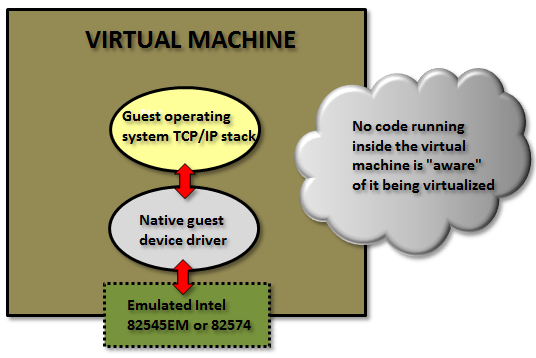
Emulated:
These are virtual hardware who emulates real existing physical network adapters. (Note that the physical network cards in the physical ESXi host is totally unrelated.) The VMkernel will present something that to the guest operating system will look exactly as some specific real world hardware and the guest could detect them through plug and play and use a native device driver.
Examples for the emulated devices are:
E1000 – which will emulate a 1 Gbit Intel 82545EM card, and is available for most operating systems since the generation of Windows Server 2003. This card is the default when creating almost all virtual machines and is by that widely used.
E1000E – emulates a newer real network adapter, the 1 Gbit Intel 82574, and is available for Windows 2012 and later. The E1000E needs VM hardware version 8 or later.
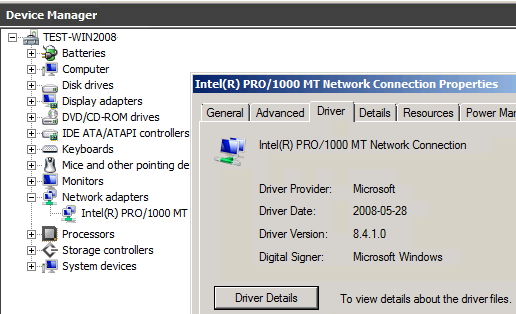
Above in Windows 2008 R2 with an emulated E1000 adapter the native guest operating system device driver is in use.
The positive side of the emulated network adapters are that they work “out of the box” and need no external code from VMware. It could be used to even (if needed) install the guest operating system by PXE since the E1000 device is available already from the BIOS start up.
The negative side is when using the default emulated adapters extra work is needed for every frame being sent or received from the guest operating system (which could be many thousands each second).
The VMkernel has to in “real time” emulate the exact behavior of the specific Intel 82545EM or 82574 cards, which will cost time and CPU cycles.
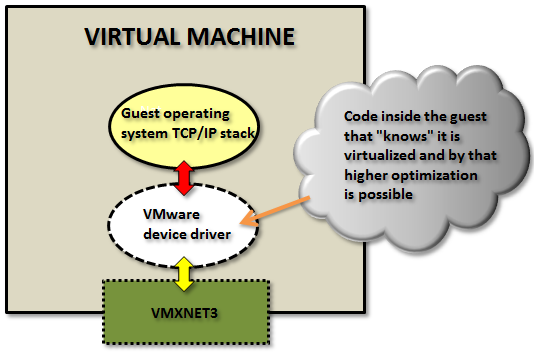
Paravirtualized:
The other type of virtual network adapters are the “paravirtualized”. The most recent one is calledVMXNET3.
The paravirtualized network card does not exist as a physical NIC, but is a device “made up” entirely by VMware. For the guest operating system this will mean that it typically during the OS installation phase only senses that an unknown device is located in a PCI slot on the (virtual) motherboard, but it has no driver to actually use it.
(Note: some Linux distributions do even have the VMXNET3 driver pre-installed.)

For Windows Server, when a device driver is supplied, typically through the installation of VMware Tools, the guest operating system will perceive this as a real NIC from some network card manufacturer called “VMware” and use it as an ordinary network adapter. It has no reason to believe anything else than this is a NIC just as any other NIC around.
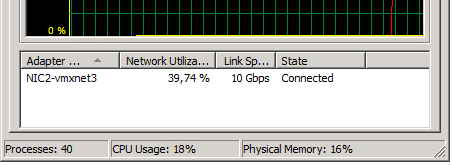
To the guest operating system the VMXNET3 card looks like a 10 Gbit physical device.
Note: there are also two obsolete paravirtualized adapters called VMXNET and VMXNET2 (sometimes the “Enhanced VMXNET”), however as long as the virtual machine has at least hardware version 7 only the VMXNET3 adapter should be used.
Since VMware with the VMXNET3 card owns much more of the network components even inside the VM there are many performance enhancements that could done. With the emulated E1000/E1000E the kernel has to mimic the exact behavior of existing adapters to the guest but with the VMXNET3 it could create a “perfect” virtual adapter optimized to be used in a virtual environment.
In the first article the general difference between the adapter types was explained.
In this article we will test the network throughput in the two most common Windows operating systems today: Windows 2008 R2 and Windows 2012 R2, and see the performance of the VMXNET3 vs the E1000 and the E1000E.
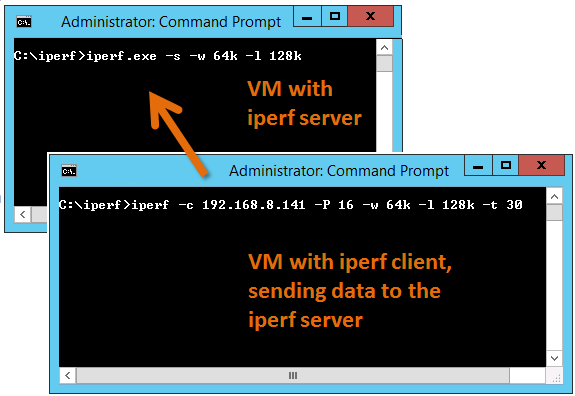
To generate large amounts of network traffic I used the iperf tool running on two virtual machines, one iperf “client” and the other as “server”. I have found that the following iperf settings generates the best combination for network throughput tests on Windows Server:
Server: iperf -s -w 64k -l 128k
Client: iperf -c <SERVER-IP> -P 16 -w 64k -l 128k -t 30
The test was done on HP Proliant Bl460c Gen8 with the virtual machines were running on the same physical host to be able to see the network performance regardless of the physical network connection between physical hosts/blades.
All settings on the E1000, E1000E and VMXNET3 was default. More on possible tweakings of the VMXNET3 card settings will be explained in a later article.
(It shall of course be noted that the following results are just observations from tests on one specific hardware and ESXi configuration, and is not in any way a “scientific” study.)
Test 1: Windows 2008 R2 with the default E1000 adapter
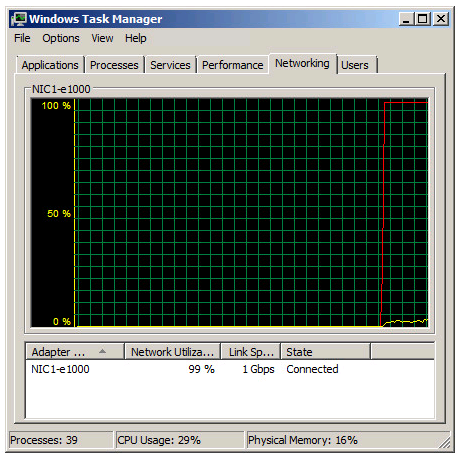
Two Windows 2008 R2 virtual machines, one as iperf server and the other as client, with the test running in 30 seconds.
As noted in the Task Manager view the 1 Gbit link speed was maxed out. A somewhat interesting fact is that even with the emulated E1000 adapter it is possible to use more than what “should” be possible on a 1 Gbit link.
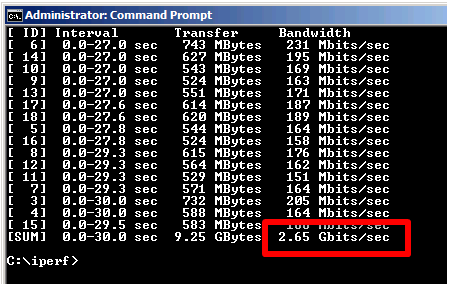
From the iperf client output we can see that we reach a total throughput of 2.65 Gbit per second with the default E1000 virtual adapter.
Test 2: Windows 2008 R2 with the VMXNET3 adapter
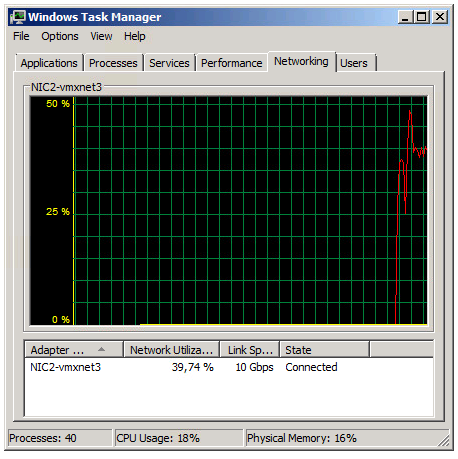
The Task Manager view reports utilization around 39% of the 10 Gbit link in the Iperf client VM.
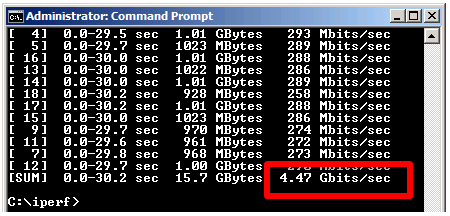
The iperf output shows a total throughput for VMXNET3 of 4.47 Gbit / second over the time the test was conducted.
The VMXNET3 adapter demonstrates almost 70 % better network throughput than the E1000 card on Windows 2008 R2.
Test 3: Windows 2012 R2 with the E1000E adapter
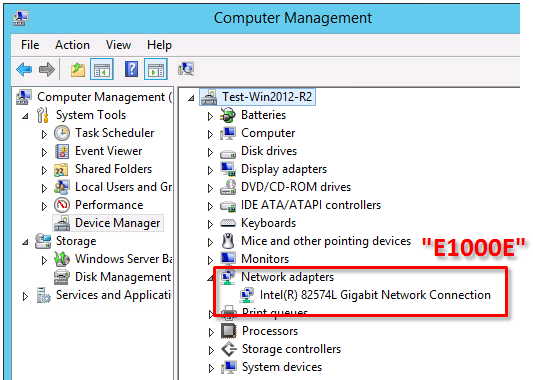
The E1000E is a newer, and more “enhanced” version of the E1000. To the guest operating system it looks like the physical adapter Intel 82547 network interface card.
However, even if it is a newer adapter it did actually deliver lower throughput than the E1000 adapter.
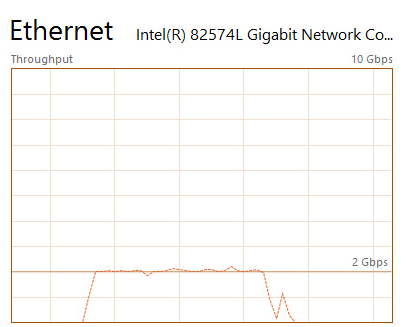
Two virtual machines running Windows 2012 R2 with the iperf tool running as client and server.
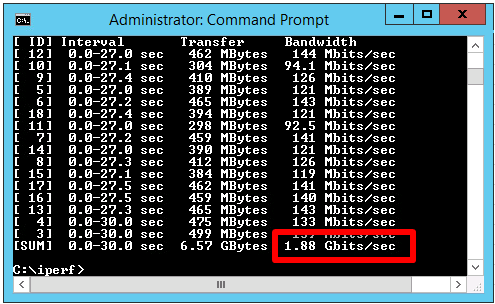
E1000E got 1.88 Gbit / sec, which is considerable lower than the 2.65 Gbit/s for the original E1000 on Windows 2008 R2.
Test 4: Windows 2012 R2 with the VMXNET3 adapter
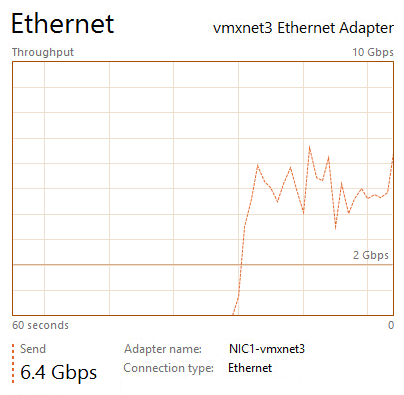
The two Windows 2012 R2 virtual machines now running with VMXNET3 adapter got the following iperf results:
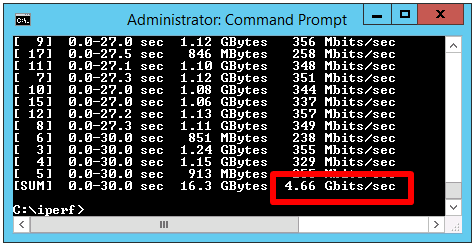
The throughput was 4.66 Gbit/sec, which is very close to the result of VMXNET3 on Windows 2008 R2, but almost 150 % better than the new E1000E.
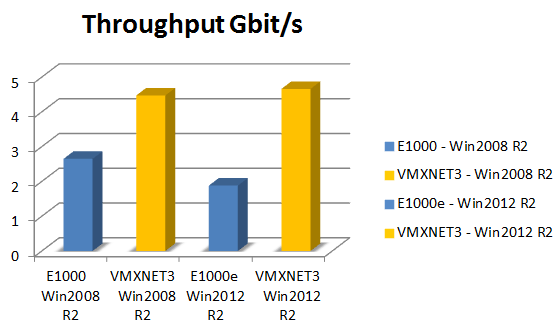
In summary the VMXNET3 adapter delivers greatly more network throughput performance than both E1000 and E1000E. Also, in at least this test setup the newer E1000E performed actually lower than the older E1000.
The test was done on Windows Server virtual machines and the top throughput of around 4.6 Gbit/sec for the VMXNET3 adapter could be the result of limitations in the TCP implementations. Other operating systems with other TCP stacks might achieve even higher numbers. It shall be noted also that these test was just for the network throughput, but there are of course other factors as well, which might be further discussed in later articles.
=============== End
VMXNET3 vs E1000E and E1000的更多相关文章
- 2.Kali安装VMware tools(详细+异常处理)
dnt@MT:~$ cd /media/cdrom0 进入光驱内 dnt@MT:/media/cdrom0$ ls 查看当前目录下有哪些内容manifest.txt run_upgrader.sh V ...
- 如何在VMware ubuntu linux虚拟机中安装VMware tools
VMware Tools可以实现在主机<->虚拟机之间拷贝文字.文件等功能.本文讲述如何在VMware ubuntu linux虚拟机中安装VMware tools. 测试环境: VMwa ...
- How to Install VMware Tools on RHEL 7/CentOS 7
The original address Mware Tools is one of important components for virtual machine (VM) in order ge ...
- 体验vSphere 6之1-安装VMware ESXi 6 RC版(转载)
体验vSphere 6之1-安装VMware ESXi 6 RC版 在2015年,各个公司都会发布一系列新的产品,例如Microsoft会发布Windows 10,VMware会发布vSphere 6 ...
- Linux 虚拟机网络适配器从E1000改为VMXNET3
我们知道VMware的网络适配器类型有多种,例如E1000.VMXNET.VMXNET 2 (Enhanced).VMXNET3等,就性能而言,一般VMXNET3要优于E1000,下面介绍如果将Lin ...
- vmware 10 e1000e e1000e_cyclecounter_read 挂机解法
http://ehc.ac/p/e1000/mailman/message/34100875/In the e1000e_cyclecounter_read function, if incvalue ...
- Linux e1000e网卡驱动
目录 识别网卡 命令行参数 附加配置 技术支持 一.识别网卡e1000e驱动支持Intel所有的GbE PCIe网卡,除了82575,82576,基于82580系列的网卡.提示:Intel(R) PR ...
- 网络数据包收发流程(三):e1000网卡和DMA
一.硬件布局每个网卡(MAC)都有自己的专用DMA Engine,如上图的 TSEC 和 e1000 网卡intel82546.上图中的红色线就是以太网数据流,DMA与DDR打交道需要其他模块的协助, ...
- Centos6.5更新e1000网卡驱动
导读 在工作过程中经常遇到linux的操作系统网络不正常的情况,以前没有注意到,今天查看系统日志发现原来是网络驱动的问题.索性直接更新系统,更新网卡 问题:linux系统经常出现断网的情况,重启之后系 ...
随机推荐
- mvc 在view视图中直接输出rdlc报表文件(Excel、PDF、Word)
给一段代码做参考 public ActionResult RdlcReport(string code) { LocalReport localReport = new LocalReport(); ...
- MVC的BundleConfig应用
1.MVC可以通过BundleConfig类来配置css和js的统一引用,分别通过StyleBundle和ScriptBundle来创建. 2.可以在母版页中统一加载设置在BundleConfig.c ...
- tomcat-在cmd窗口启动Tomcat
平时,一般使用tomcat/bin/startup.bat目录在windows环境启动Tomcat,或者使用IDE配置后启动. 下面来简单介绍下如果在cmd窗口直接输入命令启动Tomcat: 1.将t ...
- THUSC 2017 D1T2 杜老师
这是个非常有趣的数学题啦... 其实大概推一推式子就能得到一个信息,就是答案一定是$2$的整数次幂,并且其实答案就是$2^{R-L+1-sum}$,其中$sum$表示有多少个数不能用$L-i-1$的数 ...
- 添加树莓派python程序自启动的方法
首先确保网络,硬件连接都正确.保证py程序可以正确运行. 然后远程登录树莓派 打开这个文件来修改自启动,网上有很多方法都是新建一个脚本来完成的.由于我们是自启动python文件,所以命令会有不同. 如 ...
- EZ 2017 12 17初二初三第一次膜你赛
以后平时练习还是写一写吧. (题目搞来搞去太烦了,直接PDF存起来) T1 水题(???),主要是数据水,正解是设一个阙值,然而根本没人打.(暴力出奇迹) CODE #include<cstdi ...
- python 穷举法 算24点(史上最简短代码)
本来想用回溯法实现 算24点.题目都拟好了,就是<python 回溯法 子集树模板 系列 -- 7.24点>.无奈想了一天,没有头绪.只好改用暴力穷举法. 思路说明 根据四个数,三个运算符 ...
- pycharm如何全局进行查找一个关键词
PyCharm的Find in Path功能提供了全局查找功能,快捷键为Ctrl + Shift + F.Find则是在当前文件查找,快捷键为Ctrl + F.这两个个功能非常实用. Find in ...
- Android Studio Xposed模块编写(一)
1.环境说明 本文主要参考https://my.oschina.net/wisedream/blog/471292?fromerr=rNPFQidG的内容,自己实现了一遍,侵权请告知 已经安装xpos ...
- 如何使用SVN
如何正确高效地管理软件的版本是一件让人头疼的事情,使用SVN是一个不错的选择.下面简要介绍SVN在windows xp和redhat两种平台下的使用.SVN软件包括服务器端和客户端程序. 1.如何在W ...