
VMXNET3 vs E1000E and E1000
VMXNET3 vs E1000E and E1000
用户为什么要从E1000调整为VMXNET3,理由如下:
- E1000是千兆网路卡,而VMXNET3是万兆网路卡;
- E1000的性能相对较低,而VMXNET3的性能相对较高;
- VMXNET3支持TCP/IP Offload Engine,E1000不支持;
- VMXNET3可以直接和vmkernel通讯,执行内部数据处理;
eg. VMXNET3 will show the bandwidth as 10 GBps. However, the actual bandwidth will depend on your uplink speed. A physical CentOS or a Windows installation might show it as 40 GBps but, not the VMs. You will have to perform a bandwidth test to see how much you are getting in actual.
来源 http://blog.51cto.com/shipyard/1930183
Network performance with VMXNET3 compared to E1000E and E1000. This article explains the difference between the virtual network adapters and part 2 will demonstrate how much network performance could be gained by selecting the paravirtualized adapter.
The VMware administrator has several different virtual network adapters available to attach to the virtual machines. The virtual adapters belong to either of two groups:
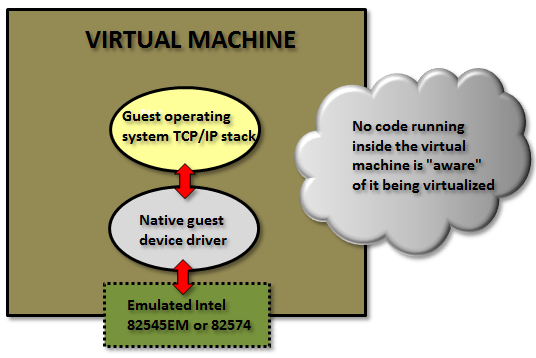
Emulated:
These are virtual hardware who emulates real existing physical network adapters. (Note that the physical network cards in the physical ESXi host is totally unrelated.) The VMkernel will present something that to the guest operating system will look exactly as some specific real world hardware and the guest could detect them through plug and play and use a native device driver.
Examples for the emulated devices are:
E1000 – which will emulate a 1 Gbit Intel 82545EM card, and is available for most operating systems since the generation of Windows Server 2003. This card is the default when creating almost all virtual machines and is by that widely used.
E1000E – emulates a newer real network adapter, the 1 Gbit Intel 82574, and is available for Windows 2012 and later. The E1000E needs VM hardware version 8 or later.
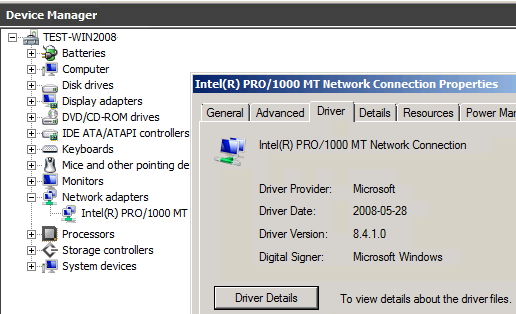
Above in Windows 2008 R2 with an emulated E1000 adapter the native guest operating system device driver is in use.
The positive side of the emulated network adapters are that they work “out of the box” and need no external code from VMware. It could be used to even (if needed) install the guest operating system by PXE since the E1000 device is available already from the BIOS start up.
The negative side is when using the default emulated adapters extra work is needed for every frame being sent or received from the guest operating system (which could be many thousands each second).
The VMkernel has to in “real time” emulate the exact behavior of the specific Intel 82545EM or 82574 cards, which will cost time and CPU cycles.
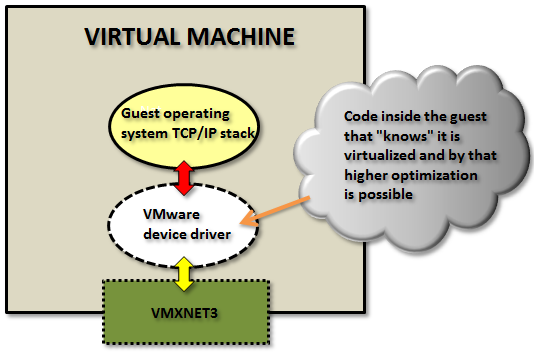
Paravirtualized:
The other type of virtual network adapters are the “paravirtualized”. The most recent one is calledVMXNET3.
The paravirtualized network card does not exist as a physical NIC, but is a device “made up” entirely by VMware. For the guest operating system this will mean that it typically during the OS installation phase only senses that an unknown device is located in a PCI slot on the (virtual) motherboard, but it has no driver to actually use it.
(Note: some Linux distributions do even have the VMXNET3 driver pre-installed.)

For Windows Server, when a device driver is supplied, typically through the installation of VMware Tools, the guest operating system will perceive this as a real NIC from some network card manufacturer called “VMware” and use it as an ordinary network adapter. It has no reason to believe anything else than this is a NIC just as any other NIC around.
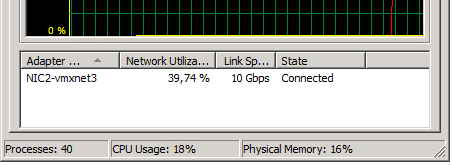
To the guest operating system the VMXNET3 card looks like a 10 Gbit physical device.
Note: there are also two obsolete paravirtualized adapters called VMXNET and VMXNET2 (sometimes the “Enhanced VMXNET”), however as long as the virtual machine has at least hardware version 7 only the VMXNET3 adapter should be used.
Since VMware with the VMXNET3 card owns much more of the network components even inside the VM there are many performance enhancements that could done. With the emulated E1000/E1000E the kernel has to mimic the exact behavior of existing adapters to the guest but with the VMXNET3 it could create a “perfect” virtual adapter optimized to be used in a virtual environment.
In the first article the general difference between the adapter types was explained.
In this article we will test the network throughput in the two most common Windows operating systems today: Windows 2008 R2 and Windows 2012 R2, and see the performance of the VMXNET3 vs the E1000 and the E1000E.
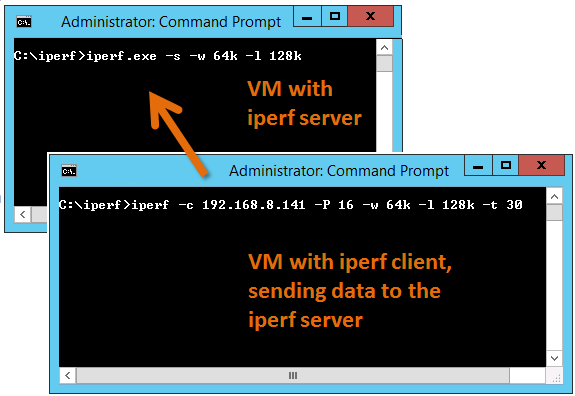
To generate large amounts of network traffic I used the iperf tool running on two virtual machines, one iperf “client” and the other as “server”. I have found that the following iperf settings generates the best combination for network throughput tests on Windows Server:
Server: iperf -s -w 64k -l 128k
Client: iperf -c <SERVER-IP> -P 16 -w 64k -l 128k -t 30
The test was done on HP Proliant Bl460c Gen8 with the virtual machines were running on the same physical host to be able to see the network performance regardless of the physical network connection between physical hosts/blades.
All settings on the E1000, E1000E and VMXNET3 was default. More on possible tweakings of the VMXNET3 card settings will be explained in a later article.
(It shall of course be noted that the following results are just observations from tests on one specific hardware and ESXi configuration, and is not in any way a “scientific” study.)
Test 1: Windows 2008 R2 with the default E1000 adapter
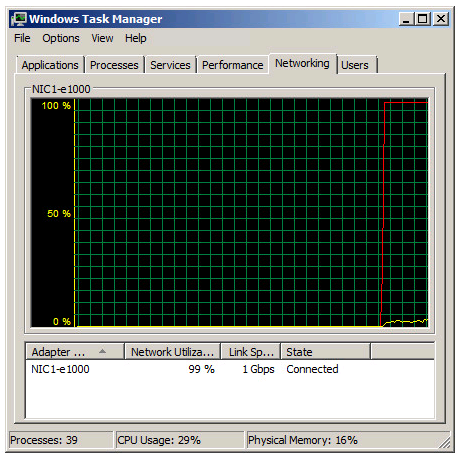
Two Windows 2008 R2 virtual machines, one as iperf server and the other as client, with the test running in 30 seconds.
As noted in the Task Manager view the 1 Gbit link speed was maxed out. A somewhat interesting fact is that even with the emulated E1000 adapter it is possible to use more than what “should” be possible on a 1 Gbit link.
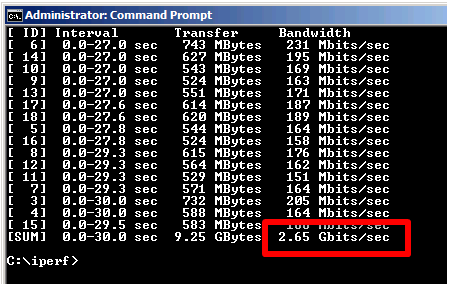
From the iperf client output we can see that we reach a total throughput of 2.65 Gbit per second with the default E1000 virtual adapter.
Test 2: Windows 2008 R2 with the VMXNET3 adapter
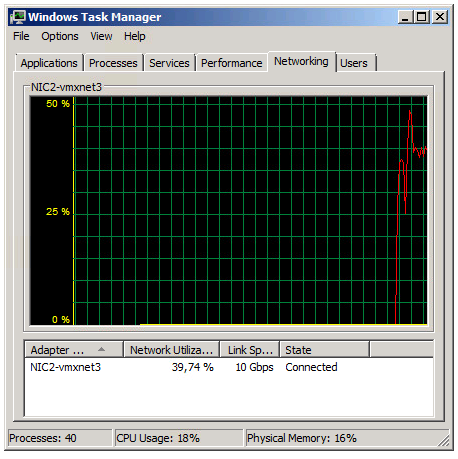
The Task Manager view reports utilization around 39% of the 10 Gbit link in the Iperf client VM.
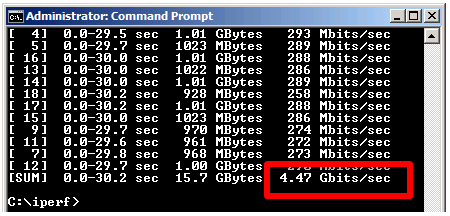
The iperf output shows a total throughput for VMXNET3 of 4.47 Gbit / second over the time the test was conducted.
The VMXNET3 adapter demonstrates almost 70 % better network throughput than the E1000 card on Windows 2008 R2.
Test 3: Windows 2012 R2 with the E1000E adapter
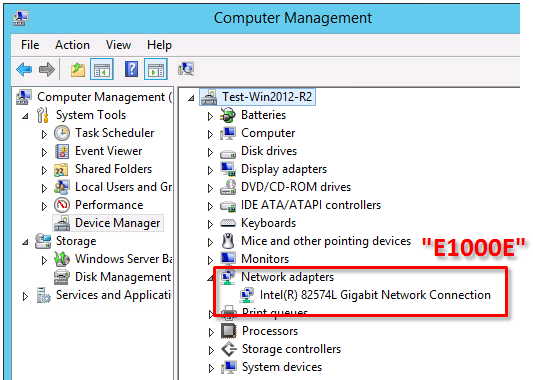
The E1000E is a newer, and more “enhanced” version of the E1000. To the guest operating system it looks like the physical adapter Intel 82547 network interface card.
However, even if it is a newer adapter it did actually deliver lower throughput than the E1000 adapter.
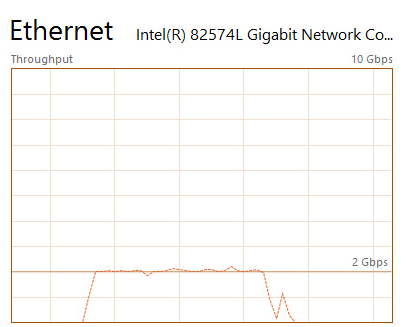
Two virtual machines running Windows 2012 R2 with the iperf tool running as client and server.
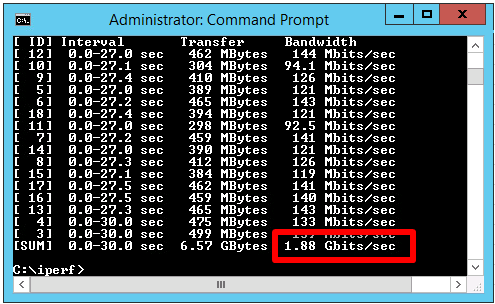
E1000E got 1.88 Gbit / sec, which is considerable lower than the 2.65 Gbit/s for the original E1000 on Windows 2008 R2.
Test 4: Windows 2012 R2 with the VMXNET3 adapter
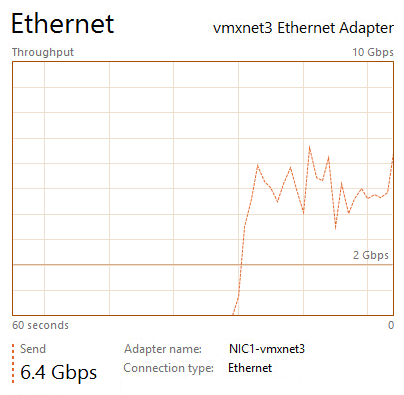
The two Windows 2012 R2 virtual machines now running with VMXNET3 adapter got the following iperf results:
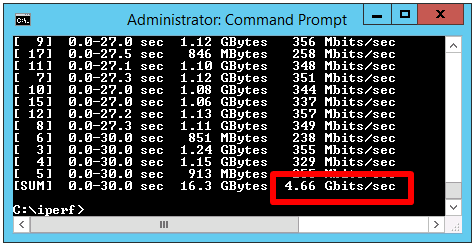
The throughput was 4.66 Gbit/sec, which is very close to the result of VMXNET3 on Windows 2008 R2, but almost 150 % better than the new E1000E.
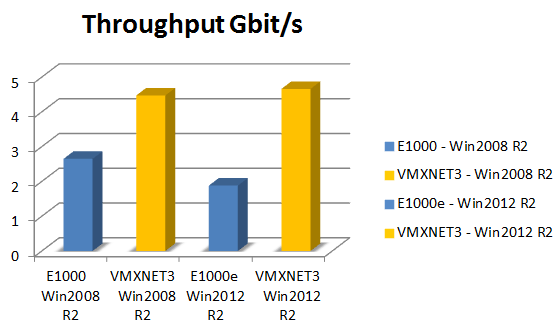
In summary the VMXNET3 adapter delivers greatly more network throughput performance than both E1000 and E1000E. Also, in at least this test setup the newer E1000E performed actually lower than the older E1000.
The test was done on Windows Server virtual machines and the top throughput of around 4.6 Gbit/sec for the VMXNET3 adapter could be the result of limitations in the TCP implementations. Other operating systems with other TCP stacks might achieve even higher numbers. It shall be noted also that these test was just for the network throughput, but there are of course other factors as well, which might be further discussed in later articles.
=============== End
VMXNET3 vs E1000E and E1000的更多相关文章
- 2.Kali安装VMware tools(详细+异常处理)
dnt@MT:~$ cd /media/cdrom0 进入光驱内 dnt@MT:/media/cdrom0$ ls 查看当前目录下有哪些内容manifest.txt run_upgrader.sh V ...
- 如何在VMware ubuntu linux虚拟机中安装VMware tools
VMware Tools可以实现在主机<->虚拟机之间拷贝文字.文件等功能.本文讲述如何在VMware ubuntu linux虚拟机中安装VMware tools. 测试环境: VMwa ...
- How to Install VMware Tools on RHEL 7/CentOS 7
The original address Mware Tools is one of important components for virtual machine (VM) in order ge ...
- 体验vSphere 6之1-安装VMware ESXi 6 RC版(转载)
体验vSphere 6之1-安装VMware ESXi 6 RC版 在2015年,各个公司都会发布一系列新的产品,例如Microsoft会发布Windows 10,VMware会发布vSphere 6 ...
- Linux 虚拟机网络适配器从E1000改为VMXNET3
我们知道VMware的网络适配器类型有多种,例如E1000.VMXNET.VMXNET 2 (Enhanced).VMXNET3等,就性能而言,一般VMXNET3要优于E1000,下面介绍如果将Lin ...
- vmware 10 e1000e e1000e_cyclecounter_read 挂机解法
http://ehc.ac/p/e1000/mailman/message/34100875/In the e1000e_cyclecounter_read function, if incvalue ...
- Linux e1000e网卡驱动
目录 识别网卡 命令行参数 附加配置 技术支持 一.识别网卡e1000e驱动支持Intel所有的GbE PCIe网卡,除了82575,82576,基于82580系列的网卡.提示:Intel(R) PR ...
- 网络数据包收发流程(三):e1000网卡和DMA
一.硬件布局每个网卡(MAC)都有自己的专用DMA Engine,如上图的 TSEC 和 e1000 网卡intel82546.上图中的红色线就是以太网数据流,DMA与DDR打交道需要其他模块的协助, ...
- Centos6.5更新e1000网卡驱动
导读 在工作过程中经常遇到linux的操作系统网络不正常的情况,以前没有注意到,今天查看系统日志发现原来是网络驱动的问题.索性直接更新系统,更新网卡 问题:linux系统经常出现断网的情况,重启之后系 ...
随机推荐
- W25Q128BV W25Q128FV W25Q128JV 什么区别?
W25Q128BV W25Q128FV W25Q128JV 什么区别? 官网没有找到 BV 的相关信息, 倒是有 FV,FW,JV,JW 信息..2019年1月19日19:09:55 F ...
- 文件I/O(2)
文件I/O(2) 文件共享 内核使用三种数据结构表示打开的文件,他们之间的关系决定了在文件共享方面一个进程对还有一个进程可能产生的影响.如图1所看到的. 1) 每一个进程在进程表中都有一个记录项.记 ...
- laravel 5.5 《电商实战 》辅助函数
Laravel 提供了很多 辅助函数,有时候我们也需要创建自己的辅助函数. 这里介绍了 tinker,一个laravel内置的php交互式控制台,方便调试php代码 php artisan tinke ...
- 20155339 Exp6 信息搜集与漏洞扫描
20155339 Exp6 信息搜集与漏洞扫描 实验后回答问题 (1)哪些组织负责DNS,IP的管理. 全球根服务器均由美国政府授权的ICANN统一管理,负责全球的域名根服务器.DNS和IP地址管理. ...
- 分类-MNIST(手写数字识别)
这是学习<Hands-On Machine Learning with Scikit-Learn and TensorFlow>的笔记,如果此笔记对该书有侵权内容,请联系我,将其删除. 这 ...
- kvm虚拟化一: 图形化的管理方式
1.安装必要工具yum install -y / qemu-kvm //kvm主程序 libvirt //虚拟化服务库 libguestfs-tools //虚拟机系统管理工具 virt-instal ...
- P4292 [WC2010]重建计划
无脑上二分+淀粉质完事了 每个子树算的时候把儿子按照最长路径从小到大依次做,和前面的单调队列算一波,每个儿子的复杂度不超过这个子树大小 // luogu-judger-enable-o2 #inclu ...
- 原生 JS 实现手机验证码倒计时
可以使用 pointer-events 来阻止元素成为鼠标事件的 target.html5 新增操作元素 class 类名的方式 classList. classList 方法 add(value): ...
- [arc076F]Exhausted?[霍尔定理+线段树]
题意 地上 \(1\) 到 \(m\) 个位置摆上椅子,有 \(n\) 个人要就座,每个人都有座位癖好:选择 \(\le L\) 或者 \(\ge R\) 的位置.问至少需要在两边添加多少个椅子能让所 ...
- 虚拟机console基础环境部署——安全加固
1. 概述 安全是一个重要的课题.广义上可以总结为: 主机安全 网络安全 信息安全 数据安全 虽然console已经是最小化安装,但是这并不能说明console就已经安全了.之前的博客对console ...