
RxJS之catchError
Catches errors on the observable to be handled by returning a new observable or throwing an error.
返回新的可观察对象
import { Component, OnInit } from '@angular/core';

import { of } from 'rxjs/observable/of';

import { map, catchError, retry } from 'rxjs/operators';

@Component({

  selector: 'app-error',

  templateUrl: './error.component.html',

  styleUrls: ['./error.component.css']

})

export class ErrorComponent implements OnInit {

  constructor() { }

  ngOnInit() {

    of('Leo', 'Raph', 'Mikey', 'Don').pipe(

      map(turtle => {

        if (turtle === 'Mikey') {

          throw new Error('出错了');

        }

        return turtle;

      }),

      catchError(err => of('Aioria', 'Mu'))

    ).subscribe(turtle => {

      console.log(turtle);

    });

  }

}

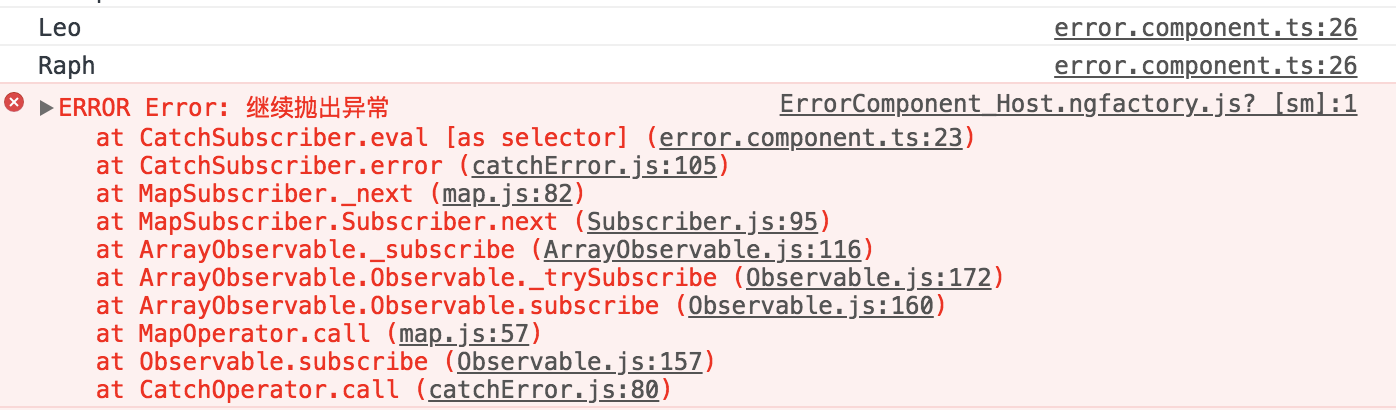
继续抛出异常
import { Component, OnInit } from '@angular/core';

import { of } from 'rxjs/observable/of';

import { map, catchError, retry } from 'rxjs/operators';

@Component({

  selector: 'app-error',

  templateUrl: './error.component.html',

  styleUrls: ['./error.component.css']

})

export class ErrorComponent implements OnInit {

  constructor() { }

  ngOnInit() {

    of('Leo', 'Raph', 'Mikey', 'Don').pipe(

      map(turtle => {

        if (turtle === 'Mikey') {

          throw new Error('出错了');

        }

        return turtle;

      }),

      catchError(err => {

        throw new Error('继续抛出异常');

      })

    ).subscribe(turtle => {

      console.log(turtle);

    });

  }

}
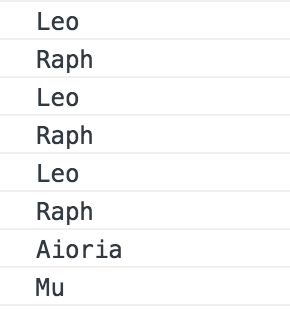
重新尝试
import { Component, OnInit } from '@angular/core';

import { of } from 'rxjs/observable/of';

import { map, catchError, retry } from 'rxjs/operators';

@Component({

  selector: 'app-error',

  templateUrl: './error.component.html',

  styleUrls: ['./error.component.css']

})

export class ErrorComponent implements OnInit {

  constructor() { }

  ngOnInit() {

    of('Leo', 'Raph', 'Mikey', 'Don').pipe(

      map(turtle => {

        if (turtle === 'Mikey') {

          throw new Error('出错了');

        }

        return turtle;

      }),

      retry(2),

      catchError(err => of('Aioria', 'Mu'))

    ).subscribe(turtle => {

      console.log(turtle);

    });

  }

}
RxJS之catchError的更多相关文章
- Angular记录(9)
文档资料 箭头函数--MDN:https://developer.mozilla.org/zh-CN/docs/Web/JavaScript/Reference/Functions/Arrow_fun ...
- Angular6封装http请求
最近抽空学习了一下Angular6,之前主要使用的是vue,所以免不了的也想对Angular6提供的工具进行一些封装,今天主要就跟大家讲一下这个http模块. 之前使用的ajax库是axios,可以设 ...
- 【CuteJavaScript】Angular6入门项目(4.改造组件和添加HTTP服务)
本文目录 一.项目起步 二.编写路由组件 三.编写页面组件 1.编写单一组件 2.模拟数据 3.编写主从组件 四.编写服务 1.为什么需要服务 2.编写服务 五.引入RxJS 1.关于RxJS 2.引 ...
- Angular 从入坑到挖坑 - HTTP 请求概览
一.Overview angular 入坑记录的笔记第四篇,介绍在 angular 中如何通过 HttpClient 类发起 http 请求,从而完成与后端的数据交互. 对应官方文档地址: Angul ...
- angular2 学习笔记 ( rxjs 流 )
RxJS 博大精深,看了好几篇文章都没有明白. 范围牵扯到了函数响应式开发去了... 我对函数式一知半解, 响应式更是第一次听到... 唉...不过日子还是得过...混着过先呗 我目前所理解的很浅, ...
- RxJS 实现摩斯密码(Morse) 【内附脑图】
参加 2018 ngChina 开发者大会,特别喜欢 Michael Hladky 奥地利帅哥的 RxJS 分享,现在拿出来好好学习工作坊的内容(工作坊Demo地址),结合这个示例,做了一个改进版本, ...
- rxjs 常用的管道操作符
操作符文档 api 列表 do -> tap catch -> catchError switch -> switchAll finally -> finalize map s ...
- RxJS v6 学习指南
为什么要使用 RxJS RxJS 是一套处理异步编程的 API,那么我将从异步讲起. 前端编程中的异步有:事件(event).AJAX.动画(animation).定时器(timer). 异步常见的问 ...
- Angular快速学习笔记(4) -- Observable与RxJS
介绍RxJS前,先介绍Observable 可观察对象(Observable) 可观察对象支持在应用中的发布者和订阅者之间传递消息. 可观察对象可以发送多个任意类型的值 -- 字面量.消息.事件. 基 ...
随机推荐
- ISO7816之管脚定义
卡座的管脚定义 如果使用示波器或者逻辑分析仪来观察 连接C3.C5.C7 小技巧当C3为3.57MHZ时候,可以使用波特率为9600的串口来监听.
- 线程池之 newScheduledThreadPool中scheduleAtFixedRate(四个参数)
转自:https://blog.csdn.net/weixin_35756522/article/details/81707276 说明:在处理消费数据的时候,统计tps,需要用一个线程监控来获得tp ...
- 解决git中文乱码问题
三条命令fix乱码问题: git config --global gui.encoding utf-8 git config --global i18n.commitencoding utf-8 gi ...
- Echarts(一)
echarts3.61.<!-- 为ECharts准备一个具备大小(宽高)的Dom --> <div id="barMain" style="heigh ...
- Spark 调优(转)
Spark 调优 返回原文英文原文:Tuning Spark Because of the in-memory nature of most Spark computations, Spark pro ...
- centos 卸载mysql
1 删除Mysql yum remove mysql mysql-server mysql-libs mysql-server; find / -name mysql 将找到的相关东西delete掉 ...
- unity 脚本说明
MonoBehavour void OnEnable(){ //OnEnable执行在Wake和之前 } void Awake(){ // } void Start(){ } void OnEnabl ...
- ES6的export和import
export import 的4种搭配 非默认 拿函数举例,常量,变量,类也可以 // 1 可以多个export--------import带上{} export var a="123&qu ...
- postmessage/cors跨域postMessage、xhr2和xmldomain
一.h5 postMessage node http-server配置服务器 有关配置:请参考我的http://www.cnblogs.com/leee/p/5502727.html 我把文件夹a配置 ...
- 第一个Python脚本!
# hello.py print 'Hello Pythons'