
Orchard模块开发全接触8:改造后台
后台默认提供了 Content 的管理,但是,所有的内容类型揉杂在一起,而我们需要更深度的定制一些功能,比如,我们只想管理订单,又比如,我们需要对注册用户进行管理。本篇的内容包括:
1:自定义 admin menu;
2:使用 content query;
3:使用 paging utilities;
4:创建 list 与 edit;
一:扩展 Admin Menu
首先我们必须要实现 INavigationProvider 接口,我们创建 AdminMenu.cs:
using Orchard.Environment;
using Orchard.Localization;
using Orchard.UI.Navigation;
using System;
using System.Collections.Generic;
using System.Linq;
using System.Text;
using System.Threading.Tasks;
using System.Web.Routing;namespace TMinji.Shop
{
public class AdminMenu : INavigationProvider
{
private readonly Work<RequestContext> _requestContextAccessor;public string MenuName
{
get { return "admin"; }
}public AdminMenu(Work<RequestContext> requestContextAccessor)
{
_requestContextAccessor = requestContextAccessor;
T = NullLocalizer.Instance;
}private Localizer T { get; set; }
public void GetNavigation(NavigationBuilder builder)
{var requestContext = _requestContextAccessor.Value;
var idValue = (string)requestContext.RouteData.Values["id"];
var id = 0;if (!string.IsNullOrEmpty(idValue))
{
int.TryParse(idValue, out id);
}builder
// Image set
.AddImageSet("webshop")// "Webshop"
.Add(item => item.Caption(T("Webshop"))
.Position("2")
.LinkToFirstChild(false)// "Customers"
.Add(subItem => subItem
.Caption(T("Customers"))
.Position("2.1")
.Action(new RouteValueDictionary
{
{"area", "TMinji.Shop"},
{"controller", "CustomerAdmin"},
{"action", "Index"}
}).Add(T("Details"), i => i.Action("Edit", "CustomerAdmin", new { id }).LocalNav())
.Add(T("Addresses"), i => i.Action("ListAddresses", "CustomerAdmin", new { id }).LocalNav())
.Add(T("Orders"), i => i.Action("ListOrders", "CustomerAdmin", new { id }).LocalNav())
)// "Orders"
.Add(subItem => subItem
.Caption(T("Orders"))
.Position("2.2")
.Action(new RouteValueDictionary
{
{"area", "TMinji.Shop"},
{"controller", "OrderAdmin"},
{"action", "Index"}
})
)
);
}
}}
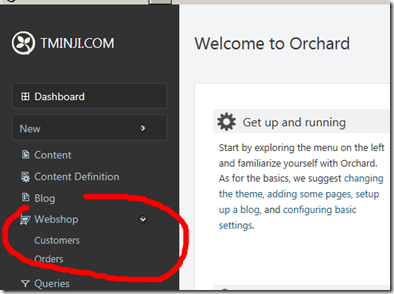
代码中,指示我们需要加两个资源,一个是 menu.webshop.png,一个是 menu.webshop-admin.css,这是需要我们手动添加的,
Styles/menu.webshop-admin.css:
.navicon-webshop {
background-image:url('../images/menu.webshop.png') !important;
}
.navicon-webshop:hover {
background-position:0 -30px !important;
}
这个时候,我们的后台,就会变成这样了:
二:后台控制器
现在,添加后台的控制器。
Controllers/CustomerAdminController.cs:
using Orchard.ContentManagement;
using Orchard.DisplayManagement;
using Orchard.Localization;
using Orchard.Settings;
using Orchard.UI.Admin;
using Orchard.UI.Navigation;
using Orchard.UI.Notify;
using Orchard.Users.Models;
using System;
using System.Collections.Generic;
using System.Linq;
using System.Text;
using System.Threading.Tasks;
using System.Web.Mvc;
using TMinji.Shop.Services;
using TMinji.Shop.ViewModels;
using TMinji.Shop.Helpers;namespace TMinji.Shop.Controllers
{
[Admin]
public class CustomerAdminController : Controller, IUpdateModel
{
private dynamic Shape { get; set; }
private Localizer T { get; set; }
private readonly ICustomerService _customerService;
private readonly ISiteService _siteService;
private readonly IContentManager _contentManager;
private readonly INotifier _notifier;
private readonly IOrderService _orderService;public CustomerAdminController
(
ICustomerService customerService,
IShapeFactory shapeFactory,
ISiteService siteService,
IContentManager contentManager,
INotifier notifier,
IOrderService orderService
)
{
Shape = shapeFactory;
T = NullLocalizer.Instance;
_customerService = customerService;
_siteService = siteService;
_contentManager = contentManager;
_notifier = notifier;
_orderService = orderService;
}public ActionResult Index(PagerParameters pagerParameters, CustomersSearchVM search)
{// Create a basic query that selects all customer content items, joined with the UserPartRecord table
var customerQuery = _customerService.GetCustomers().Join<UserPartRecord>().List();// If the user specified a search expression, update the query with a filter
if (!string.IsNullOrWhiteSpace(search.Expression))
{var expression = search.Expression.Trim();
customerQuery = from customer in customerQuery
where
customer.FirstName.Contains(expression, StringComparison.InvariantCultureIgnoreCase) ||
customer.LastName.Contains(expression, StringComparison.InvariantCultureIgnoreCase) ||
customer.As<UserPart>().Email.Contains(expression)
select customer;
}// Project the query into a list of customer shapes
var customersProjection = from customer in customerQuery
select Shape.Customer
(
Id: customer.Id,
FirstName: customer.FirstName,
LastName: customer.LastName,
Email: customer.As<UserPart>().Email,
CreatedAt: customer.CreatedAt
);// The pager is used to apply paging on the query and to create a PagerShape
var pager = new Pager(_siteService.GetSiteSettings(), pagerParameters.Page, pagerParameters.PageSize);// Apply paging
var customers = customersProjection.Skip(pager.GetStartIndex()).Take(pager.PageSize);// Construct a Pager shape
var pagerShape = Shape.Pager(pager).TotalItemCount(customerQuery.Count());// Create the viewmodel
var model = new CustomersIndexVM(customers, search, pagerShape);return View(model);
}public ActionResult Edit(int id)
{
var customer = _customerService.GetCustomer(id);
var model = _contentManager.BuildEditor(customer);// Casting to avoid invalid (under medium trust) reflection over the protected View method and force a static invocation.
return View((object)model);
}[HttpPost, ActionName("Edit")]
public ActionResult EditPOST(int id)
{
var customer = _customerService.GetCustomer(id);
var model = _contentManager.UpdateEditor(customer, this);if (!ModelState.IsValid)
return View(model);_notifier.Add(NotifyType.Information, T("Your customer has been saved"));
return RedirectToAction("Edit", new { id });
}public ActionResult ListAddresses(int id)
{
var addresses = _customerService.GetAddresses(id).ToArray();
return View(addresses);
}public ActionResult ListOrders(int id)
{
var orders = _orderService.GetOrders(id).ToArray();
return View(orders);
}bool IUpdateModel.TryUpdateModel<TModel>(TModel model, string prefix, string[] includeProperties, string[] excludeProperties)
{
return TryUpdateModel(model, prefix, includeProperties, excludeProperties);
}void IUpdateModel.AddModelError(string key, LocalizedString errorMessage)
{
ModelState.AddModelError(key, errorMessage.Text);
}
}
}
Views/CustomerAdmin/Index.cshtml:
@model TMinji.Shop.ViewModels.CustomersIndexVM
@{
Script.Require("ShapesBase");
Layout.Title = T("Customers").ToString();
}@using (Html.BeginForm("Index", "CustomerAdmin", FormMethod.Get))
{
<fieldset class="bulk-actions">
<label for="search">@T("Search:")</label>
@Html.TextBoxFor(m => m.Search.Expression)
<button type="submit">@T("Search")</button>
<a href="@Url.Action("Index")">@T("Clear")</a>
</fieldset>
}
<fieldset>
<table class="items" summary="@T("This is a table of the customers in your application")">
<colgroup>
<col id="Col1" />
<col id="Col2" />
<col id="Col3" />
<col id="Col4" />
<col id="Col5" />
<col id="Col6" />
</colgroup>
<thead>
<tr>
<th scope="col"> ↓</th>
<th scope="col">@T("FirstName")</th>
<th scope="col">@T("LastName")</th>
<th scope="col">@T("Email")</th>
<th scope="col">@T("Created")</th>
<th scope="col">@T("Actions")</th>
</tr>
</thead>
@foreach (var customer in Model.Customers)
{
<tr>
<td>@customer.Id</td>
<td>@customer.FirstName</td>
<td>@customer.LastName</td>
<td>@customer.Email</td>
<td>@customer.CreatedAt</td>
<td>
<div>
<a href="@Url.Action("Edit", new {customer.Id})" title="@T("Edit")">@T("Edit")</a>@T(" | ")
<a href="@Url.Action("List", "AddressAdmin", new {customerId = customer.Id})" title="@T("Addresses")">@T("Addresses")</a>@T(" | ")
<a href="@Url.Action("Delete", new {customer.Id, returnUrl = Request.Url.PathAndQuery})">@T("Delete")</a>
</div>
</td>
</tr>
}
</table>
@Display(Model.Pager)
</fieldset>
Services/ICustomerService.cs:
public interface ICustomerService : IDependency
{
CustomerPart CreateCustomer(string email, string password);
AddressPart GetAddress(int customerId, string addressType);
AddressPart CreateAddress(int customerId, string addressType);IContentQuery<CustomerPart> GetCustomers();
CustomerPart GetCustomer(int id);
IEnumerable<AddressPart> GetAddresses(int customerId);
AddressPart GetAddress(int id);
}
Services/CustomerService.cs:
using Orchard;
using Orchard.ContentManagement;
using Orchard.Security;
using Orchard.Services;
using Orchard.Users.Models;
using System;
using System.Collections.Generic;
using System.Linq;
using System.Text;
using System.Threading.Tasks;
using TMinji.Shop.Models;namespace TMinji.Shop.Services
{
public class CustomerService : ICustomerService
{
private readonly IOrchardServices _orchardServices;
private readonly IMembershipService _membershipService;
private readonly IClock _clock;public CustomerService(IOrchardServices orchardServices, IMembershipService membershipService, IClock clock)
{
_orchardServices = orchardServices;
_membershipService = membershipService;
_clock = clock;
}public CustomerPart CreateCustomer(string email, string password)
{
// New up a new content item of type "Customer"
var customer = _orchardServices.ContentManager.New("Customer");// Cast the customer to a UserPart
var userPart = customer.As<UserPart>();// Cast the customer to a CustomerPart
var customerPart = customer.As<CustomerPart>();// Set some properties of the customer content item (via UserPart and CustomerPart)
userPart.UserName = email;
userPart.Email = email;
userPart.NormalizedUserName = email.ToLowerInvariant();
userPart.Record.HashAlgorithm = "SHA1";
userPart.Record.RegistrationStatus = UserStatus.Approved;
userPart.Record.EmailStatus = UserStatus.Approved;// Use IClock to get the current date instead of using DateTime.Now (see http://skywalkersoftwaredevelopment.net/orchard-development/api/iclock)
customerPart.CreatedAt = _clock.UtcNow;// Use Ochard's MembershipService to set the password of our new user
_membershipService.SetPassword(userPart, password);// Store the new user into the database
_orchardServices.ContentManager.Create(customer);return customerPart;
}public AddressPart GetAddress(int customerId, string addressType)
{
return _orchardServices.ContentManager.Query<AddressPart, AddressPartRecord>().Where(x => x.CustomerId == customerId && x.Type == addressType).List().FirstOrDefault();
}public AddressPart CreateAddress(int customerId, string addressType)
{
return _orchardServices.ContentManager.Create<AddressPart>("Address", x =>
{
x.Type = addressType;
x.CustomerId = customerId;
});
}public IContentQuery<CustomerPart> GetCustomers()
{
return _orchardServices.ContentManager.Query<CustomerPart, CustomerPartRecord>();
}public CustomerPart GetCustomer(int id)
{
return _orchardServices.ContentManager.Get<CustomerPart>(id);
}public IEnumerable<AddressPart> GetAddresses(int customerId)
{
return _orchardServices.ContentManager.Query<AddressPart, AddressPartRecord>().Where(x => x.CustomerId == customerId).List();
}public AddressPart GetAddress(int id)
{
return _orchardServices.ContentManager.Get<AddressPart>(id);
}
}}
Helpers/StringExtensions.cs:
public static class StringExtensions
{
public static string TrimSafe(this string s)
{
return s == null ? string.Empty : s.Trim();
}public static bool Contains(this string source, string value, StringComparison comparison)
{
return source.IndexOf(value, comparison) >= 0;
}
}
ViewModels/CustomersIndexVM.cs:
public class CustomersIndexVM
{
public IList<dynamic> Customers { get; set; }
public dynamic Pager { get; set; }
public CustomersSearchVM Search { get; set; }public CustomersIndexVM()
{
Search = new CustomersSearchVM();
}public CustomersIndexVM(IEnumerable<dynamic> customers, CustomersSearchVM search, dynamic pager)
{
Customers = customers.ToArray();
Search = search;
Pager = pager;
}
}
ViewModels/CustomersSearchVM.cs:
public class CustomersSearchVM
{
public string Expression { get; set; }
}
Views/CustomerAdmin/Edit.cshtml:
@{
Layout.Title = "Edit Customer";
}@using (Html.BeginFormAntiForgeryPost())
{
@Display(Model)
}
Drivers/CustomerDriver.cs:
protected override DriverResult Editor(CustomerPart part, IUpdateModel updater, dynamic shapeHelper)
{
updater.TryUpdateModel(part, Prefix, null, null);var user = part.User;
updater.TryUpdateModel(user, Prefix, new[] { "Email" }, null);return Editor(part, shapeHelper);
}
Views/EditorTemplates/Parts/Customer.cshtml:
@using System.Web.Mvc.Html
@model TMinji.Shop.Models.CustomerPart
@{
var user = Model.User;
}
<fieldset>
<div class="editor-label">@Html.LabelFor(x => x.Title)</div>
<div class="editor-field">@Html.TextBoxFor(x => x.Title, new { @class = "text" })</div><div class="editor-label">@Html.LabelFor(x => x.FirstName)</div>
<div class="editor-field">
@Html.TextBoxFor(x => x.FirstName, new { @class = "large text" })
@Html.ValidationMessageFor(x => x.FirstName)
</div><div class="editor-label">@Html.LabelFor(x => x.LastName)</div>
<div class="editor-field">
@Html.TextBoxFor(x => x.LastName, new { @class = "large text" })
@Html.ValidationMessageFor(x => x.LastName)
</div><div class="editor-label">@Html.LabelFor(x => user.Email)</div>
<div class="editor-field">
@Html.TextBoxFor(x => user.Email, new { @class = "large text" })
@Html.ValidationMessageFor(x => user.Email)
</div>
</fieldset>
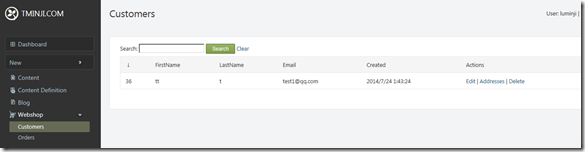
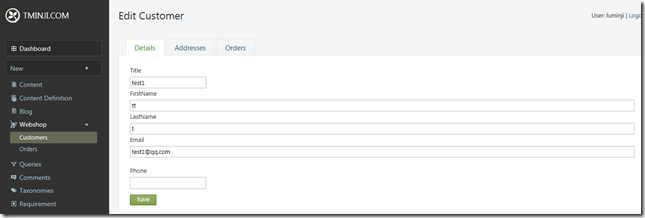
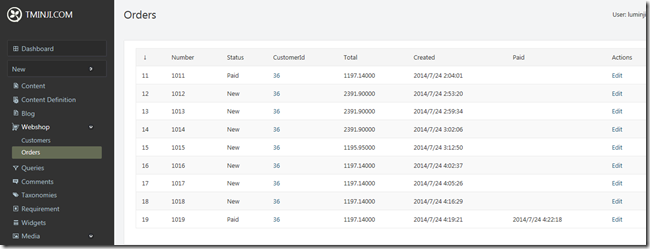
最终效果:
Orchard模块开发全接触8:改造后台的更多相关文章
- Orchard模块开发全接触1:起步
在<http://www.cnblogs.com/luminji/p/3831281.html>中简单介绍了 Orchard 的模块开发,接下来,我们需要做个更复杂的例子,Orchard ...
- Orchard模块开发全接触7:订单与支付之Event Bus
在这部分,我们要完成的工作有: 1:将购物车内的商品变成真正的订单: 2:理解 父子及一对多关系: 3:写一个针对 Event Bus 的扩展点: 4:实现一个针对该扩展点的模拟的 支付服务: 一:创 ...
- Orchard模块开发全接触4:深度改造前台
这里,我们需要做一些事情,这些事情意味着深度改造前台: 1:为商品增加 添加到购物车 按钮,点击后功能实现: 2:商品排序: 3:购物车预览,以及添加 结算 按钮: 4:一个显式 购物车中有*个 商品 ...
- Orchard模块开发全接触5:深度改造前台第二部分
在这一部分,我们继续完善我们的购物车,我们要做以下一些事情: 1:完成 shoppingcart.cshtml: 2:让用户可以更新数量及从购物车删除商品: 3:创建一个 widget,在上面可以看到 ...
- Orchard模块开发全接触3:分类的实现及内容呈现(Display)
一:分类用现有技术怎么实现? 实际就是创建 Query 和 Projection,如果不知道怎么做,参考:Orchard之在前台显式一个属于自己的列表(在这篇里,还进行了稍稍拓展),当然,基础的知道, ...
- Orchard模块开发全接触2:新建 ProductPart
一:创建 Part 1:项目引用 Orchard.Framework: 2:创建 Models 文件夹: 3:在 Models 文件夹下创建类 ProductPartRecord,如下: public ...
- Orchard模块开发全接触6:自定义用户注册
我们都知道 Orchard 的用户注册相当简单,现在,我们需要一个自定义的用户注册,现在,开始吧. 一:定义实体 Models/CustomerPartRecord.cs: public class ...
- Orchard 模块开发学习笔记 (1)
创建模块 首先,打开Bin目录下的Orchard.exe 等到出现orchard>后, 看看命令列表中是否存在 codegen module 如果不存在,则需要先执行:feature enabl ...
- Odoo9.0模块开发全流程
构建Odoo模块 模块组成 业务对象 业务对象声明为Python类, 由Odoo自己主动加载. 数据文件 XML或CSV文件格式, 在当中声明了元数据(视图或工作流).配置数据(模块參数).演示数据等 ...
随机推荐
- Codeforces Round #440 (Div. 1, based on Technocup 2018 Elimination Round 2) C - Points, Lines and Ready-made Titles
C - Points, Lines and Ready-made Titles 把行列看成是图上的点, 一个点(x, y)就相当于x行 向 y列建立一条边, 我们能得出如果一个联通块是一棵树方案数是2 ...
- Codeforces Round #480 (Div. 2) E - The Number Games
题目大意:给你n个点的一棵树, 每个点的权值为2^i ,让你删掉k个点使得剩下的权值和最大. 思路:这题还是比较好想的, 我们反过来考虑, 剩下一个的情况肯定是选第n个点,剩下两个 我们肯定优先考虑第 ...
- InnoDB的锁机制浅析(All in One)
目录 InnoDB的锁机制浅析 1. 前言 2. 锁基本概念 2.1 共享锁和排它锁 2.2 意向锁-Intention Locks 2.3 锁的兼容性 3. InnoDB中的锁 3.1 准备工作 3 ...
- 大数据技术之_14_Oozie学习_Oozie 的简介+Oozie 的功能模块介绍+Oozie 的部署+Oozie 的使用案列
第1章 Oozie 的简介第2章 Oozie 的功能模块介绍2.1 模块2.2 常用节点第3章 Oozie 的部署3.1 部署 Hadoop(CDH版本的)3.1.1 解压缩 CDH 版本的 hado ...
- StringBuffer StringBuilder append
StringBuilder is not thread safe. So, it performs better in situations where thread safety is not re ...
- 隧道接口工具airtun-ng
隧道接口工具airtun-ng airtun-ng是aircrack-ng套件提供的一个工具.该工具可以为无线网卡建立隧道接口.通过该接口,渗透测试人员可以建立wIDS,分析指定的AP的数据.借助 ...
- netbeans启动后一会崩溃处理
由于netbeans 默认不支持amd cpu渲染,故需要修改默认配置文件,修改后netbeans没有问题. http://stackoverflow.com/questions/34560485/n ...
- NOI.AC NOIP模拟赛 第六场 游记
NOI.AC NOIP模拟赛 第六场 游记 queen 题目大意: 在一个\(n\times n(n\le10^5)\)的棋盘上,放有\(m(m\le10^5)\)个皇后,其中每一个皇后都可以向上.下 ...
- Google的开源C++单元测试框架Google Test
玩转Google开源C++单元测试框架Google Test系列(gtest)(总) 前段时间学习和了解了下Google的开源C++单元测试框架Google Test,简称gtest,非常的不错. 我 ...
- GO语言基础之method
方法 method 1. Go 中虽没有 class,但依旧有 method 2. 通过显示说明 receiver 来实现与某个类型的组合 3. 只能为同一个包中的类型定义方法 4. Receiver ...