
Orchard模块开发全接触3:分类的实现及内容呈现(Display)
一:分类用现有技术怎么实现?
实际就是创建 Query 和 Projection,如果不知道怎么做,参考:Orchard之在前台显式一个属于自己的列表(在这篇里,还进行了稍稍拓展),当然,基础的知道,我们可以参考 Orchard 相关文档,不难。
1.1 当前这种模式的缺点
这种模式的缺点就是,你要么查询 Book ,要么查询 DVD,
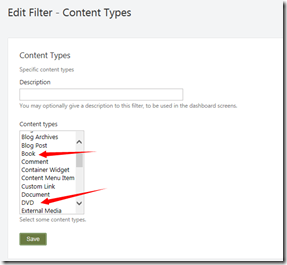
不能查询全部的 Product,这样一来,我们又要自己写代码了。
二:更新 Module.txt
因为我们的模块依赖一个特性, Orchard.Projections,所以,修改为:
name: tminji.shop
antiforgery: enabled
author: tminji.com
website: http://www.tminji.com
version: 1.0.0
orchardversion: 1.0.0
description: The tminji.com module is a shopping module.
Dependencies: Orchard.Projections
features:
shop:
Description: shopping module.
Category: ASample
三:创建 Filter
然后,
1:增加 Filters 文件夹;
2:创建 ProductPartFilter.cs,如下:
using Orchard.Localization;
using Orchard.Mvc.Filters;
using Orchard.Projections.Descriptors.Filter;
using System;
using System.Collections.Generic;
using System.Linq;
using System.Text;
using System.Threading.Tasks;
using TMinji.Shop.Models;namespace TMinji.Shop.Filters
{
public class ProductPartFilter : Orchard.Projections.Services.IFilterProvider
{
public Localizer T { get; set; }public ProductPartFilter()
{
T = NullLocalizer.Instance;
}public void Describe(DescribeFilterContext describe)
{
describe.For(
"Content", // The category of this filter
T("Content"), // The name of the filter (not used in 1.4)
T("Content")) // The description of the filter (not used in 1.4)// Defines the actual filter (we could define multiple filters using the fluent syntax)
.Element(
"ProductParts", // Type of the element
T("Product Parts"), // Name of the element
T("Product parts"), // Description of the element
ApplyFilter, // Delegate to a method that performs the actual filtering for this element
DisplayFilter // Delegate to a method that returns a descriptive string for this element
);
}private void ApplyFilter(FilterContext context)
{// Set the Query property of the context parameter to any IHqlQuery. In our case, we use a default query
// and narrow it down by joining with the ProductPartRecord.
context.Query = context.Query.Join(x => x.ContentPartRecord(typeof(ProductPartRecord)));
}private LocalizedString DisplayFilter(FilterContext context)
{
return T("Content with ProductPart");
}
}}
现在,在后台,就可以看到这个 Filter 了,如下:
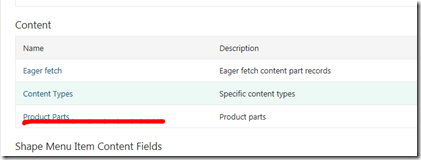
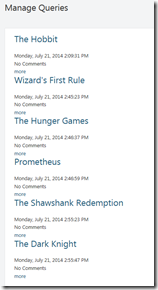
现在,我们增加这个 filter,就可以得到结果了,如下:
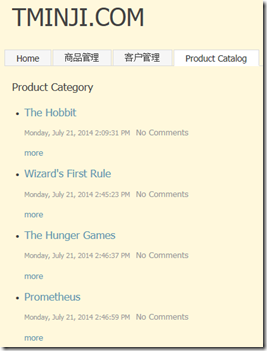
我们添加 Projection(不再赘述),然后在前台显式出来:
四:内容呈现(Dispaly)
但是,我们发现一个问题,就是 Price 和 SKU 并没有呈现出来,包括我们点击 More ,也并没有出现这些我们的核心数据。
还记得什么没有,我们在后台创建 Book 或者 DVD 的时候,一开始根本没有保存上,是因为我们没有在 Driver 中存在返回 DriverResult 的方法,以及定义对应的 cshtml 文件,现在,让我们来完成这件事情。
首先,修改 ProductPartDriver 类,增加方法:
protected override DriverResult Display(ProductPart part, string displayType, dynamic shapeHelper)
{
return ContentShape("Parts_Product", () => shapeHelper.Parts_Product(
Price: part.UnitPrice,
Sku: part.Sku
));
}
前台在呈现含有 ProductPart 的页面的时候,会调用这个 Display 方法。根据这个方法,我们知道,创建了一个 Parts_Product 的 shape,它对应的 cshtml 文件是:
Views/Parts/Product.cshtml
现在,我们来创建这个文件:
@{
var price = (decimal)Model.Price;
var sku = (string)Model.Sku;
}
<article>
Price: @price<br />
Sku: @sku
</article>
然后,记住,修改我们的 placement.info:
<Placement>
<Place Parts_Product_Edit="Content:1" />
<Place Parts_Product="Content:0" />
</Placement>
大功告成,见:
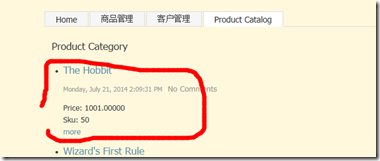
参考:http://skywalkersoftwaredevelopment.net/blog/writing-an-orchard-webshop-module-from-scratch-part-1
Orchard模块开发全接触3:分类的实现及内容呈现(Display)的更多相关文章
- Orchard模块开发全接触1:起步
在<http://www.cnblogs.com/luminji/p/3831281.html>中简单介绍了 Orchard 的模块开发,接下来,我们需要做个更复杂的例子,Orchard ...
- Orchard模块开发全接触7:订单与支付之Event Bus
在这部分,我们要完成的工作有: 1:将购物车内的商品变成真正的订单: 2:理解 父子及一对多关系: 3:写一个针对 Event Bus 的扩展点: 4:实现一个针对该扩展点的模拟的 支付服务: 一:创 ...
- Orchard模块开发全接触5:深度改造前台第二部分
在这一部分,我们继续完善我们的购物车,我们要做以下一些事情: 1:完成 shoppingcart.cshtml: 2:让用户可以更新数量及从购物车删除商品: 3:创建一个 widget,在上面可以看到 ...
- Orchard模块开发全接触4:深度改造前台
这里,我们需要做一些事情,这些事情意味着深度改造前台: 1:为商品增加 添加到购物车 按钮,点击后功能实现: 2:商品排序: 3:购物车预览,以及添加 结算 按钮: 4:一个显式 购物车中有*个 商品 ...
- Orchard模块开发全接触2:新建 ProductPart
一:创建 Part 1:项目引用 Orchard.Framework: 2:创建 Models 文件夹: 3:在 Models 文件夹下创建类 ProductPartRecord,如下: public ...
- Orchard模块开发全接触8:改造后台
后台默认提供了 Content 的管理,但是,所有的内容类型揉杂在一起,而我们需要更深度的定制一些功能,比如,我们只想管理订单,又比如,我们需要对注册用户进行管理.本篇的内容包括: 1:自定义 adm ...
- Orchard模块开发全接触6:自定义用户注册
我们都知道 Orchard 的用户注册相当简单,现在,我们需要一个自定义的用户注册,现在,开始吧. 一:定义实体 Models/CustomerPartRecord.cs: public class ...
- Orchard 模块开发学习笔记 (1)
创建模块 首先,打开Bin目录下的Orchard.exe 等到出现orchard>后, 看看命令列表中是否存在 codegen module 如果不存在,则需要先执行:feature enabl ...
- Odoo9.0模块开发全流程
构建Odoo模块 模块组成 业务对象 业务对象声明为Python类, 由Odoo自己主动加载. 数据文件 XML或CSV文件格式, 在当中声明了元数据(视图或工作流).配置数据(模块參数).演示数据等 ...
随机推荐
- Codeforces-1084C
title: Codeforces-1084C date: 2018-12-13 16:02:04 tags: acm 刷题 categories: Codeforces 概述 好久没写博客了,,,最 ...
- 使用Synchronized关键字同步类方法
要想解决“脏数据”的问题,最简单的方法就是使用synchronized关键字来使run方法同步,代码如下: public synchronized void run() { } 从上面的代码可以看出, ...
- BZOJ.4571.[SCOI2016]美味(主席树 贪心)
题目链接 要求 \(b\ xor\ (a_j+x)\) 最大,应让 \(a_j+x\) 的最高位尽可能与b相反.带个减法Trie树好像很难做?反正我不会. 从最高位开始,如果这位b是0/1,判断是否存 ...
- BZOJ2465: [中山市选2009]小球
Description 给定n个不同颜色的球,每个球都有一个分数,同时有m个瓶子,每个瓶子都有固定的容量.现在,你必须把球放到瓶子里面.请编程计算最多能放多少个球到这些瓶子里. Inpu ...
- FireDAC 下的 Sqlite [6] - 加密
主要就是设置 TFDConnection 的两个链接参数: Password, NewPassword, 非常简单. const dbPath = 'C:\Temp\SQLiteTest.sdb'; ...
- 用css解决table文字溢出控制td显示字数(转)
场景: 最左边这栏我不行让他换行,怎么办呢? 下面是解决办法: table{ width:100px; table-layout:fixed;/* 只有定义了表格的布局算法为fixed,下面td的定义 ...
- MongoDB 那些坑(转)
MongoDB 是目前炙手可热的 NoSQL 文档型数据库,它提供的一些特性很棒:如自动 failover 机制,自动 sharding,无模式 schemaless,大部分情况下性能也很棒.但是薄荷 ...
- 0xWS2812 STM32 driver for WS2812(B) RGB LEDs
0xWS2812 STM32 driver for WS2812(B) RGB LEDs 0xWS2812 pronounced "hex-WS2812" This code ai ...
- STM32F4XX devices vector table for EWARM toolchain.
;/******************** (C) COPYRIGHT 2015 STMicroelectronics ******************** ;* File Name : sta ...
- EasyNetQ介绍
EasyNetQ 是一个容易使用,坚固的,针对RabbitMQ的 .NET API. 假如你尽可能快的想去安装和运行RabbitMQ,请去看入门指南.EasyNetQ是为了提供一个尽可能简洁的适用与R ...