
通知栏消息(Notification)初步

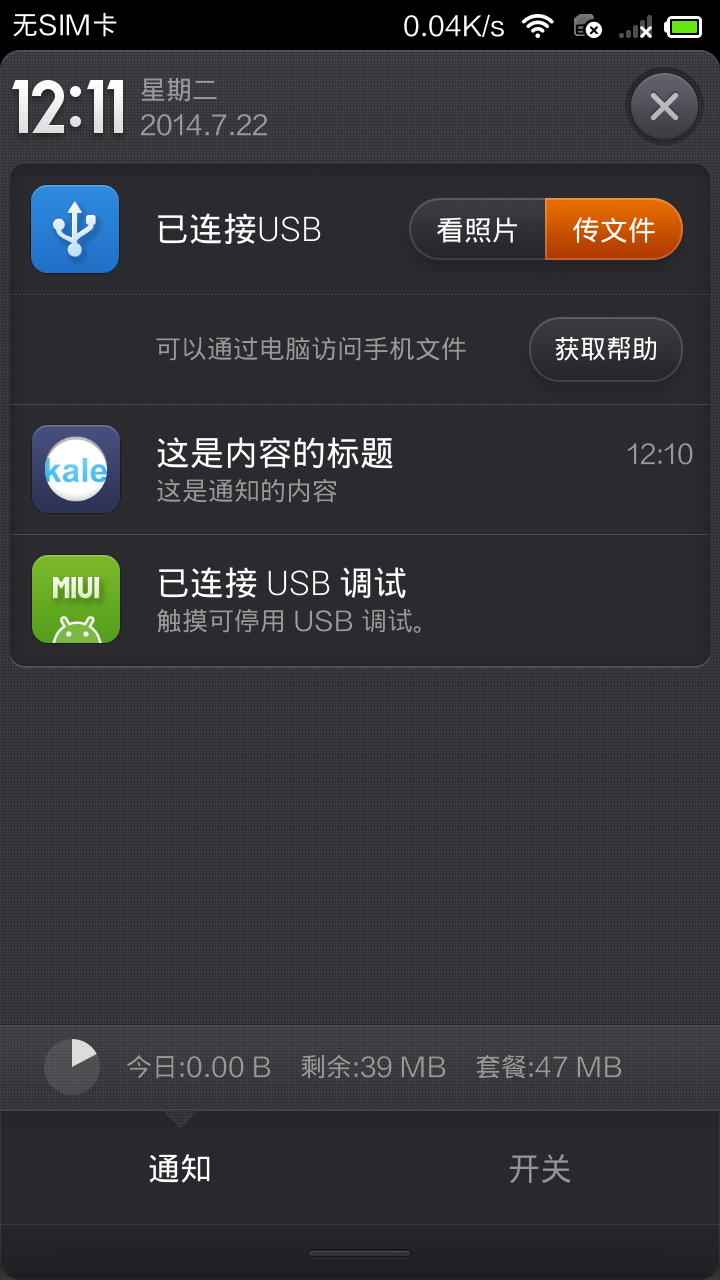
Notification是用来在通知中心中显示信息的,这里讲解了其最简单的使用方式。
关于PendingIntent和Intent的区别可以参考这篇文章:http://blog.csdn.net/zeng622peng/article/details/6180190
MainActivity.java
package com.kale.notification;

import android.app.Activity;

import android.app.Notification;

import android.app.NotificationManager;

import android.app.PendingIntent;

import android.content.Intent;

import android.os.Bundle;

import android.view.View;

import android.view.View.OnClickListener;

import android.widget.Button;

public class MainActivity extends Activity {

    static final int NOTIFICATION_ID = 0x123;

    NotificationManager nm;

    @Override

    protected void onCreate(Bundle savedInstanceState) {

        super.onCreate(savedInstanceState);

        setContentView(R.layout.activity_main);

        //获取系统服务来初始化对象

        nm = (NotificationManager)getSystemService(NOTIFICATION_SERVICE);

        initView();

    }

    private void initView() {

        // TODO 自动生成的方法存根

        Button b1 = (Button)findViewById(R.id.button1);

        b1.setOnClickListener(new OnClickListener() {

            @Override

            public void onClick(View arg0) {

                // TODO 自动生成的方法存根

                sent(arg0);

            }

        });

        Button b2 = (Button)findViewById(R.id.button2);

        b2.setOnClickListener(new OnClickListener() {

            @Override

            public void onClick(View arg0) {

                // TODO 自动生成的方法存根

                del(arg0);

            }

        });

    }

    public void sent(View source) {

        //设置点击后启动的activity

        Intent intent = new Intent(MainActivity.this,MainActivity.class);

        //将Intent封装进PendingIntent中,点击通知的消息后,就会启动对应的程序

        PendingIntent pIntent = PendingIntent.getActivity(this, 0, intent, 0);

        Notification notification = new Notification.Builder(this)

        .setAutoCancel(true)//点击通知后,自动消失

        .setTicker("在顶部状态栏的提示信息")//在顶部状态栏中的提示信息

        .setSmallIcon(R.drawable.ic_launcher)//设置顶部状态栏的小图标

        .setContentTitle("这是内容的标题")//设置通知中心的标题

        .setContentText("这是通知的内容")//设置通知中心中的内容

        .setDefaults(Notification.DEFAULT_SOUND|//设置使用默认的声音

                Notification.DEFAULT_LIGHTS|//设置使用默认的LED

                Notification.DEFAULT_VIBRATE)//设置使用默认的振动

        //.setVibrate(new Long[] {0,50,100,150}) 设置自定义的振动

        /*.setSound(Uri.parse("file:///sdcard/click.mp3"))*/

        .setWhen(System.currentTimeMillis())

        .setContentIntent(pIntent)//该通知要启动的Intent

        .build();

        //发送该通知

        nm.notify(NOTIFICATION_ID,notification);

    }

    public void del(View v) {

        //取消通知

        nm.cancel(NOTIFICATION_ID);

    }

}
补充内容(来自:http://www.oschina.net/code/snippet_270292_14489):
NotificationManager常用方法介绍:public void cancelAll() 移除所有通知(只是针对当前Context下的Notification)public void cancel(int id) 移除标记为id的通知 (只是针对当前Context下的所有Notification)public void notify(String tag ,int id, Notification notification) 将通知加入状态栏,标签为tag,标记为idpublic void notify(int id, Notification notification) 将通知加入状态栏,标记为id常量:DEFAULT_ALL 使用所有默认值,比如声音,震动,闪屏等等DEFAULT_LIGHTS 使用默认闪光提示DEFAULT_SOUNDS 使用默认提示声音DEFAULT_VIBRATE 使用默认手机震动 以上的效果常量可以叠加,即通过notification.defaults =DEFAULT_SOUND|DEFAULT_VIBRATE; notification.defaults |= DEFAULT_SOUND <!-- 闪光灯的权限 -->
<uses-permission android:name="android.permission.FLASHLIGHT"/>
<!-- 振动的权限 -->
<uses-permission android:name="android.permission.VIBRATE"/>
布局文件(仅仅就是两个按钮 ⊙﹏⊙b汗)
<RelativeLayout xmlns:android="http://schemas.android.com/apk/res/android"

    xmlns:tools="http://schemas.android.com/tools"

    android:layout_width="match_parent"

    android:layout_height="match_parent"

    android:paddingBottom="@dimen/activity_vertical_margin"

    android:paddingLeft="@dimen/activity_horizontal_margin"

    android:paddingRight="@dimen/activity_horizontal_margin"

    android:paddingTop="@dimen/activity_vertical_margin"

    tools:context="com.kale.notification.MainActivity" >

    <TextView

        android:id="@+id/textView1"

        android:layout_width="wrap_content"

        android:layout_height="wrap_content"

        android:text="@string/hello_world" />

    <Button

        android:id="@+id/button1"

        android:layout_width="wrap_content"

        android:layout_height="wrap_content"

        android:layout_below="@+id/textView1"

        android:layout_marginTop="18dp"

        android:layout_toRightOf="@+id/textView1"

        android:text="发送" />

    <Button

        android:id="@+id/button2"

        android:layout_width="wrap_content"

        android:layout_height="wrap_content"

        android:layout_alignRight="@+id/button1"

        android:layout_below="@+id/button1"

        android:layout_marginTop="47dp"

        android:text="取消" />

</RelativeLayout>
通知栏消息(Notification)初步的更多相关文章
- Android 之 信息通知栏消息Notification
Notification是安卓手机顶部的消息提示 这里我们分别设置两个按钮,来实现顶部消息的发送和取消 功能实现 首先要在主Activity中设置一个通知控制类 NotificationManager ...
- 通知栏发送消息Notification(可以使用自定义的布局)
一个简单的应用场景:假如用户打开Activity以后,按Home键,此时Activity 进入-> onPause() -> onStop() 不可见.代码在此时机发送一个Notifica ...
- Android种使用Notification实现通知管理以及自定义通知栏(Notification示例四)
示例一:实现通知栏管理 当针对相同类型的事件多次发出通知,作为开发者,应该避免使用全新的通知,这时就应该考虑更新之前通知栏的一些值来达到提醒用户的目的.例如我们手机的短信系统,当不断有新消息传来时,我 ...
- React Native之通知栏消息提示(ios)
React Native之通知栏消息提示(ios) 一,需求分析与概述 详情请查看:React Native之通知栏消息提示(android) 二,极光推送注册与集成 2.1,注册 详情请查看:Rea ...
- React Native之通知栏消息提示(android)
React Native之通知栏消息提示(android) 一,需求分析与概述 1.1,推送作为手机应用的基本功能,是手机应用的重要部分,如果自己实现一套推送系统费时费力,所以大部分的应用都会选择使用 ...
- android实现通知栏消息
一.原理 消息推送有两种,一种是客户端定时直接到服务器搜索消息,如果发现有新的消息,就获取消息下来:另一种是服务器向客户端发送消息,也就是当有信息消息时,服务器端就会向客户端发送消息. 二.步骤(代码 ...
- Android中使用Notification实现进度通知栏(Notification示例三)
我们在使用APP的过程中,软件会偶尔提示我们进行版本更新,我们点击确认更新后,会在通知栏显示下载更新进度(已知长度的进度条)以及安装情况(不确定进度条),这就是我们今天要实现的功能.实现效果如下: 在 ...
- Android中使用Notification实现宽视图通知栏(Notification示例二)
Notification是在你的应用常规界面之外展示的消息.当app让系统发送一个消息的时候,消息首先以图表的形式显示在通知栏.要查看消息的详情需要进入通知抽屉(notificationdrawer) ...
- Android中使用Notification实现普通通知栏(Notification示例一)
Notification是在你的应用常规界面之外展示的消息.当app让系统发送一个消息的时候,消息首先以图表的形式显示在通知栏.要查看消息的详情需要进入通知抽屉(notificationdrawer) ...
随机推荐
- ngResource和REST介绍
ngResource和REST介绍 一.RESTful介绍 RESTful维基百科 REST(表征性状态传输,Representational State Transfer)是Roy Fielding ...
- Codeforces 601C Kleofáš and the n-thlon 概率dp
Kleofáš and the n-thlon 我们可以用dp算出比当前这个人得分少的概率, 然后人数乘概率就好啦. dp[ i ][ j ]表示进行了 i 轮 得分为 j 的概率, 因为每个人都是独 ...
- SSH免密登录机制
SSH免密登录机制:(见下图) 1.A先使用ssh-keygen生成一对公钥和私钥:ssh-keygen 2.将A的公钥复制给B一份,并且将其追加到B的授权文件中:ssh-copy-id B 3.接 ...
- 深入分析Spring Boot2,解决 java.lang.ArrayStoreException异常
将某个项目从Spring Boot1升级Spring Boot2之后出现如下报错,查了很多不同的解决方法都没有解决: Spring boot2项目启动时遇到了异常: java.lang.ArraySt ...
- Linux-C网络编程
简介 基础是TCP/IP协议,网上资料很多不再赘述. 推荐<图解TCP/IP> socket编程 网络字节序 发送主机通常将发送缓冲区中的数据按内存地址从低到高的顺序发出, 接收主机把从网 ...
- i春秋CTF web题(1)
之前边看writeup,边做实验吧的web题,多多少少有些收获.但是知识点都已记不清.所以这次借助i春秋这个平台边做题,就当记笔记一样写写writeup(其实都大部分还是借鉴其他人的writeup). ...
- Atom-同步设置
Atom-同步设置 参考博客 CNBLOG First 首先呢,如果我们想要通过Atom的设置和插件的话,我们需要这个一个Atom插件. PS: 因为Gist被墙的原因,所以需要***才行,我挂了ss ...
- Django-ContentType-signals 实现牛逼玩法
一.ContentType 在django中,有一个记录了项目中所有model元数据的表,就是ContentType,表中一条记录对应着一个存在的model,所以可以通过一个ContentType表的 ...
- ZJOI2019day1退役记
ZJOI2019day1退役记 每天都在划水,考场上心态炸了,也没什么好说的. 有人催我更退役记,等成绩出来了再更更吧,成绩出来也没心情更了,落差好大,还打不过文化课选手 虽然被卡常数卡到心态爆炸,但 ...
- hadoop 视频教程2
Hadoop大数据零基础实战培训教程 一,教程内容: 1,Hadoop2.0YARN深入浅出系列 2,Avro数据序列化系统 3,Chukwa集群监控系统 4,Flume日志收集系统 5,Greenp ...