
【three.js练习程序】创建简单物理地形
<!DOCTYPE html>

<html>

<head>

    <meta charset="utf-8">

    <title>ceshi</title>

    <style>

        body

        {

            margin: 0;

            overflow: hidden;

        }

    </style>

    <script src="./build/three.js"></script>

    <script src="./examples/js/libs/ammo.js"></script>

    <script src="./examples/js/controls/OrbitControls.js"></script>

    <script src="./examples/js/ImprovedNoise.js"></script>

</head>

<body>

    <div id="ThreeJs">

    </div>

    <script>

        var camera, controls, scene, renderer;

        var clock = new THREE.Clock();

        // 物理引擎相关变量

        var gravityConstant = -9.8;

        var collisionConfiguration;

        var dispatcher;

        var broadphase;

        var solver;

        var physicsWorld;

        var rigidBodies = [];

        var margin = 0.05;

        var transformAux1 = new Ammo.btTransform();

        var time = 0;

        // 高度场相关

        var terrainWidthExtents = 50;

        var terrainDepthExtents = 50;

        var terrainWidth = 50;

        var terrainDepth = 50;

        var terrainHalfWidth = terrainWidth / 2;

        var terrainHalfDepth = terrainDepth / 2;

        var terrainMaxHeight = 50;

        var terrainMinHeight = -20;

        var heightData = null;

        var ammoHeightData = null;

        init();

        animate();

        function init() {

            heightData = generateHeight(terrainWidth, terrainDepth);

            initGraphics();

            initPhysics();

            createObjects();

        }

        function initGraphics() {

            // three.js基本场景配置

            camera = new THREE.PerspectiveCamera(60, window.innerWidth / window.innerHeight, 0.1, 2000);

            camera.position.x = 50;

            camera.position.y = 50;

            camera.position.z = 50;

            controls = new THREE.OrbitControls(camera);

            controls.target.y = 2;

            renderer = new THREE.WebGLRenderer();

            renderer.setClearColor(new THREE.Color("#bfd1e5"));

            renderer.shadowMapEnabled = true;

            renderer.setSize(window.innerWidth, window.innerHeight);

            // 场景

            scene = new THREE.Scene();

            // 环境光

            var ambientLight = new THREE.AmbientLight(0x404040);

            scene.add(ambientLight);

            // 线性光

            var light = new THREE.DirectionalLight(0xffffff, 1);

            light.position.set(-20, 20, 10);

            light.castShadow = true;

            var d = 50;

            light.shadow.camera.left = -d;

            light.shadow.camera.right = d;

            light.shadow.camera.top = d;

            light.shadow.camera.bottom = -d;

            light.shadow.camera.near = 2;

            light.shadow.camera.far = 50;

            light.shadow.mapSize.x = 1024;

            light.shadow.mapSize.y = 1024;

            scene.add(light);

            var axes = new THREE.AxisHelper(50);               //创建三轴表示

            scene.add(axes);

            // 添加窗口大小变化监听

            window.addEventListener('resize', onWindowResize, false);

        }

        function onWindowResize() {

            camera.aspect = window.innerWidth / window.innerHeight;

            camera.updateProjectionMatrix();

            renderer.setSize(window.innerWidth, window.innerHeight);

        }

        function initPhysics() {

            // bullet基本场景配置

            collisionConfiguration = new Ammo.btDefaultCollisionConfiguration();

            dispatcher = new Ammo.btCollisionDispatcher(collisionConfiguration);

            broadphase = new Ammo.btDbvtBroadphase();

            solver = new Ammo.btSequentialImpulseConstraintSolver();

            physicsWorld = new Ammo.btDiscreteDynamicsWorld(dispatcher, broadphase, solver, collisionConfiguration);

            physicsWorld.setGravity(new Ammo.btVector3(0, gravityConstant, 0));

        }

        function createObjects() {

            var pos = new THREE.Vector3();

            var quat = new THREE.Quaternion();

            //创建物理地形

            var geometry = new THREE.PlaneBufferGeometry(50, 50, terrainWidth - 1, terrainDepth - 1);

            geometry.rotateX(-Math.PI / 2);

            var vertices = geometry.attributes.position.array;

            for (var i = 0, j = 0, l = vertices.length; i < l; i++, j += 3) {

                // j + 1 because it is the y component that we modify

                vertices[j + 1] = heightData[i];

            }

            geometry.computeVertexNormals();

            var groundMaterial = new THREE.MeshPhongMaterial({ color: 0xC7C7C7 });

            terrainMesh = new THREE.Mesh(geometry, groundMaterial);

            terrainMesh.receiveShadow = true;

            terrainMesh.castShadow = true;

            scene.add(terrainMesh);

            var groundShape = createTerrainShape(heightData);

            var groundTransform = new Ammo.btTransform();

            groundTransform.setIdentity();

            // 设置bullet计算时物体中心

            groundTransform.setOrigin(new Ammo.btVector3(0, (terrainMaxHeight + terrainMinHeight) / 2, 0));

            var groundMass = 0;

            var groundLocalInertia = new Ammo.btVector3(0, 0, 0);

            var groundMotionState = new Ammo.btDefaultMotionState(groundTransform);

            var groundBody = new Ammo.btRigidBody(new Ammo.btRigidBodyConstructionInfo(groundMass, groundMotionState, groundShape, groundLocalInertia));

            physicsWorld.addRigidBody(groundBody);

            //创建50个小球

            for (var i = 0; i < 50; i++) {

                var ballMass = 1.2;

                var ballRadius = 0.5;

                var ball = new THREE.Mesh(new THREE.SphereGeometry(ballRadius, 20, 20), createRendomColorObjectMeatrial());

                ball.castShadow = true;

                ball.receiveShadow = true;

                var ballShape = new Ammo.btSphereShape(ballRadius);

                ballShape.setMargin(margin);

                pos.set(Math.random() + 10, 3 * (i + 1) + 20, Math.random() - 10);

                quat.set(0, 0, 0, 1);

                createRigidBody(ball, ballShape, ballMass, pos, quat);

                ball.userData.physicsBody.setFriction(1.5);

            }

            //创建50个方块

            for (var i = 0; i < 50; i++) {

                pos.set(Math.random() - 10, 3 * (i + 1) + 20, Math.random() + 10);

                quat.set(0, 0, 0, 1);

                createParallellepiped(1, 1, 1, 1, pos, quat, createRendomColorObjectMeatrial());

            }

        }

        function createRendomColorObjectMeatrial() {

            var color = Math.floor(Math.random() * (1 << 24));

            return new THREE.MeshPhongMaterial({ color: color });

        }

        function createParallellepiped(sx, sy, sz, mass, pos, quat, material) {

            var threeObject = new THREE.Mesh(new THREE.BoxGeometry(sx, sy, sz, 1, 1, 1), material);

            threeObject.castShadow = true;

            threeObject.receiveShadow = true;

            var shape = new Ammo.btBoxShape(new Ammo.btVector3(sx * 0.5, sy * 0.5, sz * 0.5));

            shape.setMargin(margin);

            createRigidBody(threeObject, shape, mass, pos, quat);

            return threeObject;

        }

        function createRigidBody(threeObject, physicsShape, mass, pos, quat) {

            threeObject.position.copy(pos);

            threeObject.quaternion.copy(quat);

            var transform = new Ammo.btTransform();

            transform.setIdentity();

            transform.setOrigin(new Ammo.btVector3(pos.x, pos.y, pos.z));

            transform.setRotation(new Ammo.btQuaternion(quat.x, quat.y, quat.z, quat.w));

            var motionState = new Ammo.btDefaultMotionState(transform);

            var localInertia = new Ammo.btVector3(0, 0, 0);

            physicsShape.calculateLocalInertia(mass, localInertia);

            var rbInfo = new Ammo.btRigidBodyConstructionInfo(mass, motionState, physicsShape, localInertia);

            var body = new Ammo.btRigidBody(rbInfo);

            threeObject.userData.physicsBody = body;

            scene.add(threeObject);

            if (mass > 0) {

                rigidBodies.push(threeObject);

                body.setActivationState(4);

            }

            physicsWorld.addRigidBody(body);

            return body;

        }

        function animate() {

            requestAnimationFrame(animate);

            var deltaTime = clock.getDelta();

            updatePhysics(deltaTime);

            controls.update(deltaTime);

            renderer.render(scene, camera);

            time += deltaTime;

        }

        function updatePhysics(deltaTime) {

            physicsWorld.stepSimulation(deltaTime);

            // 更新物体位置

            for (var i = 0, iL = rigidBodies.length; i < iL; i++) {

                var objThree = rigidBodies[i];

                var objPhys = objThree.userData.physicsBody;

                var ms = objPhys.getMotionState();

                if (ms) {

                    ms.getWorldTransform(transformAux1);

                    var p = transformAux1.getOrigin();

                    var q = transformAux1.getRotation();

                    objThree.position.set(p.x(), p.y(), p.z());

                    objThree.quaternion.set(q.x(), q.y(), q.z(), q.w());

                }

            }

        }

        function generateHeight(width, height) {

            var size = width * height, data = new Float32Array(size),

                perlin = new ImprovedNoise(), quality = 1, z = Math.random() * 10;

            for (var j = 0; j < 4; j++) {

                for (var i = 0; i < size; i++) {

                    var x = i % width, y = ~ ~(i / width);

                    data[i] += Math.abs(perlin.noise(x / quality, y / quality, z) * quality);

                }

                quality *= 3;

            }

            return data;

        }

        // 生成物理引擎用高度场

        function createTerrainShape(heightData) {

            // This parameter is not really used, since we are using PHY_FLOAT height data type and hence it is ignored

            var heightScale = 1;

            // Up axis = 0 for X, 1 for Y, 2 for Z. Normally 1 = Y is used.

            var upAxis = 1;

            // hdt, height data type. "PHY_FLOAT" is used. Possible values are "PHY_FLOAT", "PHY_UCHAR", "PHY_SHORT"

            var hdt = "PHY_FLOAT";

            // Set this to your needs (inverts the triangles)

            var flipQuadEdges = false;

            // Creates height data buffer in Ammo heap

            ammoHeightData = Ammo._malloc(4 * terrainWidth * terrainDepth);

            // Copy the javascript height data array to the Ammo one.

            var p = 0;

            var p2 = 0;

            for (var j = 0; j < terrainDepth; j++) {

                for (var i = 0; i < terrainWidth; i++) {

                    // write 32-bit float data to memory

                    Ammo.HEAPF32[ammoHeightData + p2 >> 2] = heightData[p];

                    p++;

                    // 4 bytes/float

                    p2 += 4;

                }

            }

            // Creates the heightfield physics shape

            var heightFieldShape = new Ammo.btHeightfieldTerrainShape(

                terrainWidth,

                terrainDepth,

                ammoHeightData,

                heightScale,

                terrainMinHeight,

                terrainMaxHeight,

                upAxis,

                hdt,

                flipQuadEdges

        );

            // Set horizontal scale

            var scaleX = terrainWidthExtents / (terrainWidth - 1);

            var scaleZ = terrainDepthExtents / (terrainDepth - 1);

            heightFieldShape.setLocalScaling(new Ammo.btVector3(scaleX, 1, scaleZ));

            heightFieldShape.setMargin(0.05);

            return heightFieldShape;

        }

        document.getElementById("ThreeJs").appendChild(renderer.domElement);

    </script>

</html>
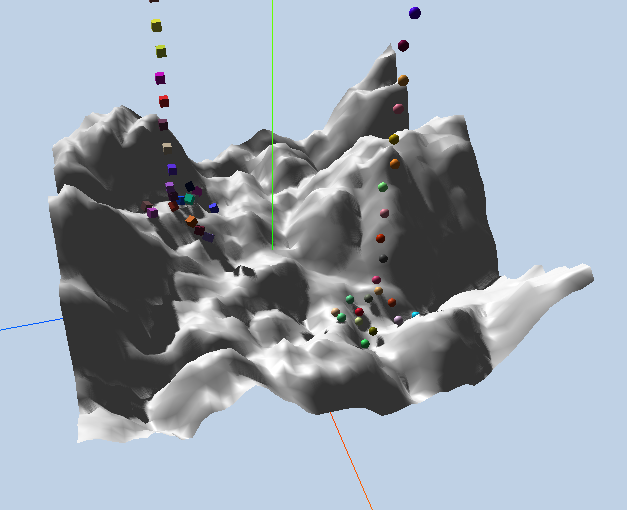
【three.js练习程序】创建简单物理地形的更多相关文章
- 【three.js练习程序】创建简单物理场景
<!DOCTYPE html> <html> <head> <meta charset="utf-8"> <title> ...
- unity3d教程动态创建简单平面地形
unity3d创建地形是不须要usingUnityEditor的.这里使用了AssetDatabase.所以需using UnityEditor; 创建三步: 1.TerrainData terrai ...
- 基于Babylon.js编写宇宙飞船模拟程序1——程序基础结构、物理引擎使用、三维罗盘
计划做一个宇宙飞船模拟程序,首先做一些技术准备. 可以访问https://ljzc002.github.io/test/Spacetest/HTML/PAGE/spacetestwp2.html查看测 ...
- node.js学习(三)简单的node程序&&模块简单使用&&commonJS规范&&深入理解模块原理
一.一个简单的node程序 1.新建一个txt文件 2.修改后缀 修改之后会弹出这个,点击"是" 3.运行test.js 源文件 使用node.js运行之后的. 如果该路径下没有该 ...
- 使用Visual Studio 2010 创建简单的Silverlight应用程序
使用Visual Studio 2010 创建简单的Silverlight应用程序 Silverlight是创建动态的引人的RIAs(Rich Internet Application)的新方法.这里 ...
- 在 Web 应用中创建 Node.js 应用程序
本分步指南将通过 Azure Web 应用帮助您启动并运行示例 Node.JS 应用程序.除 Node.JS 外,Azure Web 应用还支持其他语言,如 PHP..NET.Node.JS.Pyth ...
- 用chrome的snippets片段功能创建页面js外挂程序,从控制台创建js小脚本
用chrome的snippets片段功能创建页面js外挂程序,从控制台创建js小脚本 Chrome的snippets是小脚本,还可以创作并在Chrome DevTools的来源面板中执行.可以访问和从 ...
- 用简单的 Node.js 后台程序浅析 HTTP 请求与响应
用简单的 Node.js 后台程序浅析 HTTP 请求与响应 本文写于 2020 年 1 月 18 日 我们来看两种方式发送 HTTP 请求,一种呢,是命令行的 curl 命令:一种呢是直接在浏览器的 ...
- Socket创建简单服务器和客户端程序
使用Socket编程创建简单服务器和客户端 要知道的 Socket-AddressFamily, SocketType, ProtocolType https://blog.csdn.net/weix ...
随机推荐
- linux下的进程(孤儿进程、僵尸进程)
linux提供了一种机制可以保证只要父进程想知道子进程结束时的状态信息,就可以得到.这种机制就是:在每个进程退出的时候,内核释放该进程所有的资源,包括打开文件,占用的内存等.但是仍然为其保留一定的信息 ...
- 微信 OAuth2 网页授权获取用户信息
文档:http://mp.weixin.qq.com/wiki/17/c0f37d5704f0b64713d5d2c37b468d75.html !!! 微信跟用户没有关系类接口采用了OAUTH2 [ ...
- Kafka消息存储原理
kafka消息存储机制 (一)关键术语 复习一下几个基本概念,详见上面的基础知识文章. Broker:消息中间件处理结点,一个Kafka节点就是一个broker,多个broker能够组成一个Kafka ...
- div或其他html控件的overflow使用滚动条
在编写html代码时, 有时候不想把控件撑大,滚动条就是个不错的选择 如下代码 <div style="height:auto !important;max-height:58px;o ...
- Mybatis在非spring环境下配置文件中使用外部数据源(druidDatasource)
Spring环境下, MyBatis可以通过其本身的增强mybatis-spring提供的org.mybatis.spring.SqlSessionFactoryBean来注入第三方DataSourc ...
- Spring总结 2.装配bean
本随笔内容要点如下: bean的作用域 占位符 一.bean的作用域 在默认情况下,Spring管理的bean的单例的.也就是说,无论注入多少次,都是同一个bean对象.一般情况下,单例模式是足以应付 ...
- 深度理解C# 的执行原理
欢迎大家前往腾讯云+社区,获取更多腾讯海量技术实践干货哦~ 本文由鹅厂优文发表于云+社区专栏 从编译原理说起 虚拟机是什么 C# 是什么,IL 又是什么 .Net Framework vs Mono ...
- CAS多点登录
转自:http://www.blogjava.net/alwayscy/archive/2012/12/01/392322.html 场景 想要用到的场景:用户访问WEB服务,WEB访问非WEB服务1 ...
- SpringMVC源码阅读系列汇总
1.前言 1.1 导入 SpringMVC是基于Servlet和Spring框架设计的Web框架,做JavaWeb的同学应该都知道 本文基于Spring4.3.7源码分析,(不要被图片欺骗了,手动滑稽 ...
- [android] 新闻客户端主界面部分
当我们使用activity加fragment的时候,每个界面都要建立一个fragment,每个fragment里面都要重写onCreate(),onCreateView(),onActivityCre ...