
Apached+resin服务搭建
一、前言
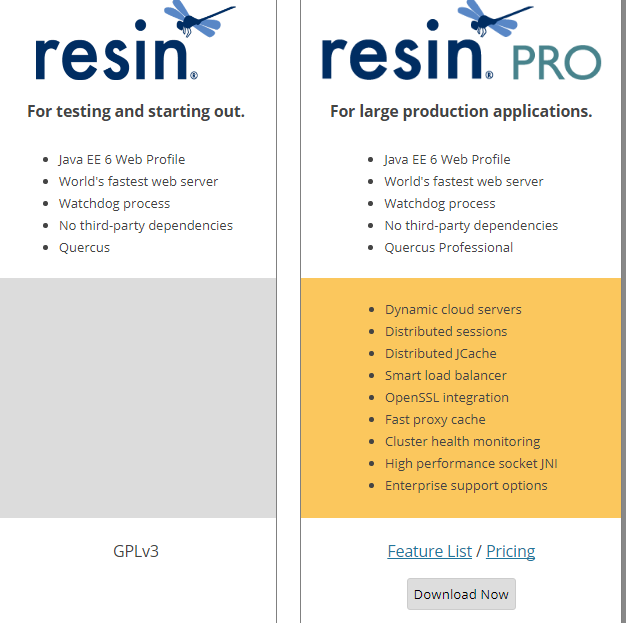
Resin是CAUCHO公司的产品,是一个非常流行的支持servlets 和jsp的引擎,速度非常快。对servlet和JSP提供了良好的支持,性能也比较优良,resin自身采用JAVA语言开发。Resin本身包含了一个支持HTTP/1.1的WEB服务器。虽然它可以显示动态内容,但是它显示静态内容的能力也非常强,速度直逼APACHE SERVER。许多站点都是使用该WEB服务器构建的。但是,resin3.09后分为了opensource的和pro的两种版本:
.opensource的resin是基于GPL开源的,如果需要将开发产品作为商业产品发布是需要收费的。

.pro的是收费的,比opensource的部分多了性能优化和集群,技术支持等
实验环境
两台服务器:

httpd-server 192.168.0.11

resin-server 192.168.0.12
二、安装java环境
[root@resin-server ~]# rpm -ivh jdk-8u25-x64.rpm

Preparing...                ########################################### [%]

   :jdk1..0_131           ########################################### [%]

Unpacking JAR files...

    tools.jar...

    plugin.jar...

    javaws.jar...

    deploy.jar...

    rt.jar...

    jsse.jar...

    charsets.jar...

    localedata.jar...

[root@resin-server ~]# cat /etc/profile.d/java.sh

export JAVA_HOME=/usr/java/latest

export CLASSPATH=$JAVA_HOME/lib/tools.jar

export PATH=$JAVA_HOME/bin:$PATH

[root@resin-server ~]# . /etc/profile.d/java.sh

[root@resin-server ~]# java -version

java version "1.8.0_131"

Java(TM) SE Runtime Environment (build 1.8.0_131-b11)

Java HotSpot(TM) -Bit Server VM (build 25.131-b11, mixed mode)
三、安装resin #如果不和httpd配合生成模块,无需编译
浏览器打开resin下载地址http://caucho.com/products/resin/download,选择对应的版本
[root@resin-server ~]# wget http://www.caucho.com/download/resin-3.1.13.tar.gz #下载软件

[root@resin-server ~]# tar xf resin-3.1..tar.gz -C /usr/local/ #不和httpd生成模块,则无需编译

[root@resin-server local]# ln -sv resin-3.1. resin

"resin" -> "resin-3.1.13"

[root@resin-server local]# sed -n '88,100p' /usr/local/resin/conf/resin.conf #修改配置文件,删除默认配置文件88-146行,添加如下内容

     <!-- resin configure by -- -->

  <server id='panwenbin' address='192.168.0.11' port='' watchdog-port=''>

        <http address="*" port="" />

        <jvm-arg>-Xmx128m</jvm-arg>

        <jvm-arg>-Xms128m</jvm-arg>

        <jvm-arg>-Xdebug</jvm-arg>

        <jvm-arg>-Dcom.sun.management.jmxremote</jvm-arg>

        <memory-free-min>1M</memory-free-min>

        <thread-max></thread-max>

        <socket-timeout>60s</socket-timeout>

        <keepalive-max></keepalive-max>

        <keepalive-timeout>15s</keepalive-timeout>

 </server>

注:resin4.0之后几点JDK参数移到resin.xml配置文件中,因为4.0之后watchdog会启动resin服务实例,并且使得配置更可维护

[root@resin-server ~]# httpd.sh -server panwenbin start  #启动服务器

Resin/3.1. started -server 'panwenbin' for watchdog at 127.0.0.1:

[root@resin-server ~]#  netstat -tnlp|egrep  "8888|8889|8080"  #查看端口是否启动

tcp               127.0.0.1:              0.0.0.0:*                   LISTEN      /sshd

tcp               :::                     :::*                        LISTEN      /java   #resin web server端口

tcp               ::ffff:192.168.0.11:    :::*                        LISTEN      /java   #Apache的请求转发端口

tcp               ::ffff:127.0.0.1:       :::*                        LISTEN      /java   #watchdog端口

tcp               :::                    :::*                        LISTEN      /sshd

[root@resin-server ~]#  echo "99+1=<%=99+1%>" > /usr/local/resin/webapps/ROOT/test.jsp #添加测试页

[root@resin-server ~]# curl http://192.168.0.11:8080/test.jsp #显示100则服务正常

+=
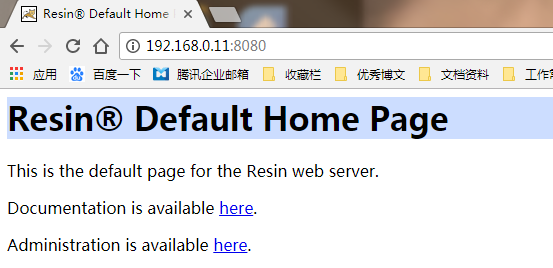
浏览器访问,测试一下,主要端口
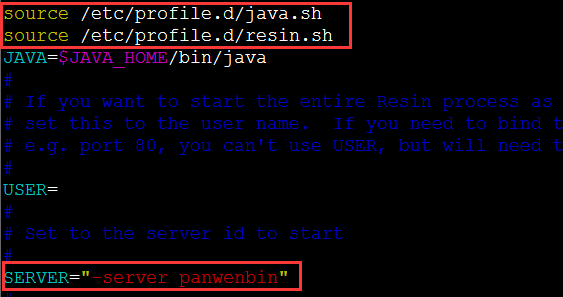
添加系统服务脚本,按需添加
[root@resin-server ~]#  cp /usr/local/resin/contrib/init.resin.in  /etc/init.d/resin

[root@resin-server ~]# vim /etc/init.d/resin
修改前:

修改后:

[root@resin-server ~]# chmod +x /etc/init.d/resin

[root@resin-server ~]# killall java

[root@resin-server ~]# /etc/init.d/resin start
四、安装httpd
[root@httpd-server ~]#yum install -y zlib libmxl libjpeg freetype libpng gd curl libiconv zlib-devel libxml2-devel libjpeg-devel freetype-devel ng-devel gd-devel curl-devel

[root@httpd-server~]#wget http://mirrors.hust.edu.cn/apache//httpd/httpd-2.2.34.tar.gz

[root@httpd-server ~]#tar xf httpd-2.2..tar.gz

[root@httpd-server ~]#cd httpd-2.2.

[root@httpd-server httpd-2.2.]#./configure --prefix=/usr/local/httpd --enable-deflate --enable-headers --enable-modules=so --enable-so --with-mpm=worker --enable-rewrite

[root@httpd-server httpd-2.2.]#make &&make install
编译生成resin的httpd模块
[root@httpd-server ~]# wget http://www.caucho.com/download/resin-3.1.13.tar.gz

[root@httpd-server ~]# tar xf resin-3.1..tar.gz

[root@httpd-server ~]# cd resin-3.1.

[root@httpd-server resin-3.1.]# ./configure --with-apxs=/usr/local/httpd/bin/apxs

[root@httpd-server resin-3.1.]# cd modules/c/src/

[root@httpd-server src]# make&&make install

[root@httpd-serverr src]# ll /usr/local/httpd/modules/  #查看模块是否生成

总用量

-rw-r--r--  root root    1月    : httpd.exp

-rwxr-xr-x  root root  1月    : mod_caucho.so

[root@httpd-server src]# tail /usr/local/httpd/conf/httpd.conf  #查看httpd配置文件是否生成resin配置命令

</IfModule>

#

# mod_caucho Resin Configuration

#

LoadModule caucho_module /usr/local/httpd/modules/mod_caucho.so

ResinConfigServer localhost

CauchoConfigCacheDirectory /tmp

CauchoStatus yes
编辑httpd配置文件,使其可以将请求转发至resin服务器
[root@httpd-server src]# tail /usr/local/httpd/conf/httpd.conf

#

# mod_caucho Resin Configuration

#

LoadModule caucho_module /usr/local/httpd/modules/mod_caucho.so

ResinConfigServer 192.168.0.11

CauchoConfigCacheDirectory /tmp

CauchoStatus yes

SetHandler cacucho-request #加上SetHandler caucho-request是全部将请求转发到resin,不加仅有PHP jsp类型转发

[root@httpd-server src]# /usr/local/httpd/bin/apachectl start #启动httpd服务

httpd: apr_sockaddr_info_get() failed for httpd-server #错误提示原因:这个问题是没有在 /etc/httpd/conf/httpd.conf 中设定 ServerName

httpd: Could not reliably determine the server's fully qualified domain name, using 127.0.0.1 for ServerName

[root@httpd-server src]# netstat -tnlp #检查端口是否启动
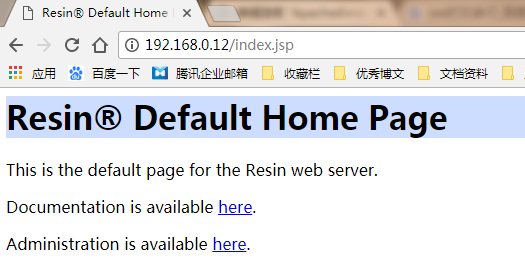
测试
浏览器访问 http://192.168.0.12/index.jsp
浏览器访问 http://192.168.0.12/test.jsp
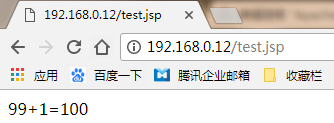
最终结果看,配置成功了!
Apached+resin服务搭建的更多相关文章
- ServiceStack.Hello——跨平台.net REST api服务搭建
ServiceStack.Hello--跨平台.net REST api服务搭建 自己创建: https://github.com/ServiceStack/ServiceStack/wiki/Cre ...
- WCFRESTFul服务搭建及实现增删改查
WCFRESTFul服务搭建及实现增删改查 RESTful Wcf是一种基于Http协议的服务架构风格, RESTful 的服务通常是架构层面上的考虑. 因为它天生就具有很好的跨平台跨语言的集成能力 ...
- 微信小程序语音识别服务搭建全过程解析(项目开源在github)
silk v3录音转olami语音识别和语义处理的api服务(ubuntu16.04服务器上实现) ## 重要的写在前面 重要事项一: 目前本文中提到的API已支持微信小程序录音文件格式:silk v ...
- 微信小程序语音识别服务搭建全过程解析(https api开放,支持新接口mp3录音、老接口silk录音)
silk v3(或新录音接口mp3)录音转olami语音识别和语义处理的api服务(ubuntu16.04服务器上实现) 重要的写在前面 重要事项一: 所有相关更新,我优先更新到我个人博客中,其它地方 ...
- Git服务搭建及github使用教程
.pos { position: fixed; top: 35%; left: 90% } .pos a { border: 2px solid white; background: #99CCFF; ...
- eureka服务搭建
Server端 引入eureka server的maven依赖 引入依赖时无需给定eureka的版本号,maven会根据当前使用的SpringCloud版本来判断应该引入哪个版本的euraka ser ...
- NodeJs之服务搭建与数据库连接
NodeJs之服务搭建与数据库连接 一,介绍与需求分析 1.1,介绍 Node.js 是一个基于 Chrome V8 引擎的 JavaScript 运行环境. Node.js 使用了一个事件驱动.非阻 ...
- JumpServer1.0 服务搭建
JumpServer1.0 服务搭建 系统环境配置 setenforce 0 systemctl stop iptables.service systemctl stop firewalld.serv ...
- Linux-ftp服务搭建
云服务器ESC 部署vsftpd服务 记一次ftp服务搭建的采坑过程,这个坑一直卡了很久时间,都给忘记了.最近由于公司项目需要部署FTP,经过各种采坑,终于把这个坑给填上了.废话不多说,开干 环境说明 ...
随机推荐
- char/unsigned char/int/short 存储范围
Type Storage size Value range char 1 byte -128 to 127 or 0 to 255 unsigned char 1 byte 0 to 255 sign ...
- create-react-app 搭建的项目中,使用 CSS Modules
create-react-app 搭建的项目中,使用 CSS Modules: 修改config目录下 webpack.config.dev.js 和 webpack.config.prod.js 文 ...
- html 简单的table样式
效果预览: 代码: <!DOCTYPE html> <html> <head> <meta charset="utf-8"> < ...
- Python 处理JSON数据报错解决办法
春节期间通过接口爬取携程数据的时候,返回的json字符串通过json.loads加载时报错"ValueError: Invalid control character at: line 1 ...
- java 泛型实现原理
泛型思想最早在C++语言的模板(Templates)中产生,Java后来也借用了这种思想.虽然思想一致,但是他们存在着本质性的不同. C++中的模板是真正意义上的泛型,在编译时就将不同模板类型参数编译 ...
- CentOS 6.5 下源码搭建LAMP环境
参考网站: http://wenku.baidu.com/link?url=Cvkqss2E9mnxXOZigMWPaCfqwsBxnm0sZ4aKE2oLAgQ888XxeC0DWOChxVqiHz ...
- [转]bigbluebutton中文社区 / 开放API / bbb API
bigbluebutton中文社区 / 开放API / bbb API 创建会议 这个接口可以重复调用多次,而不会有副作用.这带来的好处就是能简化应用程序加会的流程,无论什么用户想要加会,都可以先创建 ...
- 2015.4.21第一篇cnblog文章
个人学习记录第一篇. 输出才是最好一条途径,这也是开源的精神所在.
- 自动控制中常用的Matlab命令
部分分式展开:[r p k]=residue[num,den] 传递函数到状态空间:[A, B, C, D]=tf2ss(num, den) % 状态空间不唯一,Matlab给出其中一种 状态空间到 ...
- JS中模态窗口(showModalDialog)的详细使用
基本介绍: showModalDialog() (IE + 支持) showModelessDialog() (IE + 支持) window.showModalDialog() 方法用来创建一个显示 ...