
基于Asp.Net Core,利用ZXing来生成二维码的一般流程
本文主要介绍如何在.net环境下,基于Asp.Net Core,利用ZXing来生成二维码的一般操作。对二维码工作原理了解,详情见:https://blog.csdn.net/weixin_36191602/article/details/82466148文章介绍。
1、前期准备
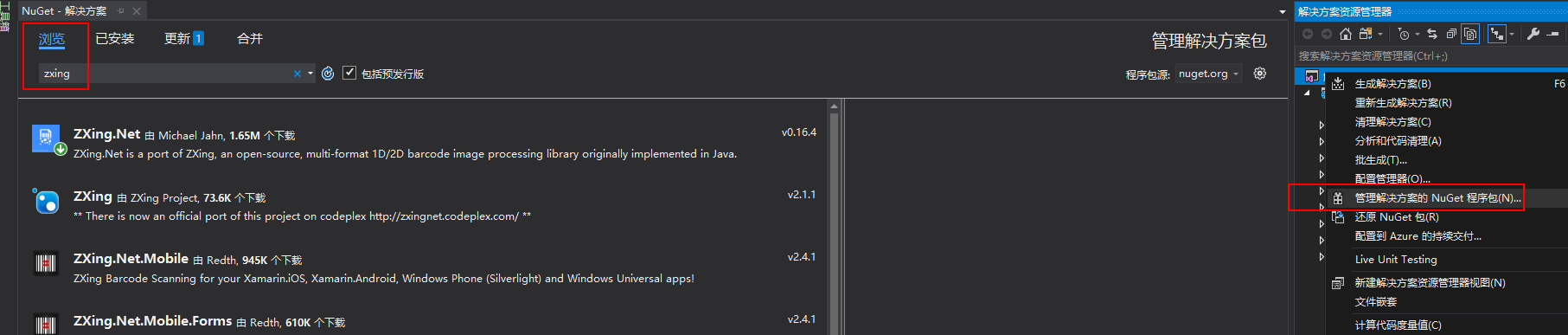
.net core preview8,vs2019(用于支持core3.0),二维码生成插件:开源库ZXIng。相关插件可以在github上找到。安装vs2019后新建.net core web解决方案,也可以右键该解决方案,通过管理解决方案Nuget包功能来找到。如下图:浏览中搜索Zxing第一个既是。选中安装即可。
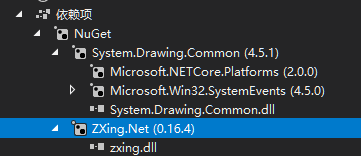
可通过项目中依赖性查看相应包的引用。如图:
2.二维码生成
2.1前端页面
在login.cshtml页面中添加前端元素,主要是一个图片控件。
 <div style="text-align:center">

     <div style="margin-top:20px">

         <span>扫码获取</span><br/>

         <img id="barcode" width="400" height="400" alt="扫码获取" src="Dynpass/GetBarCode"/>

     </div>

 </div>
src="Dynpass/GetBarCode"表示image数据从DynpassController的GetBarCode方法获取。
2.1后端代码
初始化界面以及二维码资源生成方法:
  public class DynPassController : Controller

     {

         private readonly BarCodeVue  _barCodeContent;//

         public DynPassController(IOptions<BarCodeVue> content)

         {

             this._barCodeContent = content.Value;

         }

         /// <summary>

         /// 初始化显示页面

         /// </summary>

         /// <returns></returns>

         [HttpGet]

         public IActionResult Login()

         {

             return View();

         }

         /// <summary>

         /// Svn显示==请求获取二维码资源

         /// </summary>

         /// <returns></returns>

         [HttpGet]

         public ActionResult GetBarCode()

         {

             var bar= _barCodeContent != null ? _barCodeContent.BarCode : "扫码获取";

             Bitmap bitmap = MyZxingBarcode.GenerateBitmapCode(bar);//扫码获取

             System.IO.MemoryStream ms = new System.IO.MemoryStream();

             bitmap.Save(ms, ImageFormat.Bmp);

             return File(ms.GetBuffer(), "image/png");//

         }

     }
DynPassController生成二维码的内容即_barCodeContent值由core框架依赖注入(构造该对象时通过构造函数传入)。所以需在ConfigureServices中进行注册。
Barcode类结构
  public class BarCodeVue

     {

         public string BarCode { get; set; }

     }
二维码内容注册
具体步骤:
1.在appsettings.json中添加节点。
 {

   "Logging": {

     "LogLevel": {

       "Default": "Information",

       "Microsoft": "Warning",

       "Microsoft.Hosting.Lifetime": "Information"

     }

   },

   "BarCodeVue": {

     "BarCode":"MyBarCode"

   },

   "AllowedHosts": "*"

 }
2.BarCodeVue注册
在Program类中ConfigureServices方法中通过Configure注册。
  // This method gets called by the runtime. Use this method to add services to the container.

         public void ConfigureServices(IServiceCollection services)

         {

             services.Configure<CookiePolicyOptions>(options =>

             {

                 // This lambda determines whether user consent for non-essential cookies is needed for a given request.

                 options.CheckConsentNeeded = context => true;

             });

             services.Configure<BarCodeVue>(Configuration.GetSection("BarCodeVue"));//注册BarCodeVue键值

             //services.AddMvc().AddViewOptions(options => options.HtmlHelperOptions.ClientValidationEnabled = true);

             services.AddControllersWithViews()

                 .AddNewtonsoftJson();

             services.AddRazorPages();

         }
3.生成二维码方法MyZxingBarcode类
  public class MyZxingBarcode

    {

        /// <summary>

        /// 生成二维码,保存成图片

        /// </summary>

        public static Bitmap GenerateBitmapCode(string content)

        {

            var writer = new BarcodeWriterPixelData();

            writer.Format = BarcodeFormat.QR_CODE;

            QrCodeEncodingOptions options = new QrCodeEncodingOptions();

            options.DisableECI = true;

            //设置内容编码

            options.CharacterSet = "UTF-8";

            //设置二维码的宽度和高度

            options.Width = ;

            options.Height = ;

            //设置二维码的边距,单位不是固定像素

            options.Margin = ;

            writer.Options = options;

            //

            var pixdata = writer.Write(content);

            var map = PixToBitmap(pixdata.Pixels, pixdata.Width, pixdata.Height);

            //string filename = @"D:\generate1.png";

            //map.Save(filename, ImageFormat.Bmp);

            return map;

        }

        /// <summary>

        /// 将一个字节数组转换为位图

        /// </summary>

        /// <param name="pixValue">显示字节数组</param>

        /// <param name="width">图像宽度</param>

        /// <param name="height">图像高度</param>

        /// <returns>位图</returns>

        private static Bitmap PixToBitmap(byte[] pixValue, int width, int height)

        {

            //// 申请目标位图的变量,并将其内存区域锁定

            var m_currBitmap = new Bitmap(width, height, PixelFormat.Format32bppArgb);

            var m_rect = new Rectangle(, , width, height);

            var m_bitmapData = m_currBitmap.LockBits(m_rect, ImageLockMode.WriteOnly, PixelFormat.Format32bppRgb);

            IntPtr iptr = m_bitmapData.Scan0;  // 获取bmpData的内存起始位置

            //// 用Marshal的Copy方法,将刚才得到的内存字节数组复制到BitmapData中

            System.Runtime.InteropServices.Marshal.Copy(pixValue, , iptr, pixValue.Length);

            m_currBitmap.UnlockBits(m_bitmapData);

            //// 算法到此结束,返回结果

            return m_currBitmap;

            ////初始化条形码格式,宽高,以及PureBarcode=true则不会留白框

            //var writer = new BarcodeWriterPixelData

            //{

            //    Format = BarcodeFormat.QR_CODE,

            //    Options = new ZXing.Common.EncodingOptions { Height = 31, Width = 167, PureBarcode = true, Margin = 1 }

            //};

            //var pixelData = writer.Write("123236699555555555559989966");

            //using (var bitmap = new Bitmap(pixelData.Width, pixelData.Height, PixelFormat.Format32bppRgb))

            //using (var ms = new MemoryStream())

            //{

            //    var bitmapData = bitmap.LockBits(new Rectangle(0, 0, pixelData.Width, pixelData.Height),

            //       System.Drawing.Imaging.ImageLockMode.WriteOnly, PixelFormat.Format32bppRgb);

            //    try

            //    {

            //        // we assume that the row stride of the bitmap is aligned to 4 byte multiplied by the width of the image

            //        System.Runtime.InteropServices.Marshal.Copy(pixelData.Pixels, 0, bitmapData.Scan0, pixelData.Pixels.Length);

            //    }

            //    finally

            //    {

            //        bitmap.UnlockBits(bitmapData);

            //    }

            //    // save to stream as PNG

            //    bitmap.Save(ms, ImageFormat.Png);

            //    Image image = Bitmap.FromStream(ms, true);

            //    image.Save(@"D:\content.png");

            //    byte[] bytes = ms.GetBuffer();

            //}

        }

    }
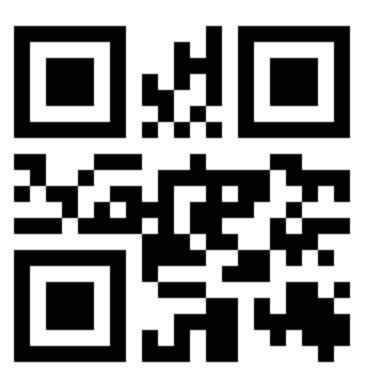
运行生成结果:
遗留问题:
当barcode包含中文时,生成二维码扫码得出结果是乱码。网上找了一些解决方案均不行。有时间在研究吧。在此记录作个记录。
基于Asp.Net Core,利用ZXing来生成二维码的一般流程的更多相关文章
- 【VB.NET】利用 ZXing.Net 生成二维码(支持自定义LOGO)
有任何疑问请去我的新博客提出 https://blog.clso.fun/posts/2019-03-03/vb-net-zxing-net-qr-maker.html ZXing .NET 的项目主 ...
- 利用QrCode.Net生成二维码 asp.net mvc c#
利用QrCode.Net生成二维码 asp.net mvc c# 里面介绍了.net的方式及js的方式,还不错. 里面用到的qrcode.net的类库下载地址:https://qrcodenet.co ...
- C# ZXing.Net生成二维码、识别二维码、生成带Logo的二维码(二)
1.使用ZXint.Net生成带logo的二维码 /// <summary> /// 生成带Logo的二维码 /// </summary> /// <param name ...
- C# 动态创建SQL数据库(二) 在.net core web项目中生成二维码 后台Post/Get 请求接口 方式 WebForm 页面ajax 请求后台页面 方法 实现输入框小数多 自动进位展示,编辑时实际值不变 快速掌握Gif动态图实现代码 C#处理和对接HTTP接口请求
C# 动态创建SQL数据库(二) 使用Entity Framework 创建数据库与表 前面文章有说到使用SQL语句动态创建数据库与数据表,这次直接使用Entriy Framwork 的ORM对象关 ...
- 利用google api生成二维码名片
利用google api生成二维码名片 二维条码/二维码可以分为堆叠式/行排式二维条码和矩阵式二维条码.堆叠式/行排式二维条码形态上是由多行短截的一维条码堆叠而成:矩阵式二维条码以矩阵的形式组成,在矩 ...
- 利用Spring Boot+zxing,生成二维码还能这么简单
在网站开发中,经常会遇到要生成二维码的情况,比如要使用微信支付.网页登录等,本文分享一个Spring Boot生成二维码的例子,这里用到了google的zxing工具类. 本文目录 一.二维码简介二. ...
- Java中使用google.zxing快捷生成二维码(附工具类源码)
移动互联网时代,基于手机端的各种活动扫码和收付款码层出不穷:那我们如何在Java中生成自己想要的二维码呢?下面就来讲讲在Java开发中使用 google.zxing 生成二维码. 一般情况下,Java ...
- 使用python调用zxing库生成二维码图片
(1) 安装Jpype 用python调用jar包须要安装jpype扩展,在Ubuntu上能够直接使用apt-get安装jpype扩展 $ sudo apt-get install pytho ...
- 利用google api生成二维码名片例子
二维条码/二维码可以分为堆叠式/行排式二维条码和矩阵式二维条码.堆叠式/行排式二维条码形态上是由多行短截的一维条码堆叠而成:矩阵式二维条码以矩阵的形式组成,在矩阵相应元素位置上用“点”表示二进制“1” ...
随机推荐
- .NET Core 获取主机运行资源的库
简介 CZGL.SystemInfo 是一个支持 Windows 和 Linux 的资源信息获取库,用于获取系统环境.机器资源信息.系统资源使用情况. Nuget 搜索 CZGL.SystemInfo ...
- Python3关于current_app传递给子线程
在学习Flask的时候,<Flask Web开发>这本书中有一个异步发送email的例子,其中用到了线程 from . import mail,create_app def send_as ...
- .Net Core WebApi在Linux上启动和关闭
测试机器:阿里云云主机1核2g 安装环境:centos-7 服务器:Nginx 1.17.1 测试默认已启动 已安装配置:.Net Core 3.1 测试默认安装 连接配置:x-ftp,x-shell ...
- url参数格式化
getQueryBbj = (url)=>{ let urlData = url.split("?")[1]; let queryArr = urlData.split('& ...
- 进程,线程,Event Loop(事件循环),Web Worker
线程,是程序执行流的最小单位.线程可与同属一个进程的其他线程共享所拥有的全部资源,同一进程中的多个线程之间可以并发执行.线程有就绪,阻塞,运行三种基本状态. 阮一峰大神针对进程和线程的类比,很是形象: ...
- Javascript中的Math.max()和Math.min()
Math.max()是求最大值,Math.min()是求最小值 Math.max(value1,value2,value3....) 但是如果是数组或者对象呢? var numArr = [1,2,4 ...
- Web安全相关(一):CSRF/XSRF(跨站请求伪造)和XSS(跨站脚本)
XSS(Cross Site Script):跨站脚本,也就是javascript脚本注入,一般在站点中的富文本框,里面发表文章,留言等表单,这种表单一般是写入数据库,然后再某个页面打开. 防御: 1 ...
- postgreSQL外键引用查询 查询外键被那些表占用
根据一个表名,查询所有外键引用它的表,以及那些外键的列名key_column_usage(系统列信息表),pg_constraint(系统所有约束表) SELECT x.table_name, x.c ...
- flask 部署外部访问
在 app.run(host='0.0.0.0',port=5000) 可以让外部客户端进行访问,访问地址是flask服务器的ip地址和你设置的端口(端口注意不要占用其他端口,如果是阿里云有可能要设置 ...
- aireplay包注入攻击
reaver爆破WPS PIN码: airodump-ng wlan0 reaver -i wlan0 -b D0:76:E7:51:2A:78 -vv macchanger更改MAC地址: ma ...