
Pytest系列(23)- allure打标记,@allure.feature()、@allure.story()、@allure.severity()的详细使用
如果你还想从头学起Pytest,可以看看这个系列的文章哦!
https://www.cnblogs.com/poloyy/category/1690628.html
前言
- 前面几篇文章主要介绍了allure的特性,这篇文章我们就来讲下allure的标记用法
- 有时候我们写pytest的时候,会用到 @pytest.mark 但并不会显示在allure报告上
- 而allure也提供了三种类型的标记装饰器,它们是可以显示在allure报告上的
allure的标记装饰器
- BDD样式的标记装饰器
- 优先级(严重程度)标记装饰器
- 自定义标记装饰器
BDD标记装饰器
提供了两个装饰器
@allure.feature
@allure.story
直接上代码栗子
#!/usr/bin/env python

# -*- coding: utf-8 -*-

"""

__title__  =

__Time__   = 2020-04-19 14:27

__Author__ = 小菠萝测试笔记

__Blog__   = https://www.cnblogs.com/poloyy/

"""

import allure

def test_without_any_annotations_that_wont_be_executed():

    pass

@allure.story('epic_1')

def test_with_epic_1():

    pass

@allure.story('story_1')

def test_with_story_1():

    pass

@allure.story('story_2')

def test_with_story_2():

    pass

@allure.feature('feature_2')

@allure.story('story_2')

def test_with_story_2_and_feature_2():

    pass
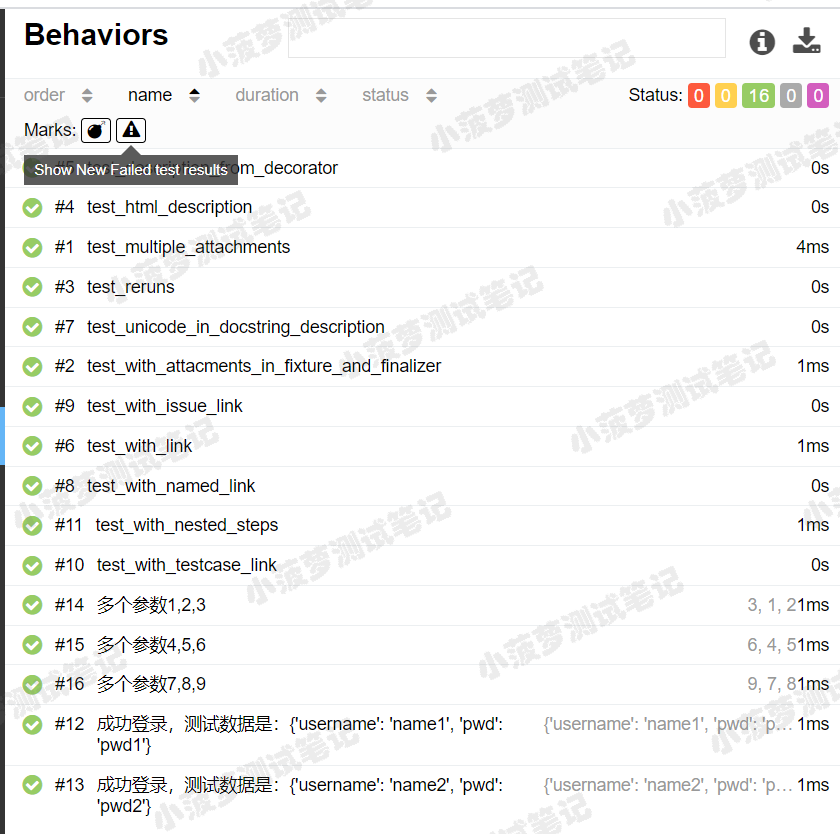
我们先看看没有设置标记装饰器时,allure报告是咋样的

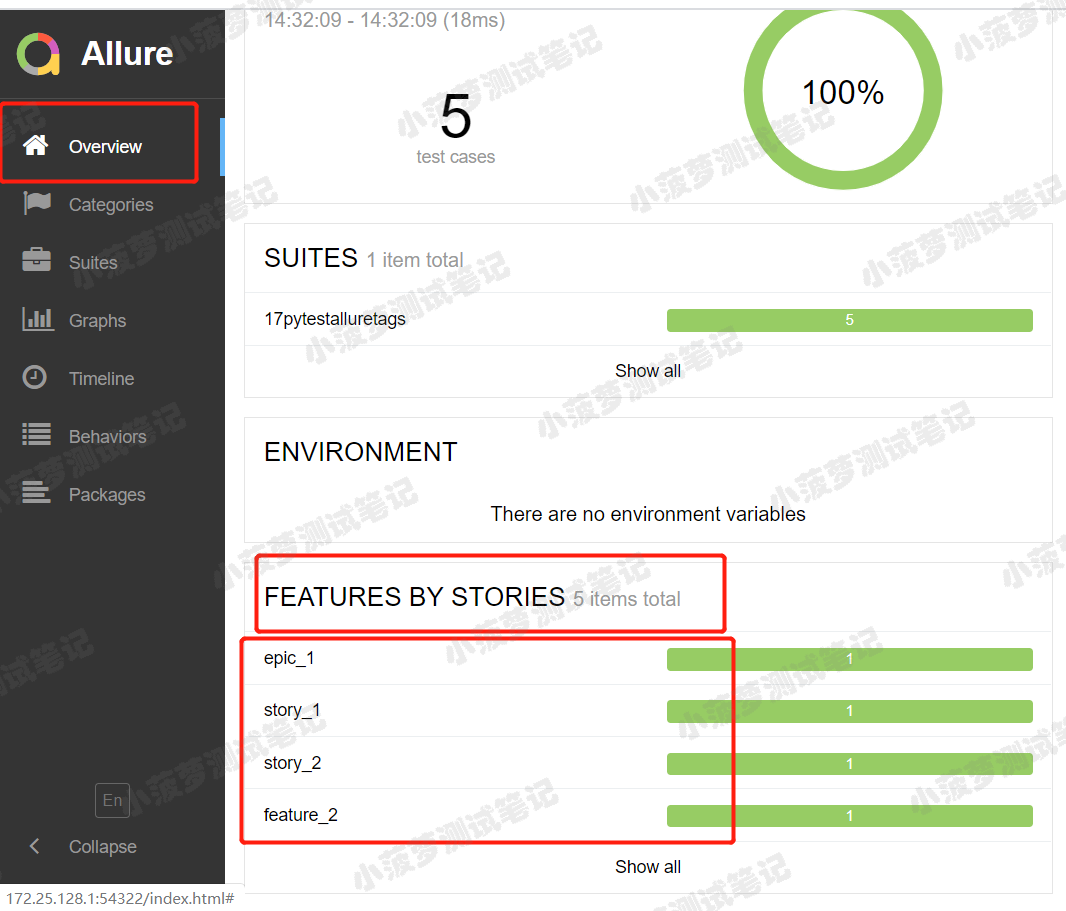
加了@allure.feature和@allure.story之后,allure报告又是怎么样的呢

知识点
story是feature的子集,当测试用例有 @allure.feature、@allure.story 时,在报告上会先显示feature,点开之后再显示story【可以想象成,安徒生童话(feature)有很多个童话故事(story)】
如果不加 @allure.feature、@allure.story 时,在Behaviors栏目下,测试用例都不会分类显示,当用例多的时候可能看的花里胡哨
总结
倘若是用pytest+allure写项目的话,又想用@pytest.mark.xxx 来自定义标记的话可以尝试用 @allure.feature、@allure.story 替换,毕竟可以显示在报告上
问题来了,用命令行方式运行时,可以指定运行某个story或者feature吗?
答案是:当然可以!!跟@pytest.mark.xxx没啥区别哦!!
- --allure-features
- --allure-stories
譬如
pytest tests.py --allure-stories story_1,story_2
pytest tests.py --allure-features feature2 --allure-stories story2
@ allure.severity
作用:按严重性(优先级)来标记测试用例,它使用allure.severity_level枚举值作为参数
先看看枚举类有哪些常量
严重程度最高blocker,最低trivial
class Severity(str, Enum):

    BLOCKER = 'blocker'

    CRITICAL = 'critical'

    NORMAL = 'normal'

    MINOR = 'minor'

    TRIVIAL = 'trivial'
看看代码栗子
#!/usr/bin/env python

# -*- coding: utf-8 -*-

"""

__title__  =

__Time__   = 2020-04-19 14:50

__Author__ = 小菠萝测试笔记

__Blog__   = https://www.cnblogs.com/poloyy/

"""

import allure

def test_with_no_severity_label():

    pass

@allure.severity(allure.severity_level.TRIVIAL)

def test_with_trivial_severity():

    pass

@allure.severity(allure.severity_level.NORMAL)

def test_with_normal_severity():

    pass

@allure.severity(allure.severity_level.NORMAL)

class TestClassWithNormalSeverity(object):

    def test_inside_the_normal_severity_test_class(self):

        pass

    @allure.severity(allure.severity_level.CRITICAL)

    def test_inside_the_normal_severity_test_class_with_overriding_critical_severity(self):

        pass
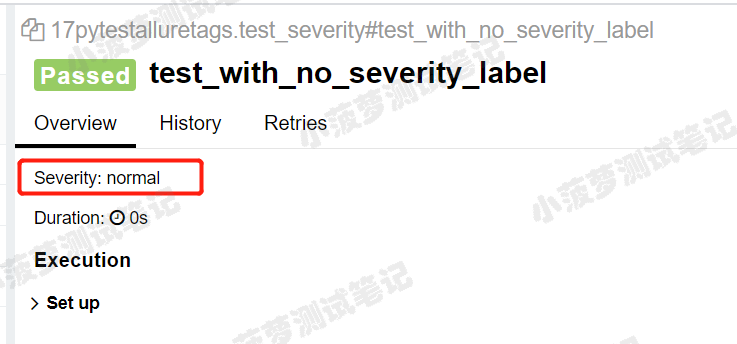
运行结果,查看allure报告
其实就是测试用例多了个优先级severity属性而已...
命令行方式
也可以通过命令行参数运行指定severity的测试用例哦
pytest tests.py --allure-severities normal,critical
Pytest系列(23)- allure打标记,@allure.feature()、@allure.story()、@allure.severity()的详细使用的更多相关文章
- Pytest 系列(25)- 标记用例级别 @allure.
如果你还想从头学起Pytest,可以看看这个系列的文章哦! https://www.cnblogs.com/poloyy/category/1690628.html 前言 平时写测试用例也会划分优先级 ...
- Pytest系列(13)- 重复执行用例插件之pytest-repeat的详细使用
如果你还想从头学起Pytest,可以看看这个系列的文章哦! https://www.cnblogs.com/poloyy/category/1690628.html 前言 平常在做功能测试的时候,经常 ...
- Pytest系列(20)- allure结合pytest,allure.step()、allure.attach的详细使用
如果你还想从头学起Pytest,可以看看这个系列的文章哦! https://www.cnblogs.com/poloyy/category/1690628.html 前言 allure除了支持pyte ...
- 【pytest系列】- mark标记功能详细介绍
如果想从头学起pytest,可以去看看这个系列的文章! https://www.cnblogs.com/miki-peng/category/1960108.html mark标记 在实际工作中, ...
- pytest系列(二):筛选用例新姿势,mark 一下,你就知道。
pytest系列(一)中给大家介绍了pytest的特性,以及它的编写用例的简单至极. 那么在实际工作当中呢,我们要写的自动化用例会比较多,不会都放在一个py文件里. 如下图所示,我们编写的用例存放在不 ...
- 蓝 / 绿部署(Blue/Green) 金丝雀发布(Canary Release) 功能标记(Feature Flagging)
https://www.cnblogs.com/apanly/p/8784096.html 最终,我选择了 GraphQL 作为企业 API 网关 蓝 / 绿部署(Blue/Green) 金丝雀发布( ...
- Pytest系列(一)初次了解
在之前,我分享过unittest系列,后来有很多人问我,能不能出pytest的教程,正好最近在整理pytest相关的资料,那么,就趁着这个机会,去和大家分享一下pytest系列. pytest是一个非 ...
- C#开发BIMFACE系列23 服务端API之获取模型数据8:获取模型链接信息
系列目录 [已更新最新开发文章,点击查看详细] 在Revit等BIM设计工具中可以给模型的某个部位添加链接信息.即类似于在Office Word.Excel 中给一段文字添加本地文件链接或者网 ...
- .NET平台系列23:.NET Core/.NET5/.NET6 和 .NET Framework 的选择建议
系列目录 [已更新最新开发文章,点击查看详细] 有两种支持的 .NET 实现可用于生成服务器端应用: .NET Framework .NET Core/5+,包括 .NET Core..NET ...
随机推荐
- Data-independent acquisition mass spectrometry in metaproteomics of gut microbiota - implementation and computational analysis DIA技术在肠道宏蛋白质组研究中的方法实现和数据分析 (解读人:闫克强)
文献名:Data-independent acquisition mass spectrometry in metaproteomics of gut microbiota - implementat ...
- tomcat源码分析01-启动过程概览
导读:tomcat是一个开源的web服务器,它实现了我们常用的Servlet,JSP,EL等相关规范,因为其性能稳定,开源等因素得到越来越多开发者的青睐,出于学习的目的,我决定研读其源码,并将阶段性成 ...
- IOS抓包工具Stream——让移动端的抓包变得轻而易举
有一天下晚班回家,在地铁上的时候,开发发来信息说,能不能把之前创建的bug再抓包看下数据.顿时心里就想,在地铁上,我上哪抓包去.之后百度了下,发现ios有一款非常实用的抓包工具,大家可以上App St ...
- python浅学【网络服务中间件】之Celery
一.关于Celery: 什么是任务队列: 任务队列一般用于线程或计算机之间分配工作的一种机制. 任务队列的输入是一个称为任务的工作单元,有专门的工作进行不断的监视任务队列,进行执行新的任务工作. 什么 ...
- SpringFramework之IoC容器初始化
分析例子 启动类 Application,使用的是ClassPathXmlApplicationContext来加载xml文件 /** * @author jianw.li * @date 2020/ ...
- Swagger2在DBA Service中生成RESTful API的实践
目的与背景: 目的:对外暴露DBA Service必要的RESTful API,形成规整的API文档 背景:DBA Service后端采用Spring-boot,属于Spring家族,故生成API的工 ...
- 浅析jdbc建立连接方式与背后的java类加载
关于jdbc的连接方式#1Connection conn;Class.forName("com.mysql.jdbc.Driver"); //2conn=DriverManager ...
- swift 网络请求中含有特殊字符的解决方案
在网络请求时,URL出现中文或特殊字符时会造成请求失败,通常可使用 addingPercentEncoding(withAllowedCharacters: CharacterSet) 方法进行解决 ...
- 打造Worktile敏捷开发管理工具的思与惑
从2019年初,我们团队准备开发一款适合研发团队使用的敏捷开发管理工具,那时候我们也在思考,到底什么样的工具才算是优秀的研发管理工具,研发管理的场景.方法和流派有很多,市面上关于研发管理工具的产品也是 ...
- Ardupilot(PX4)飞控驱动蜂鸣器和RGB细节
Ardupilot(PX4)飞控驱动蜂鸣器细节 飞控代码细节 任务调用频率50HZ(20ms),buzzer.update() 内部将频率减少到10HZ(100ms) 单响(SINGLE_BUZZ) ...