
Pytest系列(20)- allure结合pytest,allure.step()、allure.attach的详细使用
如果你还想从头学起Pytest,可以看看这个系列的文章哦!
https://www.cnblogs.com/poloyy/category/1690628.html
前言
allure除了支持pytest自带的特性之外(fixture、parametrize、xfail、skip),自己本身也有强大的特性可以在pytest中使用
@allure.step
- allure报告最重要的一点是,它允许对每个测试用例进行非常详细的步骤说明
- 通过 @allure.step() 装饰器,可以让测试用例在allure报告中显示更详细的测试过程
示例代码
#!/usr/bin/env python

# -*- coding: utf-8 -*-

"""

__title__  =

__Time__   = 2020-04-08 21:24

__Author__ = 小菠萝测试笔记

__Blog__   = https://www.cnblogs.com/poloyy/

"""

import allure

@allure.step("第一步")

def passing_step():

    pass

@allure.step("第二步")

def step_with_nested_steps():

    nested_step()

@allure.step("第三步")

def nested_step():

    nested_step_with_arguments(1, 'abc')

@allure.step("第四步{0},{arg2}")

def nested_step_with_arguments(arg1, arg2):

    pass

@allure.step("第五步")

def test_with_nested_steps():

    passing_step()

    step_with_nested_steps()
测试用例在allure上的显示
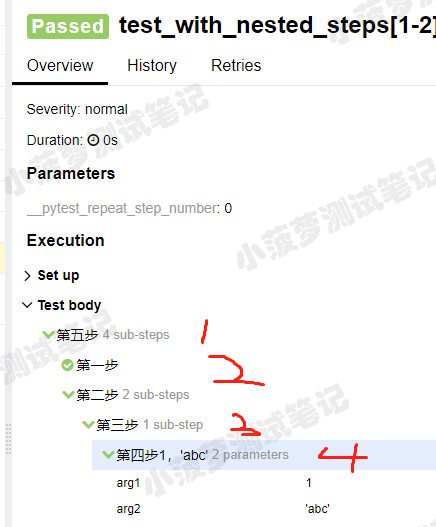
知识点
- step() 只有一个参数,就是title,你传什么,在allure上就显示什么
- 可以像python字符串一样,支持位置参数和关键字参数 {0},{arg2},可看第四步那里,如果函数的参数没有匹配成功就会报错哦
- step() 的使用场景,给我感觉就是,当方法之间嵌套会比较有用,否则的话只会显示一个步骤,类似下面图

allure.attach(挺有用的)
作用:allure报告还支持显示许多不同类型的附件,可以补充测试结果;自己想输出啥就输出啥,挺好的
语法: allure.attach(body, name, attachment_type, extension)
参数列表
- body:要显示的内容(附件)
- name:附件名字
- attachment_type:附件类型,是 allure.attachment_type 里面的其中一种
- extension:附件的扩展名(比较少用)
allure.attachment_type提供了哪些附件类型?

语法二: allure.attach.file(source, name, attachment_type, extension)
source:文件路径,相当于传一个文件
其他参数和上面的一致
其中一个测试用例的代码栗子
#!/usr/bin/env python

# -*- coding: utf-8 -*-

"""

__title__  =

__Time__   = 2020-04-08 21:24

__Author__ = 小菠萝测试笔记

__Blog__   = https://www.cnblogs.com/poloyy/

"""

import allure

import pytest

@pytest.fixture

def attach_file_in_module_scope_fixture_with_finalizer(request):

    allure.attach('在fixture前置操作里面添加一个附件txt', 'fixture前置附件', allure.attachment_type.TEXT)

    def finalizer_module_scope_fixture():

        allure.attach('在fixture后置操作里面添加一个附件txt', 'fixture后置附件',

                      allure.attachment_type.TEXT)

    request.addfinalizer(finalizer_module_scope_fixture)

def test_with_attacments_in_fixture_and_finalizer(attach_file_in_module_scope_fixture_with_finalizer):

    pass

def test_multiple_attachments():

    allure.attach('<head></head><body> 一个HTML页面 </body>', 'Attach with HTML type', allure.attachment_type.HTML)

    allure.attach.file('./reports.html', attachment_type=allure.attachment_type.HTML)
运行之后看结果
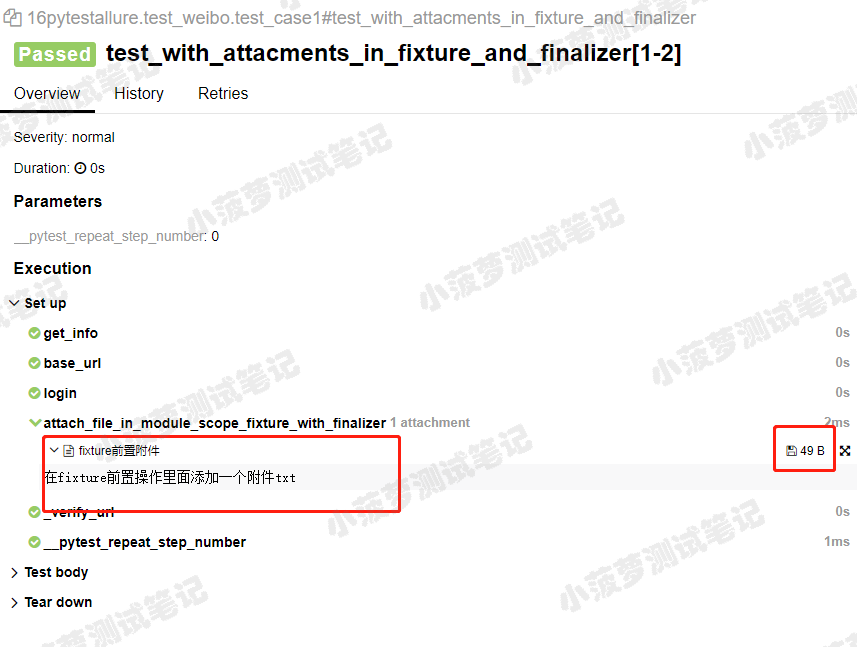
这是一个txt附件
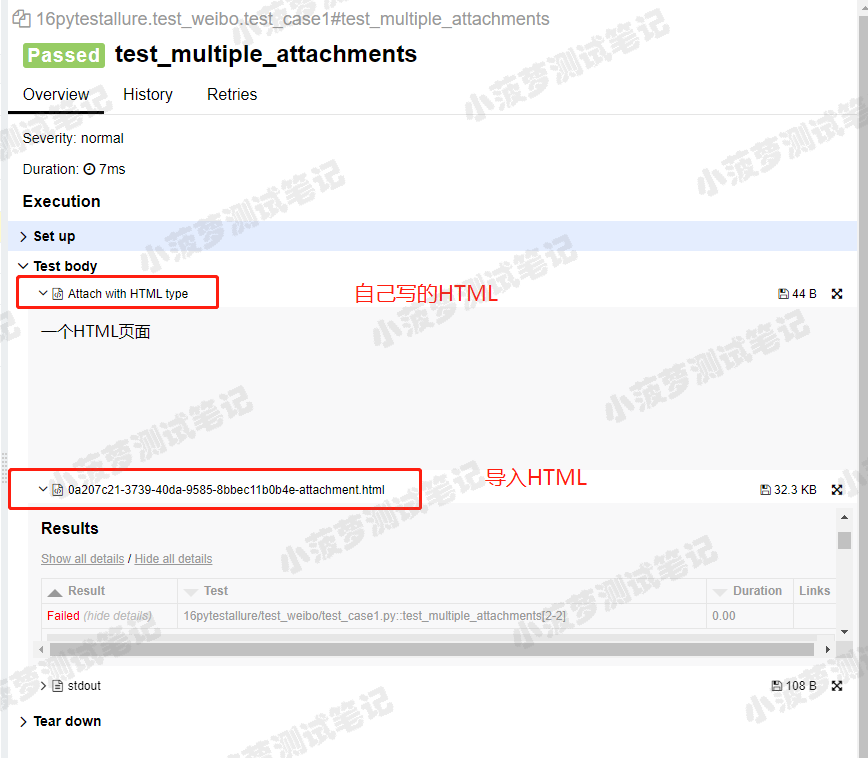
这是一个用了 allure.attach() 来插入一段自己写的HTML和 allure.attach.file() 来导入一个已存在的HTML文件(pytest-html报告)
Pytest系列(20)- allure结合pytest,allure.step()、allure.attach的详细使用的更多相关文章
- Pytest系列(16)- 分布式测试插件之pytest-xdist的详细使用
如果你还想从头学起Pytest,可以看看这个系列的文章哦! https://www.cnblogs.com/poloyy/category/1690628.html 前言 平常我们功能测试用例非常多时 ...
- Pytest系列(15)- 多重校验插件之pytest-assume的详细使用
如果你还想从头学起Pytest,可以看看这个系列的文章哦! https://www.cnblogs.com/poloyy/category/1690628.html 前言 pytest中可以用pyth ...
- Pytest学习(20)- allure之@allure.step()、allure.attach的详细使用
一.@allure.step的用法 可以理解为我们编写测试用例中的每一步操作步骤,而在allure中表示对每个测试用例进行非常详细的步骤说明 通过 @allure.step(),可以让测试用例在all ...
- Pytest系列(21)- allure的特性,@allure.description()、@allure.title()的详细使用
如果你还想从头学起Pytest,可以看看这个系列的文章哦! https://www.cnblogs.com/poloyy/category/1690628.html 前言 前面介绍了两种allure的 ...
- Pytest 系列(27)- allure 命令行参数
如果你还想从头学起Pytest,可以看看这个系列的文章哦! https://www.cnblogs.com/poloyy/category/1690628.html 先看看 allure 命令的帮助文 ...
- Pytest 系列(24)- allure 环境准备
如果你还想从头学起Pytest,可以看看这个系列的文章哦! https://www.cnblogs.com/poloyy/category/1690628.html allure 和 pytest 相 ...
- Pytest 系列(28)- 参数化 parametrize + @allure.title() 动态生成标题
如果你还想从头学起Pytest,可以看看这个系列的文章哦! https://www.cnblogs.com/poloyy/category/1690628.html 前言 参数化 @pytest.ma ...
- Pytest 系列(29)- 详解 allure.dynamic 动态生成功能
如果你还想从头学起Pytest,可以看看这个系列的文章哦! https://www.cnblogs.com/poloyy/category/1690628.html 前言 @allure.title ...
- pytest系列(四)- pytest+allure+jenkins - 持续集成平台生成allure报告
pytest是什么 pytest是python的一款测试框架,拥有unittest的功能并比它更丰富. allure是什么 有非常多的优秀的测试框架,但却是有非常少优秀的报告工具可以展示非常清楚的用例 ...
随机推荐
- 网络安全从入门到精通(第二章-3)后端基础SQL— MySQL高级查询与子查询
本文内容: MySQL的基础查询语句 链接查询 联合查询 子查询 渗透测试常用函数 1,MySQL基础查询语句: select * from 表 order by ASC/DESC; ASC:从小到 ...
- 聊聊OkHttp实现WebSocket细节,包括鉴权和长连接保活及其原理!
一.序 OkHttp 应该算是 Android 中使用最广泛的网络库了,我们通常会利用它来实现 HTTP 请求,但是实际上它还可以支持 WebSocket,并且使用起来还非常的便捷. 那本文就来聊聊, ...
- 泛微E-cology OA 远程代码执行漏洞
分析文章:https://dwz.cn/bYtnsKwa http://127.0.0.1/weaver/bsh.servlet.BshServlet 若存在如上页面,则用下面数据包进行测试. POS ...
- Linux你不知道的ping操作
1.指定ping的次数 -c 选项 ping -c 3 www.baidu.com 2.只返回结果 -q 选项 ping -q -c 3 www.baidu.com 3.指定数据包的大小 -s ...
- RabbitMQ 在Ubuntu18.04上的安装
1.安装erlang由于rabbitMq需要erlang语言的支持,在安装rabbitMq之前需要安装erlang sudo apt-get install erlang2.安装Rabbitmq更新源 ...
- CF1324F Maximum White Subtree 题解
原题链接 简要题意: 给定一棵树,每个点有黑白两种颜色:对每个节点,求出包含当前节点的连通图,使得白点数与黑点数差最小.输出这些值. F题也这么简单,咳咳,要是我也熬夜打上那么一场...可惜没时间打啊 ...
- 【codeforces】Educational Codeforces Round 80 D. Minimax Problem——二分+二进制处理
题目链接 题目大意 有n个维度为m的向量,取其中两个进行合并,合并时每个维度取两者之间的较大者,得到的新的向量中,维度值最小者最大为多少 分析 首先最需要注意的是m的取值,m最大只有8 那么我们可以二 ...
- 一个使用fasttext训练的新闻文本分类器/模型
fastext是什么? Facebook AI Research Lab 发布的一个用于快速进行文本分类和单词表示的库.优点是很快,可以进行分钟级训练,这意味着你可以在几分钟时间内就训练好一个分类模型 ...
- C#获取设备话筒主峰值(实时音频输出分贝量)
1.引用类库NAudio,Git地址 https://github.com/naudio/NAudio 2.添加如下代码和引用: public float GetVoicePeakValue() { ...
- Python基础 | pandas中dataframe的整合与形变(merge & reshape)
目录 行的union pd.concat df.append 列的join pd.concat pd.merge df.join 行列转置 pivot stack & unstack melt ...