
Java远程调用Linux脚本
参考:http://blog.csdn.net/xiao_jun_0820/article/details/26254813
http://blog.csdn.net/a19881029/article/details/20000775
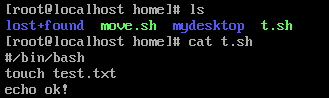
 package shell;

 import java.io.IOException;

 import java.io.InputStream;

 import java.nio.charset.Charset;

 import ch.ethz.ssh2.Connection;

 import ch.ethz.ssh2.Session;

 public class RemoteShellTool {

     private Connection conn;

     private String ipAddr;

     private String charset = Charset.defaultCharset().toString();

     private String userName;

     private String password;

     public RemoteShellTool(String ipAddr, String userName, String password, String charset) {

         this.ipAddr = ipAddr;

         this.userName = userName;

         this.password = password;

         if (charset != null) {

             this.charset = charset;

         }

     }

     public boolean login() throws IOException {

         conn = new Connection(ipAddr);

         conn.connect(); // 连接

         return conn.authenticateWithPassword(userName, password); // 认证

     }

     public String exec(String cmds) {

         InputStream in = null;

         String result = "";

         try {

             if (this.login()) {

                 Session session = conn.openSession(); // 打开一个会话

                 session.execCommand(cmds);

                 in = session.getStdout();

                 result = this.processStdout(in, this.charset);

                 session.close();

                 conn.close();

             }

         } catch (IOException e1) {

             e1.printStackTrace();

         }

         return result;

     }

     public String processStdout(InputStream in, String charset) {

         byte[] buf = new byte[1024];

         StringBuffer sb = new StringBuffer();

         try {

             while (in.read(buf) != -1) {

                 sb.append(new String(buf, charset));

             }

         } catch (IOException e) {

             e.printStackTrace();

         }

         return sb.toString();

     }

     /**

      * @param args

      */

     public static void main(String[] args) {

         RemoteShellTool tool = new RemoteShellTool("192.168.134.128", "root", "root", "utf-8");

 //        String result = tool.exec("./test.sh xiaojun");

         String result = tool.exec("cd /home;./t.sh");

         System.out.println(result);

     }

 }

Java远程调用Linux脚本的更多相关文章
- java远程调用linux的命令或者脚本
转载自:http://eksliang.iteye.com/blog/2105862 Java通过SSH2协议执行远程Shell脚本(ganymed-ssh2-build210.jar) 使用步骤如下 ...
- JAVA远程执行Shell脚本类
1.java远程执行shell脚本类 package com.test.common.utility; import java.io.IOException; import java.io.Input ...
- 使用Runtime.getRuntime().exec()在java中调用python脚本
举例有一个Python脚本叫test.py,现在想要在Java里调用这个脚本.假定这个test.py里面使用了拓展的包,使得pythoninterpreter之类内嵌的编译器无法使用,那么只能采用ja ...
- Java代码调用Shell脚本并传入参数实现DB2数据库表导出到文件
本文通过Java代码调用Shell脚本并传入参数实现DB2数据库表导出到文件,代码如下: import java.io.File; import java.io.IOException; import ...
- Java实践-远程调用Shell脚本并获取输出信息
1.添加依赖 <dependency> <groupId>ch.ethz.ganymed</groupId> <artifactId>ganymed-s ...
- Shell 脚本 —— java 代码远程调用shell脚本重启 tomcat
个人博客网:https://wushaopei.github.io/ (你想要这里多有) 1.创建maven 工程 maven 依赖: <dependency> <grou ...
- 用java代码调用shell脚本执行sqoop将hive表中数据导出到mysql
1:创建shell脚本 touch sqoop_options.sh chmod 777 sqoop_options.sh 编辑文件 特地将执行map的个数设置为变量 测试 可以java代码传参数 ...
- linux下的shell命令的编写,以及java怎样调用linux的shell命令(java怎样获取linux上的网卡的ip信息)
程序猿都非常懒,你懂的! 近期在开发中,须要用到server的ip和mac信息.可是server是架设在linux系统上的,对于多网口,在获取ip时就产生了非常大的问题.以下是在windows系统上, ...
- java中调用js脚本
JDK1.6加入了对Script(JSR223)的支持.这是一个脚本框架,提供了让脚本语言来访问Java内部的方法.你可以在运行的时候找到脚本引擎,然后调用这个引擎去执行脚本.这个脚本API允许你为脚 ...
随机推荐
- CSU-ACM2020寒假集训比赛2
A - Messenger Simulator CodeForces - 1288E 两种解法,我选择了第二种 mn很好求,联系过就是1,没联系过就是初始位置 第一种:统计同一个人两次联系之间的出现的 ...
- taro编译的时候报 exports.pRimraf = util_1.promisify(rimraf); 错误
C:\Users\1\AppData\Roaming\npm\node_modules\@tarojs\cli\dist\h5\helper.js:8 exports.pRimraf = util_1 ...
- 吴裕雄--天生自然 JAVASCRIPT开发学习:比较 和 逻辑运算符
<!DOCTYPE html> <html> <head> <meta charset="utf-8"> <title> ...
- flink和spark Streaming中的Back Pressure
Spark Streaming的back pressure 在讲flink的back pressure之前,我们先讲讲Spark Streaming的back pressure.Spark Strea ...
- 理解Spring Boot Actuator
Spring Boot Actuator 用于监控和管理spring应用,可通过HTTP Endpoint或JMX Bean与其交互.
- html_js
<!-- js的特点:别名脚本 -由浏览器内置的JavaScript引擎执行代码. -解析执行:事先不编译,逐行执行 -面向对象:内置大量的现成对象 适宜: -客户端的数据计算:不需要保存和提交 ...
- dd if= of= MBR
1.备份分区表信息 sudo fdisk -l >hda.txt #分区表信息重定向输出到文件中 2.备份MBR sudo dd if=/dev/sda of=mbr bs=512 count ...
- Nacos快速开始
Nacos是一个服务发现.配置管理和服务管理的组件. 说到服务注册与发现,我想到Eureka.Zookeeper 说到服务治理,我想到Dubbo 说到配置管理,我想到Apollo 作为后起之秀的Nac ...
- eclipse maven配置问题:org.apache.maven.archiver.mavenarchiver.getmanifest
原因就是你的maven的配置文件不是最新的 1.help ->Install New Software -> add ->https://otto.takari.io/content ...
- iOS部分页面横屏显示
在iOS系统支持横屏顺序默认读取plist里面设置的方向(优先级最高)等同于Xcode Geneal设置里面勾选application window设置的级别次之 然后是UINavigationcon ...