
canvas 实现手机图案解锁
参考☞: https://www.cnblogs.com/chenyingying0/
先上效果图:
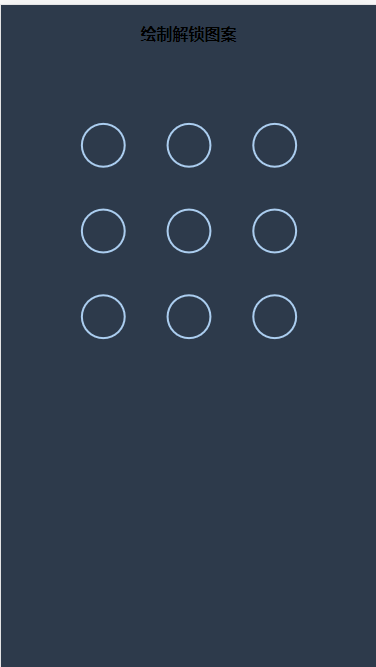
我是在 vue 里面实现js 文件 ,所以如果需要在vue 里面使用 可以将以下内容import '@/component/unlock', 这样直接引入就好,上代码
//component/unlock.js
(function() {

  // canvasLock是全局对象

  window.canvasLock = function(obj) {

    this.width = obj.width

    this.height = obj.height

    this.circleNum = obj.circleNum

    ;(this.isOk = true), (this.errrorSum = '0')

  }

  //动态生成DOM

  canvasLock.prototype.initDom = function() {

    //创建一个div

    var div = document.createElement('div')

    let app = document.getElementById('app')

    var h4 = "<h4 id='title' class='title'>绘制解锁图案</h4>"

    div.innerHTML = h4

    div.id = 'unlock'

    div.setAttribute(

      'style',

      'position:absolute;top:0;left:0;right:0;bottom:0;'

    )

    //创建canvas

    var canvas = document.createElement('canvas')

    canvas.setAttribute('id', 'canvas')

    //cssText 的本质就是设置 HTML 元素的 style 属性值

    canvas.style.cssText =

      'background:#2d3a4b;display:inine-block;margin-top:15px;'

    div.appendChild(canvas)

    app.appendChild(div)

    //设置canvas默认宽高

    var width = this.width || 300

    var height = this.height || 300

    canvas.style.width = width + 'px'

    canvas.style.height = height + 'px'

    canvas.width = width

    canvas.height = height

  }

  //以给定坐标点为圆心画出单个圆

  canvasLock.prototype.drawCircle = function(x, y) {

    this.ctx.strokeStyle = '#abcdef'

    this.ctx.lineWidth = 2

    this.ctx.beginPath()

    this.ctx.arc(x, y, this.r, 0, 2 * Math.PI, true)

    this.ctx.closePath()

    this.ctx.stroke()

  }

  //绘制出所有的圆

  canvasLock.prototype.createCircle = function() {

    var n = this.circleNum //一行几个圆

    var count = 0

    this.r = this.canvas.width / (4 * n + 2)

    this.lastPoint = []

    this.arr = []

    this.restPoint = []

    var r = this.r

    for (var i = 0; i < n; i++) {

      for (var j = 0; j < n; j++) {

        count++

        var obj = {

          x: (4 * j + 3) * r,

          y: (4 * i + 3) * r,

          index: count

        }

        this.arr.push(obj)

        this.restPoint.push(obj)

      }

    }

    //清屏

    this.ctx.clearRect(0, 0, this.canvas.width, this.canvas.height)

    for (var i = 0; i < this.arr.length; i++) {

      this.drawCircle(this.arr[i].x, this.arr[i].y)

    }

  }

  //添加事件

  canvasLock.prototype.bindEvent = function() {

    var self = this

    this.canvas.addEventListener(

      'touchstart',

      function(e) {

        var po = self.getPosition(e)

        //判断是否在圆内

        for (var i = 0; i < self.arr.length; i++) {

          if (

            Math.abs(po.x - self.arr[i].x) < self.r &&

            Math.abs(po.y - self.arr[i].y) < self.r

          ) {

            self.touchFlag = true

            self.lastPoint.push(self.arr[i])

            self.restPoint.splice(i, 1)

            break

          }

        }

      },

      false

    )

    this.canvas.addEventListener(

      'touchmove',

      function(e) {

        if (self.touchFlag) {

          self.update(self.getPosition(e))

        }

      },

      false

    )

    this.canvas.addEventListener(

      'touchend',

      function(e) {

        if (self.touchFlag) {

          self.storePass(self.lastPoint)

          setTimeout(function() {

            self.reset()

          }, 300)

        }

      },

      false

    )

  }

  canvasLock.prototype.storePass = function() {

    if (this.checkPass()) {

      document.getElementById('title').innerHTML = '解锁成功'

      window.location.href = 'http://localhost:8080/home'

      this.drawStatusPoint('lightgreen')

    } else {

      this.errrorSum++

      if (this.errrorSum === 5) {

        let num = 30

        this.isOk = false

        let time = setInterval(() => {

          num--

          document.getElementById('title').innerHTML = `${num}秒后方可继续解锁`

          if (num === 0) {

            document.getElementById('title').innerHTML = `绘制图案解锁`

          }

        }, 1000)

        setTimeout(() => {

          this.isOk = true

          this.errrorSum = 0

          clearInterval(time)

        }, 30000)

      } else if (this.errrorSum <) {

        document.getElementById('title').innerHTML = '解锁失败'

        this.drawStatusPoint('orange')

      }

    }

  }

  //判断输入的密码

  canvasLock.prototype.checkPass = function() {

    var p1 = '72943816', //成功的密码

      p2 = ''

    for (var i = 0; i < this.lastPoint.length; i++) {

      p2 += this.lastPoint[i].index

    }

    return p1 === p2

  }

  //绘制判断结束后的状态

  canvasLock.prototype.drawStatusPoint = function(type) {

    for (var i = 0; i < this.lastPoint.length; i++) {

      this.ctx.strokeStyle = type

      this.ctx.beginPath()

      this.ctx.arc(

        this.lastPoint[i].x,

        this.lastPoint[i].y,

        this.r,

        0,

        2 * Math.PI,

        true

      )

      this.ctx.closePath()

      this.ctx.stroke()

    }

  }

  //程序全部结束后重置

  canvasLock.prototype.reset = function() {

    this.createCircle()

  }

  //获取鼠标点击处离canvas的距离

  canvasLock.prototype.getPosition = function(e) {

    var rect = e.currentTarget.getBoundingClientRect()

    var po = {

      x: e.touches[0].clientX - rect.left,

      y: e.touches[0].clientY - rect.top

    }

    return po

  }

  //触摸点移动时的动画

  canvasLock.prototype.update = function(po) {

    if (this.isOk) {

      this.ctx.clearRect(0, 0, this.canvas.width, this.canvas.height)

      for (var i = 0; i < this.arr.length; i++) {

        this.drawCircle(this.arr[i].x, this.arr[i].y)

      }

      this.drawPoint()

      this.drawLine(po) //画线

      for (var i = 0; i < this.restPoint.length; i++) {

        if (

          Math.abs(po.x - this.restPoint[i].x) < this.r &&

          Math.abs(po.y - this.restPoint[i].y) < this.r

        ) {

          this.lastPoint.push(this.restPoint[i])

          this.restPoint.splice(i, 1)

          break

        }

      }

    }

  }

  //画实心圆

  canvasLock.prototype.drawPoint = function() {

    for (var i = 0; i < this.lastPoint.length; i++) {

      this.ctx.fillStyle = '#abcdef'

      this.ctx.beginPath()

      this.ctx.arc(

        this.lastPoint[i].x,

        this.lastPoint[i].y,

        this.r / 2,

        0,

        2 * Math.PI,

        true

      )

      this.ctx.closePath()

      this.ctx.fill()

    }

  }

  //画线

  canvasLock.prototype.drawLine = function(po) {

    this.ctx.beginPath()

    this.lineWidth = 3

    this.ctx.moveTo(

      this.lastPoint[0] ? this.lastPoint[0].x : '',

      this.lastPoint[0] ? this.lastPoint[0].y : ''

    ) //线条起点

    for (var i = 1; i < this.lastPoint.length; i++) {

      this.ctx.lineTo(this.lastPoint[i].x, this.lastPoint[i].y)

    }

    this.ctx.lineTo(po.x, po.y) //触摸点

    this.ctx.stroke()

    this.ctx.closePath()

  }

  canvasLock.prototype.init = function() {

    this.initDom()

    this.canvas = document.getElementById('canvas')

    this.ctx = this.canvas.getContext('2d')

    this.touchFlag = false

    this.createCircle()

    this.bindEvent()

  }

})()

new canvasLock({ circleNum: 3 }).init()
使用的vue 文件
<template></template>

<script>

import '@/component/unlock'

export default {

  created() {

    document.getElementById('unlock').style.display = 'block'

  },

  beforeDestroy() {

    document.getElementById('unlock').style.display = 'none'

  }

}

</script>

<style>

body {

  background: #2d3a4b;

  text-align: center;

}

</style>
canvas 实现手机图案解锁的更多相关文章
- 用calc()绘制手机图案解锁的九宫格样式
<!DOCTYPE html> <html lang="en"> <head> <meta charset="UTF-8&quo ...
- Python&Appium实现安卓手机图形解锁
首先,在解锁状态下,建立一个Session,打开APP.然后,调用press_keycode()方法传入整型数值"26",锁定屏幕.通过implicitly_wait()方法等待两 ...
- 长沙理工大学第十二届ACM大赛-重现赛C 安卓图案解锁 (模拟)
链接:https://ac.nowcoder.com/acm/contest/1/C来源:牛客网 安卓图案解锁 时间限制:C/C++ 1秒,其他语言2秒 空间限制:C/C++ 131072K,其他语言 ...
- Android SimpleAdapter ListView (锁定手机,解锁手机的列表)
SimpleAdapter是扩展性最好的适配器,可以定义各种你想要的布局. 构造方法: SimpleAdapter(Context context, List<? extends Map< ...
- canvas在手机qq浏览器显示错乱
做大转盘的时候,使用html5 canvas 生成转盘,但在手机qq浏览器中显示错乱. 原本想在后台生成大转盘图片,后来想一想既然用图片来实现, 还不如直接由canvas 导出 toDataURL 在 ...
- 关于华为P9手机的解锁、刷Recovery、获取Root、安装Busybox,以及升级降级的全过程(和一些错误的解决方法)
我有一部华为P9手机,型号EVA-TL00,属于移动定制机.用了半年多了,想给手机添加一些功能,发现有些功能必须Root之后才能用代码实现,所以动了Root的打算. 一.手机解锁.(不解锁则无法对手机 ...
- canvas一周一练 -- canvas绘制马尾图案 (5)
运行效果: <!DOCTYPE html> <html> <head> </head> <body> <canvas id=" ...
- 小米手机BL解锁连接不上手机
解锁工具下载页面:http://www.miui.com/unlock/download.html 线刷工具下载页面:http://www.miui.com/shuaji-393.html 额外注意说 ...
- App自动化(2)--Python&Appium实现安卓手机九宫格解锁
九宫格作为常见的手势密码,我们在使用的时候,是从起点开始,按住不放,然后滑动手指,直到最后一个点松开手指,如果与设置的手势密码匹配,则解锁成功. 现在大多数九宫格作为一个元素存在,很难定位到每一个点. ...
随机推荐
- 获取的ajax方法return的返回值的问题解析
今天刚上班就偶遇关于获取Ajax方法return的返回值的问题,这里小记一下. 在使用jquery中,如果获取不到ajax返回值,原因有二: 一.ajax未使用同步 ajax未使用同步,导致数据未加载 ...
- 2020最新ArchLinux安装(KDE桌面)
许多网友反映之前的教程安装好后连不上互联网,最近我刚好又安装了一遍,总结出以下没毛病的过程 按照此教程需要你会基本的vim操作(或其他文本编辑工具比如nano),基本的fdisk分盘操作(或其他分盘工 ...
- iTerm2 都不会用,还敢自称老司机?(上)
对于需要长期与终端打交道的工程师来说,拥有一款称手的终端管理器是很有必要的,对于 Windows 用户来说,最好的选择是 Xshell,这个大家都没有异议.但对于 MacOS 用户来说,仍然毋庸置疑, ...
- 使用openxml提取word中的文本和图片并转为Html
使用openxml提取word中的文本和图片 使用 openXml 提取 word 中的 Text 和 Drawing 使用 openXml 将 word 中的文本和图片转为Html 使用 openX ...
- 还在使用集合类完成这些功能?不妨来看看 Guava 集合类!!!
日常开发中,小黑哥经常需要用到 Java 提供集合类完成各种需求.Java 集合类虽然非常强大实用,但是提供功能还是有点薄弱. 举个例子,小黑哥最近接到一个需求,从输入一个文档中,统计一个关键词出现的 ...
- MyISAM 和 InnoDB
1.MyISAM类型不支持事务处理等高级处理,而InnoDB类型支持.MyISAM类型的表强调的是性能,其执行数度比InnoDB类型更快,但是不提供事务支持,而InnoDB提供事务支持已经外部键等高级 ...
- Redis使用指南
原文链接 能坚持别人不能坚持的,才能拥有别人未曾拥有的.关注编程大道公众号,让我们一同坚持心中所想,一起成长!! 设置过期时间.释放资源 使用Redis做K-V存储,一定要注意过期时间的把控,任何K- ...
- pip 安装超时问题
pip install -i https://pypi.doubanio.com/simple/ 包名 参考: https://blog.csdn.net/qq_39161804/article/de ...
- Ubuntu16.04 desktop 设置共享文件夹 -- 图形界面配置
1. 安装 安装samba 直接采用 Ubuntu16.04 desktop 里面的安装向导来完成: 选中需要共享的文件夹 -> 右键 “local Network Share” -> 安 ...
- Vue2.0 【第二季】第3节 Vue.set全局操作
目录 Vue2.0 [第二季]第3节 Vue.set全局操作 第3节:Vue.set全局操作 一.引用构造器外部数据 二.在外部改变数据的三种方法: 三.为什么要有Vue.set的存在? Vue2.0 ...