
centos6.5 yum update 报错Couldn't resolve host 'centos.ustc.edu.cn'
异常信息
[root@localhost ~]# yum -y update

Loaded plugins: fastestmirror, refresh-packagekit, security

Setting up Update Process

Loading mirror speeds from cached hostfile

 * base: centos.ustc.edu.cn

 * extras: ftp.sjtu.edu.cn

 * updates: centos.ustc.edu.cn

http://centos.ustc.edu.cn/centos/6.8/os/x86_64/repodata/repomd.xml: [Errno 14] PYCURL ERROR 6 - "Couldn't resolve host 'centos.ustc.edu.cn'"

Trying other mirror.

http://ftp.sjtu.edu.cn/centos/6.8/os/x86_64/repodata/repomd.xml: [Errno 14] PYCURL ERROR 6 - "Couldn't resolve host 'ftp.sjtu.edu.cn'"

Trying other mirror.

http://mirror.bit.edu.cn/centos/6.8/os/x86_64/repodata/repomd.xml: [Errno 14] PYCURL ERROR 6 - "Couldn't resolve host 'mirror.bit.edu.cn'"

Trying other mirror.

http://mirrors.163.com/centos/6.8/os/x86_64/repodata/repomd.xml: [Errno 14] PYCURL ERROR 6 - "Couldn't resolve host 'mirrors.163.com'"

Trying other mirror.

http://mirrors.aliyun.com/centos/6.8/os/x86_64/repodata/repomd.xml: [Errno 14] PYCURL ERROR 6 - "Couldn't resolve host 'mirrors.aliyun.com'"

Trying other mirror.

http://mirrors.cn99.com/centos/6.8/os/x86_64/repodata/repomd.xml: [Errno 14] PYCURL ERROR 6 - "Couldn't resolve host 'mirrors.cn99.com'"

Trying other mirror.

.....

sssd-krb5-common-1.13.3-22.el6_8.6.x86_64: failure: Packages/sssd-krb5-common-1.13.3-22.el6_8.6.x86_64.rpm from updates: [Errno 256] No more mirrors to try.

  nss-tools-3.21.3-2.el6_8.x86_64: failure: Packages/nss-tools-3.21.3-2.el6_8.x86_64.rpm from updates: [Errno 256] No more mirrors to try.

  iscsi-initiator-utils-6.2.0.873-22.el6_8.x86_64: failure: Packages/iscsi-initiator-utils-6.2.0.873-22.el6_8.x86_64.rpm from updates: [Errno 256] No more mirrors to try.

  db4-4.7.25-20.el6_8.1.x86_64: failure: Packages/db4-4.7.25-20.el6_8.1.x86_64.rpm from updates: [Errno 256] No more mirrors to try.
1.服务器解析不了域名, ping mirrors.ustc.edu.cn 这个地址,发现 unknown host mirrors.ustc.edu.cn,ping www.baidu.com同样不行
[root@localhost ~]# ping mirrors.ustc.edu.cn

ping: unknown host mirrors.ustc.edu.cn
2.查看 /etc/resolv.conf 文件,发现没有设置域名服务
[root@localhost ~]# cat /etc/resolv.conf

# Generated by NetworkManager

# No nameservers found; try putting DNS servers into your

# ifcfg files in /etc/sysconfig/network-scripts like so:

#

# DNS1=xxx.xxx.xxx.xxx

# DNS2=xxx.xxx.xxx.xxx

# DOMAIN=lab.foo.com bar.foo.com

search localhost
3.查看网络配置文件,发现没有配置默认网关
[root@localhost ~]# cat /etc/sysconfig/network-scripts/ifcfg-eth0

DEVICE=eth0

IPADDR=192.168.200.105

NETMASK=255.0.0.0

NETWORK=127.0.0.0

# If you're having problems with gated making 127.0.0.0/8 a martian,

# you can change this to something else (255.255.255.255, for example)

BROADCAST=127.255.255.255

ONBOOT=yes

NAME=eth0
3.查看当前网关信息,发现默认网关不对
[root@localhost ~]# route

Kernel IP routing table

Destination     Gateway         Genmask         Flags Metric Ref    Use Iface

link-local      *               255.255.0.0     U     1002   0        0 eth0

192.0.0.0       *               255.0.0.0       U     0      0        0 eth0
4.添加默认网关(虚拟机选择桥接模式配置下面信息)
vi /etc/sysconfig/network-scripts/ifcfg-eth0
DEVICE=eth0 #网卡名称

#HWADDR=00:0C:29:3B:A3:99 MAC地址可以不写(与 /etc/udev/rules.d/70-persistent-net.rules 文件中的 ATTR{address}值一致就行)

TYPE=Ethernet #网络类型(通常是Ethemet)

UUID=3259a85a-c34c-4ecf-98e8-e1fe495c899f #随机数,唯一标识

ONBOOT=yes #设置为yes,开机自动启用网络连接

NM_CONTROLLED=yes #network mamager的参数 ,是否可以由NNetwork Manager托管

BOOTPROTO=static #设置为none禁止DHCP,设置为static启用静态IP地址,设置为dhcp开启DHCP服务

DNS1=192.168.200.1 #DNS 配置

IPV6INIT=no #是否启用IPv6的接口

USERCTL=no #是否允许非root用户控制该设备,设置为no,只能用root用户更改

IPADDR=192.168.200.200 #指定静态ip地址

NETMASK=255.255.255.0 #子网掩码

GATEWAY=192.168.200.1 #默认网关
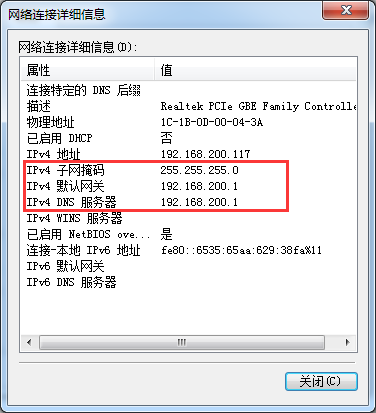
windows查看网关
控制面板 -->网络和Internet -->网络和共享中心 -->本地连接 -->详细信息
如图
5.重启网络
service network restart
centos6.5 yum update 报错Couldn't resolve host 'centos.ustc.edu.cn'的更多相关文章
- yum命令报错 yum update File "/usr/bin/yum", line 30 except KeyboardInterrupt, e: --CentOS7.5
1.问题: 使用yum命令如:yum update 报SyntaxError invalid syntax 2.原因分析 yum的解释器是Python,CentOS自带的yum采用(自带的)pytho ...
- centos6.5环境wget报错Unable to establish SSL connection
centos6.5环境wget报错Unable to establish SSL connection [root@centossz008 src]# wget --no-check-certific ...
- linux -小记(2)问题:yum 安装报错"Another app is currently holding the yum lock; waiting for it to exit... ...: yum Memory : 26 M RSS (868 MB VSZ) Started: Wed Oct 26 22:48:24 2016 - 0"
yum 安装报错 "Another app is currently holding the yum lock; waiting for it to exit... The other ap ...
- mysql执行update报错1175解决方法
mysql执行update报错 update library set status=true where 1=1 Error Code: 1175. You are using safe update ...
- yum安装报错有冲突file /usr/lib64/php/modules/fileinfo.so conflicts between
yum安装报错有冲突file /usr/lib64/php/modules/fileinfo.so conflicts between attempted installs of php-pecl-f ...
- centos在yum install报错:Another app is currently holding the yum lock解决方法
centos在yum install报错:Another app is currently holding the yum lock,这个问题可能是很多的新手经常遇到问题,之前也有人问我,包括本人在刚 ...
- mysql执行update报错 Err] 1055 - 'information_schema.PROFILING.SEQ' isn't in GROUP BY
mysql执行update报错 Err] 1055 - 'information_schema.PROFILING.SEQ' isn't in GROUP BY 今天开发的同事发来如下错误信息,最最简 ...
- kali linux 2.0配置更新源后apt-get update 报错
这个是我/etc/apt/sources.list的更新源: deb http://http.kali.org/kali kali-rolling main contrib non-free deb ...
- CentOS6.5 重启网络报错:Bringing up interface eth0: Error: Connection activation failed: Device not managed by NetworkManager or unavailable
CentOS6.5 重启网络报错: Bringing up interface eth0: Error: Connection activation failed: Device not manage ...
随机推荐
- 2017年当下最值得你关注的前端开发框架,不知道你就OUT了!
近几年随着 jQuery.Ext 以及 CSS3 的发展,以 Bootstrap 为代表的前端开发框架如雨后春笋般挤入视野,可谓应接不暇. 在这篇分享中,我将总结2017年当下最值得你关注的前端开发框 ...
- 关于cocos2d-x面试的问题
关于高效渲染的问题: 1.先说下渲染批次:这是游戏引擎中一个比较重要的优化指标,指的是一次渲染凋用.也就是说,渲染的次数越少,游戏的运行效率越高. 2.CCSpriteBatchNode就是cocos ...
- scala时间处理
1.获取当前时间的年份.月份.天.小时等等 val nowDay=LocalDate.now().getDayOfMonth val nowDay=LocalTime.now().getHour 2. ...
- 在.NET Core类库中使用EF Core迁移数据库到SQL Server
前言 如果大家刚使用EntityFramework Core作为ORM框架的话,想必都会遇到数据库迁移的一些问题. 起初我是在ASP.NET Core的Web项目中进行的,但后来发现放在此处并不是很合 ...
- 文件夹的创建(cmd利用)
在windows本地上创建文件夹是无法用..结束的,我们要创建的话,需要在cmd里面进行创建输入 mkdir abc..\ 那么我们从本地看出abc..文件夹建成了怎么删除呢? 需要手动在里面建个文件 ...
- 移动端H5制作安卓和IOS的坑 持续更新...
移动端H5制作安卓和IOS的坑 持续更新... 前言:最近参加公司的H5页面创意竞赛,又遇到不少页面在不同系统上的坑.踩坑之余,觉得很多之前遇到的知识点都忘了,索性开一篇博文,把这些坑都统一归纳起来, ...
- django1.11如何实时访问mysql数据库
前几天,一直在研究django框架,发现它自身封装了很多有用的API,很有意思.比如,数据库操作基本的创表,查询,插值,更新,删除都有,很方便,再加上json库可以直接将数据json化,通过服务器传给 ...
- c++邻接表存储图(无向),并用广度优先和深度优先遍历(实验)
一开始我是用c写的,后面才发现广搜要用到队列,所以我就直接使用c++的STL队列来写, 因为不想再写多一个队列了.这次实验写了两个多钟,因为要边写边思考,太菜了哈哈. 主要参考<大话数据结构&g ...
- Hadoop 少量map/reduce任务执行慢问题
最近在做报表统计,跑hadoop任务. 之前也跑过map/reduce但是数据量不大,遇到某些map/reduce执行时间特别长的问题. 执行时间长有几种可能性: 1. 单个map/reduce任务处 ...
- Unix:关于一个file在file system和disk中占用空间
參考文献: Harley Hahns:Guide to Unix and Linux. Chap 24 -->首先要有的关键概念:the amount of "disk space&q ...