
Android 7.1 屏幕旋转流程分析
Android 7.1 屏幕旋转流程分析
一、概述
Android屏幕的旋转在framework主要涉及到三个类,结构如图
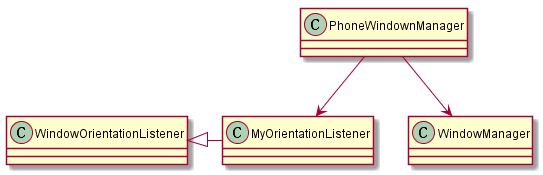
PhoneWindowManager:为屏幕的横竖屏转换的管理类。
WindowOrientationListener: 是一个传感器的listener的基类,PhoneWindowManager的MyOrientationListener继承自该基类。
WindowManagerService:是具体实施屏幕旋转的工作。
代码路径:
PhoneWindowManager:
路径:/frameworks/base/services/core/java/com/android/server/policy/PhoneWindowManager.java
WindowOrientationListener:
路径:
/frameworks/base/services/core/java/com/android/server/policy/WindowOrientationListener.java
WindowManagerService:
路径:
/fram eworks/base/services/core/java/com/android/server/wm/WindowManagerService.java
总的流程大致如下:
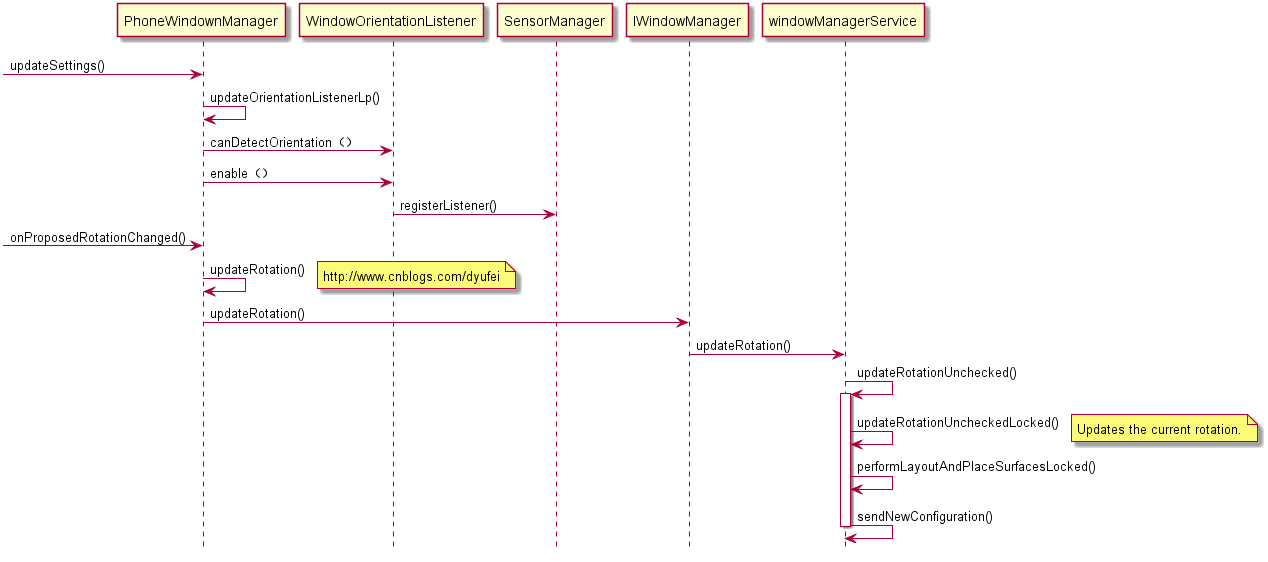
PhoneWindowManager实现一个MyOrientationListener用来注册和监听传感器(屏幕)变化,根据用户设置情况(是否允许屏幕旋转)来启动和关闭监听。当屏幕方向变化时PhoneWindowManager通过调用 WindowManagerService具体来完成屏幕的旋转。
二、流程分析
1)PhoneWindownManager 开启监听
A: 监听用户设置的变化
PhoneWindownManager 通过注册一个ContentObserver来监听用户设置的变化,当用户设置变化后调用updateSettings()函数,做设置变化的更新和做相应的动作。
  class SettingsObserver extends ContentObserver {

        SettingsObserver(Handler handler) {

            super(handler);

        }

        void observe() {

            // Observe all users' changes

            ContentResolver resolver = mContext.getContentResolver();

            resolver.registerContentObserver(Settings.System.getUriFor(

                    Settings.System.END_BUTTON_BEHAVIOR), false, this,

                    UserHandle.USER_ALL);

            resolver.registerContentObserver(Settings.Secure.getUriFor(

                    Settings.Secure.INCALL_POWER_BUTTON_BEHAVIOR), false, this,

                    UserHandle.USER_ALL);

            resolver.registerContentObserver(Settings.Secure.getUriFor(

                    Settings.Secure.INCALL_BACK_BUTTON_BEHAVIOR), false, this,

                    UserHandle.USER_ALL);

            resolver.registerContentObserver(Settings.Secure.getUriFor(

                    Settings.Secure.WAKE_GESTURE_ENABLED), false, this,

                    UserHandle.USER_ALL);

            resolver.registerContentObserver(Settings.System.getUriFor(

                    Settings.System.ACCELEROMETER_ROTATION), false, this,

                    UserHandle.USER_ALL);

            resolver.registerContentObserver(Settings.System.getUriFor(

                    Settings.System.USER_ROTATION), false, this,

                    UserHandle.USER_ALL);

            resolver.registerContentObserver(Settings.System.getUriFor(

                    Settings.System.SCREEN_OFF_TIMEOUT), false, this,

                    UserHandle.USER_ALL);

            resolver.registerContentObserver(Settings.System.getUriFor(

                    Settings.System.POINTER_LOCATION), false, this,

                    UserHandle.USER_ALL);

            resolver.registerContentObserver(Settings.Secure.getUriFor(

                    Settings.Secure.DEFAULT_INPUT_METHOD), false, this,

                    UserHandle.USER_ALL);

            resolver.registerContentObserver(Settings.Secure.getUriFor(

                    Settings.Secure.IMMERSIVE_MODE_CONFIRMATIONS), false, this,

                    UserHandle.USER_ALL);

            resolver.registerContentObserver(Settings.Global.getUriFor(

                    Settings.Global.POLICY_CONTROL), false, this,

                    UserHandle.USER_ALL);

            updateSettings();

        }

        @Override public void onChange(boolean selfChange) {

            updateSettings();

            updateRotation(false);

        }

    }
B:监听传感器(设备方向)的变化
PhoneWindownManager是通过其中的updateSettings()函数来更新用户的设定来判断是否需要启动方向监听(即设置中的屏幕锁定按钮),如果允许屏幕旋转则去注册传感器的监听。
 public void updateSettings() {

        ContentResolver resolver = mContext.getContentResolver();

        boolean updateRotation = false;

        synchronized (mLock) {

。。。。。。。。。

            // Configure rotation lock.

            int userRotation = Settings.System.getIntForUser(resolver,

                    Settings.System.USER_ROTATION, Surface.ROTATION_0,

                    UserHandle.USER_CURRENT);

            if (mUserRotation != userRotation) {

                mUserRotation = userRotation;

                updateRotation = true;

            }

            int userRotationMode = Settings.System.getIntForUser(resolver,

                    Settings.System.ACCELEROMETER_ROTATION, 0, UserHandle.USER_CURRENT) != 0 ?

                            WindowManagerPolicy.USER_ROTATION_FREE :

                                    WindowManagerPolicy.USER_ROTATION_LOCKED;

            if (mUserRotationMode != userRotationMode) {

                mUserRotationMode = userRotationMode;

                updateRotation = true;

                updateOrientationListenerLp();

            }

            if (mSystemReady) {

                int pointerLocation = Settings.System.getIntForUser(resolver,

                        Settings.System.POINTER_LOCATION, 0, UserHandle.USER_CURRENT);

                if (mPointerLocationMode != pointerLocation) {

                    mPointerLocationMode = pointerLocation;

                    mHandler.sendEmptyMessage(pointerLocation != 0 ?

                            MSG_ENABLE_POINTER_LOCATION : MSG_DISABLE_POINTER_LOCATION);

                }

            }

            // use screen off timeout setting as the timeout for the lockscreen

            mLockScreenTimeout = Settings.System.getIntForUser(resolver,

                    Settings.System.SCREEN_OFF_TIMEOUT, 0, UserHandle.USER_CURRENT);

            String imId = Settings.Secure.getStringForUser(resolver,

                    Settings.Secure.DEFAULT_INPUT_METHOD, UserHandle.USER_CURRENT);

            boolean hasSoftInput = imId != null && imId.length() > 0;

            if (mHasSoftInput != hasSoftInput) {

                mHasSoftInput = hasSoftInput;

                updateRotation = true;

            }

            if (mImmersiveModeConfirmation != null) {

                mImmersiveModeConfirmation.loadSetting(mCurrentUserId);

            }

        }

        synchronized (mWindowManagerFuncs.getWindowManagerLock()) {

            PolicyControl.reloadFromSetting(mContext);

        }

        if (updateRotation) {

            updateRotation(true);

        }

    }
C: updateOrientationListenerLp()函数多种场景下都会被调用:(注释很清楚无需解释)
(1) screen turning off, should always disable listeners if already enabled
(2) screen turned on and current app has sensor based orientation, enable listeners if not already enabled
(3) screen turned on and current app does not have sensor orientation, disable listeners if already enabled
(4) screen turning on and current app has sensor based orientation, enable listeners if needed
(5) screen turning on and current app has nosensor based orientation, do nothing
 void updateOrientationListenerLp() {

        if (!mOrientationListener.canDetectOrientation()) {

            // If sensor is turned off or nonexistent for some reason

            return;

        }

        // Could have been invoked due to screen turning on or off or

        // change of the currently visible window's orientation.

        if (localLOGV) Slog.v(TAG, "mScreenOnEarly=" + mScreenOnEarly

                + ", mAwake=" + mAwake + ", mCurrentAppOrientation=" + mCurrentAppOrientation

                + ", mOrientationSensorEnabled=" + mOrientationSensorEnabled

                + ", mKeyguardDrawComplete=" + mKeyguardDrawComplete

                + ", mWindowManagerDrawComplete=" + mWindowManagerDrawComplete);

        boolean disable = true;

        // Note: We postpone the rotating of the screen until the keyguard as well as the

        // window manager have reported a draw complete.

        if (mScreenOnEarly && mAwake &&

                mKeyguardDrawComplete && mWindowManagerDrawComplete) {

            if (needSensorRunningLp()) {

                disable = false;

                //enable listener if not already enabled

                if (!mOrientationSensorEnabled) {

                    mOrientationListener.enable();

                    if(localLOGV) Slog.v(TAG, "Enabling listeners");

                    mOrientationSensorEnabled = true;

                }

            }

        }

        //check if sensors need to be disabled

        if (disable && mOrientationSensorEnabled) {

            mOrientationListener.disable();

            if(localLOGV) Slog.v(TAG, "Disabling listeners");

            mOrientationSensorEnabled = false;

        }

    }
D: WindowOrientationListener的enable()和disable()
启动和取消传感器事件的监听,是通过调 SensorManager.registerListener()和SensorManager.unregisterListener()函数来完成的,与APP 的传感器事件的监听和取消监听用法没有区别。
 /**

     * Enables the WindowOrientationListener so it will monitor the sensor and call

     * {@link #onProposedRotationChanged(int)} when the device orientation changes.

     */

    public void enable() {

        synchronized (mLock) {

            if (mSensor == null) {

                Slog.w(TAG, "Cannot detect sensors. Not enabled");

                return;

            }

            if (mEnabled == false) {

                if (LOG) {

                    Slog.d(TAG, "WindowOrientationListener enabled");

                }

                mOrientationJudge.resetLocked();

                if (mSensor.getType() == Sensor.TYPE_ACCELEROMETER) {

                    mSensorManager.registerListener(

                            mOrientationJudge, mSensor, mRate, DEFAULT_BATCH_LATENCY, mHandler);

                } else {

                    mSensorManager.registerListener(mOrientationJudge, mSensor, mRate, mHandler);

                }

                mEnabled = true;

            }

        }

    }

    /**

     * Disables the WindowOrientationListener.

     */

    public void disable() {

        synchronized (mLock) {

            if (mSensor == null) {

                Slog.w(TAG, "Cannot detect sensors. Invalid disable");

                return;

            }

            if (mEnabled == true) {

                if (LOG) {

                    Slog.d(TAG, "WindowOrientationListener disabled");

                }

                mSensorManager.unregisterListener(mOrientationJudge);

                mEnabled = false;

            }

        }

    }
2)sensor事件回调
传感器事件是通过WindowOrientationListener 的onProposedRotationChanged()接口回调到PhoneWindownManager中的,然后通过updateRotation()调用windowManagerService的updateRotation()做屏幕旋转。
首先调用PowerManagerInternal.powerHint()来提升cpu的频率来提高屏幕旋转时候的性能,然后调用WindowManager.updateRotation()做屏幕旋转,屏幕旋转的实际操作是由WindowManagerService实际来完成的。
    class MyOrientationListener extends WindowOrientationListener {

        private final Runnable mUpdateRotationRunnable = new Runnable() {

            @Override

            public void run() {

                // send interaction hint to improve redraw performance

                mPowerManagerInternal.powerHint(PowerManagerInternal.POWER_HINT_INTERACTION, 0);

                updateRotation(false);

            }

        };

        MyOrientationListener(Context context, Handler handler) {

            super(context, handler);

        }

        @Override

        public void onProposedRotationChanged(int rotation) {

            if (localLOGV) Slog.v(TAG, "onProposedRotationChanged, rotation=" + rotation);

            mHandler.post(mUpdateRotationRunnable);

        }

    }
    void updateRotation(boolean alwaysSendConfiguration) {

        try {

            //set orientation on WindowManager

            mWindowManager.updateRotation(alwaysSendConfiguration, false);

        } catch (RemoteException e) {

            // Ignore

        }

    }
3)WindowManagerService做屏幕旋转
WindowManagerService 大致完成三件事,首先更新屏幕方向,然后具体实施屏幕旋转,最后通知AMS configuration变更。
具体实施屏幕旋转的函数是updateRotationUncheckedLocked()这部分详细旋转过程单独详细分析。
    @Override

    public void updateRotation(boolean alwaysSendConfiguration, boolean forceRelayout) {

        updateRotationUnchecked(alwaysSendConfiguration, forceRelayout);

    }
    public void updateRotationUnchecked(boolean alwaysSendConfiguration, boolean forceRelayout) {

        if(DEBUG_ORIENTATION) Slog.v(TAG_WM, "updateRotationUnchecked("

                   + "alwaysSendConfiguration=" + alwaysSendConfiguration + ")");

        long origId = Binder.clearCallingIdentity();

        boolean changed;

        synchronized(mWindowMap) {

            changed = updateRotationUncheckedLocked(false);

            if (!changed || forceRelayout) {

                getDefaultDisplayContentLocked().layoutNeeded = true;

                mWindowPlacerLocked.performSurfacePlacement();

            }

        }

        if (changed || alwaysSendConfiguration) {

            sendNewConfiguration();

        }

        Binder.restoreCallingIdentity(origId);

    }
  public boolean updateRotationUncheckedLocked(boolean inTransaction) {

        if (mDeferredRotationPauseCount > 0) {

            // Rotation updates have been paused temporarily.  Defer the update until

            // updates have been resumed.

            if (DEBUG_ORIENTATION) Slog.v(TAG_WM, "Deferring rotation, rotation is paused.");

            return false;

        }

        ScreenRotationAnimation screenRotationAnimation =

                mAnimator.getScreenRotationAnimationLocked(Display.DEFAULT_DISPLAY);

        if (screenRotationAnimation != null && screenRotationAnimation.isAnimating()) {

            // Rotation updates cannot be performed while the previous rotation change

            // animation is still in progress.  Skip this update.  We will try updating

            // again after the animation is finished and the display is unfrozen.

            if (DEBUG_ORIENTATION) Slog.v(TAG_WM, "Deferring rotation, animation in progress.");

            return false;

        }

        if (mDisplayFrozen) {

            // Even if the screen rotation animation has finished (e.g. isAnimating

            // returns false), there is still some time where we haven't yet unfrozen

            // the display. We also need to abort rotation here.

            if (DEBUG_ORIENTATION) Slog.v(TAG_WM, "Deferring rotation, still finishing previous rotation");

            return false;

        }

        if (!mDisplayEnabled) {

            // No point choosing a rotation if the display is not enabled.

            if (DEBUG_ORIENTATION) Slog.v(TAG_WM, "Deferring rotation, display is not enabled.");

            return false;

        }

        final DisplayContent displayContent = getDefaultDisplayContentLocked();

        final WindowList windows = displayContent.getWindowList();

        final int oldRotation = mRotation;

        int rotation = mPolicy.rotationForOrientationLw(mLastOrientation, mRotation);

        boolean rotateSeamlessly = mPolicy.shouldRotateSeamlessly(oldRotation, rotation);

        if (rotateSeamlessly) {

            for (int i = windows.size() - 1; i >= 0; i--) {

                WindowState w = windows.get(i);

                // We can't rotate (seamlessly or not) while waiting for the last seamless rotation

                // to complete (that is, waiting for windows to redraw). It's tempting to check

                // w.mSeamlessRotationCount but that could be incorrect in the case of window-removal.

                if (w.mSeamlesslyRotated) {

                    return false;

                }

                // In what can only be called an unfortunate workaround we require

                // seamlessly rotated child windows to have the TRANSFORM_TO_DISPLAY_INVERSE

                // flag. Due to limitations in the client API, there is no way for

                // the client to set this flag in a race free fashion. If we seamlessly rotate

                // a window which does not have this flag, but then gains it, we will get

                // an incorrect visual result (rotated viewfinder). This means if we want to

                // support seamlessly rotating windows which could gain this flag, we can't

                // rotate windows without it. This limits seamless rotation in N to camera framework

                // users, windows without children, and native code. This is unfortunate but

                // having the camera work is our primary goal.

                if (w.isChildWindow() & w.isVisibleNow() &&

                        !w.mWinAnimator.mSurfaceController.getTransformToDisplayInverse()) {

                    rotateSeamlessly = false;

                }

            }

        }

        // TODO: Implement forced rotation changes.

        //       Set mAltOrientation to indicate that the application is receiving

        //       an orientation that has different metrics than it expected.

        //       eg. Portrait instead of Landscape.

        boolean altOrientation = !mPolicy.rotationHasCompatibleMetricsLw(

                mLastOrientation, rotation);

        if (DEBUG_ORIENTATION) {

            Slog.v(TAG_WM, "Selected orientation "

                    + mLastOrientation + ", got rotation " + rotation

                    + " which has " + (altOrientation ? "incompatible" : "compatible")

                    + " metrics");

        }

        if (mRotation == rotation && mAltOrientation == altOrientation) {

            // No change.

             return false;

        }

        if (DEBUG_ORIENTATION) {

            Slog.v(TAG_WM,

                "Rotation changed to " + rotation + (altOrientation ? " (alt)" : "")

                + " from " + mRotation + (mAltOrientation ? " (alt)" : "")

                + ", lastOrientation=" + mLastOrientation);

        }

        mRotation = rotation;

        mAltOrientation = altOrientation;

        mPolicy.setRotationLw(mRotation);

        mWindowsFreezingScreen = WINDOWS_FREEZING_SCREENS_ACTIVE;

        mH.removeMessages(H.WINDOW_FREEZE_TIMEOUT);

        mH.sendEmptyMessageDelayed(H.WINDOW_FREEZE_TIMEOUT, WINDOW_FREEZE_TIMEOUT_DURATION);

        mWaitingForConfig = true;

        displayContent.layoutNeeded = true;

        final int[] anim = new int[2];

        if (displayContent.isDimming()) {

            anim[0] = anim[1] = 0;

        } else {

            mPolicy.selectRotationAnimationLw(anim);

        }

        if (!rotateSeamlessly) {

            startFreezingDisplayLocked(inTransaction, anim[0], anim[1]);

            // startFreezingDisplayLocked can reset the ScreenRotationAnimation.

            screenRotationAnimation =

                mAnimator.getScreenRotationAnimationLocked(Display.DEFAULT_DISPLAY);

        } else {

            // The screen rotation animation uses a screenshot to freeze the screen

            // while windows resize underneath.

            // When we are rotating seamlessly, we allow the elements to transition

            // to their rotated state independently and without a freeze required.

            screenRotationAnimation = null;

            // We have to reset this in case a window was removed before it

            // finished seamless rotation.

            mSeamlessRotationCount = 0;

        }

        // We need to update our screen size information to match the new rotation. If the rotation

        // has actually changed then this method will return true and, according to the comment at

        // the top of the method, the caller is obligated to call computeNewConfigurationLocked().

        // By updating the Display info here it will be available to

        // computeScreenConfigurationLocked later.

        updateDisplayAndOrientationLocked(mCurConfiguration.uiMode);

        final DisplayInfo displayInfo = displayContent.getDisplayInfo();

        if (!inTransaction) {

            if (SHOW_TRANSACTIONS) {

                Slog.i(TAG_WM, ">>> OPEN TRANSACTION setRotationUnchecked");

            }

            SurfaceControl.openTransaction();

        }

        try {

            // NOTE: We disable the rotation in the emulator because

            //       it doesn't support hardware OpenGL emulation yet.

            if (CUSTOM_SCREEN_ROTATION && screenRotationAnimation != null

                    && screenRotationAnimation.hasScreenshot()) {

                if (screenRotationAnimation.setRotationInTransaction(

                        rotation, mFxSession,

                        MAX_ANIMATION_DURATION, getTransitionAnimationScaleLocked(),

                        displayInfo.logicalWidth, displayInfo.logicalHeight)) {

                    scheduleAnimationLocked();

                }

            }

            if (rotateSeamlessly) {

                for (int i = windows.size() - 1; i >= 0; i--) {

                    WindowState w = windows.get(i);

                    w.mWinAnimator.seamlesslyRotateWindow(oldRotation, mRotation);

                }

            }

            mDisplayManagerInternal.performTraversalInTransactionFromWindowManager();

        } finally {

            if (!inTransaction) {

                SurfaceControl.closeTransaction();

                if (SHOW_LIGHT_TRANSACTIONS) {

                    Slog.i(TAG_WM, "<<< CLOSE TRANSACTION setRotationUnchecked");

                }

            }

        }

        for (int i = windows.size() - 1; i >= 0; i--) {

            WindowState w = windows.get(i);

            // Discard surface after orientation change, these can't be reused.

            if (w.mAppToken != null) {

                w.mAppToken.destroySavedSurfaces();

            }

            if (w.mHasSurface && !rotateSeamlessly) {

                if (DEBUG_ORIENTATION) Slog.v(TAG_WM, "Set mOrientationChanging of " + w);

                w.mOrientationChanging = true;

                mWindowPlacerLocked.mOrientationChangeComplete = false;

                w.mLastFreezeDuration = 0;

            }

        }

        if (rotateSeamlessly) {

            mH.removeMessages(H.SEAMLESS_ROTATION_TIMEOUT);

            mH.sendEmptyMessageDelayed(H.SEAMLESS_ROTATION_TIMEOUT, SEAMLESS_ROTATION_TIMEOUT_DURATION);

        }

        for (int i=mRotationWatchers.size()-1; i>=0; i--) {

            try {

                mRotationWatchers.get(i).watcher.onRotationChanged(rotation);

            } catch (RemoteException e) {

            }

        }

        // TODO (multidisplay): Magnification is supported only for the default display.

        // Announce rotation only if we will not animate as we already have the

        // windows in final state. Otherwise, we make this call at the rotation end.

        if (screenRotationAnimation == null && mAccessibilityController != null

                && displayContent.getDisplayId() == Display.DEFAULT_DISPLAY) {

            mAccessibilityController.onRotationChangedLocked(getDefaultDisplayContentLocked(),

                    rotation);

        }

        return true;

    }
Android 7.1 屏幕旋转流程分析的更多相关文章
- Android 7.1 WindowManagerService 屏幕旋转流程分析 (二)
一.概述 从上篇[Android 7.1 屏幕旋转流程分析]知道实际的旋转由WindowManagerService来完成,这里接着上面具体详细展开. 调了三个函数完成了三件事,即首先调用update ...
- Android 7.1 WindowManagerService 屏幕旋转流程分析 (三)
三.屏幕的绘制 performSurfacePlacement()函数来触发window的绘制,这里最大的循环次数是6,当然一般不会到最大次数就会被Scheduled. final void perf ...
- Android 7.1 ActivityManagerService 屏幕旋转流程分析 (四)
四.Activity的更新(旋转) sendNewConfiguration()会调用到ActivityManagerService的updateConfiguration()来update Conf ...
- Qt for Android 程序禁止屏幕旋转
有时候我们希望让一个程序的界面始终保持在一个方向,不随手机(平板)方向旋转而变化:在AndroidManifest.xml的每一个需要禁止转向的Activity配置中加入 android:screen ...
- 设置Android默认锁定屏幕旋转
/********************************************************************************** * 设置Android默认锁定屏 ...
- Android 4.4 音量调节流程分析(二)
之前在Android 4.4 音量调节流程分析(一)里已经有简单的分析音量控制的流程,今天想接着继续分析下音量大小计算的方法.对于任一播放文件而言其本身都有着固定大小的音量Volume_Max,而在A ...
- Android之 MTP框架和流程分析
概要 本文的目的是介绍Android系统中MTP的一些相关知识.主要的内容包括:第1部分 MTP简介 对Mtp协议进行简单的介绍.第2部分 MTP框架 介绍 ...
- Android系统之LK启动流程分析(一)
1.前言 LK是Little Kernel的缩写,在Qualcomm平台的Android系统中普遍采用LK作为bootloader,它是一个开源项目,LK是整个系统的引导部分,所以不是独立存在的,但是 ...
- Android视图状态及重绘流程分析,带你一步步深入了解View(三)
转载请注明出处:http://blog.csdn.net/guolin_blog/article/details/17045157 在前面一篇文章中,我带着大家一起从源码的层面上分析了视图的绘制流程, ...
随机推荐
- HDU 5242 Game(三个贪心)
Game Time Limit: 3000/1500 MS (Java/Others) Memory Limit: 32768/32768 K (Java/Others)Total Submis ...
- zabbix 2.2.20 安装详解(Centos6.9)
环境说明 [root@centos ~]# cat /etc/redhat-release CentOS release 6.9 (Final) [root@centos ~]# uname -a L ...
- Sqoop的安装部署
在root的用户下 1):前提 安装JDK环境 2):前提 安装Hadoop和Hive客户端环境,如果需要导出到HBase则需要安装HBase客户端 3):下载sqoop : 命令: wget htt ...
- shapes 不规则边界
CSS基本形状都是矩形,CSS shapes允许开发者用定制的路径来包裹内容,例如圆形,椭圆,多边形等. 形状可以自定义也可以从图片中推断 从图片推断,例如可以让文字按照图片形状来浮动到一边: ...
- scrollWidth,clientWidth,offsetWiddth,innerWinth 元素定位
getBoundingClientRect()方法.它返回一个对象,其中包含了left.right.top.bottom四个属性,分别对应了该元素的左上角和右下角相对于浏览器窗口(viewport)左 ...
- Ruby变量常量
全局变量:以$开头 实例变量:以@开头 @cust_id=id Ruby 常量: 常量以大写字母开头
- 乐视(LeTV)占用8080端口
- js关闭子页面刷新父页面
一.打开方式为window.open window.opener.location.reload(); 二.打开方式为window.showModalDialog 首先在打开时的时候要设置window ...
- let 和const与var的不同
1. let的作用域在代码块中仅限在当前的作用于中 { var str1 = 12; console.log(str1); let str2 = 20; console.log(str2); //20 ...
- [转载] java多线程学习-java.util.concurrent详解(二)Semaphore/FutureTask/Exchanger
转载自http://janeky.iteye.com/blog/770393 ------------------------------------------------------------- ...