
Android 7.1 ActivityManagerService 屏幕旋转流程分析 (四)
四、Activity的更新(旋转)
sendNewConfiguration()会调用到ActivityManagerService的updateConfiguration()来update Configuration,并根据应用的配置来判断是否要重新lunch应用。
    void sendNewConfiguration() {

        try {

            mActivityManager.updateConfiguration(null);

        } catch (RemoteException e) {

        }

    }
 public void updateConfiguration(Configuration values) {

        enforceCallingPermission(android.Manifest.permission.CHANGE_CONFIGURATION,

                "updateConfiguration()");

        synchronized(this) {

            if (values == null && mWindowManager != null) {

                // sentinel: fetch the current configuration from the window manager

                values = mWindowManager.computeNewConfiguration();

            }

            if (mWindowManager != null) {

                mProcessList.applyDisplaySize(mWindowManager);

            }

            final long origId = Binder.clearCallingIdentity();

            if (values != null) {

                Settings.System.clearConfiguration(values);

            }

            updateConfigurationLocked(values, null, false);

            Binder.restoreCallingIdentity(origId);

        }

    }
先看一下总体时序图,后面详细展开:
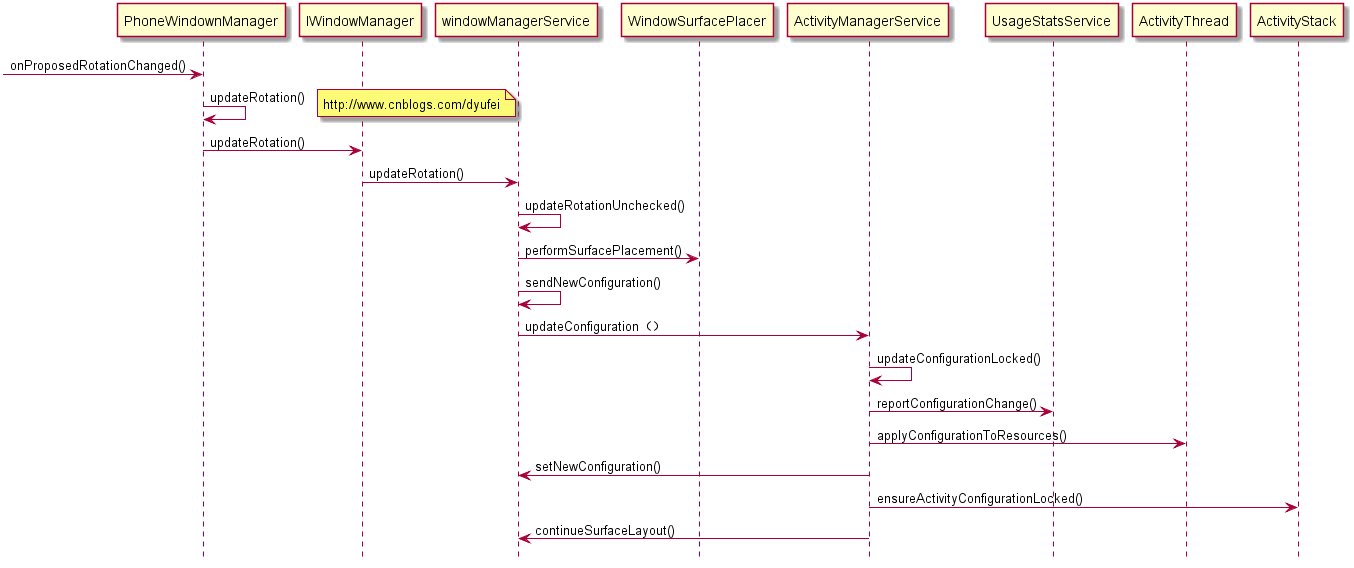
1)updateConfigurationLocked()
updateConfigurationLocked()
(1)获取Configuration数据保存在mConfiguration
(2)调用ActivityThread的scheduleConfigurationChanged()
(3)发送ACTION_CONFIGURATION_CHANGED广播
(4)获取当前最上面活动的Activity,调用ActivityStack的ensureActivityConfigurationLocked()函数根据应用配置判断是否要重新luncher应用
 private boolean updateConfigurationLocked(Configuration values, ActivityRecord starting,

            boolean initLocale, boolean persistent, int userId, boolean deferResume) {

        int changes = 0;

        if (mWindowManager != null) {

            mWindowManager.deferSurfaceLayout();

        }

        if (values != null) {

            Configuration newConfig = new Configuration(mConfiguration);

            changes = newConfig.updateFrom(values);

            if (changes != 0) {

                if (DEBUG_SWITCH || DEBUG_CONFIGURATION) Slog.i(TAG_CONFIGURATION,

                        "Updating configuration to: " + values);

                EventLog.writeEvent(EventLogTags.CONFIGURATION_CHANGED, changes);

                if (!initLocale && !values.getLocales().isEmpty() && values.userSetLocale) {

                    final LocaleList locales = values.getLocales();

                    int bestLocaleIndex = 0;

                    if (locales.size() > 1) {

                        if (mSupportedSystemLocales == null) {

                            mSupportedSystemLocales =

                                    Resources.getSystem().getAssets().getLocales();

                        }

                        bestLocaleIndex = Math.max(0,

                                locales.getFirstMatchIndex(mSupportedSystemLocales));

                    }

                    SystemProperties.set("persist.sys.locale",

                            locales.get(bestLocaleIndex).toLanguageTag());

                    LocaleList.setDefault(locales, bestLocaleIndex);

                    mHandler.sendMessage(mHandler.obtainMessage(SEND_LOCALE_TO_MOUNT_DAEMON_MSG,

                            locales.get(bestLocaleIndex)));

                }

                mConfigurationSeq++;

                if (mConfigurationSeq <= 0) {

                    mConfigurationSeq = 1;

                }

                newConfig.seq = mConfigurationSeq;

                mConfiguration = newConfig;

                Slog.i(TAG, "Config changes=" + Integer.toHexString(changes) + " " + newConfig);

                mUsageStatsService.reportConfigurationChange(newConfig,

                        mUserController.getCurrentUserIdLocked());

                //mUsageStatsService.noteStartConfig(newConfig);

                final Configuration configCopy = new Configuration(mConfiguration);

                // TODO: If our config changes, should we auto dismiss any currently

                // showing dialogs?

                mShowDialogs = shouldShowDialogs(newConfig, mInVrMode);

                AttributeCache ac = AttributeCache.instance();

                if (ac != null) {

                    ac.updateConfiguration(configCopy);

                }

                // Make sure all resources in our process are updated

                // right now, so that anyone who is going to retrieve

                // resource values after we return will be sure to get

                // the new ones.  This is especially important during

                // boot, where the first config change needs to guarantee

                // all resources have that config before following boot

                // code is executed.

                mSystemThread.applyConfigurationToResources(configCopy);

                if (persistent && Settings.System.hasInterestingConfigurationChanges(changes)) {

                    Message msg = mHandler.obtainMessage(UPDATE_CONFIGURATION_MSG);

                    msg.obj = new Configuration(configCopy);

                    msg.arg1 = userId;

                    mHandler.sendMessage(msg);

                }

                final boolean isDensityChange = (changes & ActivityInfo.CONFIG_DENSITY) != 0;

                if (isDensityChange) {

                    // Reset the unsupported display size dialog.

                    mUiHandler.sendEmptyMessage(SHOW_UNSUPPORTED_DISPLAY_SIZE_DIALOG_MSG);

                    killAllBackgroundProcessesExcept(Build.VERSION_CODES.N,

                            ActivityManager.PROCESS_STATE_FOREGROUND_SERVICE);

                }

                for (int i=mLruProcesses.size()-1; i>=0; i--) {

                    ProcessRecord app = mLruProcesses.get(i);

                    try {

                        if (app.thread != null) {

                            if (DEBUG_CONFIGURATION) Slog.v(TAG_CONFIGURATION, "Sending to proc "

                                    + app.processName + " new config " + mConfiguration);

                            app.thread.scheduleConfigurationChanged(configCopy);

                        }

                    } catch (Exception e) {

                    }

                }

                Intent intent = new Intent(Intent.ACTION_CONFIGURATION_CHANGED);

                intent.addFlags(Intent.FLAG_RECEIVER_REGISTERED_ONLY

                        | Intent.FLAG_RECEIVER_REPLACE_PENDING

                        | Intent.FLAG_RECEIVER_FOREGROUND);

                broadcastIntentLocked(null, null, intent, null, null, 0, null, null,

                        null, AppOpsManager.OP_NONE, null, false, false,

                        MY_PID, Process.SYSTEM_UID, UserHandle.USER_ALL);

                if ((changes&ActivityInfo.CONFIG_LOCALE) != 0) {

                    intent = new Intent(Intent.ACTION_LOCALE_CHANGED);

                    intent.addFlags(Intent.FLAG_RECEIVER_FOREGROUND);

                if (initLocale || !mProcessesReady) {

                        intent.addFlags(Intent.FLAG_RECEIVER_REGISTERED_ONLY);

                    }

                    broadcastIntentLocked(null, null, intent,

                            null, null, 0, null, null, null, AppOpsManager.OP_NONE,

                            null, false, false, MY_PID, Process.SYSTEM_UID, UserHandle.USER_ALL);

                }

            }

            // Update the configuration with WM first and check if any of the stacks need to be

            // resized due to the configuration change. If so, resize the stacks now and do any

            // relaunches if necessary. This way we don't need to relaunch again below in

            // ensureActivityConfigurationLocked().

            if (mWindowManager != null) {

                final int[] resizedStacks = mWindowManager.setNewConfiguration(mConfiguration);

                if (resizedStacks != null) {

                    for (int stackId : resizedStacks) {

                        final Rect newBounds = mWindowManager.getBoundsForNewConfiguration(stackId);

                        mStackSupervisor.resizeStackLocked(

                                stackId, newBounds, null, null, false, false, deferResume);

                    }

                }

            }

        }

        boolean kept = true;

        final ActivityStack mainStack = mStackSupervisor.getFocusedStack();

        // mainStack is null during startup.

        if (mainStack != null) {

            if (changes != 0 && starting == null) {

                // If the configuration changed, and the caller is not already

                // in the process of starting an activity, then find the top

                // activity to check if its configuration needs to change.

                starting = mainStack.topRunningActivityLocked();

            }

            if (starting != null) {

                kept = mainStack.ensureActivityConfigurationLocked(starting, changes, false);

                // And we need to make sure at this point that all other activities

                // are made visible with the correct configuration.

                mStackSupervisor.ensureActivitiesVisibleLocked(starting, changes,

                        !PRESERVE_WINDOWS);

            }

        }

        if (mWindowManager != null) {

            mWindowManager.continueSurfaceLayout();

        }

        return kept;

    }
五、总结
总流程图如下

Android 7.1 ActivityManagerService 屏幕旋转流程分析 (四)的更多相关文章
- Android 7.1 WindowManagerService 屏幕旋转流程分析 (二)
一.概述 从上篇[Android 7.1 屏幕旋转流程分析]知道实际的旋转由WindowManagerService来完成,这里接着上面具体详细展开. 调了三个函数完成了三件事,即首先调用update ...
- Android 7.1 WindowManagerService 屏幕旋转流程分析 (三)
三.屏幕的绘制 performSurfacePlacement()函数来触发window的绘制,这里最大的循环次数是6,当然一般不会到最大次数就会被Scheduled. final void perf ...
- Android 7.1 屏幕旋转流程分析
Android 7.1 屏幕旋转流程分析 一.概述 Android屏幕的旋转在framework主要涉及到三个类,结构如图 PhoneWindowManager:为屏幕的横竖屏转换的管理类. Wi ...
- 【转】如何在 Android 程序中禁止屏幕旋转和重启Activity
原文网址:http://www.cnblogs.com/bluestorm/p/3665890.html 禁止屏幕随手机旋转变化 有时候我们希望让一个程序的界面始终保持在一个方向,不随手机方向旋转而变 ...
- 如何在 Android 程序中禁止屏幕旋转和重启Activity
禁止屏幕随手机旋转变化 有时候我们希望让一个程序的界面始终保持在一个方向,不随手机方向旋转而变化:在AndroidManifest.xml的每一个需要禁止转向的Activity配置中加入android ...
- Android系统分析之运营商显示流程分析之运营商信息的读取流程二
运营商显示流程分析之运营商信息的读取流程 一. SIM卡运营商信息的读取 从前面的 运营商信息的获取和赋值 可以知道SIM卡运营商的赋值最终是在 SIMRecords 中完成的, 而SIM卡信息的相关 ...
- 【Android】11.3 屏幕旋转和场景变换过程中GridView的呈现
分类:C#.Android.VS2015: 创建日期:2016-02-21 一.简介 实际上,对于布局文件中的View来说,大多数情况下,Android都会自动保存这些状态,并不需要我们都去处理它.这 ...
- 屏幕旋转时调用PopupWindow update方法更新位置失效的问题及解决方案
接到一个博友的反馈,在屏幕旋转时调用PopupWindow的update方法失效.使用场景如下:在一个Activity中监听屏幕旋转事件,在Activity主布局文件中有个按钮点击弹出一个Pop ...
- Android 4.4 Kitkat Phone工作流程浅析(六)__InCallActivity显示更新流程
本文来自http://blog.csdn.net/yihongyuelan 转载请务必注明出处 本文代码以MTK平台Android 4.4为分析对象,与Google原生AOSP有些许差异,请读者知悉. ...
随机推荐
- apache通过AD验证
## apache通过AD验证 #yum install httpd mod_authz_ldap#安装apahce的ldap模块yum install mod_authz_ldap -y #配置ap ...
- Java关键字(一) 修饰符private、protected、public和default的作用域
我们经常用着四种修饰符去修饰变量.方法和类,但是这四种的作用域都一样吗? 其中private和public可能是最多人知道的,但是protected和default可能就不知道其具体的作用域是哪些范围 ...
- 2016第七届 蓝桥杯 全国总决赛B题(完全平方数) (练习)
道友给看了一道题目,就记录一下吧 题目: 给你0,1,2,3,4,5,6,7,8,9十个数字,要你选出任意一个或几个组合在一起成为完全平方数,每个数字都必须选且只能选一次,求可能的方案. 比如有其中几 ...
- svn 如果遇到an unversioned directory of the same name already exists的解决办法
svn 如果遇到an unversioned directory of the same name already exists的解决办法 一般这种情况是因为,在一个已经存在的文件夹里做SVN che ...
- XAMPP重要文件目录及配置
一.XAMPP 的安装过程 1:下载XAMPP 的 Linux 版 (1.7.4) http://www.apachefriends.org/en/xampp-linux.html#374 2:安装( ...
- 《跟我学IDEA》一、下载安装idea,设置背景字体编码,配置JDK
写在前面的话:作为一个在IT界摸爬滚打6年+的老程序员,我属于会的东西多而杂,但是没有任何一样精通的.曾经自己也认真过,蹉跎过,最近和别的同事朋友聊天时,突然发现自己得到的东西却很少很少,于是想认真的 ...
- es6+require混合开发,兼容es6 module,import,export
近一年,一直很忙,做了不少的项目,不过都不是太满意,毕竟是别人的作品,不好意思写出来.最近打算开发一个es6的项目,项目中用到require,本文主要讲解es6的module规范怎么与require的 ...
- 如何在你的blog中添加炫酷的飘雪动画效果
将下面的代码复制到你的设置栏下页眉html代码框中即可 <script> (function($){$.fn.snow=function(options){,maxSize:,newOn: ...
- POI tools 参数化生成excel表格
package com.eccom.neteagle.server.confsave.service.impl; import java.io.File; import java.io.FileNot ...
- ZED-Board从入门到精通系列(八)——Vivado HLS实现FIR滤波器
http://www.tuicool.com/articles/eQ7nEn 最终到了HLS部分.HLS是High Level Synthesis的缩写,是一种能够将高级程序设计语言C,C++.Sys ...